Getting Started with WPF Chat
This topic will guide you through the process of creating a sample application containing RadChat.
Adding Telerik Assemblies Using NuGet
To use RadChat when working with NuGet packages, install the Telerik.Windows.Controls.ConversationalUI.for.Wpf.Xaml package. The package name may vary slightly based on the Telerik dlls set - Xaml or NoXaml
Read more about NuGet installation in the Installing UI for WPF from NuGet Package article.
With the 2025 Q1 release, the Telerik UI for WPF has a new licensing mechanism. You can learn more about it here.
Adding Assembly References Manually
If you are not using NuGet packages, you can add a reference to the following assemblies:
- Telerik.Licensing.Runtime
- Telerik.Windows.Controls
- Telerik.Windows.Controls.Input
- Telerik.Windows.Controls.Navigation
- Telerik.Windows.Controls.ConversationalUI
- Telerik.Windows.Controls.GridView
- Telerik.Windows.Controls.FileDialogs
- Telerik.Windows.Controls.Data
Adding RadChat to the Project
Before proceeding with adding RadChat to your project, make sure the required assembly references are added to the project.
You can add Conversational UI manually by writing the XAML code in Example 1. You can also add the control by dragging it from the Visual Studio Toolbox and dropping it over the XAML view.
Example 1: Adding RadChat in XAML
<telerik:RadChat x:Name="chat" />Running the application at this state will result in an empty chat.
Empty chat example

Adding Authors to RadChat
Two authors will be defined for this example. Note, that the CurrentAuthor property of RadChat must be set.
Adding Authors to RadChat
public partial class MainWindow : Window
{
	private Author currentAuthor;
	private Author otherAuthor;

	public MainWindow()
	{
		InitializeComponent();

		currentAuthor = new Author("Peter");
		otherAuthor = new Author("Steven");
		this.chat.CurrentAuthor = currentAuthor;
	}
}
Handling the Sent Message
The user's input can be handled by hooking up to the SendMessage event of RadChat. The event arguments are of type RoutedEventArgs which are extended by the Message property.
Subscribing to the SendMessage event
<telerik:RadChat x:Name="chat" SendMessage="RadChat_SendMessage" />SendMessage event handler
private void RadChat_SendMessage(object sender, SendMessageEventArgs e)
{
	// We will handle the event in order to add a new message manually
	e.Handled = true;

	var updatedMessageText = "[Updated from event handler] " + (e.Message as TextMessage).Text;
	this.chat.AddMessage(this.chat.CurrentAuthor, updatedMessageText);
}
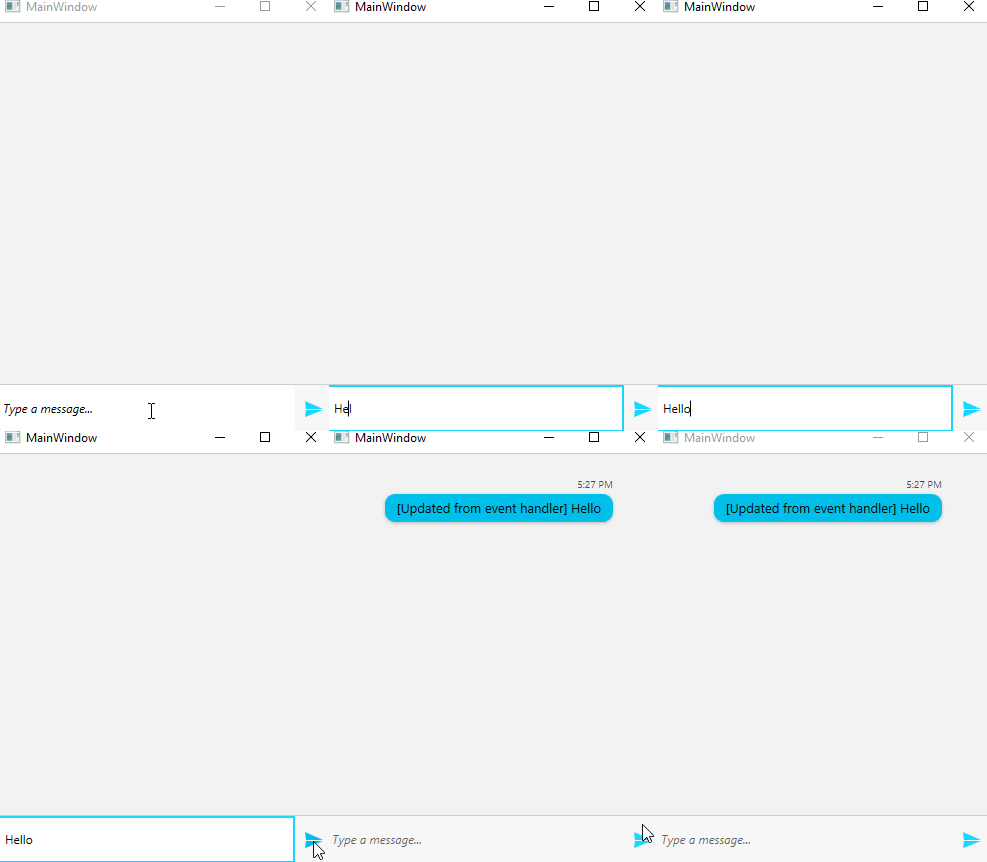
This setup will have the following result.
RadChat with Messages
Telerik UI for WPF Learning Resources
- Telerik UI for WPF ConversationalUI Component
- Getting Started with Telerik UI for WPF Components
- Telerik UI for WPF Installation
- Telerik UI for WPF and WinForms Integration
- Telerik UI for WPF Visual Studio Templates
- Setting a Theme with Telerik UI for WPF
- Telerik UI for WPF Virtual Classroom (Training Courses for Registered Users)
- Telerik UI for WPF License Agreement