Available NuGet Packages
Telerik UI for WPF comes with several different packages that can be installed via the Telerik server or from a local package source.
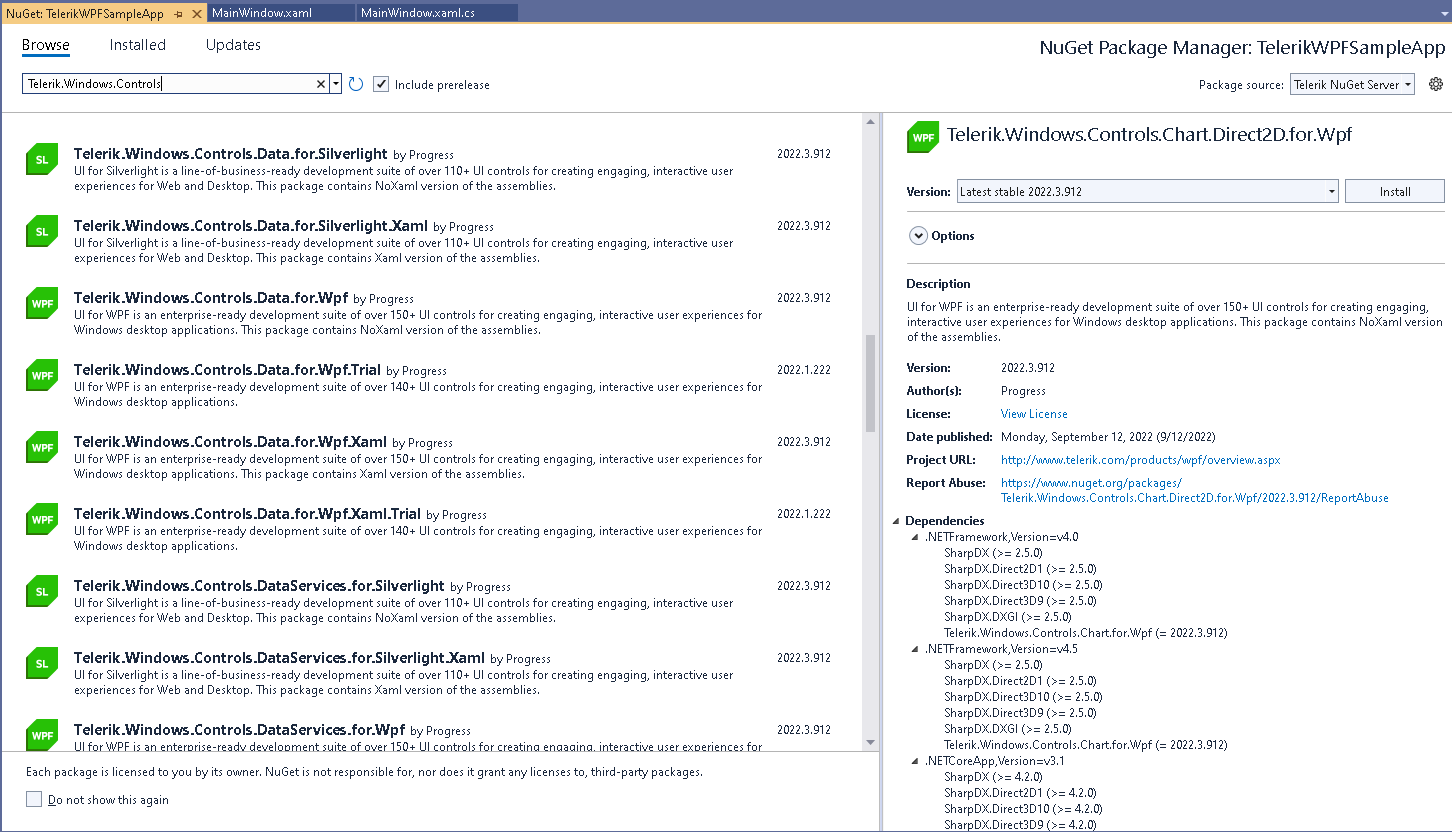
The Telerik dlls are built against different versions of .NET starting from .NET 4.6.2 to the latest official .NET. The dlls can be separated into two categories - Xaml and NoXaml. This creates a rich set of assemblies that can be downloaded which are also available as nuget packages.
The packages can be downloaded as .nupkg files which can be used to setup a local package source or alternatively the online Telerik package source can be used. These two different options contain a slightly different set of packages. This article aims to list and describe the packages.
NuGet Local Packages
The Telerik UI for WPF product provides .nupkg files that can be downloaded from your telerik.com account. The download page has the following .zip files.
Full Packages (Local)
The Telerik_UI_for_WPF_<version number>__NuGet_Separate_Packages_<Xaml or NoXaml>.zip file contains the separate .nupkg package files, along with one big full package that references all separate packages.
The full package is named Telerik.UI.for.Wpf.AllControls.<Xaml or NoXaml>.<version number>
Separate Packages (Local)
-
Telerik_UI_for_WPF_<version number>_NuGet_Separate_Packages_Xaml.zip—This file contains separate packages for each Telerik assembly.Telerik.Windows.Controls.for.Wpf.XamlTelerik.Windows.Controls.Navigation.for.Wpf.XamlTelerik.Windows.Controls.GridView.for.Wpf.XamlTelerik.Windows.Controls.RichTextBox.for.Wpf.Xaml- etc.
Each of these packages contain the corresponding Telerik (Xaml) dll for all available .NET versions (.462, .8). In case the dll is dependent on another Telerik dll, the required package will be installed automatically.
-
Telerik_UI_for_WPF_<version number>_Dev_NuGet_Separate_Packages_NoXaml.zip—This file contains separate packages for each Telerik assembly.Telerik.Windows.Controls.for.WpfTelerik.Windows.Controls.Navigation.for.WpfTelerik.Windows.Controls.GridView.for.WpfTelerik.Windows.Controls.RichTextBox.for.WpfTelerik.Windows.Themes.Fluent.for.WpfTelerik.Windows.Themes.Material.for.Wpf- etc.
Each of these packages contain the corresponding Telerik (NoXaml) dll for all available .NET versions (.462, .8). In case the dll is dependent on another Telerik dll, the required package will be installed automatically.
Telerik NuGet Server Packages
Starting with the Q3 2026 release, all Telerik UI for WPF NuGet packages will also be available on NuGet.org. If you use NuGet.org, you will not need to configure the Telerik NuGet server.
There is an online package source that can be used to get Telerik nugets. The packages on the server are almost identical to local ones.
Full Packages (Server)
Telerik.UI.for.Wpf.AllControls.NoXamlTelerik.UI.for.Wpf.AllControls.Xaml
Separate Packages (Server)
Telerik.Windows.Controls.for.Wpf.Xaml(includes localization resources)Telerik.Windows.Controls.for.Wpf(includes localization resources)Telerik.Windows.Controls.GridView.for.Wpf.XamlTelerik.Windows.Controls.GridView.for.WpfTelerik.Windows.Controls.Navigation.for.Wpf.XamlTelerik.Windows.Controls.Navigation.for.WpfTelerik.Windows.Themes.Fluent.for.Wpf(theme dll)Telerik.Windows.Themes.Material.for.Wpf(theme dll)- etc.
Each of these packages contain all .NET versions of the corresponding Telerik dll. The package names ending with .Xaml contain the Xaml version of the Telerik dlls. The ones without .Xaml in the name have the NoXaml version.
The oldest nuget package that can be found in the Telerik NuGet Feed is 2016.3.1024.
NuGet Packages and Controls Localization
The Telerik UI for WPF controls provide built-in localization support through satellite assemblies. These assemblies contain translated resources for the supported languages and must be present in your project for localization to work.
Getting Localization Assemblies via NuGet
Starting with the Q2 2026 release, the localization satellite assemblies are bundled directly in the Telerik.Windows.Controls.for.Wpf NuGet package (or Telerik.Windows.Controls.for.Wpf.Xaml for Xaml builds). Installing this package automatically provides the satellite assemblies for all supported languages (for example, Telerik.Windows.Controls.for.Wpf.de.dll for German, French, Spanish, etc.).
For releases prior to Q2 2026, localization assemblies are distributed as separate NuGet packages named by language code below. Install the package for each language you need to support in your application:
Telerik.Windows.Controls.for.Wpf.de(German)Telerik.Windows.Controls.for.Wpf.fr(French)Telerik.Windows.Controls.for.Wpf.es(Spanish)- etc.
To enable localization in your project, ensure the satellite assemblies are deployed alongside the main Telerik assemblies. For more information, see the Localization article.