New to Telerik UI for WPF? Start a free 30-day trial
Suggested Actions
Updated on Aug 24, 2026
Conversational UI supports adding message suggestions in the chat's UI that can be used easily send text to the chat.
Adding the SuggestedAction
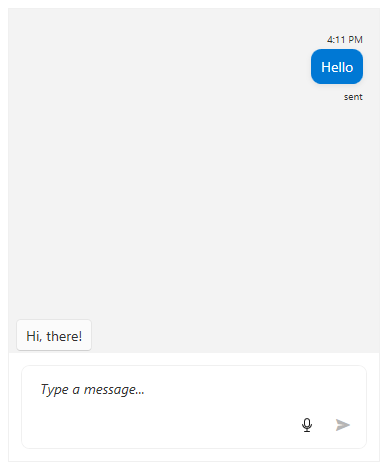
To add suggestions, use the SuggestedActions collection of RadChat.
C#
private Author currentAuthor;
private Author otherAuthor;

public MainWindow()
{
	InitializeComponent();

	currentAuthor = new Author("1") { Name = "Peter" };
	otherAuthor = new Author("2") { Name = "Steven" };
	this.chat.CurrentAuthor = currentAuthor;

	var textMessage = new TextMessage(this.currentAuthor, "Hello", "sent");
	textMessage.InlineViewModel.StatusVisibility = Visibility.Visible;

	this.chat.AddMessage(textMessage);

	this.chat.SuggestedActions.Add(new SuggestedAction("Hi, there!"));
}
The SuggestedActions are visible by default. In case they need to hide the suggestions, set the SuggestedActionsVisibility property of RadChat to Collapsed.
Handling the SuggestedActionReported event
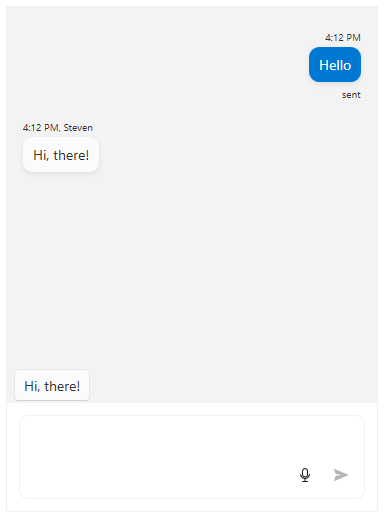
When the user selects a given suggestion, the SuggestedActionReported is raised. Through it the user input can be modified. Its arguments expose the following members.
CloseAfterReport: A boolean property that controls whether the message will be removed after it reports a result.PostResultInline: A boolean property that determines whether the suggestion should be posted as an inline text message or not.Text: The text result.
C#
private void Chat_SuggestedActionReported(object sender, SuggestedActionsEventArgs e)
{
	if (e.Text == "Hi, there!")
	{
		e.CloseAfterReport = false;
		e.PostResultInline = false;

		this.chat.AddMessage(this.otherAuthor, e.Text);
	}
}
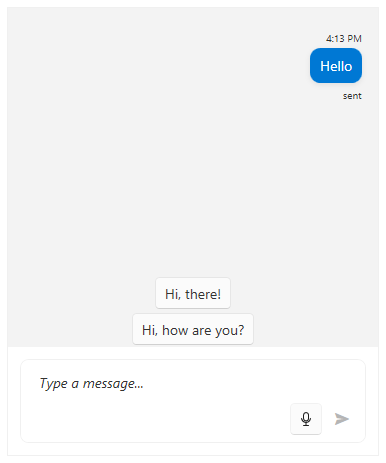
SuggestedActionsOrientation
To set the layout orientation of the suggested actions, use the SuggestedActionsOrientation property of RadChat.
XAML
<telerik:RadChat x:Name="chat" SuggestedActionsOrientation="Vertical"/>