WinForms StepProgressBar Overview
RadStepProgressBar enables you to set up a visual element that displays a multi-step process via a number of different steps and a progress track bar between each step. This control can be used to track the progress of an ongoing process, booking transport tickets, user registration, etc.
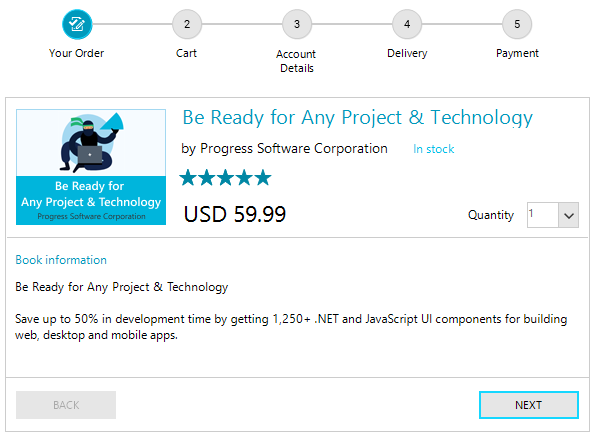
Key Features
Here are a few of the StepProgressBar's main features:
-
Easily customizeable visuals: The track bar and each step of the control can be customized by changing their default properties (like color and size) or by replacing the default indicator shape with a custom one. Read more about it the Customize Step Item section of the documentation.
-
Horizontal and vertical orientations: The control is arranged horizontally by default (left to right). Additionally, the control can be arranged vertically (top to bottom or bottom to top). Read more in the Layout article.
-
Progress Mode: The control allows you to change how its steps are related to each other. Read more in the Step Progress Mode article.
-
Layout and Flow Direction: The control allows you to change its orientation (horizontal or vertical) and how the steps are arranged (left-right,right-left). Read more in the Layout article.
-
Theming : Like any other control from the UI for WinForms suite, RadStepProgressBar comes with different themes.
Telerik UI for WinForms Learning Resources
- Telerik UI for WinForms StepProgressBar Homepage
- Get Started with the Telerik UI for WinForms StepProgressBar
- Telerik UI for WinForms API Reference
- Getting Started with Telerik UI for WinForms Components
- Telerik UI for WinForms Virtual Classroom (Training Courses for Registered Users)
- Telerik UI for WinForms Forum
- Telerik UI for WinForms Knowledge Base
Telerik UI for WinForms Additional Resources
- Telerik UI for WinForms Product Overview
- Telerik UI for WinForms Blog
- Telerik UI for WinForms Videos
- Telerik UI for WinForms Roadmap
- Telerik UI for WinForms Pricing
- Telerik UI for WinForms Code Library
- Telerik UI for WinForms Support
- What’s New in Telerik UI for WinForms