New to Telerik UI for WinForms? Start a free 30-day trial
Bind to XML
Updated on Aug 27, 2026
Binding to XML is not directly supported but DataTables are supported and a DataSet (containing DataTables) can be created from an XML document.
This is a simple xml file used in the examples below:
XML
    <?xml version="1.0" encoding="utf-8"?>
    <people>
      <person>
        <name> John </name>
        <age> 30</age>
      </person>
      <person>
        <name> Sarah </name>
        <age> 45</age>
      </person>
      <person>
        <name> Tom</name>
        <age> 50 </age>
      </person>
    </people>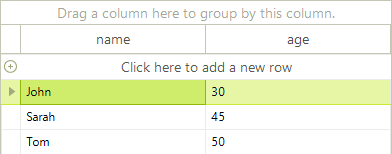
You have to create a DataSet instance from the XML file. For the sample XML file above, the created DataSet contains only one DataTable which is set as RadGridView data source. Please refer to this topic if you want to create hierarchy.
C#
DataSet xmlDataSet = new DataSet();
xmlDataSet.ReadXml("..\\..\\GridView\\PopulatingWithData\\gridXml.xml");
this.radGridView1.DataSource = xmlDataSet.Tables[0];