New to Telerik UI for WinForms? Start a free 30-day trial
Binding to BindingList
Updated on Aug 27, 2026
BindingList is a generic list type that has additional binding support. While you can bind to a generic list, BindingList provides additional control over list items, i.e. if they can be edited, removed or added. BindingList also surfaces events that notify when the list has been changed. The example below creates a list of MyObject, initializes the list and assigns the list to the grid DataSource property. The example also uses a ListChangedEventHandler that reports the type of change that occurred, the new index of the item and the content of the item.
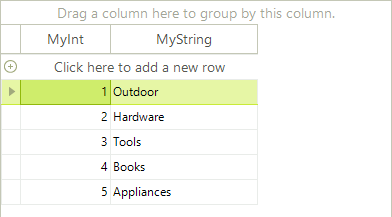
C#
public class MyObject
{
    public MyObject()
    {
    }
    public MyObject(int myInt, string myString)
    {
        _myInt = myInt;
        _myString = myString;
    }
    private int _myInt;
    public int MyInt
    {
        get { return _myInt; }
        set { _myInt = value; }
    }
    private string _myString;
    public string MyString
    {
        get { return _myString; }
        set { _myString = value; }
    }
}