Cannot Read execCommand property Error on Print
Environment
| Product | Report Viewer |
|---|---|
| Progress Telerik Reporting | HTML5 Report Viewers |
Description
When I try to print a report using any of the HTML5-based Report Viewers, the print dialog does not open, and instead, errors are displayed in the browser console.
Error Message
TypeError: Cannot read properties of null (reading 'execCommand')
Possible Cause
The issue may occur if the browser is configured to always download PDF files instead of opening them directly in the built‑in PDF viewer.
Solution
You can resolve the problem in either of the following ways:
- By manually changing the browser settings
- By creating an endpoint that handles browsers configured to automatically download PDFs
Solution 1: Change the Browser Settings
To change the browser settings:
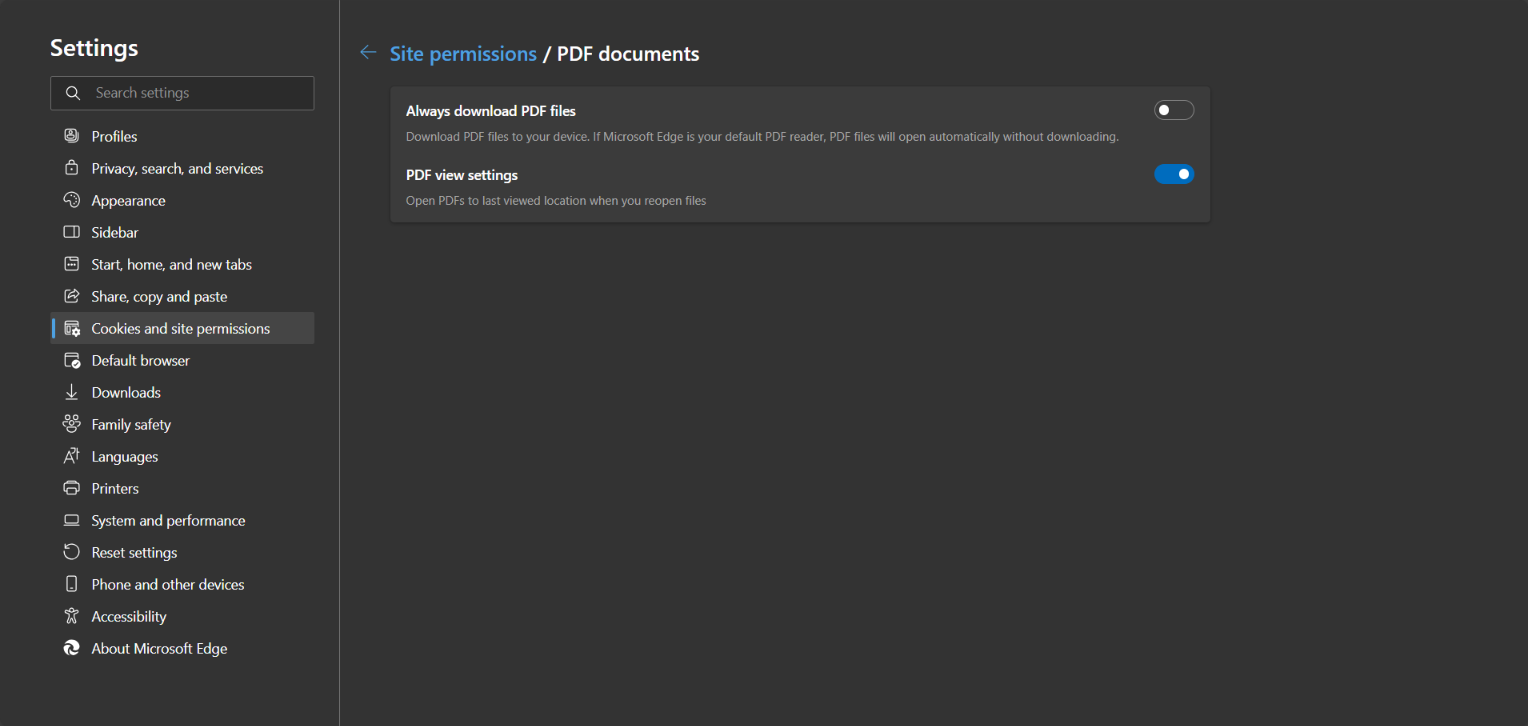
- In Edge, navigate to
edge://settings/content/pdfDocuments. - In Chrome, navigate to
chrome://settings/content/pdfDocuments.
Then, disable the Download PDFs setting so that the PDF documents are not automatically downloaded. This is required since the printing functionality of the web viewers is based on rendering the report in PDF format with special settings, so when the PDF file opens in a browser, the PDF plug-in's Print dialog is directly invoked.
Solution 2: Custom Export/Print Logic
When changing the browser settings on each client isn't feasible, consider creating a dedicated endpoint. Use the printBegin(e, args) event to manually handle scenarios where the user has configured the browser's PDF document settings to download PDFs.
There is no direct JavaScript API to control this setting. However, the navigator.pdfViewerEnabled property toggles between true and false when the setting changes.
To handle scenarios where the PDF viewer is disabled, you can create a custom endpoint for rendering reports as PDFs, following the approach described in the Exporting a report to PDF Programmatically article in Telerik Reporting.
This endpoint is invoked manually whenever the PDF viewer is disabled according to the navigator.pdfViewerEnabled value.
        public class ExportReportRequest
        {
            public string ReportName { get; set; }
            public Dictionary<string, object> Parameters { get; set; }
        }


        [HttpPost]
        [Route("exportreport")]
        public IActionResult GenerateReportPDF([FromBody]ExportReportRequest request)
        {
            var reportsPath = "C:\\Program Files (x86)\\Progress\\Telerik Reporting 2025 Q4\\Report Designer\\Examples";
            ReportProcessor reportProcessor = new ReportProcessor();

            Telerik.Reporting.UriReportSource uriReportSource = new Telerik.Reporting.UriReportSource();
            uriReportSource.Uri = Path.Combine(reportsPath, request.ReportName);

            if (request.Parameters != null)
            {
                foreach (var parameter in request.Parameters)
                {
                    uriReportSource.Parameters.Add(parameter.Key, parameter.Value);
                }
            }

            RenderingResult result = reportProcessor.RenderReport("PDF", uriReportSource, null);
            return File(result.DocumentBytes, result.MimeType);
        }
On the client side, use the printBegin(e, args) event to handle this scenario. In the event handler, return the PDF as an attachment because the print dialog cannot be opened when the setting is configured to download PDFs.
  // Helper function to convert parameter objects with valueMember to simple values
        function normalizeParameters(params) {
            if (!params || typeof params !== 'object') {
                return params;
            }

            const normalized = {};

            for (const key in params) {
                if (params.hasOwnProperty(key)) {
                    const value = params[key];

                    // Check if the value is an object with a valueMember property
                    if (value && typeof value === 'object' && 'valueMember' in value) {
                        normalized[key] = value.valueMember;
                    }
                    // Otherwise keep the value as is (strings, numbers, booleans, etc.)
                    else {
                        normalized[key] = value;
                    }
                }
            }

            return normalized;
        }

$("#reportViewer1")
    .telerik_ReportViewer({
        serviceUrl: "api/reports/",
        printBegin: function (e, args) {

           const reportParameters = e.data.sender.getReportParameters();
           const reportSource = e.data.sender.reportSource();

           if (!navigator.pdfViewerEnabled) {

            // Get the current report source from the viewer
            const reportViewer = e.data.sender;

            // Normalize parameters - convert objects with valueMember to simple values
            const normalizedParameters = normalizeParameters(reportParameters);

            console.log("Normalized parameters:", normalizedParameters);

            // Prepare the request payload
            const requestData = {
                reportName: reportSource.report,
                parameters: normalizedParameters
            };

            console.log("Request data:", requestData);

            // Make fetch request to export the report
            fetch('/api/reportdesigner/exportreport', {
                method: 'POST',
                headers: {
                    'Content-Type': 'application/json'
                },
                body: JSON.stringify(requestData)
            })
            .then(response => {
                if (response.ok) {
                    return response.blob();
                }
                throw new Error('Failed to export report: ' + response.statusText);
            })
            .then(blob => {
                // Create a download link
                var url = window.URL.createObjectURL(blob);
                var link = document.createElement('a');
                link.href = url;
                link.download = 'report.pdf';
                document.body.appendChild(link);
                link.click();
                document.body.removeChild(link);
                window.URL.revokeObjectURL(url);

                console.log('PDF exported successfully');

                args.handled = true;
            })
            .catch(error => {
                console.error('Error exporting PDF:', error);
            });
           }
        },
        reportSource: {
            report: "Dashboard.trdp",
        }
      });