Convert Unix Epoch Timestamps to DateTime Values in Telerik Reporting
Environment
| Version | Product | Author |
|---|---|---|
| 20.2.26.812 | Telerik Reporting | Desislava Yordanova |
Description
Unix epoch timestamps represent a date and time as the number of seconds elapsed since January 1, 1970, UTC. This article demonstrates how to convert Unix epoch timestamps stored as numeric values in a CSV file to DateTime values in Telerik Reporting.
The example uses 10-digit timestamp values such as 1755772800. These values are Unix timestamps in seconds, so the calculated field uses the AddSeconds expression function.
Although this example uses a CSV data source, the same calculated field expression applies to any data source that exposes the Unix timestamp as a field named UnixTimestamp.
Solution
Create the CSV file
Use the following CSV content. The first row contains the field names, and the UnixTimestamp field contains the Unix timestamp in seconds.
EventID,EventName,UnixTimestamp
1,UserLogin,1755772800
2,FileUpload,1755776400
3,ReportGenerated,1755780000
4,OrderPlaced,1755783600
5,PaymentReceived,1755787200
6,EmailSent,1755790800
7,UserLogout,1755794400
8,BackupStarted,1755798000
9,BackupCompleted,1755801600
10,SystemRestart,1755805200
Add a CsvDataSource
- Add a CsvDataSource component to the report.
- Enable Has headers so that the first row is used for the field names.
- Verify that the
EventID,EventName, andUnixTimestampfields are available in the Data Explorer.
Add the calculated field
-
Select the
CsvDataSourcecomponent in the Report Designer. -
Open its Properties window.
-
Find the CalculatedFields property and click its ellipsis button.
-
Add a calculated field with the following settings:
Property Value Name EventDateTimeDataType DateTimeExpression =Date(1970, 1, 1).AddSeconds(CDbl(Fields.UnixTimestamp)) -
Confirm the calculated field.
The calculated field expression performs these operations:
Date(1970, 1, 1)creates the Unix epoch start date.Fields.UnixTimestampreads the timestamp from the current data record.CDbl(...)converts the field to a numeric value accepted by the date function.AddSeconds(...)adds the elapsed seconds to the epoch start date.
The DateTime calculated-field type makes the converted value available as a date and time value to report items.
Display the converted value
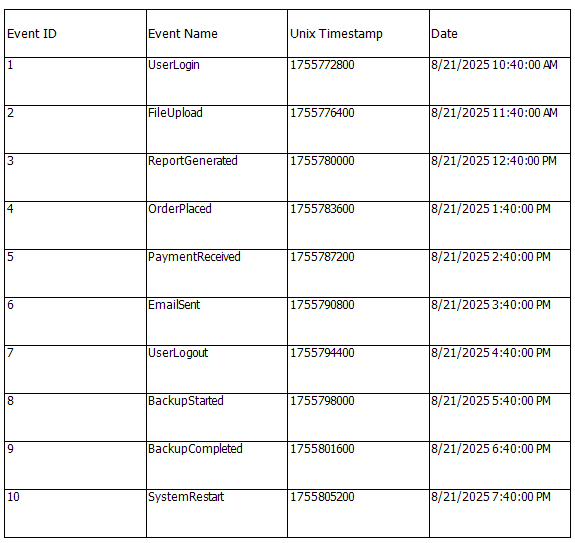
Add a Table using the wizard. The CsvDataSource automatically reads the CSV records and exposes their values as report fields. The calculated field performs the date conversion after the data source has read the numeric timestamp.
The report displays the event name, original timestamp, and converted date and time for each CSV record:
Important: verify the timestamp unit
The expression in this article is for the supplied 10-digit values, which are seconds. Do not use AddMilliseconds with this CSV because it would interpret the values as milliseconds and produce dates near the Unix epoch instead of the intended dates.
If your source system uses a different unit, identify that unit before creating the calculated field and use the corresponding date conversion logic. The number of digits alone is not a complete substitute for the source system's timestamp definition.