API for Controlling the Automatic Operations
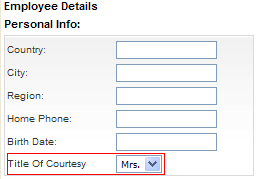
When placing Telerik RadGrid in "Insert" mode, you can use the overloaded versions of GridTableView.InsertItem() method. This can help you set predefined values to specific fields. The example below demonstrates how to set predefined values to a dropdown list in an edit form with a single row of code.
protected void RadGrid1_ItemCommand(object source, GridCommandEventArgs e)
{
    if (e.CommandName == RadGrid.InitInsertCommandName) //"Add new" button clicked
    {
        e.Canceled = true;
        //Prepare an IDictionary with the predefined values
        System.Collections.Specialized.ListDictionary newValues = new System.Collections.Specialized.ListDictionary();
        newValues["TitleOfCourtesy"] = "Mrs.";
        //Insert the item and rebind
        e.Item.OwnerTableView.InsertItem(newValues);
    }
}
-
InsertItem() - no default values.
-
InsertItem(object dataItem) - the new Item of Telerik RadGrid will be bound to the dataItem object. This method can be used to set the default values of the editors that will appear in the InsertItem.
-
InsertItem(IDictionary newValues) - the new Item of Telerik RadGrid will be bound to an empty object with only values taken from the newValues dictionary. This method can be used to set the default values of the editors that will appear in the InsertItem.
Telerik RadGrid will place the newly inserted item just below the header item on the last page. This item can be accessed after grid is bound in "Insert" mode (after InsertItem method has been executed or "InitInsert" command has bubbled) using the GetInsertedItem() method of GridTableView.
There are three basic functions of GridTableView that control the Telerik RadGrid behavior when you want to perform automatic updates:
-
PerformDelete (GridEditableItem, [boolean suppressRebind]) - performs automatic delete using the DataSource control
-
PerformUpdate (GridEditableItem, [boolean suppressRebind]) - performs automatic update using the DataSource control
-
PerformInsert (GridEditableItem, [boolean suppressRebind]) - performs automatic insert using the DataSource control
The suppressRebind parameter is optional. It determines whether the grid is rebound after the automatic update. The default value is false, so the grid is rebound unless you set the parameter to true.
Handling Custom Commands - Delete Command (Command Item Online Example)
Generally, you can handle any command by using the ItemCommandEvent. The example below shows how to handle a custom command named DeleteSelected. It deletes all selected items. In the ASPX file, set the CommandName property to DeleteSelected. Then, in the ItemCommandEvent handler, check whether the CommandName is DeleteSelected and call a method that deletes the selected items.
<CommandItemTemplate>
    <asp:LinkButton ID="LinkButton1" OnClientClick="javascript:return confirm('Delete all selected customers?')"
         runat= "server" CommandName="DeleteSelected">
    <img style="border:0px" alt="Delete selected customers" src="../../DataEditing/Img/Delete.gif" /> Delete Selected Customers
    </asp:LinkButton>
</CommandItemTemplate>