Virtual Scrolling and Paging
When working with large data sets, you can use the RadGrid paging mechanism. For larger data sets, virtual scrolling lets users browse records by scrolling instead of navigating through pages.
If you need endless scrolling in your grid, see the newer Virtualization feature.
Virtual Scroll Bar
When scrolling with the virtual scroll bar, RadGrid can use either standard postbacks or AJAX requests when AJAX callbacks are enabled using RadAjaxManager, RadAjaxPanel, or the ASP.NET UpdatePanel. AJAX callbacks update the configured controls without a full-page refresh.
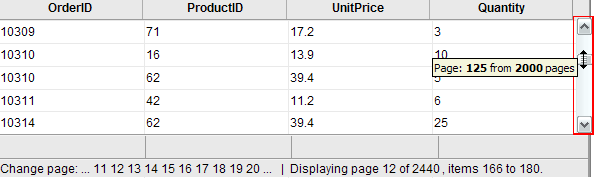
To enable virtual scrolling for browsing large record sets,
-
Set the ClientSettings.Scrolling.AllowScroll and ClientSettings.Scrolling.EnableVirtualScrollPaging properties to True.
-
Set the AllowPaging and AllowCustomPaging properties to True. Set the VirtualItemCount property to the total number of records in the data source.
-
Bind the grid using the NeedDataSource event, and in the event handler, use the CurrentPageIndex property to determine which subset of the records to fetch.
<telerik:RadAjaxManager ID="RadAjaxManager1" runat="server">
  <AjaxSettings>
	<telerik:AjaxSetting AjaxControlID="RadAjaxManager1">
      <UpdatedControls>
        <telerik:AjaxUpdatedControl ControlID="RadGrid1" LoadingPanelID="RadAjaxLoadingPanel1" />
      </UpdatedControls>
    </telerik:AjaxSetting>
  </AjaxSettings>
</telerik:RadAjaxManager>

<telerik:RadAjaxLoadingPanel ID="RadAjaxLoadingPanel1" runat="server" Height="75px"
  Width="75px" Transparency="25">
  <img alt="Loading..." src='<%= RadAjaxLoadingPanel.GetWebResourceUrl(Page, "Telerik.Web.UI.Skins.Default.Ajax.loading.gif") %>'
    style="border: 0;" /></telerik:RadAjaxLoadingPanel>

<telerik:RadGrid RenderMode="Lightweight" ID="RadGrid1" runat="server" Width="97%" Skin="Silk" AllowSorting="True"
  AllowPaging="True" PageSize="14" AllowCustomPaging="true" VirtualItemCount="100000"
  OnNeedDataSource="RadGrid1_NeedDataSource">
  <PagerStyle Mode="NumericPages" />
  <MasterTableView TableLayout="Fixed" />
  <ClientSettings>
    <Scrolling AllowScroll="True" EnableVirtualScrollPaging="True" UseStaticHeaders="True"
      SaveScrollPosition="True" />
  </ClientSettings>
</telerik:RadGrid> protected void RadGrid1_NeedDataSource(object source, Telerik.Web.UI.GridNeedDataSourceEventArgs e)
{
RadGrid1.DataSource = GetDataTable("SELECT [OrderID], [ProductID], [Quantity], [Discount] FROM [LargeOrderDetails] WHERE ID BETWEEN " + RadGrid1.CurrentPageIndex * RadGrid1.PageSize + " AND " + ((RadGrid1.CurrentPageIndex + 1) * RadGrid1.PageSize));
}Fetching additional records when the scroll bar reaches its endpoint
Another approach is to trigger an AJAX request to increase the page size when the user drags the scroll bar to the bottom. This approach uses client-side JavaScript and server-side code. Additional data is supplied while the rendered rows contain fewer records than the full data source:
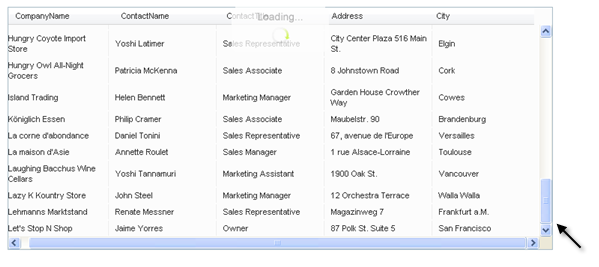
The following steps describe how to achieve this effect:
- Add a RadGrid control to your Web page.
- Bind it to a data source.
- Enable Paging in the grid, but set the PagerStyle.Visible property to False so that the pager does not show.
- Enable scrolling in the grid. Set the ClientSettings.Scrolling.ScrollHeight property sufficiently small so that the scroll bar appears when the grid first loads.
- Add a RadAjaxManager and RadAjaxLoadingPanel to the Web page.
- Configure the RadAjaxManager so that RadGrid initiates AJAX requests and is updated in response to those requests. Set the LoadingPanelID property to the ID of the RadAjaxLoadingPanel.
- Add an AjaxRequest event handler to the RadAjaxManager. In the event handler, increase the PageSize property of the RadGrid, then call the grid's Rebind method.
- In the ASPX file, add a RadCodeBlock with a JavaScript function named
HandleScrollingthat triggers an AJAX request when the grid's scroll bar reaches the bottom. The AjaxRequest event handler then fetches more records. - Assign the JavaScript function to the grid's OnScroll client event.
	  <telerik:RadCodeBlock ID="RadCodeBlock1" runat="server">
	    <script type="text/javascript">
	      function HandleScrolling(e) {
	        var grid = $find("<%=RadGrid1.ClientID %>");
	        var scrollArea = document.getElementById("<%= RadGrid1.ClientID %>" + "_GridData");
	        if (IsScrolledToBottom(scrollArea)) {
	          var currentlyDisplayedRecords = grid.get_masterTableView().get_pageSize() * (grid.get_masterTableView().get_currentPageIndex() + 1);
			  //if the visible items are less than the entire record count
			  //trigger an AJAX request to increase them
	          if (currentlyDisplayedRecords < 100)
	          { $find("<%= RadAjaxManager1.ClientID %>").ajaxRequest("LoadMoreRecords"); }
	        }
	      }
		  //calculate when the scroll bar is at the bottom
			function IsScrolledToBottom(scrollArea) {
				var currentPosition = scrollArea.scrollTop + scrollArea.clientHeight;
				return currentPosition >= scrollArea.scrollHeight;
		  }
	    </script>
	  </telerik:RadCodeBlock>
	  <telerik:RadAjaxManager ID="RadAjaxManager1" runat="server" OnAjaxRequest="RadAjaxManager1_AjaxRequest">
	    <AjaxSettings>
	      <telerik:AjaxSetting AjaxControlID="RadGrid1">
	        <UpdatedControls>
	          <telerik:AjaxUpdatedControl ControlID="RadGrid1" LoadingPanelID="RadAjaxLoadingPanel1" />
	        </UpdatedControls>
	      </telerik:AjaxSetting>
	    </AjaxSettings>
	  </telerik:RadAjaxManager>
	  <telerik:RadAjaxLoadingPanel ID="RadAjaxLoadingPanel1" runat="server" Height="75px"
	    Width="75px" Transparency="25">
	    <img alt="Loading..." src='<%= RadAjaxLoadingPanel.GetWebResourceUrl(Page, "Telerik.Web.UI.Skins.Default.Ajax.loading.gif") %>'
	      style="border: 0;" /></telerik:RadAjaxLoadingPanel>

	  <telerik:RadGrid RenderMode="Lightweight" ID="RadGrid1" runat="server" Skin="Silk" DataSourceID="SqlDataSource1"
	    AllowSorting="True" AllowPaging="True" PageSize="15" Width="97%" GridLines="None">
	    <PagerStyle Visible="False" />
		<MasterTableView Width="99%" TableLayout="Fixed" CommandItemDisplay="None" CurrentResetPageIndexAction="SetPageIndexToFirst"
			DataSourceID="SqlDataSource1" PageSize="15">
	    </MasterTableView>
	    <ClientSettings>
	      <Scrolling AllowScroll="True" UseStaticHeaders="True" ScrollHeight="100px" />
	      <ClientEvents OnScroll="HandleScrolling" />
	    </ClientSettings>
	  </telerik:RadGrid>
	  <asp:SqlDataSource ID="SqlDataSource1" runat="server" ConnectionString="<%$ ConnectionStrings:NorthwindConnectionString %>"
SelectCommand="SELECT * FROM [Customers]"></asp:SqlDataSource> protected void RadAjaxManager1_AjaxRequest(object sender, AjaxRequestEventArgs e)
{
RadGrid1.PageSize = 10 + RadGrid1.PageSize;
RadGrid1.Rebind();
}For a live example demonstrating the techniques described above, see Virtual scrolling and paging.