New to Telerik UI for .NET MAUI? Start a free 30-day trial
.NET MAUI SegmentedControl Visual Structure
Updated on Aug 11, 2026
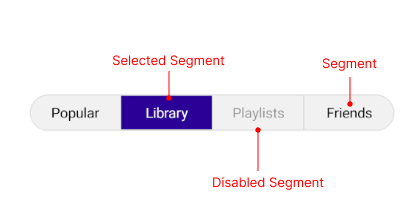
The visual structure of the .NET MAUI SegmentedControl represents the anatomy of the UI control. Being familiar with the visual elements of the SegmentedControl allows you to quickly find the information required to configure them.
The following image shows the anatomy of the SegmentedControl.
Displayed Elements
- Segment—Represents a single item in the SegmentedControl. Each segment is rendered by a
RadSegmentedControlItemViewand can be styled through theItemViewStyleor theItemViewStyleSelectorproperties of the control. - Selected Segment—Represents the visual indicator that highlights the currently selected segment. It can be styled through the
SelectionIndicatorStyleproperty. - Disabled Segment—Represents a segment whose interactions are disabled through the
SetSegmentEnabledmethod.