New to Telerik UI for .NET MAUI? Start a free 30-day trial
.NET MAUI Rating Visual Structure
Updated on Aug 11, 2026
The visual structure of the .NET MAUI Rating represents the anatomy of the UI component. Being familiar with the visual elements of the Rating allows you to quickly find the information required to configure them.
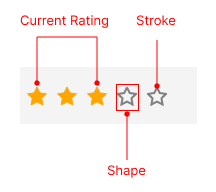
The following image shows the anatomy of the Rating.
Displayed Elements
- Shape—Represents the shape used to display the rating value. You can customize it by setting the
ItemShapeproperty. - Current Rating—Represents the current rating value displayed by the control. You can set it by using the
Valueproperty. - Stroke—Represents the stroke color of the border around the shape.