or
1 answer
149 views
I have created a form (ReportViewerTelerik.cs) with a telerik reportviewer(reportVeiwer1) on the form. I have created an InstanceReportSource(TelContractirs) in a different event. I want to use the reportviewer in that event by ReportViewerTelerik myReportViewer = new ReportViewerTelerik(); and then pass the reportdocument (TelContractirs.ReportDocument = currRpt;) to the reportviewer.reportsource.
The problem is that in the event private void exportTelerik(Telerik.Reporting.Report currRpt, string saveLocation) I can instantiate the reportviewer form ReportViewerTelerik myReportViewer = new ReportViewerTelerik(); but when i try myReportViewer.reportViewer1 my intellisense does not give me reportviewer1 as an option in the dropdown thus i then cannot pass the currRpt to the reportsource.
Thanks for the help with my dilemma.
The problem is that in the event private void exportTelerik(Telerik.Reporting.Report currRpt, string saveLocation) I can instantiate the reportviewer form ReportViewerTelerik myReportViewer = new ReportViewerTelerik(); but when i try myReportViewer.reportViewer1 my intellisense does not give me reportviewer1 as an option in the dropdown thus i then cannot pass the currRpt to the reportsource.
Thanks for the help with my dilemma.

Ivan Hristov
Telerik team

answered
on
05 Jul 2013
2 answers
170 views
Dear Sir,
I need older version of Report (7.0.13.220).
Thanks & Regards
Sharan
I need older version of Report (7.0.13.220).
Thanks & Regards
Sharan

Peter
Telerik team
answered
on
04 Jul 2013
1 answer
436 views
Buen dia
Me gustaria saber la forma en la que puedo mostrar los elementos seleccionados, es decir, que si el usuario selecciono como en el video se muestra "AZ,IL,NE" estas selecciones se le muestren concatenadas en el encabezado del reporte. (http://tv.telerik.com/watch/reporting/video/telerik-trainer-reporting-subreports)
De ser posible me gustaria que me proporcionaras un ejemplo. Gracias
Me despido esperando tu pronta respuesta
________________________________________________________________________________________________________________
Good day
I would like to know how I can show the selected items, ie if the user selected as shown in the video "AZ, IL, NE" these selections is displayed in the header concatenated report. (http://tv.telerik.com/watch/reporting/video/telerik-trainer-reporting-subreports)
If possible I would like proporcionaras me an example. thanks
I say goodbye to waiting for your prompt response
Me gustaria saber la forma en la que puedo mostrar los elementos seleccionados, es decir, que si el usuario selecciono como en el video se muestra "AZ,IL,NE" estas selecciones se le muestren concatenadas en el encabezado del reporte. (http://tv.telerik.com/watch/reporting/video/telerik-trainer-reporting-subreports)
De ser posible me gustaria que me proporcionaras un ejemplo. Gracias
Me despido esperando tu pronta respuesta
________________________________________________________________________________________________________________
Good day
I would like to know how I can show the selected items, ie if the user selected as shown in the video "AZ, IL, NE" these selections is displayed in the header concatenated report. (http://tv.telerik.com/watch/reporting/video/telerik-trainer-reporting-subreports)
If possible I would like proporcionaras me an example. thanks
I say goodbye to waiting for your prompt response
Squall
Top achievements
 Rank 1
Rank 1
answered
on
04 Jul 2013
1 answer
111 views
Hi.
Is it possible to have one header and use it to all my reports?
The idea is to maintain just one header.
In this header I will need to show page number.
Just a part of the header will change for each report. Is it possible to have a dynamic part of the header, maybe like a subreport?
Best regards,
Wilton Ruffato Wonrath
Is it possible to have one header and use it to all my reports?
The idea is to maintain just one header.
In this header I will need to show page number.
Just a part of the header will change for each report. Is it possible to have a dynamic part of the header, maybe like a subreport?
Best regards,
Wilton Ruffato Wonrath
IvanY
Telerik team
answered
on
04 Jul 2013
1 answer
127 views
Hi,
We have project where reports is a seperate optional package.When reports is installed,Telerik.Reporting.dll and Telerik.ReportViewer.WebForms.dll will be copied automatically but when i uninstall reports pack and try to access my application ,it throws the error as shown in the image.If i copy these two dll manually in bin folder it works fine.
Is there any way so that when reports is uninstalled,the telerik dll should not be deleted? Please help
We have project where reports is a seperate optional package.When reports is installed,Telerik.Reporting.dll and Telerik.ReportViewer.WebForms.dll will be copied automatically but when i uninstall reports pack and try to access my application ,it throws the error as shown in the image.If i copy these two dll manually in bin folder it works fine.
Is there any way so that when reports is uninstalled,the telerik dll should not be deleted? Please help
Unknown
Top achievements
Rank 1
Rank 1
answered
on
04 Jul 2013
1 answer
137 views
We have an existing report solution in one of our legacy applications that uses HTML documents as templates. The reports are generated based on these templates.
It has been decided that we are to switch this application to telerik reporting as we have with some of our other software. Rather than having to re-design the report in the telerik designer, it would be helpful if we could convert the HTML directly to a telerik design. Then, we would only have to create the report datasource and tools.
Is this possible?
It has been decided that we are to switch this application to telerik reporting as we have with some of our other software. Rather than having to re-design the report in the telerik designer, it would be helpful if we could convert the HTML directly to a telerik design. Then, we would only have to create the report datasource and tools.
Is this possible?
Stef
Telerik team
answered
on
03 Jul 2013
2 answers
136 views
Hi
My situation is like this:
I've a chart on a report. On this chart I display an amount of categories, each of them has thee property that can be bound. Each category has a categoryname like "operating time" or something like that. My problem is now, I can't display these categorynames on the chart. I know it's possible to set the DataLabelsColumn, but that's not my goal. (I also tried to set the plotArea.xaxis... doesn't work)
For better understanding of my problem:
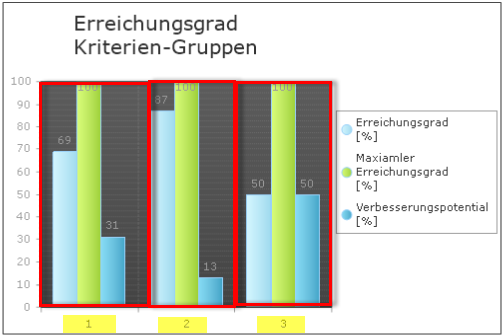
The numbers 1, 2, 3 should display the name of the associated category.
Someone knows how to do that?
Regards Michael
My situation is like this:
I've a chart on a report. On this chart I display an amount of categories, each of them has thee property that can be bound. Each category has a categoryname like "operating time" or something like that. My problem is now, I can't display these categorynames on the chart. I know it's possible to set the DataLabelsColumn, but that's not my goal. (I also tried to set the plotArea.xaxis... doesn't work)
For better understanding of my problem:
The numbers 1, 2, 3 should display the name of the associated category.
Someone knows how to do that?
Regards Michael
Roman
Top achievements
Rank 1
Rank 1
answered
on
03 Jul 2013
5 answers
740 views
Update
Using:
Copy code
I have checked in Acrobat reader >> Properties, and the "Arial Unicode MS" Font is embedded/subset.
However, Hebrew chars still do not show up at all.
Additionally, I tried embedding a specific freeware Hebrew font (called 'Alef').
In the report it all shows fine, but in the PDF the end result is the same as before, where English chars display fine, but Hebrew chars simply do not show up at all.
any ideas?
Thanx
Using:
Copy code
Hashtable deviceInfo = new Hashtable();deviceInfo["FontEmbedding"] = "Subset";deviceInfo["ViewerDirection"] = "R2L";I have checked in Acrobat reader >> Properties, and the "Arial Unicode MS" Font is embedded/subset.
However, Hebrew chars still do not show up at all.
Additionally, I tried embedding a specific freeware Hebrew font (called 'Alef').
In the report it all shows fine, but in the PDF the end result is the same as before, where English chars display fine, but Hebrew chars simply do not show up at all.
any ideas?
Thanx
Stef
Telerik team
answered
on
03 Jul 2013
10 answers
491 views
Hi, I am new to the Telerik Reporting. I am trying to display the data item on the legend but could not do so. I need some help. I have attached a screen shot on what I want to do. Appreciate some help.
Unknown
Top achievements
Rank 1
Rank 1
answered
on
02 Jul 2013
7 answers
863 views
I want to hide the group footer when the sum of a particular expression is zero -- not just a single field; it's the product of one field with the sum of three others, and I want to sum this product for all group records and check if it is zero. Can I do this with conditional formatting? I have tried various expressions but whenever it is anything except a single field, the footer section shows as a red box in preview.
This is what I really want:
=Sum(Fields.field1 * (Fields.field2 + Fields.field3 + Fields.field4))
=
0
This is what I really want:
=Sum(Fields.field1 * (Fields.field2 + Fields.field3 + Fields.field4))
=
0
Tim
Top achievements
Rank 1
Rank 1
answered
on
02 Jul 2013





