

Hi All,
I have an issue here . I have a datatable as datasource for a radgrid. I have faced issue with the border for the radgrid as some cell borders are not displayed. Refer 1.jpg file i have attached
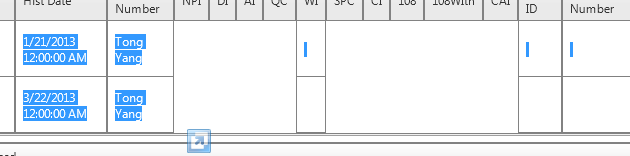
I have changed my SQL query to handle the Null case.
But for my surprise when i remove the alias name cell border is coming up. But i need the alias name, since by adding ISNULL check the column header will go blank.
EVEN i have used prerender code in codebehind to handle if there is any blank cells.
Kindly let me know how to handle this scenario..
Thanks in advance
I have an issue here . I have a datatable as datasource for a radgrid. I have faced issue with the border for the radgrid as some cell borders are not displayed. Refer 1.jpg file i have attached
I have changed my SQL query to handle the Null case.
SELECT
.....ISNULL(KP.dbo.PH.qc,'') as qc,ISNULL(KP.dbo.PH.di,' ') as di
.....
..... FROM KP.dbo.PHBut for my surprise when i remove the alias name cell border is coming up. But i need the alias name, since by adding ISNULL check the column header will go blank.
<telerik:RadGrid ID="RadGridInspection" CssClass="RadGridCustomClass" AllowSorting="false" AllowPaging="true" AllowFilteringByColumn="false" AutoGenerateColumns="false" runat="server" ClientSettings-EnableAlternatingItems="False" AlternatingItemStyle-BorderStyle="Solid" BorderStyle="Solid" EditItemStyle-BorderStyle="Solid" ItemStyle-BorderStyle="Solid"> <MasterTableView AutoGenerateColumns="False" > <Columns > <telerik:GridBoundColumn DataField="di" UniqueName ="di" HeaderText="DI" ItemStyle-BorderColor="Gray" ItemStyle-BorderStyle="Solid"> </telerik:GridBoundColumn> <telerik:GridBoundColumn DataField="ai" UniqueName ="ai" HeaderText="AI" ItemStyle-BorderColor="Gray" ItemStyle-BorderStyle="Solid"> </telerik:GridBoundColumn> <telerik:GridBoundColumn DataField="qc" UniqueName ="qc" HeaderText="QC" ItemStyle-BorderColor="Gray" ItemStyle-BorderStyle="Solid"> </telerik:GridBoundColumn></Columns> </MasterTableView> </telerik:RadGrid>EVEN i have used prerender code in codebehind to handle if there is any blank cells.
Protected Sub RadGridInspection_PreRender(sender As Object, e As EventArgs) Handles RadGridInspection.PreRender For Each dataItem As GridDataItem In RadGridInspection.Items For Each col As GridColumn In RadGridInspection.Columns 'If dataItem(col.UniqueName).Text = String.Empty Then If String.IsNullOrEmpty(dataItem(col.UniqueName).Text) Or dataItem(col.UniqueName).Text = " " Then dataItem(col.UniqueName).Text = " " End If Next Next End SubKindly let me know how to handle this scenario..
Thanks in advance