This is a migrated thread and some comments may be shown as answers.

[Solved] Problem with hiding GridButtonColumn on client-side

11 Answers 254 Views
Grid
This is a migrated thread and some comments may be shown as answers.
Marie
Top achievements
Rank 1
Marie asked on 11 Jun 2009, 02:18 PM
Hello,

I have a grid that has both GridBoundColumns and GridButtonColumns and is populated using client-side databinding. 
On Page_Load, I hide one of the GridButtonColumns using the following code:
C#:
grdManifest.MasterTableView.GetColumn("ViewErrorDescription").Display = false
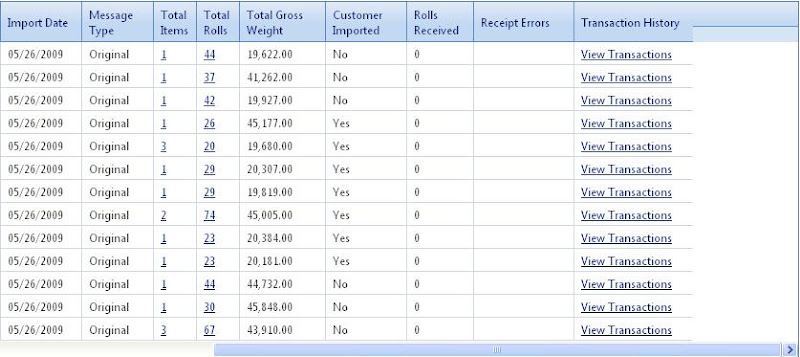
Here is what the grid looks like on initial load: grid on initial load

When the user clicks a radio button, I need to show or hide certain columns depending on their selection.  I attempt to do this using the following code:
JS:
tableView = grdManifest.get_masterTableView();          
tableView.showColumn(tableView.getColumnByUniqueName("ViewErrorDescription").get_element().cellIndex);  
tableView.hideColumn(tableView.getColumnByUniqueName("CustomerImported").get_element().cellIndex);  
tableView.hideColumn(tableView.getColumnByUniqueName("RollsReceived").get_element().cellIndex);  
tableView.hideColumn(tableView.getColumnByUniqueName("ViewReceiptErrors").get_element().cellIndex);  
tableView.hideColumn(tableView.getColumnByUniqueName("ViewTransactionHistory").get_element().cellIndex); 
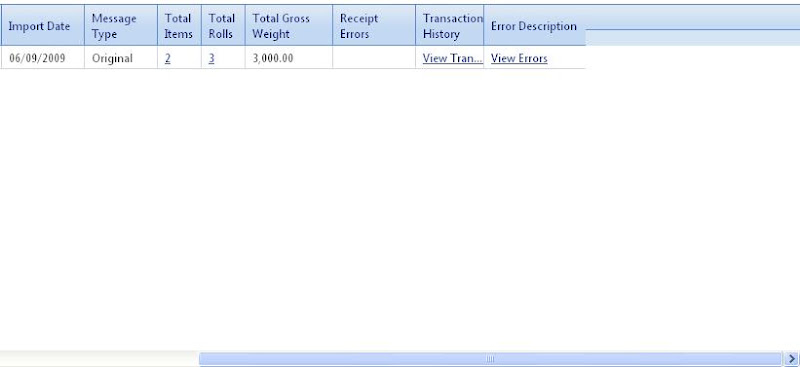
This successfully hides the two GridBoundColumns (CustomerImported and RollsReceived) but the two GridButtonColumns (ViewReceiptErrors and ViewTransactionHistory) do not get hidden.  Also, the GridButtonColumn (ViewErrorDescription) that I'm trying to show does not get displayed.  Here is what the grid looks like after this code is executed: grid after trying to show/hide columns

Could someone tell me what I'm doing wrong?

Here is the markup for the grid:
<telerik:RadGrid ID="grdManifest" runat="server" AllowFilteringByColumn="false" AllowSorting="true" 
        AllowPaging="true" PageSize="13" EnableViewState="false" AutoGenerateColumns="false" 
        style="display:none; overflow:hidden;">  
        <MasterTableView ClientDataKeyNames="ManifestID, SupplierCode, SoldToCodeType, SoldToCode, CorporateCode, PrintSiteCode" 
            ShowHeader="true">  
            <Columns> 
                <telerik:GridBoundColumn DataField="ManifestID" Visible="false" DataType="System.Int32" 
                    UniqueName="ManifestID" /> 
                <telerik:GridBoundColumn DataField="ManifestNumber" HeaderText="Manifest Number" 
                    DataType="System.String" DataFormatString="<nobr>{0}</nobr>" HeaderStyle-Width="95px" 
                    ItemStyle-Width="95px" /> 
                <telerik:GridBoundColumn DataField="BillOfLading" HeaderText="BOL" DataType="System.String" 
                    DataFormatString="<nobr>{0}</nobr>" UniqueName="BillOfLading" HeaderStyle-Width="90px" 
                    ItemStyle-Width="90px" /> 
                <telerik:GridBoundColumn DataField="SupplierCode" Visible="false" DataType="System.String" /> 
                <telerik:GridBoundColumn DataField="SoldToCodeType" Visible="false" DataType="System.String" /> 
                <telerik:GridBoundColumn DataField="SoldToCode" Visible="false" DataType="System.String" /> 
                <telerik:GridButtonColumn HeaderText="Sold To" ButtonType="LinkButton" CommandName="ViewSoldTo" 
                    DataTextField="SoldTo" DataTextFormatString="<nobr>{0}</nobr>" UniqueName="ViewSoldTo" 
                    HeaderStyle-Width="150px" ItemStyle-Width="150px" SortExpression="SoldTo">  
                </telerik:GridButtonColumn> 
                <telerik:GridBoundColumn DataField="CorporateCode" Visible="false" DataType="System.String" /> 
                <telerik:GridBoundColumn DataField="PrintSiteCode" Visible="false" DataType="System.String" /> 
                <telerik:GridButtonColumn HeaderText="Print Site" ButtonType="LinkButton" CommandName="ViewPrintSite" 
                    DataTextField="PSName" DataTextFormatString="<nobr>{0}</nobr>" UniqueName="ViewPrintSite" 
                    HeaderStyle-Width="150px" ItemStyle-Width="150px" SortExpression="PrintSite">  
                </telerik:GridButtonColumn> 
                <telerik:GridBoundColumn DataField="ShipDate" HeaderText="Ship Date" DataType="System.DateTime" 
                    DataFormatString="{0:MM/dd/yyyy}" UniqueName="ShipDate" HeaderStyle-Width="70px" 
                    ItemStyle-Width="70px" /> 
                <telerik:GridBoundColumn DataField="ImportDate" HeaderText="Import Date" DataType="System.DateTime" 
                    DataFormatString="{0:MM/dd/yyyy}" HeaderStyle-Width="70px" ItemStyle-Width="70px" /> 
                <telerik:GridBoundColumn DataField="MessageType" HeaderText="Message Type" DataType="System.String" 
                    HeaderStyle-Width="60px" ItemStyle-Width="60px" /> 
                <telerik:GridButtonColumn HeaderText="Total Items" ButtonType="LinkButton" CommandName="ViewItems" 
                    DataTextField="TotalItems" DataTextFormatString="{0}" UniqueName="ViewItems" 
                    HeaderStyle-Width="30px" ItemStyle-Width="30px" SortExpression="TotalItems">  
                </telerik:GridButtonColumn> 
                <telerik:GridButtonColumn HeaderText="Total Rolls" ButtonType="LinkButton" CommandName="ViewRolls" 
                    DataTextField="TotalRolls" DataTextFormatString="{0}" UniqueName="ViewRolls" 
                    HeaderStyle-Width="30px" ItemStyle-Width="30px" SortExpression="TotalRolls">  
                </telerik:GridButtonColumn> 
                <telerik:GridBoundColumn DataField="TotalGrossWeight" HeaderText="Total Gross Weight" 
                    DataType="System.Decimal" DataFormatString="{0:N}" HeaderStyle-Width="75px" ItemStyle-Width="75px" /> 
                <telerik:GridBoundColumn DataField="CustomerImported" HeaderText="Customer Imported" 
                    DataType="System.String" HeaderStyle-Width="70px" ItemStyle-Width="70px" UniqueName="CustomerImported"/>  
                <telerik:GridBoundColumn DataField="RollsReceived" HeaderText="Rolls Received" DataType="System.Int32" 
                    HeaderStyle-Width="55px" ItemStyle-Width="55px" /> 
                <telerik:GridButtonColumn HeaderText="Receipt Errors" ButtonType="LinkButton" CommandName="ViewReceiptErrors" 
                    DataTextField="ReceiptErrors" DataTextFormatString="<nobr>{0}</nobr>" UniqueName="ViewReceiptErrors" 
                    HeaderStyle-Width="90px" ItemStyle-Width="90px" SortExpression="ReceiptErrors">  
                </telerik:GridButtonColumn> 
                <telerik:GridButtonColumn HeaderText="Transaction History" ButtonType="LinkButton" 
                    CommandName="ViewTransactionHistory" DataTextFormatString="<nobr>View Transactions</nobr>" 
                    UniqueName="ViewTransactionHistory" DataTextField="ManifestID" HeaderStyle-Width="110px" 
                    ItemStyle-Width="110px">  
                </telerik:GridButtonColumn> 
                <telerik:GridButtonColumn HeaderText="Error Description" ButtonType="LinkButton"   
                    CommandName="ViewErrorDescription" DataTextField="ReceiptErrors"   
                    DataTextFormatString="<nobr>{0}</nobr>" UniqueName="ViewErrorDescription"   
                    SortExpression="ReceiptErrors" HeaderStyle-Width="110px" 
                    ItemStyle-Width="110px">  
                </telerik:GridButtonColumn> 
            </Columns> 
            <PagerStyle Mode="Slider" /> 
        </MasterTableView> 
        <ClientSettings AllowColumnHide="true">  
            <ClientEvents OnCommand="grdManifest_OnCommand"   
                OnRowMouseOver="grdManifest_RowMouseOver" 
                OnRowContextMenu="grdManifest_RowContextMenu"/>  
            <Selecting AllowRowSelect="true" /> 
            <Scrolling AllowScroll="true" UseStaticHeaders="true" ScrollHeight="330px" /> 
        </ClientSettings> 
    </telerik:RadGrid> 

Thanks,
Marie

11 Answers, 1 is accepted

Sort by
0
Georgi Krustev
Telerik team
answered on 15 Jun 2009, 03:04 PM
Hello Marie,

Unfortunately I could not reproduce the described abnormality. In my attempt to replicate the problem I have created a simple test project, which is attached to this thread. Please examine it and let me know if I am missing something.

All the best,
Georgi Krustev
the Telerik team

Instantly find answers to your questions on the newTelerik Support Portal.
Check out the tipsfor optimizing your support resource searches.
0
Marie
Top achievements
Rank 1
answered on 15 Jun 2009, 04:14 PM

Thanks for the sample Georgi.

After looking at your project, I moved my code to show/hide the columns to the grid's ondatabound event handler as follows:
JS:

function grdManifest_OnDataBound(sender, args) {  
    tableView = grdManifest.get_masterTableView();    
      
    if (strManifestType == "Error") {             
        tableView.showColumn(tableView.getColumnByUniqueName("ViewErrorDescription").get_element().cellIndex);  
        tableView.get_columns()[tableView.getColumnByUniqueName("ViewErrorDescription").get_element().cellIndex].Display = null;  
        tableView.hideColumn(tableView.getColumnByUniqueName("CustomerImported").get_element().cellIndex);  
        tableView.hideColumn(tableView.getColumnByUniqueName("RollsReceived").get_element().cellIndex);  
        tableView.hideColumn(tableView.getColumnByUniqueName("ViewReceiptErrors").get_element().cellIndex);  
        tableView.hideColumn(tableView.getColumnByUniqueName("ViewTransactionHistory").get_element().cellIndex);  
    } else {    
        tableView.hideColumn(tableView.getColumnByUniqueName("ViewErrorDescription").get_element().cellIndex);  
        tableView.showColumn(tableView.getColumnByUniqueName("CustomerImported").get_element().cellIndex);                   
        tableView.showColumn(tableView.getColumnByUniqueName("RollsReceived").get_element().cellIndex);  
        tableView.showColumn(tableView.getColumnByUniqueName("ViewReceiptErrors").get_element().cellIndex);  
        tableView.showColumn(tableView.getColumnByUniqueName("ViewTransactionHistory").get_element().cellIndex);  
        tableView.get_columns()[tableView.getColumnByUniqueName("CustomerImported").get_element().cellIndex].Display = null;    
        tableView.get_columns()[tableView.getColumnByUniqueName("RollsReceived").get_element().cellIndex].Display = null;    
        tableView.get_columns()[tableView.getColumnByUniqueName("ViewReceiptErrors").get_element().cellIndex].Display = null;    
        tableView.get_columns()[tableView.getColumnByUniqueName("ViewTransactionHistory").get_element().cellIndex].Display = null;    
    }  
}  
 
I also removed the following line of code in my server side Page_Load event:
C#:
grdManifest.MasterTableView.GetColumn("ViewErrorDescription").Display = false

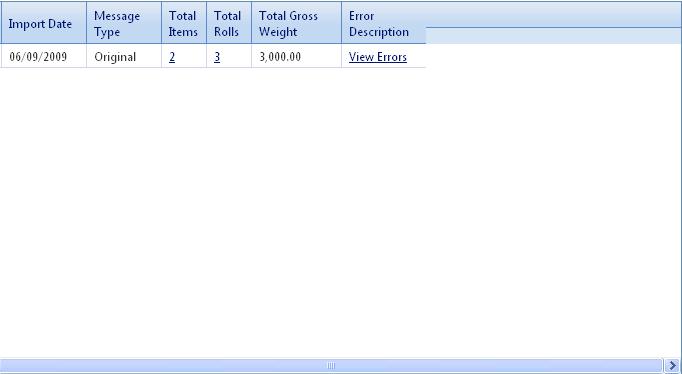
Although the result is slightly improved, it is still not the desired result.  On initial load, the grid looks like this.  After trying to show/hide columns, the grid looks like this

The problem seems to be with hiding the last 3 columns which are all GridButtonColumns.  Could you try reproducing the problem using GridButtonColumns?

Thanks again for your help,
Marie
0
Georgi Krustev
Telerik team
answered on 16 Jun 2009, 04:41 PM
Hello Marie,

Please find the modified project attached to this message. Please examine it and let me know if I am missing something.

Kind regards,
Georgi Krustev
the Telerik team

Instantly find answers to your questions on the new Telerik Support Portal.
Check out the tips for optimizing your support resource searches.
0
Marie
Top achievements
Rank 1
answered on 16 Jun 2009, 04:50 PM
Hi Georgi,

I took a look at your latest sample project and there is no showing/hiding column functionality in it.  The code you attached is for exporting the grid.

Thanks,
Marie
0
Georgi Krustev
Telerik team
answered on 17 Jun 2009, 11:15 AM
Hello Marie,

Please excuse me for the misunderstanding. I have attached the right project to this message. You can review it and described if the used approach is helpful.

Greetings,
Georgi Krustev
the Telerik team

Instantly find answers to your questions on the newTelerik Support Portal.
Check out the tipsfor optimizing your support resource searches.
0
Marie
Top achievements
Rank 1
answered on 17 Jun 2009, 01:28 PM
Thanks again for the sample Georgi.

I'm not really sure why, but I was able to show and hide the GridButtonColumns by essentially calling the code twice.  Once when the user clicks on a radio button and also immediately after that during the grid's OnDataBound event.

The only problem I have now, is that there seems to be extra space at the end of the grid where the hidden columns would have been.  This is shown here.

Is there anyway to remove that extra space?

Thanks,
Marie
0
Georgi Krustev
Telerik team
answered on 18 Jun 2009, 04:29 PM
Hello Marie,

To achieve your goal you need to set TableLayout to "Auto".

Regards,
Georgi Krustev
the Telerik team

Instantly find answers to your questions on the newTelerik Support Portal.
Check out the tipsfor optimizing your support resource searches.
0
Marie
Top achievements
Rank 1
answered on 18 Jun 2009, 05:57 PM
Hi Georgi,

Unfortunately, setting the TableLayout to "Auto" didn't resolve my issue.  The grid still has some extra space at the end when I hide the columns.

Any other suggestions?

Thanks,
Marie
0
Georgi Krustev
Telerik team
answered on 22 Jun 2009, 03:53 PM
Hello Marie,

Please examine the modified test project project attached to this thread.

Let me know if I am missing something.

Greetings,
Georgi Krustev
the Telerik team

Instantly find answers to your questions on the new Telerik Support Portal.
Check out the tips for optimizing your support resource searches.
0
Marie Naranjo
Top achievements
Rank 1
answered on 25 Jun 2009, 02:51 PM
Hi Georgi,

The only change I see from your previous code sample is setting the TableLayout = "Auto".  I've already tried this and it didn't work.  Am I missing something else?

Thanks,
Marie
0
Georgi Krustev
Telerik team
answered on 29 Jun 2009, 03:49 PM
Hello Marie,

I am not exactly sure what is your implementation of RadGrid, but in the attached project in my previous message I have set TableLayout to "Auto" and remove any properties for the width and height. Thus the grid will use the default values, which are 100% width and height.

I will suggest you remove set values for the width and height properties, if they have set values.

To avoid any duplication of the posts I will ask to continue in the support thread open on the same matter.

Greetings,
Georgi Krustev
the Telerik team

Instantly find answers to your questions on the new Telerik Support Portal.
Check out the tips for optimizing your support resource searches.
Tags
Grid
Asked by
Marie
Top achievements
Rank 1
Answers by
Georgi Krustev
Telerik team
Marie
Top achievements
Rank 1
Marie Naranjo
Top achievements
Rank 1
Share this question
or