

Hi
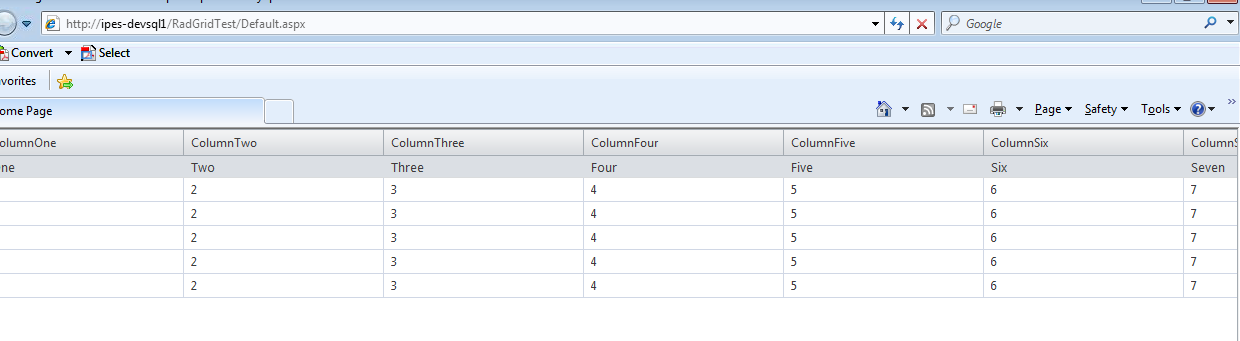
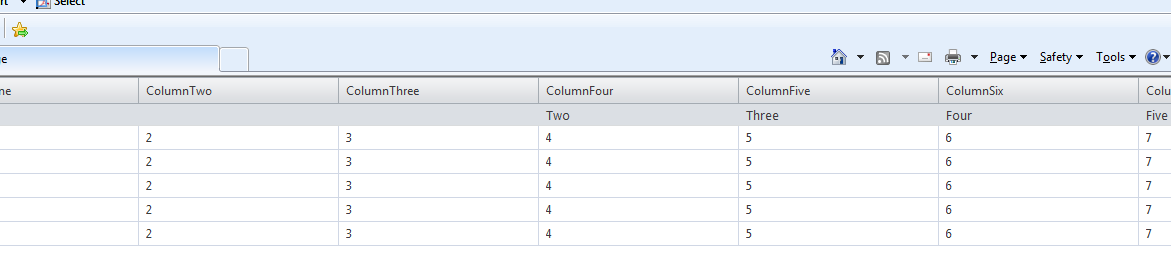
I have implemented some custom code (which came from elsewhere on the site) as I want the data in the headers to appear over the relevant column. I get a problem when using the Frozen columns feature in that after horizontally scrolling to the right and then back to the left the contents of the columns shifts to the right. I've posted a couple of screenshots below. I can see that a colspan is added to the first column in the header row as the view is scrolled back. Anyone seen this before?
Versions are : asp.net 4.0, Windows 7, I.E. 8.0.7601.17514, RadGrid 2012.3.1308.40.
Thanks
Before
After
Code for setting up the group header:
I have implemented some custom code (which came from elsewhere on the site) as I want the data in the headers to appear over the relevant column. I get a problem when using the Frozen columns feature in that after horizontally scrolling to the right and then back to the left the contents of the columns shifts to the right. I've posted a couple of screenshots below. I can see that a colspan is added to the first column in the header row as the view is scrolled back. Anyone seen this before?
Versions are : asp.net 4.0, Windows 7, I.E. 8.0.7601.17514, RadGrid 2012.3.1308.40.
Thanks
Before
After
Code for setting up the group header:
protected void RadGrid_ItemCreated(object sender, GridItemEventArgs e) { if (e.Item is GridGroupHeaderItem) { (e.Item as GridGroupHeaderItem).DataCell.Visible = false; e.Item.PreRender += new EventHandler(Item_PreRender); } } void Item_PreRender(object sender, EventArgs e) { GridGroupHeaderItem groupHeader = sender as GridGroupHeaderItem; if (groupHeader != null) { for (int i = 3; i < groupHeader.OwnerTableView.RenderColumns.Length; i++) { if (groupHeader.OwnerTableView.RenderColumns[i].UniqueName == "ColumnOne") { groupHeader.Cells[i - 1].Text = string.Format("<nobr>{0}</nobr>", "One"); } else if (groupHeader.OwnerTableView.RenderColumns[i].UniqueName == "ColumnTwo") { groupHeader.Cells[i - 1].Text = "Two"; } else if (groupHeader.OwnerTableView.RenderColumns[i].UniqueName == "ColumnThree") { groupHeader.Cells[i - 1].Text = "Three"; } else if (groupHeader.OwnerTableView.RenderColumns[i].UniqueName == "ColumnFour") { groupHeader.Cells[i - 1].Text = "Four"; } else if (groupHeader.OwnerTableView.RenderColumns[i].UniqueName == "ColumnFive") { groupHeader.Cells[i - 1].Text = "Five"; } else if (groupHeader.OwnerTableView.RenderColumns[i].UniqueName == "ColumnSix") { groupHeader.Cells[i - 1].Text = "Six"; } else if (groupHeader.OwnerTableView.RenderColumns[i].UniqueName == "ColumnSeven") { groupHeader.Cells[i - 1].Text = "Seven"; } else if (groupHeader.OwnerTableView.RenderColumns[i].UniqueName == "ColumnEight") { groupHeader.Cells[i - 1].Text = "Eight"; } else if (groupHeader.OwnerTableView.RenderColumns[i].UniqueName == "ColumnNine") { groupHeader.Cells[i - 1].Text = "Nine"; } } }