




Any ideas on how I can get the Badge to pop beyond the constraints of its host/parent? Or, can I put the badge to the upper-middle left so it fits better inside the container?
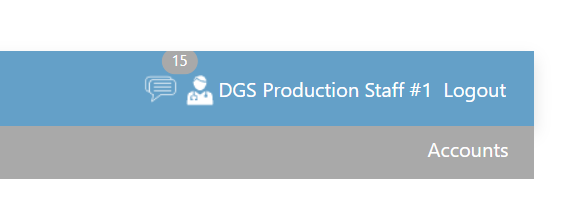
        <TelerikAppBar Class="gsi-background-color">
            <AppBarSection>
                <NavLink href="@ProfileService.HomeUrl" class="gsi-navlink gsi-padding-10 gsi-padding-10-top-bottom">
                    Home
                </NavLink>
            </AppBarSection>

            <AppBarSection>
                <NavLink href="@AboutUrl" class="gsi-navlink gsi-padding-10 gsi-padding-10-top-bottom">
                    About
                </NavLink>
            </AppBarSection>

            <AppBarSpacer />

            <AppBarSection>
                <div class="input-group">

                    @if (ProfileService.IsNotNull())
                    {
                        if (ProfileService.IsInRole(SecurityRoles.Admin, Direction.Up))
                        {
                            <TelerikButton OnClick="OnRouteToNotifications" Class="gsi-button-icon-32">
                                <img src="/images/32/Nofications.white.32x32.png" height="32" width="32" />
                                @if (MessageCount > 0)
                                {
                                    <TelerikBadge VerticalAlign="@BadgeVerticalAlign.Top"
                                                  Class="gsi-background-color-darkgray gsi-color-white">
                                        @MessageCount
                                    </TelerikBadge>
                                }
                            </TelerikButton>

                            <TelerikButton OnClick="@OnRouteToProfile" Class="gsi-button-icon-32">
                                <img src="/images/32/PersonV2.png" height="32" width="32" />
                            </TelerikButton>

                            <NavLink href="@UserDetailsUrl" class="gsi-navlink gsi-padding-10-top-bottom gsi-cursor-pointer">
                                @UserDisplayName
                            </NavLink>
