or
1 answer
102 views
Hi,
I have a script error happening only in a very specific set of circumstances in a webpart in MOSS 2007 SP1 since I upgraded to Q1 2010.
I have an hierarcial Rad Grid that works correctly until the master table requires pagination, then I get a script error part way through the ajax request and the page hangs and does not recover.
The error is as below:
| Webpage error details |
| User Agent: Mozilla/4.0 (compatible; MSIE 8.0; Windows NT 5.1; Trident/4.0; .NET CLR 2.0.50727; .NET CLR 3.0.4506.2152; .NET CLR 3.5.30729; .NET CLR 1.1.4322; InfoPath.2; .NET4.0C; .NET4.0E) |
| Timestamp: Mon, 19 Apr 2010 13:55:36 UTC |
| Message: Object doesn't support this property or method |
| Line: 827 |
| Char: 32 |
| Code: 0 |
| URI: http://portal.eastbourne-college.co.uk/ScriptResource.axd?d=txQS_34g4oX2-DztPEESENt3RtxUORct0OjIfAJgFWNNLtYZW5oja4jdvk773UqBatOLP9kNfvljXhYOe_gC4SY_QjcWJMkoox23HN8ePFp6C8NiAIn_8RrH1i_Msgqj0&t=634054532715333782 |
The line in the js file that causes the problem is :
| if(this._disposeChildElements){$telerik.disposeElement(c); |
This was all working correctly with the previous version that I was using (2009.2.826.20). As a note the child grids needing pagination does not cause an error only the master table. Please see below for the code for the contol.
Markup:
| <%@ Control Language="C#" AutoEventWireup="true" |
| CodeFile="QuickBudgetView.ascx.cs" |
| Inherits="usercontrols_quickbudgetview" %> |
| <%@ Register assembly="Telerik.Web.UI, Version=2010.1.309.20, Culture=neutral, PublicKeyToken=121fae78165ba3d4" |
| namespace="Telerik.Web.UI" tagprefix="telerik" %> |
| <%@ Register assembly="AjaxControlToolkit, Version=1.0.20229.25335, Culture=neutral, PublicKeyToken=28f01b0e84b6d53e" |
| namespace="AjaxControlToolkit" tagprefix="cc1" %> |
| <telerik:RadCodeBlock ID="RadCodeBlock1" runat="server" > |
| <script type="text/javascript"> |
| function showFilterItem() { |
| $find('<%=rgBudgets.ClientID %>').get_masterTableView().showFilterItem(); |
| } |
| function hideFilterItem() { |
| $find('<%=rgBudgets.ClientID %>').get_masterTableView().hideFilterItem(); |
| } |
| </script> |
| </telerik:RadCodeBlock> |
| <telerik:RadAjaxManagerProxy runat="server" ID="rampChild" > |
| </telerik:RadAjaxManagerProxy> |
| <telerik:RadAjaxLoadingPanel Runat="server" height="75px" width="75px" |
| ID="alpMain" Transparency="20" BackColor="White" |
| HorizontalAlign="Center" > |
| <br /> |
| <br /> |
| <img alt="Loading..." src='<%= RadAjaxLoadingPanel.GetWebResourceUrl(Page, "Telerik.Web.UI.Skins.Default.Ajax.loading.gif") %>' |
| style="border: 0px;" /> |
| </telerik:RadAjaxLoadingPanel> |
| <span class="ec-smartpart" > |
| <div> |
| Show filters <input id="Radio1" type="radio" runat="server" name="showHideGroup" onclick="showFilterItem()" /><label for="Radio1">Yes</label> |
| <input id="Radio2" type="radio" runat="server" name="showHideGroup" onclick="hideFilterItem()" checked="true"/><label for="Radio2" >No</label> |
| </div> |
| <br/> |
| <div class="filterDiv"> |
| <telerik:RadFilter runat="server" ID="RadFilter1" FilterContainerID="rgBudgets" ShowApplyButton="false" /> |
| </div> |
| <telerik:RadGrid ID="rgBudgets" runat="server" AllowPaging="True" AllowSorting="True" |
| AutoGenerateColumns="False" DataSourceID="dsBudgetSummary" GridLines="None" |
| Skin="Sunset" PageSize="15" onitemdatabound="rgBudgets_ItemDataBound" |
| onitemcommand="RadGrid1_ItemCommand" > |
| <HeaderContextMenu EnableAutoScroll="True"></HeaderContextMenu> |
| <PagerStyle Mode="NextPrevAndNumeric" /> |
| <MasterTableView DataSourceID="dsBudgetSummary" DataKeyNames="SUMMARY_ID" IsFilterItemExpanded="false" CommandItemDisplay="Top"> |
| <CommandItemTemplate> |
| <telerik:RadToolBar runat="server" ID="RadToolBar1" OnButtonClick="RadToolBar1_ButtonClick"> |
| <Items> |
| <telerik:RadToolBarButton Text="Apply filter" CommandName="FilterRadGrid" ImageUrl="<%#GetFilterIcon() %>" |
| ImagePosition="Right" /> |
| </Items> |
| </telerik:RadToolBar> |
| </CommandItemTemplate> |
| <RowIndicatorColumn> |
| <HeaderStyle Width="20px"></HeaderStyle> |
| </RowIndicatorColumn> |
| <ExpandCollapseColumn> |
| <HeaderStyle Width="20px"></HeaderStyle> |
| </ExpandCollapseColumn> |
| <DetailTables> |
| <telerik:GridTableView DataKeyNames="SUMMARY_ID" DataSourceID="dsBudgetDetails" |
| Width="100%" runat="server" Name="BudgetDetails" ShowHeader="true" PageSize="25" > |
| <ParentTableRelation> |
| <telerik:GridRelationFields DetailKeyField="SUMMARY_ID" MasterKeyField="SUMMARY_ID" /> |
| </ParentTableRelation> |
| <Columns> |
| <telerik:GridBoundColumn DataField="TRANSACTION_ID" UniqueName="TRANSACTION_ID" Visible="false"> |
| </telerik:GridBoundColumn> |
| <telerik:GridBoundColumn DataField="SUMMARY_ID" HeaderText="SUMMARY_ID" |
| ReadOnly="True" SortExpression="SUMMARY_ID" UniqueName="SUMMARY_ID" |
| Visible="False"> |
| </telerik:GridBoundColumn> |
| <telerik:GridBoundColumn DataField="TRANSACTION_DATE" UniqueName="TRANSACTION_DATE" |
| HeaderText="Date" DataFormatString="{0:dd/MM/yy}" Visible="true"> |
| </telerik:GridBoundColumn> |
| <telerik:GridBoundColumn DataField="ACCOUNT_CODE" HeaderText="Account" |
| SortExpression="ACCOUNT_CODE" UniqueName="ACCOUNT_CODE"> |
| <HeaderStyle Width="60px" Wrap="true" /> |
| </telerik:GridBoundColumn> |
| <telerik:GridBoundColumn DataField="DEPARTMENT_CODE" HeaderText="Dept" |
| SortExpression="DEPARTMENT_CODE" UniqueName="DEPARTMENT_CODE"> |
| <HeaderStyle Width="60px" Wrap="true" /> |
| </telerik:GridBoundColumn> |
| <telerik:GridBoundColumn DataField="REFERENCE_1" HeaderText="Ref 1" |
| SortExpression="REFERENCE_1" UniqueName="REFERENCE_1"> |
| <HeaderStyle Width="60px" Wrap="true" /> |
| </telerik:GridBoundColumn> |
| <telerik:GridBoundColumn DataField="REFERENCE_2" HeaderText="Ref 2" |
| SortExpression="REFERENCE_2" UniqueName="REFERENCE_2"> |
| <HeaderStyle Wrap="true" /> |
| </telerik:GridBoundColumn> |
| <telerik:GridBoundColumn DataField="TRANSACTION_VALUE" DataType="System.Decimal" |
| HeaderText="Value" ReadOnly="True" SortExpression="TRANSACTION_VALUE" |
| UniqueName="TRANSACTION_VALUE" DataFormatString="{0:C}" AllowFiltering="False"> |
| <HeaderStyle Width="60px" /> |
| <ItemStyle HorizontalAlign="Right" /> |
| </telerik:GridBoundColumn> |
| </Columns> |
| </telerik:GridTableView> |
| </DetailTables> |
| <Columns> |
| <telerik:GridBoundColumn DataField="SUMMARY_ID" HeaderText="SUMMARY_ID" |
| ReadOnly="True" SortExpression="SUMMARY_ID" UniqueName="SUMMARY_ID" |
| Visible="False"> |
| </telerik:GridBoundColumn> |
| <telerik:GridBoundColumn DataField="ACCOUNT_CODE" HeaderText="Account" |
| SortExpression="ACCOUNT_CODE" UniqueName="ACCOUNT_CODE"> |
| <HeaderStyle Width="60px" Wrap="true" /> |
| </telerik:GridBoundColumn> |
| <telerik:GridBoundColumn DataField="DEPT_CODE" HeaderText="Dept" |
| SortExpression="DEPT_CODE" UniqueName="DEPT_CODE"> |
| <HeaderStyle Width="60px" Wrap="true" /> |
| </telerik:GridBoundColumn> |
| <telerik:GridBoundColumn DataField="DESCRIPTION" HeaderText="Description" |
| ReadOnly="True" SortExpression="DESCRIPTION" UniqueName="DESCRIPTION" |
| AllowFiltering="False"> |
| </telerik:GridBoundColumn> |
| <telerik:GridBoundColumn DataField="BUDGET" DataType="System.Decimal" |
| HeaderText="Budget" ReadOnly="True" SortExpression="BUDGET" |
| UniqueName="BUDGET" DataFormatString="{0:C}" AllowFiltering="False"> |
| <HeaderStyle Width="60px" /> |
| <ItemStyle HorizontalAlign="Right" /> |
| </telerik:GridBoundColumn> |
| <telerik:GridBoundColumn DataField="BALANCE" DataType="System.Decimal" |
| HeaderText="Balance" ReadOnly="True" SortExpression="BALANCE" |
| UniqueName="BALANCE" DataFormatString="{0:C}" AllowFiltering="False"> |
| <HeaderStyle Width="60px" /> |
| <ItemStyle HorizontalAlign="Right" /> |
| </telerik:GridBoundColumn> |
| <telerik:GridBoundColumn DataField="BUDGET_REMAINING" DataType="System.Decimal" |
| HeaderText="Budget Remaining" ReadOnly="True" SortExpression="BUDGET_REMAINING" |
| UniqueName="BUDGET_REMAINING" DataFormatString="{0:C}" |
| AllowFiltering="False"> |
| <HeaderStyle Width="60px" Wrap="true" /> |
| <ItemStyle HorizontalAlign="Right" /> |
| </telerik:GridBoundColumn> |
| </Columns> |
| </MasterTableView> |
| </telerik:RadGrid> |
| </span> |
| <asp:SqlDataSource ID="dsBudgetSummary" runat="server" |
| ConnectionString="<%$ ConnectionStrings:PassMainConnectionString %>" |
| SelectCommand="usps_GetBudgetSummary" SelectCommandType="StoredProcedure" |
| onselecting="dsBudgetSummary_Selecting"> |
| <SelectParameters> |
| <asp:Parameter DefaultValue="xxxx" Name="loginName" Type="String" /> |
| </SelectParameters> |
| </asp:SqlDataSource> |
| <asp:SqlDataSource ID="dsBudgetDetails" runat="server" |
| ConnectionString="<%$ ConnectionStrings:PassMainConnectionString %>" |
| SelectCommand="usps_GetBudgetDetail" SelectCommandType="StoredProcedure" |
| onselecting="dsBudgetDetails_Selecting"> |
| <SelectParameters> |
| <asp:Parameter Name="SUMMARY_ID" Type="String" /> |
| <asp:Parameter Name="loginName" Type="String" /> |
| </SelectParameters> |
| </asp:SqlDataSource> |
Code Behind:
| #region Imports |
| using System; |
| using System.Data; |
| using System.Collections.Generic; |
| using System.ComponentModel; |
| using System.Drawing; |
| using System.Globalization; |
| using System.Web.UI; |
| using System.Web.UI.WebControls; |
| using Microsoft.SharePoint; |
| using Telerik.Web.UI; |
| using EastbourneCollege.Global; |
| #endregion |
| [Description("Quick Budget View")] |
| public partial class usercontrols_quickbudgetview : System.Web.UI.UserControl |
| { |
| private SPUser _user; |
| private SPWeb _web; |
| protected override void OnInit(EventArgs e) |
| { |
| base.OnInit(e); |
| Page.ClientScript.RegisterStartupScript(typeof(usercontrols_quickbudgetview), this.ID, "_spOriginalFormAction = document.forms[0].action;_spSuppressFormOnSubmitWrapper=true;", true); |
| if (this.Page.Form != null) |
| { |
| string formOnSubmitAtt = this.Page.Form.Attributes["onsubmit"]; |
| if (!string.IsNullOrEmpty(formOnSubmitAtt) && formOnSubmitAtt == "return _spFormOnSubmitWrapper();") |
| { |
| this.Page.Form.Attributes["onsubmit"] = "_spFormOnSubmitWrapper();"; |
| } |
| } |
| } |
| protected override void OnPreRender(EventArgs e) |
| { |
| base.OnPreRender(e); |
| RadAjaxManager.GetCurrent(Page).AjaxSettings.AddAjaxSetting(rgBudgets,rgBudgets,alpMain); |
| } |
| protected void RadGrid1_ItemCommand(object source, GridCommandEventArgs e) |
| { |
| if (e.CommandName == "FilterRadGrid") |
| { |
| RadFilter1.FireApplyCommand(); |
| } |
| } |
| protected void Header1_SkinChanged(object sender, SkinChangedEventArgs e) |
| { |
| //Required for dynamic skin changing |
| rgBudgets.Rebind(); |
| } |
| protected void RadToolBar1_ButtonClick(object sender, RadToolBarEventArgs e) |
| { |
| // |
| } |
| protected string GetFilterIcon() |
| { |
| return RadAjaxLoadingPanel.GetWebResourceUrl(Page, string.Format("Telerik.Web.UI.Skins.{0}.Grid.Filter.gif",rgBudgets.SkinID)); |
| } |
| protected void Page_Load(object sender, EventArgs e) |
| { |
| _web = SPContext.Current.Web; |
| _user = _web.CurrentUser; |
| if (Page.IsPostBack) return; |
| EnsureChildControls(); |
| DataBind(); |
| } |
| protected void dsBudgetSummary_Selecting(object sender, SqlDataSourceSelectingEventArgs e) |
| { |
| e.Command.Parameters["@loginName"].Value = _user.LoginName;// @"epcot\cjg"; |
| } |
| protected void dsBudgetDetails_Selecting(object sender, SqlDataSourceSelectingEventArgs e) |
| { |
| e.Command.Parameters["@loginName"].Value = _user.LoginName;// @"epcot\cjg"; |
| } |
| protected void rgBudgets_ItemDataBound(object sender, GridItemEventArgs e) |
| { |
| //Is it a GridDataItem |
| if (e.Item is GridDataItem && e.Item.OwnerTableView.Name!="BudgetDetails") |
| { |
| //Get the instance of the right type |
| GridDataItem dataBoundItem = e.Item as GridDataItem; |
| //Check the formatting condition |
| if (double.Parse(dataBoundItem["BUDGET_REMAINING"].Text,NumberStyles.Any) < 0) |
| { |
| dataBoundItem["BUDGET_REMAINING"].ForeColor = Color.Red; |
| dataBoundItem["BUDGET_REMAINING"].Font.Bold = true; |
| } |
| } |
| } |
| } |
Thanks
Chris


4 answers
114 views
Dear All,
I've a few queries for clarification.
1. How to get the client Id of the radcombo box that is placed in a user control from an aspx page.
2. How to get the edited row's id in a radgrid
3. After the row is inserted in a radgrid, the grid is not rebinding though I've given radGrid1.EditIndexes.Clear()
4. On select of a row in the radgrid in user control, the other radgrid on the aspx page loads. Initially when no record is added and I try to click on the Edit button instead of add button, error is thrown. How to make edit button disabled till atleast one record is added.
Thanks in advance.

Mira
Telerik team

answered
on
21 Apr 2010
1 answer
142 views
Dear Telerik,
We're facing a problem pasting plain text to an already existing memo in Google Chrome. To re-produce the problem, please do the following:
We're facing a problem pasting plain text to an already existing memo in Google Chrome. To re-produce the problem, please do the following:
- Open a text file in Notepad
- Copy some lines
- Open the Editor / Default Setting Demo on your demo site http://demos.telerik.com/aspnet-ajax/editor/examples/default/defaultcs.aspx with Google Chrome
- Click anywhere inside the editor, and press Ctrl-V to Paste the text
- The text will be super-imposed on top of the current text
The same paste with IE8 will work just fine.
Please advise
Salah A. Malaeb
TeknoBuild

Rumen
Telerik team
answered
on
21 Apr 2010
1 answer
91 views
Hi,
I am using telerik version RadControlsQ1 2007. On the page for some functionality I am using rad ajax calls. The view state is enabled for the page. In the firebug it is observed that the complete page data along with view state information is getting posted on rad ajax call. This is becoming really expensive on slow networks. Please let me know if there is any way to avoid the whole page data getting postback due to the ajax call. We do not want to update to newer version at this point since it will be huge change so please let me know if we could do using same controls.
Details : On my page there are 2 rad grids and 1 rad ajax panel. The 2 different ajax requests get called for two respective rad grids in single javascript function. In the firebug it is showing that all page data including data from rad ajax panel as well complete view state information getting posted back to the server. Could you please tell me what might be going wrong.
Thanks in advance.
Smita

robertw102
Top achievements
 Rank 1
Rank 1
answered
on
21 Apr 2010
1 answer
99 views
Hi - my grid is as follows:
| <telerik:RadGrid CellSpacing="0" CellPadding="0" OnItemDataBound="rgItemDataBound" Skin="Vista" ShowHeader="true" PagerStyle-Position="TopAndBottom" AllowPaging="true" PageSize="10" AutoGenerateColumns="false" Width="700" ID="RadGrid1" runat="server"> |
| <MasterTableView > |
| <Columns> |
| <telerik:GridTemplateColumn> |
| <ItemTemplate> |
| <div class="documentRow"> |
| <div class="documentInfo"> |
| <h3> <%# Eval("Subject").ToString() %></h3> |
| <p class="postDate"><strong>Added:</strong> <%# Eval("PostDate", "{0:dd MMM yyyy}")%> | <strong>Views:</strong> <%# Eval("TotalViews").ToString() %></p> |
| <p class="documentBody"> <%# Eval("Body").ToString() %> <%# Eval("PostID", "<a href='/media/p/{0}.aspx'>View document</a>") %></p> |
| </div> |
| </div> |
| </ItemTemplate> |
| </telerik:GridTemplateColumn> |
| </Columns> |
| </MasterTableView> |
| </telerik:RadGrid> |
How do I add sorting to this as there aren't clearly defined columns in the grid? I'd like to be able to sort on Subject, PostDate and Views
Thanks
Pavlina
Telerik team
answered
on
21 Apr 2010
1 answer
129 views
Hi,
I have the following tooltip to display static text:
When clicking on Print Preview in the IE8 or Firefox 3.5.8 the tooltip goes out of the printing area or half away depending on the text in it. When changing zoom to 60% it display as it looks in the browser. It also happens with the tooltip demo site under First Look.
Is it possible to print a tooltip or any workarounds available?
Thanks & Regards,
Constantin
I have the following tooltip to display static text:
<telerik:RadToolTip ID="reportInfoTip" runat="server" Animation="Fade" ContentScrolling="Auto"
Position="MiddleRight" RelativeTo="Element" TargetControlID="ddlSiteLogReport"
ShowEvent="FromCode" OffsetX="32" OffsetY="12" ShowCallout="false" EnableViewState="true"
Sticky="true" Width="580px" Height="98px" ManualClose="true" />
When clicking on Print Preview in the IE8 or Firefox 3.5.8 the tooltip goes out of the printing area or half away depending on the text in it. When changing zoom to 60% it display as it looks in the browser. It also happens with the tooltip demo site under First Look.
Is it possible to print a tooltip or any workarounds available?
Thanks & Regards,
Constantin

Constantin Dimitrov
Top achievements
Rank 1
Rank 1
answered
on
21 Apr 2010
11 answers
261 views
My Unique customer ID is: WT370784
I create app local resources for my page using visual studio:
WebMeetingScheduler.aspx.resx <-. default
WebMeetingScheduler.aspx.pt.resx <- for my languange
The options "auto" don't have any impact in the RadScheduler control. is this correct?
So i add Culture="Portuguese (Portugal)" in my code:
I start to see Portuguese language in my page, but Not everything is translated
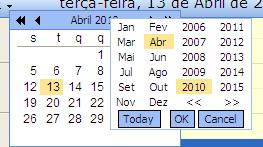
a1.jpg show that Today, OK, Cancel are not translated
a2.jpg show the hours in a bat format, should be 11, 12, 13, 14, 15, 16, 17 etc
can you help me?
Best Regards.
I create app local resources for my page using visual studio:
WebMeetingScheduler.aspx.resx <-. default
WebMeetingScheduler.aspx.pt.resx <- for my languange
| <%@ Page Language="C#" MasterPageFile="~/Office/Office.Master" StylesheetTheme="OfficeSkin" |
| AutoEventWireup="true" ValidateRequest="false" Codebehind="WebMeetingScheduler.aspx.cs" |
| Inherits="MeetingPointOffice.Office.WebMeetingScheduler" meta:resourcekey="PageResource1" UICulture="auto" |
| Culture="auto" %> |
The options "auto" don't have any impact in the RadScheduler control. is this correct?
So i add Culture="Portuguese (Portugal)" in my code:
| <telerik:RadScheduler ID="scheduler" runat="server" |
| CustomAttributeNames="MeetingID,MeetingStateID,UserID,Subject,Description" |
| Skin="Outlook" |
| OnFormCreated="scheduler_FormCreated" |
| OnClientAppointmentMoveStart="OnClientAppointmenMoveStartHandler" |
| OnClientAppointmentResizeStart="OnClientAppointmentResizeStartHandler" |
| OnFormCreating="scheduler_FormCreating" |
| OnAppointmentDelete="scheduler_AppointmentDelete" |
| OnAppointmentDataBound="scheduler_AppointmentDataBound" |
| Culture="Portuguese (Portugal)" |
| meta:resourcekey="schedulerResource1" > |
I start to see Portuguese language in my page, but Not everything is translated
a1.jpg show that Today, OK, Cancel are not translated
a2.jpg show the hours in a bat format, should be 11, 12, 13, 14, 15, 16, 17 etc
can you help me?
Best Regards.
Miguel Nazario
Top achievements
Rank 1
Rank 1
answered
on
21 Apr 2010
2 answers
132 views
I would like to show a message if someone inputs an Amount larger than my MaxValue. For example, if they inputted $300 and my max value was $299, I would like to show them a link that says something like "Click here for help".
Any suggestions?
Any suggestions?
1 answer
191 views
Hi,
I am using single XML file to update both MasterTable and DetailTable views.
When I edit a row in detailTable, then XML is updated and so is values of few columns in mastertableview.
The update in detailTable view take place via edit template and by default after UpdateCommand completion, which updates required XML. The control goes to NeedDatasource and DetailTableDataBind. sample code below
I am using single XML file to update both MasterTable and DetailTable views.
When I edit a row in detailTable, then XML is updated and so is values of few columns in mastertableview.
The update in detailTable view take place via edit template and by default after UpdateCommand completion, which updates required XML. The control goes to NeedDatasource and DetailTableDataBind. sample code below
protected
void RadGridFinancials_NeedDataSource(object source, GridNeedDataSourceEventArgs e)
{
RadGrid1.DataSource = ds.Tables[
"NEWXML"];
// OR should I use
//RadGrid1.MasterTableView.DataSource = ds.Tables["NEWXML"]; But this also does not update mastertableview
// HierarchyLoadMode = "ServerOnDemand"
}
protected void RadGridFinancials_DetailTableDataBind(object source, GridDetailTableDataBindEventArgs e)
{
e.DetailTableView.DataSource = ds.Tables["NEWXML"];
}
But after these calls only detailtableview gets updated and not mastertableview.
So How can I update mastertableview columns after update in row of detailtableview ?
This is required because few columns in mastertable view is valued as sum of a particular column in detailtableview. So an update in row of childtable needs to update parent tableview row.
Iana Tsolova
Telerik team
answered
on
21 Apr 2010
1 answer
276 views
can I get ahold of this and replace it in ItemDataBound with something else if no ratings have been submitted for an entry?
Mira
Telerik team
answered
on
21 Apr 2010