or
11 answers
1.1K+ views
Hi. Is there a good example anywhere of how to use the AsyncUpload control (ideally with mutiple file selection set to auto), but where the uploaded files are not just saved to the file system but are handled as a stream for the purposes of saving to a database. Many thanks in advance for you help.

Doncho
Telerik team

updated answer
on
20 Jan 2023
0 answers
136 views
How can I use user interface expressions for find in Telerik asp.net core grid?
0 answers
149 views
We have multiple RadGrids with the MasterTableView configured thusly:
<MasterTableView EditFormSettings-PopUpSettings-KeepInScreenBounds="true" EditMode="PopUp" TimeZoneID="Central Standard Time">If a record from the database has a null datetime value, the min value of DATETIME data type is used (01/01/0001). When the grid tries convert UTC to CST, we get the error: The added or subtracted value results in an un-representable DateTime.
Parameter name: value.
How can this be handled so the Grid display an empty cell when a null datetime is encountered?

Allan Erickson
Top achievements
 Rank 1
Rank 1
asked
on
19 Jan 2023
0 answers
177 views
hello
in google chrome if we have "google translate extension" installed and the "Immediately display popup." option is enabled, by double clicking a word normally a pop up would display the translation; but in telerik editor, chrome extension's pop up will get inserted in the editor as html.
it even happens in the telerik demo page: https://www.telerik.com/products/aspnet-ajax.aspx
how can we fix that?
thanks

0 answers
226 views
Trying to add a text box and button into a Column Group Header server side and can't seem to get to the cell of the specific header. I know how to set the text and all but want to place controls into the header.
protected void RadGrid1_PreRender(object sender, EventArgs e)
{
foreach (GridColumnGroup cg in RadGrid1.MasterTableView.ColumnGroups)
{
if (cg.Name == "HeaderGroupName")
{
cg.HeaderText = "TEST";
}
}
}

0 answers
229 views
We have a development partner that create a custom component for us. It is using an older version of Telerik. What would be the recommended version to use now. We are looking to move to an Azure environment using containers. Below is the version information of the DLL.
Thanks!
Version information
Product Name - Telerik.Web.UIProduct Version - 2015.1.401.45
Original filename - Telerik.Web.UI.dll
Howard
Top achievements
Rank 1
Rank 1
asked
on
18 Jan 2023
0 answers
188 views
Hello
I'm asking you a question because there's a tricky screen.
The screen consists of Grid and Dialog, as shown below.
[StudentGrid]
[StudentDialog]
Hello,
I'm trying to organize the screen, so I'd like your help.
If I press "Add" button to add a new Editable row to Grid[StudentGrid]
And then, go to StudentNo in the added row and press the "Enter" key.
I press "Enter" Key, the [StudentDialog] visible
If I put the student number and press "Enter" key in [StudentDialog], the information of the students corresponding to the grid below will be printed out (for example, if the search term is "10", students with 101, 1001, and 10 will print out as search results)
And [StudentDialog] disappears when selecting one of the rows of the retrieved results.
Insert student's information into [StudentGrid] currentEditRow, which was selected in [StudentDialog].
I am currently using html and javascript.
I'm asking you a question because I couldn't find and try data on where the current Row of grid is
and how to put the value in each column of grid's current EditRow when selected from dialog.
Please let me know if there is an example or reference for that part.
WoorimartDEV
Top achievements
Rank 1
 Iron
Iron
 Iron
Iron
Rank 1
Iron
Iron
asked
on
18 Jan 2023
1 answer
325 views
I've been trying to display a System.Drawing.Image (obtained from live camera feed snapshot) dynamically in a DataList control with asp:Image control but not having any success.
I was looking at RadBinaryImage to see if this is a viable option.
The images to be displayed are variable (aka dynamic number of images not static number/count) so I may have 5 images or 10 images or 7 images that are all System.Drawing.Image types. I want to display those images in a Grid or DataList.
    <asp:DataList ID="cameras" runat="server" RepeatColumns="3" RepeatDirection="Horizontal" RepeatLayout="Table">
        <ItemTemplate>
            <asp:Image ID="cameraX" runat="server" />
        </ItemTemplate>
    </asp:DataList>
In the ItemDataBound event handler I convert to byte array and assign to asp:Image ImageUrl ... but this results in nothing being displayed. No errors, just nothing displayed. Would RadBinaryImage be a solution?
        protected void cameras_ItemDataBound(object sender, System.Web.UI.WebControls.DataListItemEventArgs e)
        {

            Models.Facility.Camera camera = e.Item.DataItem as Models.Facility.Camera;
            Image img = GetImage(camera);
            MemoryStream ms = new MemoryStream();
            img.Save(ms, System.Drawing.Imaging.ImageFormat.Jpeg);
            System.Web.UI.WebControls.Image imgControl = (System.Web.UI.WebControls.Image)e.Item.FindControl("camera");
            var base64Data = Convert.ToBase64String(ms.ToArray());
            imgControl.ImageUrl = "data:image/jpg;base64," + base64Data;

        }

Rob
Top achievements
 Rank 4
 Bronze
 Bronze
 Iron
Iron
Rank 4
Bronze
Bronze
Iron
answered
on
17 Jan 2023
1 answer
212 views
Good day,
An error is thrown when I set the RetainExpandStateOnRebind = "True" after a partial postback. Here's the sample code that replicate the issue.
Scenario: selecting a row (with collapsed detail)
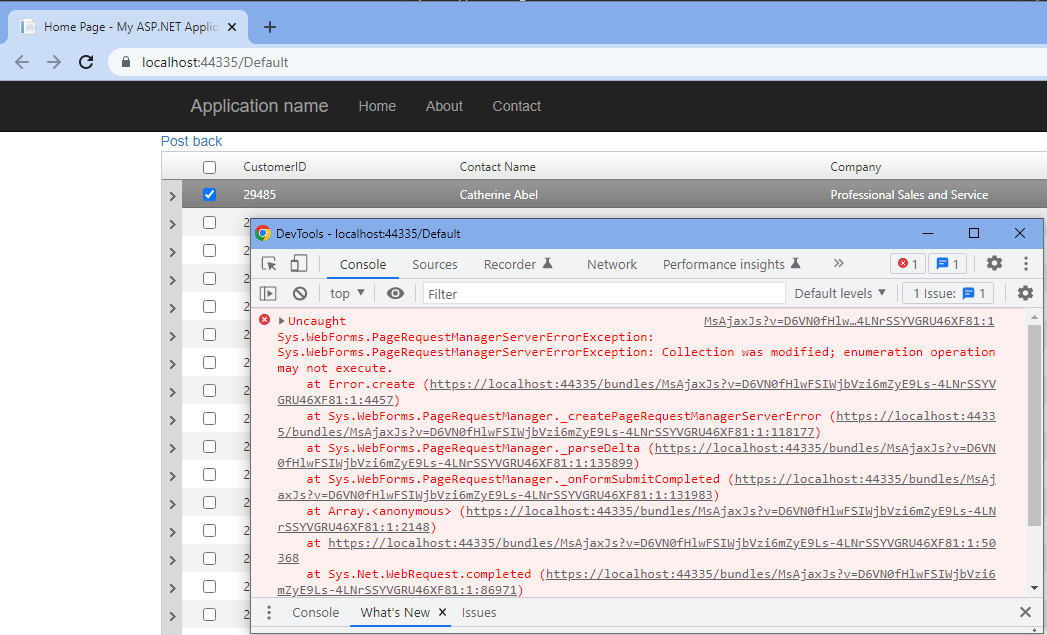
An error is thrown when I set the RetainExpandStateOnRebind = "True" after a partial postback. Here's the sample code that replicate the issue.
Scenario: selecting a row (with collapsed detail)

Attila Antal
Telerik team
answered
on
16 Jan 2023
1 answer
265 views
hello, I'm using RadSpreadsheet and didn't figure out how to do the following:
1. In SpreadsheetTool Name="InsertCells", Can I change the default tool that appear to be other than "Add Column left"?
2. When dragging down a cell it behaves like "Copy cell" , but if the cell include content that ends with a digit the dragging will cause a "Fill Series" behavior, which means the new cell will have the prev cell value increased by 1, is there a way to control this default behavior and config it to be only "copy cell" with no increments??
Thanks,
Efrat

Rumen
Telerik team
answered
on
13 Jan 2023



