or
2 answers
379 views
I realize this isn't a DNN forum, but couldn't find anything there so hoping someone here can answer.
After upgrading to DNN 9.11.3 several modules don't work right because DNN no longer supports Telerik.
I've read somewhere that you can purchase a Telerik license and just update the dlls for it in DNN in order to resolve this issue.
Has anyone else had this experience?
Thanks

Rumen
Telerik team

answered
on
21 Nov 2025
1 answer
262 views
What is the latest compatible Telerik.Web.UI version for .NET framework 4.7.2 that can address the security vulnerabilities.
Current version used in the project is - 2012.3.1308.40
Looking to fix the following vulnerabilities -
CVE-2019-19790, CVE-2019-18935, CVE-2017-11357, CVE-2017-11317, CVE-2017-9248, CVE-2014-4958
Rumen
Telerik team
answered
on
21 Nov 2025
3 answers
165 views
I'm trying hide a couple of columns in a RadGrid. I can do this in RadGrid1_ItemDataBound with the GrdiHeaderItem setting visible = false.
However, the output still uses space for the 2 columns that were hidden at the end of the grid.
Looking at the page source when I run my app there are 2 extra <col /> tags in <colgroup> and the <tfoot> tag has 2 extra <td></td> tags. There is the correct number of <td> tags in each row in <tr> in the table body.
Could this be from css? Is there a way in override this in RadGrid1_ItemDataBound manually?


1 answer
151 views
On our side the update to version 2025.4 is failing because of browser inlog issue, see attaches screenshot.
What to do?
Marc
Rumen
Telerik team
updated answer
on
18 Nov 2025
3 answers
101 views
I’m working with Telerik RadGrid and need an example where filtering is enabled on the columns and vertical scrolling is also active. Could someone direct me to a demo or sample that demonstrates this setup?
1 answer
111 views
Hey everyone, I'm working on an ASP.NET AJAX project and am having some confusion about handling delta updates within partial postbacks.
Specifically:
- I'm trying to update just a small part of a control using delta logic, but the entire control seems to refresh instead.
- I'm not sure if I'm missing a required setting on the UpdatePanel or if delta updates require a different approach in Telerik controls.
- If anyone has best practices, examples, or even "don't do this" warnings, I would seriously appreciate the help.
I am waiting yours valuable replies. Thanks in advance!

Attila Antal
Telerik team
answered
on
17 Nov 2025
1 answer
89 views
Is there any way to get a list of all items from a RadMultiSelect?
I've found the solution of get it from the datasource, but I'm remodeling exiting code that is replacing RadListBoxes and it would be simpler if I could read the items from RadMultiSelect.Items.
Bernie

Vasko
Telerik team
answered
on
12 Nov 2025
1 answer
133 views
If the user selects the highlighted text individually (by double clicking their mouse and highlighting the words) and paste it into an Editor, all is good.
However, if the user triple clicks to highlight the entire sentence and then paste that into an Editor, this is what shows up in the HTML view:
<div>
<div id="ctl00_Main_Content_ctl00_Main_Content_RadMultiPagePanel">
<div id="ctl00_Main_Content_RadMultiPage">
<div id="Main_Content_SummaryPage">
<div>
<div>Please load claims from QNXT Production 09/12/2025 into Test Reports.</div>
</div>
</div>
</div>
</div>
</div>
<div>
<div>
<div>
<div id="ctl00_Main_Content_ctl00_Main_Content_ddlQuickLinksPanel">
<div id="ctl00_Main_Content_ddlQuickLinks" tabindex="0"> </div>
</div>
</div>
</div>
</div>Is there a way to prevent this?
I still want the user to be able to copy/paste images into the Editor, but this is causing problems. In the users minds they are simply copying and pasting text.
Rumen
Telerik team
answered
on
10 Nov 2025
1 answer
89 views
Using the following client script to change the selected value of the slider. However, it does not seem that the "item" or slider "set_value()" function is doing anything. The selected value nor the position of the of the slider changes on the client.
Thank you in advance for any help resolving this issue.
Client Script:
var dateValue = dayjs(selectedDate).format("M/D/YYYY");
var slider = $find("<%=RadSlider1.ClientID%>");
var items = slider.get_items();
for (var i = 0; i < items.length; i++) {
	 var item = items[i];
	 var sliderDate = item.get_value();
	 if (sliderDate == dateValue) {
		 item.set_value(dateValue);
		slider.set_value(dateValue);
		slider.repaint();
		break;
		}
}
Slider Markup
<telerik:RadSlider ID="RadSlider1" runat="server" Skin="Bootstrap" Width="98%" Height="50" Orientation="Horizontal" CssClass="ItemsSlider" OnClientValueChanged="Slider_ValueChanged" AnimationDuration="400" EnableServerSideRendering="true" TrackPosition="BottomRight" ItemType="Item" ThumbsInteractionMode="Push" DataSourceID="dsWeekDays">
	<ItemBinding TextField="WeekdayName" ValueField="WeekdayDate" ToolTipField="WeekdayDate"  />
</telerik:RadSlider>

<asp:SqlDataSource ID="dsWeekDays" runat="server" ConnectionString="<%$ ConnectionStrings:CHPCOMSDB %>" SelectCommand="SELECT WeekdayDate = FORMAT(Weekdaydate, 'M/d/yyyy'), WeekdayName FROM dbo.fx_getLastFiveWeekdays() ORDER BY WeekdayDate" SelectCommandType="Text"></asp:SqlDataSource>
Attila Antal
Telerik team
answered
on
06 Nov 2025
1 answer
210 views
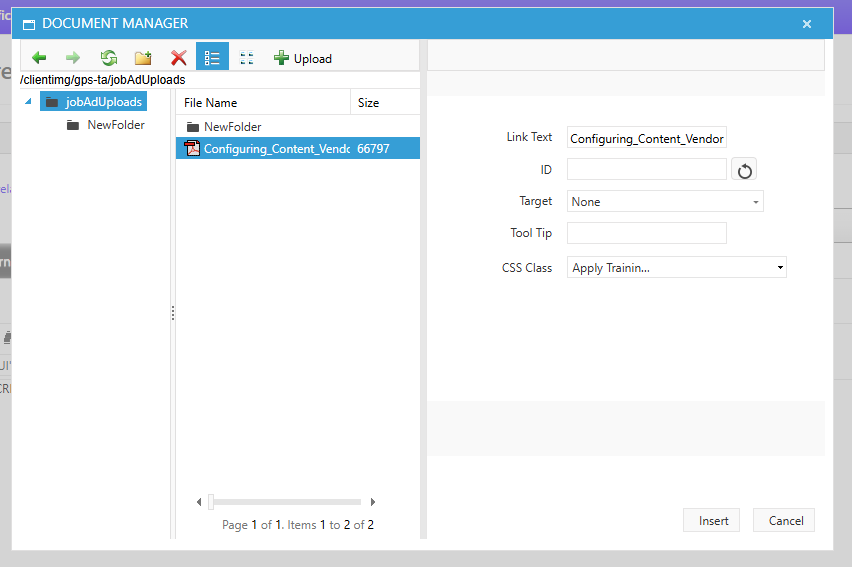
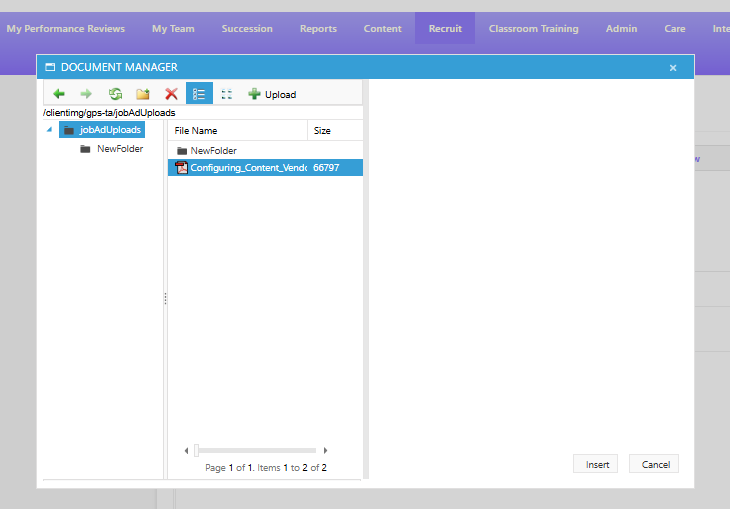
Hi, I am facing an issue where the Document Manager pop-up window that appears when attaching documents disappears from the right-hand file settings menu when zooming out of the page in any browser.
The issue is also reproducible here: Official RadEditor By Telerik
Please see the recording for more information:- https://jam.dev/c/de662891-5a44-4419-8738-616672fbb7f8
Before:-
After:-
The issue is also reproducible here: Official RadEditor By Telerik
Please see the recording for more information:- https://jam.dev/c/de662891-5a44-4419-8738-616672fbb7f8
Before:-
After:-
Rumen
Telerik team
answered
on
03 Nov 2025







