or
3 answers
76 views
Hello,
I have followed this example to build a SelfHierarchy RadGrid:
http://www.telerik.com/help/aspnet/grid/grdselfreferencinghierarchy.html
and it went well, except for the filters.
What's happening is that when I add a filter condition it displays the root item and the child items as it should and then again child items as if they were root items.
Here is the aspx code of the grid:
Best regards,
Tomaž Lovrec
I have followed this example to build a SelfHierarchy RadGrid:
http://www.telerik.com/help/aspnet/grid/grdselfreferencinghierarchy.html
and it went well, except for the filters.
What's happening is that when I add a filter condition it displays the root item and the child items as it should and then again child items as if they were root items.
Here is the aspx code of the grid:
| <telerik:RadGrid ID="RadGrid1" runat="server" DataSourceID="SqlTask" OnColumnCreated="RadGrid1_ColumnCreated" |
| OnItemCreated="RadGrid1_ItemCreated" OnInsertCommand="taskInsertCommand" OnItemCommand="RadGrid1_ItemCommand" |
| OnUpdateCommand="taskUpdateCommand" OnDeleteCommand="taskDeleteCommand" |
| OnItemDataBound="RadGrid1_ItemDataBound" GridLines="None" Skin="Sunset" Width="100%"> |
| <MasterTableView HierarchyDefaultExpanded="true" HierarchyLoadMode="ServerBind" AllowSorting="true" AllowFilteringByColumn="true" |
| DataKeyNames="id, deadline, percent_complete, id_prioritete" Width="100%" AutoGenerateColumns="False" |
| DataSourceID="SqlTask" GridLines="None" AllowPaging="False" EditMode="PopUp"> |
| <SelfHierarchySettings ParentKeyName="id_parent" KeyName="id" /> |
| <Columns> |
| <telerik:GridButtonColumn ButtonType="ImageButton" CommandName="Preview" Text="Predogled" ImageUrl="~/members/images/magnifier.png" UniqueName="Preview"> |
| <HeaderStyle Width="25px" /> |
| </telerik:GridButtonColumn> |
| <telerik:GridEditCommandColumn ButtonType="ImageButton" CancelText="Preklici" |
| InsertText="Dodaj" UpdateText="Shrani"> |
| <HeaderStyle Width="32px" /> |
| </telerik:GridEditCommandColumn> |
| <telerik:GridButtonColumn ButtonType="ImageButton" CommandName="Delete" |
| ConfirmDialogType="RadWindow" ConfirmText="Ali si preprican da želiš izbrisati vnos?" |
| Text="Briši" UniqueName="column"> |
| <HeaderStyle Width="32px" /> |
| </telerik:GridButtonColumn> |
| <telerik:GridButtonColumn ButtonType="ImageButton" CommandName="StartTask" Text="Začni z nalogo" |
| UniqueName="StartTask" ImageUrl="~/members/images/calendar.gif"> |
| <HeaderStyle Width="25px" /> |
| </telerik:GridButtonColumn> |
| <telerik:GridBoundColumn HeaderText="P" ReadOnly="true" UniqueName="priority" AllowFiltering="false" HeaderStyle-Width="25px" DataField="priority"> |
| </telerik:GridBoundColumn> |
| <telerik:GridBoundColumn HeaderText="P" ReadOnly="true" UniqueName="id_prioritete" |
| AllowFiltering="false" HeaderStyle-Width="25px" DataField="id_prioritete" Visible="false"> |
| </telerik:GridBoundColumn> |
| <telerik:GridButtonColumn ButtonType="ImageButton" CommandName="EndTask" Text="Končaj nalogo" |
| UniqueName="EndTask" ImageUrl="~/members/images/cancel.gif"> |
| <HeaderStyle Width="25px" /> |
| </telerik:GridButtonColumn> |
| <telerik:GridBoundColumn DataField="id" DataType="System.Int32" HeaderText="ID" |
| ReadOnly="True" SortExpression="id" UniqueName="id" Visible="false"> |
| <HeaderStyle Width="200px" /> |
| </telerik:GridBoundColumn> |
| <telerik:GridBoundColumn DataField="title" DataType="System.String" |
| HeaderText="NASLOV" SortExpression="title" |
| UniqueName="title" HeaderStyle-Width="150px"> |
| </telerik:GridBoundColumn> |
| <telerik:GridBoundColumn DataField="start_date" DataType="System.DateTime" |
| HeaderText="DATUM ZAČETKA" SortExpression="start_date" UniqueName="start_date" HeaderStyle-Width="150px"> |
| </telerik:GridBoundColumn> |
| <telerik:GridBoundColumn DataField="task_creator" DataType="System.Guid" |
| HeaderText="USTVARJALEC" SortExpression="task_creator" |
| UniqueName="task_creator" HeaderStyle-Width="150px"> |
| </telerik:GridBoundColumn> |
| <telerik:GridBoundColumn DataField="task_assigned" DataType="System.Guid" |
| HeaderText="IZVAJALEC" SortExpression="task_assigned" |
| UniqueName="task_assigned" HeaderStyle-Width="150px"> |
| </telerik:GridBoundColumn> |
| <telerik:GridBoundColumn DataField="deadline" DataType="System.DateTime" |
| HeaderText="ROK" SortExpression="deadline" UniqueName="deadline" HeaderStyle-Width="150px"> |
| </telerik:GridBoundColumn> |
| <telerik:GridBoundColumn DataField="percent_complete" DataType="System.Int32" |
| HeaderText="KONČANO V %" SortExpression="percent_complete" |
| UniqueName="percent_complete" HeaderStyle-Width="150px"> |
| </telerik:GridBoundColumn> |
| <telerik:GridBoundColumn DataField="end_date" DataType="System.DateTime" |
| HeaderText="DATUM KONCA" SortExpression="end_date" UniqueName="end_date" HeaderStyle-Width="150px"> |
| </telerik:GridBoundColumn> |
| <telerik:GridBoundColumn DataField="predecessors" HeaderText="PREDHODNIKI" |
| SortExpression="predecessors" UniqueName="predecessors" HeaderStyle-Width="150px"> |
| </telerik:GridBoundColumn> |
| <telerik:GridBoundColumn DataField="id_parent" DataType="System.Int32" |
| HeaderText="id_parent" SortExpression="id_parent" UniqueName="id_parent" Visible="false" HeaderStyle-Width="150px"> |
| </telerik:GridBoundColumn> |
| </Columns> |
| <EditFormSettings CaptionFormatString="UREJANJE NALOG" UserControlName="user_controls/insertTask.ascx" |
| EditFormType="WebUserControl" PopUpSettings-Width="600"> |
| <EditColumn ButtonType="ImageButton" UniqueName="EditCommandColumn1"> |
| </EditColumn> |
| <PopUpSettings ScrollBars="None"></PopUpSettings> |
| </EditFormSettings> |
| </MasterTableView> |
| <ClientSettings AllowExpandCollapse="true" /> |
| </telerik:RadGrid> |
Best regards,
Tomaž Lovrec

Tomaž Lovrec
Top achievements
 Rank 1
Rank 1
answered
on
28 Jul 2010
4 answers
227 views
I am using the Drag and Drop integration example. When I drag a row from the RadGrid onto the scheduler while the scheduler is group by resources I get the error "Resource index out of range: 1". This is the sample default.aspx.cs code I am trying to use. I have noted that when grouped by resources the slotTargetindex format goes from "1:0:0" to "0:1:0:0". Any help would be appreciated.
Thanks, Tom
Thanks, Tom
| protected void RadGrid1_RowDrop(object sender, GridDragDropEventArgs e) |
| { |
| GridDataItem dataItem = e.DraggedItems[0]; |
| Hashtable values = new Hashtable(); |
| dataItem.ExtractValues(values); |
| int id = (int) dataItem.GetDataKeyValue("AppointmentID"); |
| string subject = (string) values["Subject"]; |
| string targetSlotIndex = TargetSlotHiddenField.Value; |
| if (targetSlotIndex != string.Empty) |
| { |
| HandleSchedulerDrop(id, subject, targetSlotIndex); |
| TargetSlotHiddenField.Value = string.Empty; |
| } |
| RadScheduler1.Rebind(); |
| RadGrid1.Rebind(); |
| RadAjaxManager1.AjaxSettings.AddAjaxSetting(RadGrid1, RadScheduler1); |
| } |
| private void HandleSchedulerDrop(int id, string subject, string targetSlotIndex) |
| { |
| RadScheduler1.Rebind(); |
| ISchedulerTimeSlot slot = RadScheduler1.GetTimeSlotFromIndex(targetSlotIndex); |
| TimeSpan duration = TimeSpan.FromHours(1); |
| if (slot.Duration == TimeSpan.FromDays(1)) |
| { |
| duration = slot.Duration; |
| } |
| ScheduleAppointment(id, subject, slot.Start, slot.Start.Add(duration), slot.Resource); |
| } |
| protected void RadScheduler1_AppointmentCommand(object sender, AppointmentCommandEventArgs e) |
| { |
| if (e.CommandName == "Unschedule") |
| { |
| int id = (int)e.Container.Appointment.ID; |
| DateTime dueDate = DateTime.Now; |
| if (!string.IsNullOrEmpty(e.Container.Appointment.Attributes["Due"])) |
| dueDate = Convert.ToDateTime(e.Container.Appointment.Attributes["Due"]); |
| string priority = "Medium"; |
| if (!string.IsNullOrEmpty(e.Container.Appointment.Attributes["Priority"])) |
| priority = e.Container.Appointment.Attributes["Priority"]; |
| UnscheduleAppointment(id, dueDate, priority); |
| RadScheduler1.Rebind(); |
| RadGrid1.Rebind(); |
| RadAjaxManager1.AjaxSettings.AddAjaxSetting(RadScheduler1, RadGrid1); |
| } |
| } |
| private void UnscheduleAppointment(int id, DateTime dueDate, string priority) |
| { |
| IDataSource dataSource = SqlDataSource2; |
| DataSourceView view = dataSource.GetView("DefaultView"); |
| IOrderedDictionary data = new OrderedDictionary(); |
| data.Add("Start", null); |
| data.Add("End", null); |
| data.Add("Due", dueDate); |
| data.Add("Priority", priority); |
| IDictionary keys = new OrderedDictionary(); |
| keys.Add("AppointmentID", id); |
| view.Update(keys, data, new OrderedDictionary(), OnDataSourceOperationComplete); |
| } |
| private void ScheduleAppointment(int id, string subject, DateTime start, DateTime end, Resource res) |
| { |
| IDataSource dataSource = SqlDataSource1; |
| DataSourceView view = dataSource.GetView("DefaultView"); |
| IOrderedDictionary data = new OrderedDictionary(); |
| data.Add("Subject", subject); |
| data.Add("Start", start); |
| data.Add("End", end); |
| data.Add("employeeid", res); |
| IDictionary keys = new OrderedDictionary(); |
| keys.Add("AppointmentID", id); |
| view.Update(keys, data, new OrderedDictionary(), OnDataSourceOperationComplete); |
| } |
| private static bool OnDataSourceOperationComplete(int count, Exception e) |
| { |
| if (e != null) |
| { |
| throw e; |
| } |
| return true; |
| } |
3 answers
165 views
Hi,
Is it possible to arrange the inner nodes in two columns rather than default one column? For example,
Rather than following default look,
Node1
InnerNode1
InnerNode2
InnerNode3
Node2
InnerNode1
InnerNode2
InnerNode3
InnerNode4
Is it possible to have it re-arranged to like below?
Node1
InnerNode1 Inner Node2
InnerNode3
Node2
InnerNode1 InnerNode2
InnerNode3 InnerNode4
Any help is highly appreciated.
Many thanks.
M G
Is it possible to arrange the inner nodes in two columns rather than default one column? For example,
Rather than following default look,
Node1
InnerNode1
InnerNode2
InnerNode3
Node2
InnerNode1
InnerNode2
InnerNode3
InnerNode4
Is it possible to have it re-arranged to like below?
Node1
InnerNode1 Inner Node2
InnerNode3
Node2
InnerNode1 InnerNode2
InnerNode3 InnerNode4
Any help is highly appreciated.
Many thanks.
M G
Yana
Telerik team

answered
on
28 Jul 2010
1 answer
94 views
Hello,
I am evaluating the Editor control for possible use. I would like to know if this scenario can be accomplished using it.
1. There will be some RTF files on the web server, the files would contain tags or merge fields for a database merge. These RTF files would serve as templates. Admin users could edit the content using the RichTextBox and save the changed RTF file to the same folder.
2. Other users would fill out a form, the form data is stored in a database.
3. The form data is merged with the RTF template and the resulting new RTF file is stored in a new folder on the web server that is specific to the user.
4. The RTF from step 3 is converted to a PDF in the same folder.
If possible, steps 3 and 4 would be done programitically and the process would be invisible to the user. In other words the user does not need to open the document in the Editor choose a location, and save. They simply fill out the form in step 2, click a button, and steps 3 and 4 are performed.
Thank you very much,
Randy

Rumen
Telerik team
answered
on
28 Jul 2010
1 answer
80 views
Hello Sir,
i want to change spliter property like
DockOnOpen
="true" ClickToOpen="true"
on spliter client side event how can i achive it.
please help me.
Thanks
Chandan
for example :- if i write following event
function OnClientCollapsed(sender,args)
{
what code should written for set Property
DockOnOpen="true" ClickToOpen="true"
}
Dobromir
Telerik team
answered
on
28 Jul 2010
1 answer
222 views
2 answers
130 views
I have a grid that returns fields from a SQL Database.
I've setup my grid to not display a couple of the fields by setting their "Visible" property to False in the Column/Behavior section of the Property Builder.
I've set the Edit mode to be PopUp so that the editing of a record happens in a PopUp window.
Everthing works fine except that the PopUp window displays the fields that have their "Visible" property set to False.
Is there a specific place to set propertys for which fields to display in the PopUp window?
Or is it working as designed and I need to find a different solution?
Thanks in advance for any help,
Mike T.
I've setup my grid to not display a couple of the fields by setting their "Visible" property to False in the Column/Behavior section of the Property Builder.
I've set the Edit mode to be PopUp so that the editing of a record happens in a PopUp window.
Everthing works fine except that the PopUp window displays the fields that have their "Visible" property set to False.
Is there a specific place to set propertys for which fields to display in the PopUp window?
Or is it working as designed and I need to find a different solution?
Thanks in advance for any help,
Mike T.


1 answer
130 views
(this is a firefox issue, chrome and IE is fine)
I think that bug is caused by the radwindow, is that any workaround?
http://www.telerik.com/community/forums/aspnet-ajax/window/radwindow-zindex-style-no-longer-supported-after-upgrade.aspx
I think that bug is caused by the radwindow, is that any workaround?
http://www.telerik.com/community/forums/aspnet-ajax/window/radwindow-zindex-style-no-longer-supported-after-upgrade.aspx
Georgi Tunev
Telerik team
answered
on
28 Jul 2010
0 answers
413 views
Hi all,
Recently we discovered that Visual Studio can sporadicaly display the "Error rendering control" message in design time.
This can occur in several specific error messages:
The screenshots below demonstrate sample occurrences of the error:
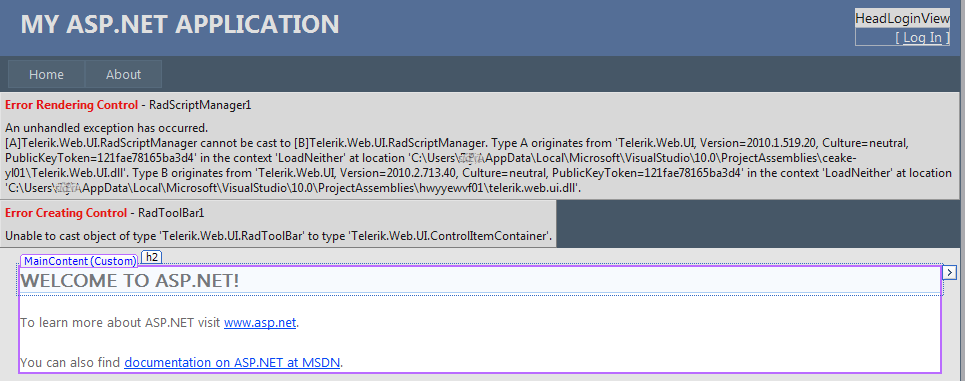
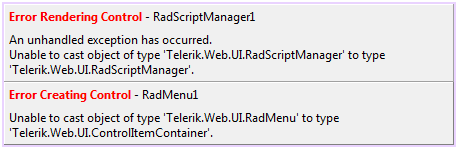
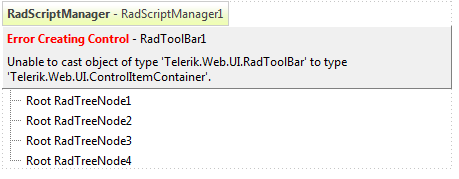
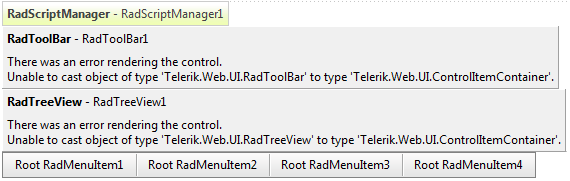
A subsequent close of the page in design time and a further reload usually might make it render correctly. A further close and reload can cause the error to reappear though.
Our research showed that some registry entries we use to enable Visual Studio display RadControls in the "Add Reference" and "Choose ToolBox Items" dialogs are the reason for the error. It seems that for some reason Visual Studio loads several instances of the Telerik.Web.UI assembly into its AppDomain, which results in the error above.
We decided to sacrifice the appearance of the Telerik.Web.UI assembly in the above mentioned dialogs, but prevent this annoying error from happening and we already removed the registry entries from the RadControls installers.
As a fix in the meantime, you could use the .reg files in the attached archives (one targets a 32-bit machine and the other targets a 64-bit one) and the .bat files (targeting Windows XP and Windows7/Vista respectively) to fix the problem. Here are the steps to follow:
Kind regards,
Erjan Gavalji
Telerik
Recently we discovered that Visual Studio can sporadicaly display the "Error rendering control" message in design time.
This can occur in several specific error messages:
- [A]Telerik.Web.UI.RadScriptManager cannot be cast to [B]Telerik.Web.UI.RadScriptManager. Type A originates from...
- Unable to cast object of type 'Telerik.Web.UI.RadScriptManager' to 'Telerik.Web.UI.RadScriptManager'
- Unable to cast object of type Telerik.Web.UI.[ControlName] to Telerik.Web.UI.ControlItemContainer
The screenshots below demonstrate sample occurrences of the error:
A subsequent close of the page in design time and a further reload usually might make it render correctly. A further close and reload can cause the error to reappear though.
Our research showed that some registry entries we use to enable Visual Studio display RadControls in the "Add Reference" and "Choose ToolBox Items" dialogs are the reason for the error. It seems that for some reason Visual Studio loads several instances of the Telerik.Web.UI assembly into its AppDomain, which results in the error above.
We decided to sacrifice the appearance of the Telerik.Web.UI assembly in the above mentioned dialogs, but prevent this annoying error from happening and we already removed the registry entries from the RadControls installers.
As a fix in the meantime, you could use the .reg files in the attached archives (one targets a 32-bit machine and the other targets a 64-bit one) and the .bat files (targeting Windows XP and Windows7/Vista respectively) to fix the problem. Here are the steps to follow:
- Download and extract the archive to a folder of your choice
- Close all Visual Studio instances
- Double-click the .reg file (use the Remove_AssemblyFoldersEx_32bitMachine.reg for 32-bit machines and the Remove_AssemblyFoldersEx_64bitMachine.reg one for 64-bit machines) and click the 'Yes' button when asked to confirm the registry entry merge
- Double-click the bat file, depending on the Windows system you're running (use the ClearProjectAssemblies_Win7_Vista.bat for Windows7/Vista and the ClearProjectAssemblies_WinXP.bat for Windows XP)
- Start Visual Studio and load your project
Kind regards,
Erjan Gavalji
Telerik

Telerik Admin
Top achievements
Rank 1
 Iron
Iron
Rank 1
Iron
asked
on
28 Jul 2010
1 answer
120 views
Hai,
I have a treenode control. Its structure is as follows:
1. Node 1
Node 1a
Node 1b
Node 1c
2. Node 2
Node 2a
Node 2b
Node 2c
Node 2d
3. Node 3
In the OnNodeExpand event of the treeview control, sub nodes( Node 1a, Node 1b, Node 1c etc...) are generating.
Client Side events OnClientNodeClicking, OnClientNodeExpanding etc... are working on clicking both parent nodes(Node 1, Node 2 etc...) and sub nodes( Node 1a, Node 1b, Node 1c etc...).
I want to perform some server side events on clicking the sub nodes( Node 1a, Node 1b, Node 1c etc...).
How can I do it?
Please help me.
Thanks & regards,
Regeesh Joseph
I have a treenode control. Its structure is as follows:
1. Node 1
Node 1a
Node 1b
Node 1c
2. Node 2
Node 2a
Node 2b
Node 2c
Node 2d
3. Node 3
In the OnNodeExpand event of the treeview control, sub nodes( Node 1a, Node 1b, Node 1c etc...) are generating.
Client Side events OnClientNodeClicking, OnClientNodeExpanding etc... are working on clicking both parent nodes(Node 1, Node 2 etc...) and sub nodes( Node 1a, Node 1b, Node 1c etc...).
I want to perform some server side events on clicking the sub nodes( Node 1a, Node 1b, Node 1c etc...).
How can I do it?
Please help me.
Thanks & regards,
Regeesh Joseph





