or
3 answers
185 views
Greetings,
Does RadStyleSheetManager already provide a way to include stylesheets external to the root directory of an application that I have not found?
For example, is there a way to set each of the RadStyleSheetManager.StyleSheets as hyperlinks in the code behind?
If not, why not ? & is this a planned enhancement ?
Take the following two examples :
Example1: Relative-to-root path fail.
Complies fine, but will error at runtime with "cannot use a leading .. to exit above the top directory" (.net constraint, not bug nor Telerik constraint).
<telerik:RadStyleSheetManager ID="RadStyleSheetManager" runat="server" OutputCompression="AutoDetect" EnableStyleSheetCombine="true"> <StyleSheets> <telerik:StyleSheetReference Path="~/../../../WebAssets/Styles/mainstyles.css"/> <telerik:StyleSheetReference Path="~/../../../WebAssets/Styles/extrastyles.css"/> </StyleSheets></telerik:RadStyleSheetManager><appSettings> <add key="Telerik.Web.UI.StyleSheetFolders" value="~/../../../WebAssets/Styles"/></appSettings>Example2: virtual directory fail.
.AXD can't serve the resources at all becuase it can't find them even though these paths are correct at runtime if linked 'normally'.
<telerik:RadStyleSheetManager ID="RadStyleSheetManager" runat="server" OutputCompression="AutoDetect" EnableStyleSheetCombine="true"> <StyleSheets> <telerik:StyleSheetReference Path="~/VirtualDirWebAssets/Styles/mainstyles.css"/> <telerik:StyleSheetReference Path="~/VirtualDirWebAssets/Styles/extrastyles.css"/> </StyleSheets></telerik:RadStyleSheetManager><appSettings> <add key="Telerik.Web.UI.StyleSheetFolders" value="~/VirtualDirWebAssets/Styles"/></appSettings>
Genady Sergeev
Telerik team

answered
on
12 Mar 2013
1 answer
121 views

2 answers
112 views
Is it possible to set the scheduler control in group mode when using webservice binding without doing a postback? The user should be able to switch from group mode to 'normal' mode.

5 answers
194 views
Hi,
In my visual studio intellisense radsearchbox is missing. i m using telerik 2012 dll. please help.
Thank you.
Saira.
In my visual studio intellisense radsearchbox is missing. i m using telerik 2012 dll. please help.
Thank you.
Saira.

Princy
Top achievements
 Rank 2
Rank 2
answered
on
12 Mar 2013
1 answer
51 views
Hi,
I tried to build the new Controls from source. The problem is that when I use the Controls I get a message about Unobtrusive Validiation on most pages. If I use the suppiled dll for .net4.5 this problem does not occur.
The reason is that we need to change the green color in the black theme to orange.
How can I resolve this?
Best Regards
Daniel
I tried to build the new Controls from source. The problem is that when I use the Controls I get a message about Unobtrusive Validiation on most pages. If I use the suppiled dll for .net4.5 this problem does not occur.
The reason is that we need to change the green color in the black theme to orange.
How can I resolve this?
Best Regards
Daniel
Genady Sergeev
Telerik team
answered
on
12 Mar 2013
4 answers
385 views
Ok, i know there is a big problem with the auto resize of radwindows but i think i'm very close to getting my version working.
I've followed the guides here from these threads:
http://demos.telerik.com/aspnet-ajax/window/examples/dialogreturnvalue/defaultcs.aspx
http://www.telerik.com/community/forums/aspnet-ajax/window/resize-radwindow-based-on-content-not-onload.aspx
http://www.telerik.com/community/forums/aspnet-ajax/window/resizing-problem-and-autoresize-option.aspx
http://www.telerik.com/community/forums/orm/general-discussions/to-resize-rad-window-on-the-change-of-the-size-of-control-on-it.aspx
http://www.telerik.com/community/forums/aspnet-ajax/window/best-way-to-resize-window-when-content-changes-via-javascript.aspx
But what is happening is that first my radwindow on chrome shows up very very small and then grows to the appropriate size. This kinda sucks but hey if it happens the first time i can deal with that. The problem is that every time i call "AdjustRadWidow" it does this behavior. This is unlike the demo's above.
Calling code block:
My javascript block: this is functionaly equivalent to the code above but i made changes so it works with my custom skin.
How can i fix this.
I've followed the guides here from these threads:
http://demos.telerik.com/aspnet-ajax/window/examples/dialogreturnvalue/defaultcs.aspx
http://www.telerik.com/community/forums/aspnet-ajax/window/resize-radwindow-based-on-content-not-onload.aspx
http://www.telerik.com/community/forums/aspnet-ajax/window/resizing-problem-and-autoresize-option.aspx
http://www.telerik.com/community/forums/orm/general-discussions/to-resize-rad-window-on-the-change-of-the-size-of-control-on-it.aspx
http://www.telerik.com/community/forums/aspnet-ajax/window/best-way-to-resize-window-when-content-changes-via-javascript.aspx
But what is happening is that first my radwindow on chrome shows up very very small and then grows to the appropriate size. This kinda sucks but hey if it happens the first time i can deal with that. The problem is that every time i call "AdjustRadWidow" it does this behavior. This is unlike the demo's above.
Calling code block:
<telerik:RadWindowManager ID="RadWindowManager1" Overlay="true" runat="server" Modal="true" EnableViewState="false" VisibleStatusbar="false" Behaviors="Close,Move,Resize" Skin="skr" EnableEmbeddedSkins="false" OnClientPageLoad="AdjustRadWidow" autoSize="true" ></telerik:RadWindowManager>My javascript block: this is functionaly equivalent to the code above but i made changes so it works with my custom skin.
function AdjustRadWidow() { try { var manager = GetRadWindowManager(); var oWindow = manager.GetActiveWindow(); } catch (err) { var oWindow = GetRadWindow(); } setTimeout(function () { oWindow.autoSize(true); if ($telerik.isChrome || $telerik.isSafari) ChromeSafariFix(oWindow); }, 500);}//fix for Chrome/Safari due to absolute positioned popup not counted as part of the content page layoutfunction ChromeSafariFix(oWindow) { var iframe = oWindow.get_contentFrame(); var body = jQuery('iframe[name=RadWindow1]').contents().find(".content"); if (typeof jQuery(body).html() === 'undefined') { body = jQuery('.content'); } setTimeout(function () { var height = jQuery(body)[0].scrollHeight + 275; var width = jQuery(body)[0].scrollWidth + 70; var iframeBounds = $telerik.getBounds(iframe); var heightDelta = height - iframeBounds.height; var widthDelta = width - iframeBounds.width; if (heightDelta > 0) oWindow.set_height(oWindow.get_height() + heightDelta); if (widthDelta > 0) oWindow.set_width(oWindow.get_width() + widthDelta); oWindow.center(); }, 310);}How can i fix this.
1 answer
122 views
Hello,
Is it possible to create multiple rows in the Timeline View? For instance, in my current control lets say I have 10 days, each with its own slot. Currently these would render side by side and could become cramped, especially on smaller resolutions. What I would like to do is wrap them so they appear as two rows; five and five.
Below is a mock-up of what I am trying to achieve:
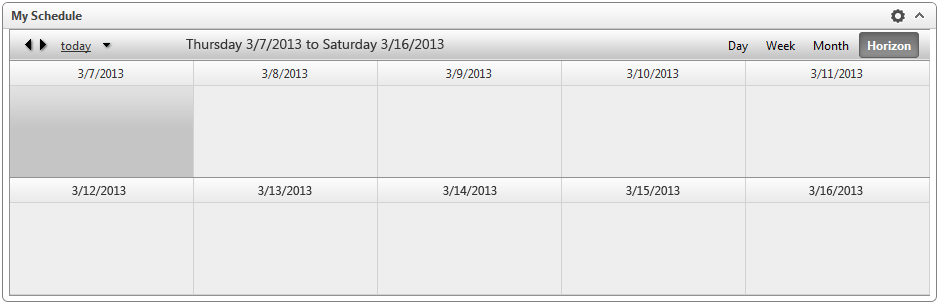
Thanks for any assistance you can provide.
Is it possible to create multiple rows in the Timeline View? For instance, in my current control lets say I have 10 days, each with its own slot. Currently these would render side by side and could become cramped, especially on smaller resolutions. What I would like to do is wrap them so they appear as two rows; five and five.
Below is a mock-up of what I am trying to achieve:
Thanks for any assistance you can provide.
Bozhidar
Telerik team
answered
on
12 Mar 2013
1 answer
197 views
Hi,
I know that RadFilter field editor can be added dynamically either on Page_Load or on Page_Init but still don't have a clear idea about its technical difference. Can anyone highlight the difference between those two?
Thanks,
Damian.
I know that RadFilter field editor can be added dynamically either on Page_Load or on Page_Init but still don't have a clear idea about its technical difference. Can anyone highlight the difference between those two?
Thanks,
Damian.
2 answers
164 views
Hello everyone.
I have a need for a custom advanced form for scheduler and found that the current Advanced form is too rigid. I have no need for recurrence, but I need to have a lot of other properties in the form. I tried resources, again, too rigid for my taste. I also tried AdvancedFormTemplate, I didn't like it.
I'd like to know if it's possible for me to have my own form in a RadWindow and upon New Appointment / Edit Appointment, my own RadWindow pops up instead. That way, I can have my own buttons, my own validation, my own properties easily. As I'm new to Scheduler, it'll be of great help if any kind souls could point me in the right direction.
Thank you in advance.
I have a need for a custom advanced form for scheduler and found that the current Advanced form is too rigid. I have no need for recurrence, but I need to have a lot of other properties in the form. I tried resources, again, too rigid for my taste. I also tried AdvancedFormTemplate, I didn't like it.
I'd like to know if it's possible for me to have my own form in a RadWindow and upon New Appointment / Edit Appointment, my own RadWindow pops up instead. That way, I can have my own buttons, my own validation, my own properties easily. As I'm new to Scheduler, it'll be of great help if any kind souls could point me in the right direction.
Thank you in advance.

9 answers
328 views
I have a radgrid with filters enabled. I want to draw attention to the filters by changing the background color of the textbox if text exists. So my pseudo code would be as follows:
How do I programmatically target these textbox filters? I have three of them on my RadGrid: one for client name, employee name, and client number. Plus I would also like to lengthen with width of these textbox filters.
Thanks,
Alex
if textbox.text != null{textbox.backgroundcolor = red;}How do I programmatically target these textbox filters? I have three of them on my RadGrid: one for client name, employee name, and client number. Plus I would also like to lengthen with width of these textbox filters.
Thanks,
Alex





