or
3 answers
61 views
I've read dozens of postings on the issues of why Vertical Gridlines are not appearing when I set: GridLines="Both"
But nothing works. The property does work properly in Microsoft's GridView control but not in RadGrid.
I do not use any skins with RadGrid.
How do I get GridLines to appear?
Robert
But nothing works. The property does work properly in Microsoft's GridView control but not in RadGrid.
I do not use any skins with RadGrid.
How do I get GridLines to appear?
Robert

Galin
Telerik team

answered
on
22 Mar 2013
4 answers
135 views
We have a grid with quite a few columns that we want to fit into a 1024x768 screen.
The grid is inside an html table cell (for certain reasons we have to do it using html tables). The table has 4 columns, and the grid is in the second column with a colspan of 3
The problem now is, the grid goes extra long (as in wide).
As seen in the attached images, when a fixed width is specified for the grid (width=895px;) then the grid width fits, but there is a horizontal scroll bar that we don't want.
When there is no fixed width specified for the grid, then the grid goes past the width of the table/cell/etc, requiring the user to horizontally scroll on the browser window.
Screenshots were taken using IE9.
I also note that when we remove the Client Settings Scrolling AllowScroll, then it fits fine without a width specified for the grid. But obviously it would not show a specific height for the grid. Basically we want the grid to have a specific height regardless of how many rows of data it has (0, 1, 2, 400, etc).
Is there a way to get this to work?
The grid is inside an html table cell (for certain reasons we have to do it using html tables). The table has 4 columns, and the grid is in the second column with a colspan of 3
<tr> <td> </td> <td colspan="3" style="max-width:895px;"> <telerik:RadGrid ID="RadGrid1" runat="server" AutoGenerateColumns="False" CellSpacing="0" GridLines="Vertical" Height="285"> <ClientSettings> <Scrolling AllowScroll="true" UseStaticHeaders="true"/> </ClientSettings> stuff ommitted for readability </td></tr>The problem now is, the grid goes extra long (as in wide).
As seen in the attached images, when a fixed width is specified for the grid (width=895px;) then the grid width fits, but there is a horizontal scroll bar that we don't want.
When there is no fixed width specified for the grid, then the grid goes past the width of the table/cell/etc, requiring the user to horizontally scroll on the browser window.
Screenshots were taken using IE9.
I also note that when we remove the Client Settings Scrolling AllowScroll, then it fits fine without a width specified for the grid. But obviously it would not show a specific height for the grid. Basically we want the grid to have a specific height regardless of how many rows of data it has (0, 1, 2, 400, etc).
Is there a way to get this to work?

Pavlina
Telerik team
answered
on
22 Mar 2013
10 answers
484 views
I am using "ServerSide" expand mode and using the following code to scroll to the last expanded node, but it is not working:
function ScrollToSelectedNode()
{
var tree = $find("<%= RadTreeView1.ClientID %>");
//this was not working. so i used a hidden control to store the value of the last node clicked.
//var selectedNode = treeviewInstance.SelectedNode;
//The value of the expandedNode is set in the RadTreeView1_NodeExpand event on the server side
var selectedNode = tree.findNodeByValue(document.getElementById("expandedNode").value);
if (selectedNode != null)
{
selectedNode.select();
selectedNode.scrollIntoView();
//window.setTimeout(function() { selectedNode.scrollIntoView(); }, 200);
}
}
I will appreciate if you please help me out here.
function ScrollToSelectedNode()
{
var tree = $find("<%= RadTreeView1.ClientID %>");
//this was not working. so i used a hidden control to store the value of the last node clicked.
//var selectedNode = treeviewInstance.SelectedNode;
//The value of the expandedNode is set in the RadTreeView1_NodeExpand event on the server side
var selectedNode = tree.findNodeByValue(document.getElementById("expandedNode").value);
if (selectedNode != null)
{
selectedNode.select();
selectedNode.scrollIntoView();
//window.setTimeout(function() { selectedNode.scrollIntoView(); }, 200);
}
}
I will appreciate if you please help me out here.


1 answer
82 views
Hi,
how can I get the specified item of a RadListBox using the index?
Thanks
how can I get the specified item of a RadListBox using the index?
Thanks

13 answers
499 views
Hello, I am having trouble with a detail table in my hierarchical radgrid not updating to show the appropriate columns. I do have an AjaxManager on the page, but I am changing the datasource through a button click event not monitored by the AjaxManager. The colums are autogenerated, and on the columncreated method, HTMLEncode is set to true for GridBoundColumns. I looked into rebinding, needdatasource, and altering the viewstate with no luck.
The datasource I am using can be switched from a detailed to a summary view, so that columns that used to be in the radgrid should be removed on databind. Currently, the columns remain and are empty. I would guess that they are assigned null values.
ASPX
VB
So any thoughts would be appreciated.
The datasource I am using can be switched from a detailed to a summary view, so that columns that used to be in the radgrid should be removed on databind. Currently, the columns remain and are empty. I would guess that they are assigned null values.
ASPX
<telerik:RadGrid ID="rdgGridView" runat="server" AllowSorting="true" DataSourceID="datasource1" AutoGenerateColumns="false" AllowPaging="true" EnableViewState="true"><MasterTableView DataSourceID="datasource1" DataKeyNames="ID" AutoGenerateColumns="false"><DetailTables><telerik:GridTableView Name="Detail" runat="server" AutoGenerateColumns="true" AllowSorting="true"><columns><telerik:GridTemplateColumn><HeaderTemplate>Link</HeaderTemplate><ItemTemplate><asp:LinkButton ID="LB" runat="server" Text="text" /></ItemTemplate></telerik:GridTemplateColumn></columns></DetailTables></MasterTableView></telerik:RadGrid>VB
Private Sub Submit_Click(ByVal sender As System.object, ByVal e As System.EventArgs) Handles Submit.ClickrdgGridView.MasterTableView.DetailTables(0).DataSource = NothingrdgGridView.DataBind()End Sub Private Sub rdgGridView_DetailTableDataBind(ByVal sender As System.object, ByVal e As GridDetailTableDataBindEventArgs) Handles rdgGridView. GridDetailTableDataBindEventArgs'Modify datasourcerdgGridView.MasterTableView.DetailTables(0).DataSource = DataSourceEnd SubSo any thoughts would be appreciated.
Andrey
Telerik team
answered
on
22 Mar 2013
1 answer
132 views
Hello,
I have a dynamically built HTMLChart (Line type) that I am pre-populating with multiple series of data via SQL. Would I would like to be able to do is load the data and all of the series at one time, but then have an option via JavaScript show or hide a particular series or combination of series without making another db call to rebuilt the whole chart. Is this possible?
Regards,
Steve
I have a dynamically built HTMLChart (Line type) that I am pre-populating with multiple series of data via SQL. Would I would like to be able to do is load the data and all of the series at one time, but then have an option via JavaScript show or hide a particular series or combination of series without making another db call to rebuilt the whole chart. Is this possible?
Regards,
Steve
Danail Vasilev
Telerik team
answered
on
22 Mar 2013
17 answers
507 views
Simply put, I am not able to group on a child object's property in my LINQ to SQL datasource. I am able to bind, sort, and filter on the property but not group by it. Here is the the template column in question. Note: all works save the GroupByExpression. I have yet to find a solution, some direction is welcome.
Error message received:
Line: 605
Char: 13
Error: Sys.WebForms.PageRequestManagerServerErrorException: Field
Dc.Name not found in the source table. Please check the expression
syntax.
Code: 0
Thanks,
Chris
| <telerik:GridTemplateColumn | |
| HeaderText="DC" | |
| SortExpression="Dc.Name" | |
| UniqueName="DC" | |
| GroupByExpression="Dc.Name [DC] Group By Dc.Name"> | |
| <EditItemTemplate> | |
| <telerik:RadComboBox | |
| ID="cboDc" | |
| runat="server" | |
| DataSourceID="ldsDcs" | |
| DataValueField="DcID" | |
| DataTextField="Name" | |
| SelectedValue='<%# Bind("DcID") %>'> | |
| </telerik:RadComboBox> | |
| </EditItemTemplate> | |
| <ItemTemplate> | |
| <%# Eval("Dc.Name") %> | |
| </ItemTemplate> | |
| </telerik:GridTemplateColumn> |
Error message received:
Line: 605
Char: 13
Error: Sys.WebForms.PageRequestManagerServerErrorException: Field
Dc.Name not found in the source table. Please check the expression
syntax.
Code: 0
Thanks,
Chris

Radoslav
Telerik team
answered
on
22 Mar 2013
1 answer
90 views
How to disable the addnewrecord button when grid is inedit mode?

1 answer
223 views
Hello,
I am using the RadMenu as as ContextMenu targeted to the HTMLChart. When I right-click, the Context Menu renders will the Skin completely out of alignment with some parts even being transparent. It doesn't seem to matter which Skin I define (if any); the same results occur. I have also noticed similar behavior when using the RadComboBox.
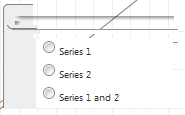
Here is the page code for the Menu:
Thanks for the assistance.
I am using the RadMenu as as ContextMenu targeted to the HTMLChart. When I right-click, the Context Menu renders will the Skin completely out of alignment with some parts even being transparent. It doesn't seem to matter which Skin I define (if any); the same results occur. I have also noticed similar behavior when using the RadComboBox.
Here is the page code for the Menu:
<telerik:RadContextMenu runat="server" ID="ctxtCompEntitySpan" Skin="Default" EnableRoundedCorners="true" EnableShadows="true" EnableAutoScroll="true" RenderMode="Classic"> <Targets> <telerik:ContextMenuControlTarget ControlID="chtCompletion" /> </Targets> <Items> <telerik:RadMenuItem> <ItemTemplate> <telerik:RadButton ID="btnCompASC" runat="server" ToggleType="Radio" ButtonType="ToggleButton" GroupName="Radios" Skin="Default" Font-Size="10px"> <ToggleStates> <telerik:RadButtonToggleState Text="Series 1" PrimaryIconCssClass="rbToggleRadioChecked" /> <telerik:RadButtonToggleState Text="Series 1" PrimaryIconCssClass="rbToggleRadio" /> </ToggleStates> </telerik:RadButton> <br /> <telerik:RadButton ID="btnCompLDR" runat="server" ToggleType="Radio" ButtonType="ToggleButton" GroupName="Radios" Skin="Default" Font-Size="10px"> <ToggleStates> <telerik:RadButtonToggleState Text="Series 2" PrimaryIconCssClass="rbToggleRadioChecked" /> <telerik:RadButtonToggleState Text="Series 2" PrimaryIconCssClass="rbToggleRadio" /> </ToggleStates> </telerik:RadButton> <br /> <telerik:RadButton ID="btnCompBTH" runat="server" ToggleType="Radio" ButtonType="ToggleButton" GroupName="Radios" Skin="Default" Font-Size="10px"> <ToggleStates> <telerik:RadButtonToggleState Text="Series 1 and 2" PrimaryIconCssClass="rbToggleRadioChecked" /> <telerik:RadButtonToggleState Text="Series 1 and 2" PrimaryIconCssClass="rbToggleRadio" /> </ToggleStates> </telerik:RadButton> </ItemTemplate> </telerik:RadMenuItem> </Items></telerik:RadContextMenu>Thanks for the assistance.
Kate
Telerik team
answered
on
22 Mar 2013
1 answer
74 views
When I add new records in grid its always shown in last page. How can I show it in first page?






