or
3 answers
1.6K+ views
Hello,
On my page I have some DropDownLists (created in codebehind) that works great .
Skin: Default
When there is no DropDownListItem in the DropDownList, I set myDdl.Enabled = false;
I want change the style for the disabled DropDownList:
color: lightgrey
border: lightgrey
image on the right side: lightgrey
How can I achive this?
thanks
Bernie

Nencho
Telerik team

answered
on
02 Apr 2013
5 answers
129 views
It does not appear your Online Help for RadControls for ASP.NET Ajax has been updated (http://www.telerik.com/help/aspnet-ajax/introduction.html).
I've downloaded the latest release (RadControlsForAspNetAjaxControlPanel_2013_1_220.exe). Your documentation does not reflect any information related to VS2012 or ASP.NET 4.5. The Control Panel installer was also new (no .msi as per usual?).
So, before I go too much deeper, I'm wondering how out-of-date the overall documentation is.
I've downloaded the latest release (RadControlsForAspNetAjaxControlPanel_2013_1_220.exe). Your documentation does not reflect any information related to VS2012 or ASP.NET 4.5. The Control Panel installer was also new (no .msi as per usual?).
So, before I go too much deeper, I'm wondering how out-of-date the overall documentation is.

Kate
Telerik team
answered
on
02 Apr 2013
1 answer
149 views
Dear,
I have a combobox with a treeview control, its working fine in IE, but when i tried to use it in Chrome:
ServerSide:
HTML:
I have a combobox with a treeview control, its working fine in IE, but when i tried to use it in Chrome:
- The server side code shows that the Parent and Child Nodes are Created Successfully.
- In the Web Page the tree is only showing the parent nodes only (in chrome), although opening the same page in IE shows it correctly.
ServerSide:
private void LoadCountryByRegion(out string ErrorMessage) { ErrorMessage = ""; try { RadTreeView tre_Country = (RadTreeView)ddl_Country.Items[0].FindControl("tre_Country"); if (tre_Country != null) { tre_Country.Nodes.Clear(); } IList<Region> _regionList = (new RegionBL()).getAll(); if (_regionList.Count > 0) { foreach (Region _region in _regionList) { RadTreeNode _regionNode = new RadTreeNode(); _regionNode.Text = _region.Title; _regionNode.Value = "region|" + _region.ID.ToString(); _regionNode.ImageUrl = "~/Resources/Images/16x16/Circle_Red.png"; IList<Country> _countryList = _region.Country_List; foreach (Country _country in _countryList) { RadTreeNode _countryNode = new RadTreeNode(); _countryNode.Text = _country.Title; _countryNode.Value = "country|" + _country.ID.ToString(); _countryNode.ImageUrl = "~/Resources/Images/16x16/Circle_Green.png"; _regionNode.Nodes.Add(_countryNode); } tre_Country.Nodes.Add(_regionNode); } } } catch (Exception ex) { ErrorMessage += ex.Message; } }HTML:
<telerik:RadComboBox ID="ddl_Country" runat="server" ExpandAnimation-Type="None" CollapseAnimation-Type="None" OnClientDropDownOpened="tre_Country_OnClientDropDownOpenedHandler" LoadingMessage="Loading..." EmptyMessage="Please Select Country" Style="vertical-align: middle;" Width="300px" Height="190px" Skin="Office2007" > <ItemTemplate> <telerik:RadTreeView ID="tre_Country" runat="server" ShowLineImages="true" BackColor="#FFFFFF" Height="180px" Width="290px" OnClientNodeClicking="tre_Country_NodeClicking" Skin="Office2007" /> </ItemTemplate> <Items> <telerik:RadComboBoxItem Text="" /> </Items> </telerik:RadComboBox>
Hristo Valyavicharski
Telerik team
answered
on
02 Apr 2013
3 answers
127 views
Hi
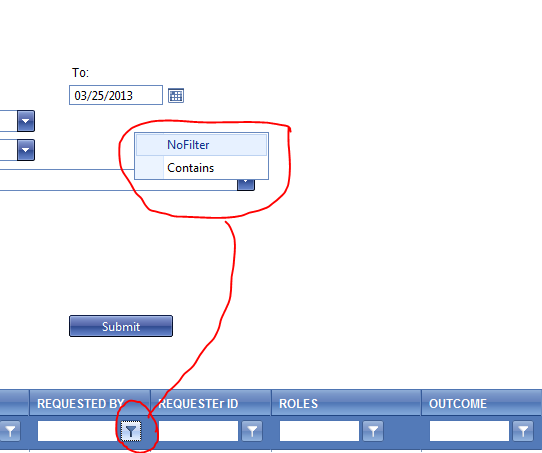
In my page I have a RadGrid with filter menu. When I click on the menu button the little box with the menu options does not have a consistent place. Sometimes it is close to the button sometimes in the middle of the page. Most of the time this hapen when the internet explorer is not fully opened.
I and not using css file for menu.
Could you please explain where is the setting for the location of the filter menu? or how can I fix the problem.
Thanks
In my page I have a RadGrid with filter menu. When I click on the menu button the little box with the menu options does not have a consistent place. Sometimes it is close to the button sometimes in the middle of the page. Most of the time this hapen when the internet explorer is not fully opened.
I and not using css file for menu.
Could you please explain where is the setting for the location of the filter menu? or how can I fix the problem.
Thanks

Radoslav
Telerik team
answered
on
02 Apr 2013
1 answer
160 views
Hi,
I am trying to display a confirm dialog box on the button click and keep getting an erro 'Object expected' r on the following line.
I copied the function from one of the demo's so I am not sure why it doesn't work.
Thank You
Tracy
I am trying to display a confirm dialog box on the button click and keep getting an erro 'Object expected' r on the following line.
radconfirm(text, callBackFunction, 500, 100, null, "Delete Record"
);
I am calling the function on the OnClientClicking
<telerik:RadButton ID="rbtDeleteSetting" runat="server" SkinId="skn_SavedSettings_Delete" EnableViewState="true" OnClientClicking="DeleteOnClientClicking" CommandArgument="Display"/>
Here is the complete function
function DeleteOnClientClicking(sender, args)
{
varcallBackFunction= Function.createDelegate(sender, function(argument)
{
if (argument)
{
this.click();
}
});
vartext = "Are you sure you want to delete these Saved Settings?<br\>This process CANNOT be un-done.<br\>";
radconfirm(text, callBackFunction, 500, 100, null, "Delete Settings");
args.set_cancel(true);
}
I copied the function from one of the demo's so I am not sure why it doesn't work.
Thank You
Tracy
1 answer
169 views
Hi,
I am using RadTabStrip (Q3 2012 SP1 version 2012.3.1308) in the mobile version of my web site. I have set the NavigateUrl to the RadTabs but its not working in my Android Tablet. This is working fine in my laptop browsers. Is it a bug or RadTabStrip got any compatibility issues with Android browser?
Thanks,
Saira
I am using RadTabStrip (Q3 2012 SP1 version 2012.3.1308) in the mobile version of my web site. I have set the NavigateUrl to the RadTabs but its not working in my Android Tablet. This is working fine in my laptop browsers. Is it a bug or RadTabStrip got any compatibility issues with Android browser?
Thanks,
Saira
1 answer
70 views
Hi,
I am using RadControls version Q2 2012. The RadTextBox generates a NullReferenceException when I try to paste something and this behavior is shown in IE 10 only. RadTextBox works fine in MF and Chrome. How to resolve this?
Thank you,
Antony.
I am using RadControls version Q2 2012. The RadTextBox generates a NullReferenceException when I try to paste something and this behavior is shown in IE 10 only. RadTextBox works fine in MF and Chrome. How to resolve this?
Thank you,
Antony.

Princy
Top achievements
 Rank 2
Rank 2
answered
on
02 Apr 2013
3 answers
97 views
I'm trying to find the cleanest format in which I can get the current filters entered on a postback. The only place I'm able to find it is in the MasterTableView.FilterExpression string. An example of how that looks is:
(it["Continent"].ToString().Contains("Af")) AND (it["Country"].ToString().Contains("So"))
I'm just wondering if there's a way to get this information in a nicer format.
Eventually I need to turn this information into sql, and I'll need to create a helper method to make that translation (unless someone knows of one that already exists).
Thanks,
Alex
Edit: to further complicate matters it appears that sometimes the filter expression can be in a different format, for example:
(Convert.ToString(it[\"CategoryName\"]) >= \"Bev\")
(it["Continent"].ToString().Contains("Af")) AND (it["Country"].ToString().Contains("So"))
I'm just wondering if there's a way to get this information in a nicer format.
Eventually I need to turn this information into sql, and I'll need to create a helper method to make that translation (unless someone knows of one that already exists).
Thanks,
Alex
Edit: to further complicate matters it appears that sometimes the filter expression can be in a different format, for example:
(Convert.ToString(it[\"CategoryName\"]) >= \"Bev\")

1 answer
198 views
Hi,
The RadCaptcha is having a Refresh Captcha hyperlink. I want to remove that hyperlink and instead of that give a refresh icon beside the captcha image. Is this possible?
Thanks,
Joseph.
The RadCaptcha is having a Refresh Captcha hyperlink. I want to remove that hyperlink and instead of that give a refresh icon beside the captcha image. Is this possible?
Thanks,
Joseph.
1 answer
100 views
Hi,
We use vs 2012 with 2013 Q1 RadGrid. I am trying to delete row when looping thru rows in code behind in private routine like this:
while (curRowIdx < rowCount)
{
if (curTransRow["ID"].Text == 100)
curTransRow.Remove(); -------------- how to do this.
}
Thanks,
Prathiba
We use vs 2012 with 2013 Q1 RadGrid. I am trying to delete row when looping thru rows in code behind in private routine like this:
int
rowCount = pRgdTrans.Items.Count;
int curRowIdx = 0;
while (curRowIdx < rowCount)
{
GridDataItem
curTransRow = pRgdTrans.Items[curRowIdx];
if (curTransRow["ID"].Text == 100)
//delete row.
curTransRow.Remove(); -------------- how to do this.
}
Thanks,
Prathiba






