or
1 answer
105 views
Hi,
I was wondering if it is possible to select multiple items from a combobox in one field of an insert on a grid, and once the Insert button is clicked, it parses out the items in that combobox into different records but with the same information on the other fields.
Please look at the attachment for an example. I am working in vb.net
I was wondering if it is possible to select multiple items from a combobox in one field of an insert on a grid, and once the Insert button is clicked, it parses out the items in that combobox into different records but with the same information on the other fields.
Please look at the attachment for an example. I am working in vb.net


1 answer
121 views
Hi,
Using JavaScript, How to set the NavigateUrl property of RadWindow in a RadButton Click?
Thanks,
Dona
Using JavaScript, How to set the NavigateUrl property of RadWindow in a RadButton Click?
Thanks,
Dona

1 answer
1.0K+ views
Hi,
Can I hide the close button in the RadWindow Title bar?
Thanks,
Dona
Can I hide the close button in the RadWindow Title bar?
Thanks,
Dona
2 answers
312 views
Hi All !
I have a Treeview inside EditFormSetting -> FormTemplate . I want to when I click edit row for update data Treeview auto expand and select node. Thank a lot .
I have a Treeview inside EditFormSetting -> FormTemplate . I want to when I click edit row for update data Treeview auto expand and select node. Thank a lot .
6 answers
311 views
Hi All !
I'm from VietNam. Today I have a question for you. I need you help me . Thanks
I have use RadGrid and input controls in EdtiFormSetting --> FormTemplate. I have use Treeview in Combobox . But I can't get value for combobox when i edit row and use updatecommand .
I have attach file below.
This is my code :
HTML :
I'm from VietNam. Today I have a question for you. I need you help me . Thanks
I have use RadGrid and input controls in EdtiFormSetting --> FormTemplate. I have use Treeview in Combobox . But I can't get value for combobox when i edit row and use updatecommand .
I have attach file below.
This is my code :
HTML :
<EditFormSettings EditFormType="Template"> <FormTemplate> <div id="frmTemp"> <div class="frmTemp_left"> <label>Danh mục</label> <div> <telerik:RadComboBox ID="cbbCategory" runat="server" AppendDataBoundItems="true"> <ItemTemplate> <div id="div1" onclick="StopPropagation(event);" > <telerik:RadTreeView ID="trvCategory" runat="server" DataFieldID="CategoryId" DataFieldParentID="ParentId" DataTextField="CateName" DataValueField="CategoryId" OnClientNodeClicking="nodeClicking" > </telerik:RadTreeView> </div> </ItemTemplate> <Items> <telerik:RadComboBoxItem Text="" Value="" Selected="True"></telerik:RadComboBoxItem> </Items> </telerik:RadComboBox> </div> <label>Tên danh mục</label> <div> <asp:TextBox ID="txtCateName" runat="server" Text='<%# Bind("CateName") %>'></asp:TextBox> </div> <label>Sắp xếp</label> <div> <asp:TextBox ID="txtOrderBy" runat="server" Text='<%# Bind("OrderBy") %>'></asp:TextBox> </div> <label>Hiển thị</label> <div> <asp:CheckBox ID="ckbActive" runat="server" Checked='<%# ((Container is TreeListEditFormInsertItem) ? false : Eval("Active")) %>' /> </div> <div style="padding-top: 10px;"> <asp:HiddenField ID="HiddenField2" runat="server" Value='<%# Eval("ParentId") %>' /> <asp:HiddenField ID="HiddenField1" runat="server" Value='<%# Eval("CategoryId") %>' /> <telerik:RadButton ID="btnUpdate" Text='<%# (Container is TreeListEditFormInsertItem) ? "Lưu" : "Cập nhật" %>' runat="server" CommandName='<%# (Container is TreeListEditFormInsertItem) ? "PerformInsert" : "Update" %>' Icon-PrimaryIconCssClass="rbOk"> </telerik:RadButton> <telerik:RadButton ID="btnCancel" Text="Đóng" runat="server" CausesValidation="False" CommandName="Cancel" Icon-PrimaryIconCssClass="rbCancel"> </telerik:RadButton> </div> </div> </div> </FormTemplate> </EditFormSettings>9 answers
1.2K+ views
Hello,
I am using a regular RadButton (ButtonType is not set) in Q2 2011 with the height set to 65px. I want two lines of text but cannot get it to work. I tried the solution in this thread but it did not work. I was hoping you could point me in the right direction.
Thanks,
Josh
I am using a regular RadButton (ButtonType is not set) in Q2 2011 with the height set to 65px. I want two lines of text but cannot get it to work. I tried the solution in this thread but it did not work. I was hoping you could point me in the right direction.
Thanks,
Josh

David Terrie
Top achievements
 Rank 1
Rank 1
answered
on
08 Apr 2013
1 answer
98 views
Hi All,
I'll put my hand up now and say I am a javascript n00b so I don't even know if my question is possible. The long and the short of it is that my client wants to have to enter a password whenever they open a file from the RadFileExplorer (they are a little paranoid about security). Now I've managed to figure out how to do this using a mixture of page methods and javascript but the problem is the password dialog that is displayed is just a javascript prompt box and as such the password they are entering isn't masked like a normal password box would be. After some research I discovered that the only way to make it a masked password box was to use something like jquery ui to create a modal popup that contains a password masked textbox - my problem - how the &*^@ do I intergrate that into my solution? You will see in my code that I call a 'prompt' box and this is obviously where the jquery ui box needs to be but I just have no clue about how to do this.
Any help or direction would be greatly appreciated.
Oh....here's my code :)
I'll put my hand up now and say I am a javascript n00b so I don't even know if my question is possible. The long and the short of it is that my client wants to have to enter a password whenever they open a file from the RadFileExplorer (they are a little paranoid about security). Now I've managed to figure out how to do this using a mixture of page methods and javascript but the problem is the password dialog that is displayed is just a javascript prompt box and as such the password they are entering isn't masked like a normal password box would be. After some research I discovered that the only way to make it a masked password box was to use something like jquery ui to create a modal popup that contains a password masked textbox - my problem - how the &*^@ do I intergrate that into my solution? You will see in my code that I call a 'prompt' box and this is obviously where the jquery ui box needs to be but I just have no clue about how to do this.
Any help or direction would be greatly appreciated.
Oh....here's my code :)
function OnClientFileOpen(sender, args) { args.set_cancel(true); var password = prompt("Enter Password"); PageMethods.MyAuthorisationMethod(password, onSuccess, onerror); function onSuccess(response) { if (response == true) { var item = args.get_item(); var fileExtension = item.get_extension(); var fileDownloadMode = true; if ((fileDownloadMode == true) && (fileExtension == "jpg" || fileExtension == "gif" || fileExtension == "doc" || fileExtension == "mp3" || fileExtension == "txt")) {// Download the file // File is an image document or a word document, do not open a new window args.set_cancel(true); // Tell browser to open file directly var requestImage = "Handler.ashx?path=" + item.get_url(); document.location = requestImage; } } else { alert("The password entered is incorrect"); } }}
Vessy
Telerik team

answered
on
08 Apr 2013
1 answer
110 views
Hi,
I have added AutoCompleteBox to my page
1) Textbox is disabled ?

If i enable textbox using CSS ( firebug ) :
.racTokenList:after {
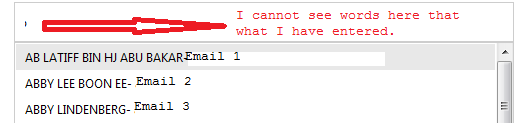
Code :
Please help me on this.. Thanks..
I have added AutoCompleteBox to my page
1) Textbox is disabled ?
If i enable textbox using CSS ( firebug ) :
.racTokenList:after {
display: block !important;
}
2) text is not appearing when enter in to text box.Code :
<telerik:RadAutoCompleteBox runat="server" ID="Recipient" Width="500px" DataSourceID="SqlDataSourceEmails" DataTextField="ContactName" DataValueField="Email" Filter="StartsWith" Skin="Metro" DropDownHeight="400px" DropDownWidth="500px"> <DropDownItemTemplate> <table> <tr> <td> <%# DataBinder.Eval(Container.DataItem, "ContactName")%>- <%#DataBinder.Eval(Container.DataItem, "Email")%> </td> </tr> </table> </DropDownItemTemplate> </telerik:RadAutoCompleteBox>Please help me on this.. Thanks..

Nencho
Telerik team
answered
on
08 Apr 2013
1 answer
265 views
Hi.
how can I change the hover color via css (if possible) when the user is hovering over submenu items?
So currently it appears to be white but I would like to change this to say... blue.
how can I change the hover color via css (if possible) when the user is hovering over submenu items?
So currently it appears to be white but I would like to change this to say... blue.
Boyan Dimitrov
Telerik team
answered
on
08 Apr 2013
5 answers
111 views
Dear All,
I have the following code attached with this post, and for some reason, in Firefox and IE it looks good, ie no scrollbars and height is 100%, however in Chrome, I am getting a scrollbar, and cannot set the height properly to 100%.
My code is as follows, however I can provide a zip of the page if needed :-
<!DOCTYPE html>
<html lang="en">
<head id="Head1" runat="server">
<meta charset="utf-8" />
<title><%: Page.Title %> - My ASP.NET Application</title>
<asp:PlaceHolder ID="PlaceHolder1" runat="server">
<%: Scripts.Render("~/bundles/modernizr") %>
</asp:PlaceHolder>
<webopt:BundleReference ID="BundleReference1" runat="server" Path="~/Content/css" />
<link href="~/favicon.ico" rel="shortcut icon" type="image/x-icon" />
<meta name="viewport" content="width=device-width" />
<link href="http://ajax.googleapis.com/ajax/libs/jqueryui/1.8.1/themes/base/jquery-ui.css" rel="stylesheet" type="text/css"/>
<script type="text/javascript" src="http://ajax.googleapis.com/ajax/libs/jquery/1.8.2/jquery.min.js"></script>
<script type="text/javascript" src="http://ajax.googleapis.com/ajax/libs/jqueryui/1.9.2/jquery-ui.min.js"></script>
<style type="text/css">
html {
background-color: #e2e2e2;
margin: 0;
padding: 0;
}
body {
background-color: #fff;
color: #333;
font-size: .85em;
font-family: "Segoe UI", Verdana, Helvetica, Sans-Serif;
margin: 0;
padding: 0;
}
header, footer, hgroup,
nav, section {
display: block;
}
.float-left {
float: left;
}
.float-right {
float: right;
}
.clear-fix:after {
content: ".";
clear: both;
display: block;
height: 0;
visibility: hidden;
}
h5 a:link, h5 a:visited, h5 a:active {
padding: 0;
text-decoration: none;
}
/* Header*/
header {
padding-bottom: 5px;
position: relative;
}
/* main layout
----------------------------------------------------------*/
.content-wrapper {
margin: 0 auto;
/*max-width: 960px;*/
width: 100%;
}
.radSplitterCss {
height: 100% !important;
margin: 0;
}
.radLeftPane {
height: 100%;
padding-left: 5px;
}
.radSplitBar {
height: 100%;
}
.radRightPane {
height: 100% !important;
width: 79%;
padding-left: 5px;
}
.mainContent {
width: 98%;
text-align: justify;
}
#body {
background-color: #ffffff;
clear: both;
padding-bottom: 35px;
}
footer {
clear: both;
font-size: .8em;
height: 60px;
border-top: 1px solid #D5D5D5;
}
</style>
</head>
<body>
<form id="Form1" runat="server">
<asp:ScriptManager ID="ScriptManager1" runat="server">
</asp:ScriptManager>
<header>
<div class="content-wrapper">
header
</div>
</header>
<div id="body">
<section class="content-wrapper main-content clear-fix">
<telerik:RadSplitter ID="RadSplitter1" runat="server" PanesBorderSize="0" BorderSize="0"
Width="100%" Height="100%" Orientation="Vertical" CssClass="radSplitterCss" HeightOffset="30">
<telerik:RadPane ID="RadPane2" runat="server" Width="15%" Height="100%" BackColor="white"
MinWidth="315" CssClass="radLeftPane">
This is the left pane
</telerik:RadPane>
<telerik:RadSplitBar ID="RadSplitbar2" runat="server" Width="1%" CollapseMode="Forward" CssClass="radSplitBar" >
</telerik:RadSplitBar>
<telerik:RadPane ID="RadPane3" runat="server" BackColor="white" CssClass="radRightPane" >
<asp:UpdatePanel runat="server" ID="UPContent">
<ContentTemplate>
<div class="mainContent">
Lorem ipsum dolor sit amet, consectetur adipiscing elit. Donec eu sapien vel libero congue hendrerit at vel leo. Vivamus convallis enim sed leo hendrerit at posuere dui tristique. Donec lorem magna, aliquam sit amet feugiat sed, viverra a ligula. Sed gravida, nulla sed egestas faucibus, dui justo aliquam ligula, pellentesque facilisis justo turpis tristique felis. Nulla facilisi. Class aptent taciti sociosqu ad litora torquent per conubia nostra, per inceptos himenaeos. Pellentesque ante ipsum, lobortis vel facilisis eu, sodales eget nibh. Aenean vehicula, tellus vitae elementum malesuada, justo nulla vestibulum ipsum, condimentum dapibus augue est nec diam. Pellentesque volutpat turpis et velit viverra in sodales metus euismod. Duis in leo eget justo bibendum mattis eu eget lectus. Integer odio enim, eleifend eget ullamcorper eu, sodales id lacus. Maecenas malesuada malesuada dui, sit amet molestie dolor sollicitudin nec. Nunc a mauris leo, ut pellentesque nunc. Nullam sed augue nibh, eget feugiat risus. Nunc faucibus scelerisque felis, non sodales tortor sodales a. Nullam non mauris sem, id dictum mi.
Nunc quis eros a dui hendrerit condimentum et in nisl. In pretium nisi eu augue venenatis sit amet ultrices turpis suscipit. Pellentesque lacinia, leo eget eleifend faucibus, augue ligula vehicula lectus, sed vestibulum justo sapien id mi. In et erat nisl, ut suscipit metus. Morbi eu nulla at massa placerat tincidunt ac et mi. Suspendisse mattis condimentum tellus, nec elementum orci suscipit id. Maecenas sit amet magna ac mauris facilisis ornare sodales dictum felis. Pellentesque facilisis commodo ipsum, et malesuada nisi consequat et. Fusce laoreet sagittis hendrerit. Nunc ut metus risus. Fusce vulputate scelerisque tortor nec dignissim. Vestibulum ante ipsum primis in faucibus orci luctus et ultrices posuere cubilia Curae; Fusce sodales scelerisque eleifend.
Aenean et erat purus. Donec ut quam sed ante mattis consequat ut at est. Sed viverra elit sed risus aliquam ac iaculis nibh euismod. Proin rutrum varius risus, at blandit urna venenatis ac. Nam consequat sollicitudin lobortis. Phasellus pharetra, nisi id dictum commodo, magna magna mollis sapien, vel accumsan sem nisi a ipsum. Phasellus venenatis scelerisque sem, vel mattis lectus auctor sit amet.
Cum sociis natoque penatibus et magnis dis parturient montes, nascetur ridiculus mus. Ut pretium rutrum sem sed ultrices. Duis sit amet tortor et ligula luctus scelerisque in at magna. Ut consequat laoreet magna, et vehicula arcu sodales non. Proin nec sapien risus, sit amet pulvinar dolor. Aliquam erat volutpat. Mauris sit amet est sit amet est tristique feugiat eget vel mauris.
Cras facilisis viverra ipsum quis rutrum. Maecenas id dui vitae justo pellentesque consectetur fringilla eget felis. Duis hendrerit porta sapien, id scelerisque dolor ullamcorper vel. Cras ullamcorper mauris sed ligula dignissim sed luctus tellus lacinia. Quisque egestas neque nec mi porttitor vitae facilisis odio sollicitudin. Aliquam erat volutpat. Ut lacus leo, venenatis id placerat pellentesque, tempor sit amet justo. Duis eget venenatis justo. In gravida est in elit adipiscing adipiscing et vitae lacus.
<p></p>
Lorem ipsum dolor sit amet, consectetur adipiscing elit. Donec eu sapien vel libero congue hendrerit at vel leo. Vivamus convallis enim sed leo hendrerit at posuere dui tristique. Donec lorem magna, aliquam sit amet feugiat sed, viverra a ligula. Sed gravida, nulla sed egestas faucibus, dui justo aliquam ligula, pellentesque facilisis justo turpis tristique felis. Nulla facilisi. Class aptent taciti sociosqu ad litora torquent per conubia nostra, per inceptos himenaeos. Pellentesque ante ipsum, lobortis vel facilisis eu, sodales eget nibh. Aenean vehicula, tellus vitae elementum malesuada, justo nulla vestibulum ipsum, condimentum dapibus augue est nec diam. Pellentesque volutpat turpis et velit viverra in sodales metus euismod. Duis in leo eget justo bibendum mattis eu eget lectus. Integer odio enim, eleifend eget ullamcorper eu, sodales id lacus. Maecenas malesuada malesuada dui, sit amet molestie dolor sollicitudin nec. Nunc a mauris leo, ut pellentesque nunc. Nullam sed augue nibh, eget feugiat risus. Nunc faucibus scelerisque felis, non sodales tortor sodales a. Nullam non mauris sem, id dictum mi.
Nunc quis eros a dui hendrerit condimentum et in nisl. In pretium nisi eu augue venenatis sit amet ultrices turpis suscipit. Pellentesque lacinia, leo eget eleifend faucibus, augue ligula vehicula lectus, sed vestibulum justo sapien id mi. In et erat nisl, ut suscipit metus. Morbi eu nulla at massa placerat tincidunt ac et mi. Suspendisse mattis condimentum tellus, nec elementum orci suscipit id. Maecenas sit amet magna ac mauris facilisis ornare sodales dictum felis. Pellentesque facilisis commodo ipsum, et malesuada nisi consequat et. Fusce laoreet sagittis hendrerit. Nunc ut metus risus. Fusce vulputate scelerisque tortor nec dignissim. Vestibulum ante ipsum primis in faucibus orci luctus et ultrices posuere cubilia Curae; Fusce sodales scelerisque eleifend.
Aenean et erat purus. Donec ut quam sed ante mattis consequat ut at est. Sed viverra elit sed risus aliquam ac iaculis nibh euismod. Proin rutrum varius risus, at blandit urna venenatis ac. Nam consequat sollicitudin lobortis. Phasellus pharetra, nisi id dictum commodo, magna magna mollis sapien, vel accumsan sem nisi a ipsum. Phasellus venenatis scelerisque sem, vel mattis lectus auctor sit amet.
Cum sociis natoque penatibus et magnis dis parturient montes, nascetur ridiculus mus. Ut pretium rutrum sem sed ultrices. Duis sit amet tortor et ligula luctus scelerisque in at magna. Ut consequat laoreet magna, et vehicula arcu sodales non. Proin nec sapien risus, sit amet pulvinar dolor. Aliquam erat volutpat. Mauris sit amet est sit amet est tristique feugiat eget vel mauris.
Cras facilisis viverra ipsum quis rutrum. Maecenas id dui vitae justo pellentesque consectetur fringilla eget felis. Duis hendrerit porta sapien, id scelerisque dolor ullamcorper vel. Cras ullamcorper mauris sed ligula dignissim sed luctus tellus lacinia. Quisque egestas neque nec mi porttitor vitae facilisis odio sollicitudin. Aliquam erat volutpat. Ut lacus leo, venenatis id placerat pellentesque, tempor sit amet justo. Duis eget venenatis justo. In gravida est in elit adipiscing adipiscing et vitae lacus.
<p></p>
Lorem ipsum dolor sit amet, consectetur adipiscing elit. Donec eu sapien vel libero congue hendrerit at vel leo. Vivamus convallis enim sed leo hendrerit at posuere dui tristique. Donec lorem magna, aliquam sit amet feugiat sed, viverra a ligula. Sed gravida, nulla sed egestas faucibus, dui justo aliquam ligula, pellentesque facilisis justo turpis tristique felis. Nulla facilisi. Class aptent taciti sociosqu ad litora torquent per conubia nostra, per inceptos himenaeos. Pellentesque ante ipsum, lobortis vel facilisis eu, sodales eget nibh. Aenean vehicula, tellus vitae elementum malesuada, justo nulla vestibulum ipsum, condimentum dapibus augue est nec diam. Pellentesque volutpat turpis et velit viverra in sodales metus euismod. Duis in leo eget justo bibendum mattis eu eget lectus. Integer odio enim, eleifend eget ullamcorper eu, sodales id lacus. Maecenas malesuada malesuada dui, sit amet molestie dolor sollicitudin nec. Nunc a mauris leo, ut pellentesque nunc. Nullam sed augue nibh, eget feugiat risus. Nunc faucibus scelerisque felis, non sodales tortor sodales a. Nullam non mauris sem, id dictum mi.
Nunc quis eros a dui hendrerit condimentum et in nisl. In pretium nisi eu augue venenatis sit amet ultrices turpis suscipit. Pellentesque lacinia, leo eget eleifend faucibus, augue ligula vehicula lectus, sed vestibulum justo sapien id mi. In et erat nisl, ut suscipit metus. Morbi eu nulla at massa placerat tincidunt ac et mi. Suspendisse mattis condimentum tellus, nec elementum orci suscipit id. Maecenas sit amet magna ac mauris facilisis ornare sodales dictum felis. Pellentesque facilisis commodo ipsum, et malesuada nisi consequat et. Fusce laoreet sagittis hendrerit. Nunc ut metus risus. Fusce vulputate scelerisque tortor nec dignissim. Vestibulum ante ipsum primis in faucibus orci luctus et ultrices posuere cubilia Curae; Fusce sodales scelerisque eleifend.
Aenean et erat purus. Donec ut quam sed ante mattis consequat ut at est. Sed viverra elit sed risus aliquam ac iaculis nibh euismod. Proin rutrum varius risus, at blandit urna venenatis ac. Nam consequat sollicitudin lobortis. Phasellus pharetra, nisi id dictum commodo, magna magna mollis sapien, vel accumsan sem nisi a ipsum. Phasellus venenatis scelerisque sem, vel mattis lectus auctor sit amet.
Cum sociis natoque penatibus et magnis dis parturient montes, nascetur ridiculus mus. Ut pretium rutrum sem sed ultrices. Duis sit amet tortor et ligula luctus scelerisque in at magna. Ut consequat laoreet magna, et vehicula arcu sodales non. Proin nec sapien risus, sit amet pulvinar dolor. Aliquam erat volutpat. Mauris sit amet est sit amet est tristique feugiat eget vel mauris.
Cras facilisis viverra ipsum quis rutrum. Maecenas id dui vitae justo pellentesque consectetur fringilla eget felis. Duis hendrerit porta sapien, id scelerisque dolor ullamcorper vel. Cras ullamcorper mauris sed ligula dignissim sed luctus tellus lacinia. Quisque egestas neque nec mi porttitor vitae facilisis odio sollicitudin. Aliquam erat volutpat. Ut lacus leo, venenatis id placerat pellentesque, tempor sit amet justo. Duis eget venenatis justo. In gravida est in elit adipiscing adipiscing et vitae lacus.
</div>
</ContentTemplate>
</asp:UpdatePanel>
</telerik:RadPane>
</telerik:RadSplitter>
</section>
</div>
<footer>
<div class="content-wrapper">
This is the footer
</div>
</footer>
</form>
</body>
</html>
Thanks for your help and time
I have the following code attached with this post, and for some reason, in Firefox and IE it looks good, ie no scrollbars and height is 100%, however in Chrome, I am getting a scrollbar, and cannot set the height properly to 100%.
My code is as follows, however I can provide a zip of the page if needed :-
<!DOCTYPE html>
<html lang="en">
<head id="Head1" runat="server">
<meta charset="utf-8" />
<title><%: Page.Title %> - My ASP.NET Application</title>
<asp:PlaceHolder ID="PlaceHolder1" runat="server">
<%: Scripts.Render("~/bundles/modernizr") %>
</asp:PlaceHolder>
<webopt:BundleReference ID="BundleReference1" runat="server" Path="~/Content/css" />
<link href="~/favicon.ico" rel="shortcut icon" type="image/x-icon" />
<meta name="viewport" content="width=device-width" />
<link href="http://ajax.googleapis.com/ajax/libs/jqueryui/1.8.1/themes/base/jquery-ui.css" rel="stylesheet" type="text/css"/>
<script type="text/javascript" src="http://ajax.googleapis.com/ajax/libs/jquery/1.8.2/jquery.min.js"></script>
<script type="text/javascript" src="http://ajax.googleapis.com/ajax/libs/jqueryui/1.9.2/jquery-ui.min.js"></script>
<style type="text/css">
html {
background-color: #e2e2e2;
margin: 0;
padding: 0;
}
body {
background-color: #fff;
color: #333;
font-size: .85em;
font-family: "Segoe UI", Verdana, Helvetica, Sans-Serif;
margin: 0;
padding: 0;
}
header, footer, hgroup,
nav, section {
display: block;
}
.float-left {
float: left;
}
.float-right {
float: right;
}
.clear-fix:after {
content: ".";
clear: both;
display: block;
height: 0;
visibility: hidden;
}
h5 a:link, h5 a:visited, h5 a:active {
padding: 0;
text-decoration: none;
}
/* Header*/
header {
padding-bottom: 5px;
position: relative;
}
/* main layout
----------------------------------------------------------*/
.content-wrapper {
margin: 0 auto;
/*max-width: 960px;*/
width: 100%;
}
.radSplitterCss {
height: 100% !important;
margin: 0;
}
.radLeftPane {
height: 100%;
padding-left: 5px;
}
.radSplitBar {
height: 100%;
}
.radRightPane {
height: 100% !important;
width: 79%;
padding-left: 5px;
}
.mainContent {
width: 98%;
text-align: justify;
}
#body {
background-color: #ffffff;
clear: both;
padding-bottom: 35px;
}
footer {
clear: both;
font-size: .8em;
height: 60px;
border-top: 1px solid #D5D5D5;
}
</style>
</head>
<body>
<form id="Form1" runat="server">
<asp:ScriptManager ID="ScriptManager1" runat="server">
</asp:ScriptManager>
<header>
<div class="content-wrapper">
header
</div>
</header>
<div id="body">
<section class="content-wrapper main-content clear-fix">
<telerik:RadSplitter ID="RadSplitter1" runat="server" PanesBorderSize="0" BorderSize="0"
Width="100%" Height="100%" Orientation="Vertical" CssClass="radSplitterCss" HeightOffset="30">
<telerik:RadPane ID="RadPane2" runat="server" Width="15%" Height="100%" BackColor="white"
MinWidth="315" CssClass="radLeftPane">
This is the left pane
</telerik:RadPane>
<telerik:RadSplitBar ID="RadSplitbar2" runat="server" Width="1%" CollapseMode="Forward" CssClass="radSplitBar" >
</telerik:RadSplitBar>
<telerik:RadPane ID="RadPane3" runat="server" BackColor="white" CssClass="radRightPane" >
<asp:UpdatePanel runat="server" ID="UPContent">
<ContentTemplate>
<div class="mainContent">
Lorem ipsum dolor sit amet, consectetur adipiscing elit. Donec eu sapien vel libero congue hendrerit at vel leo. Vivamus convallis enim sed leo hendrerit at posuere dui tristique. Donec lorem magna, aliquam sit amet feugiat sed, viverra a ligula. Sed gravida, nulla sed egestas faucibus, dui justo aliquam ligula, pellentesque facilisis justo turpis tristique felis. Nulla facilisi. Class aptent taciti sociosqu ad litora torquent per conubia nostra, per inceptos himenaeos. Pellentesque ante ipsum, lobortis vel facilisis eu, sodales eget nibh. Aenean vehicula, tellus vitae elementum malesuada, justo nulla vestibulum ipsum, condimentum dapibus augue est nec diam. Pellentesque volutpat turpis et velit viverra in sodales metus euismod. Duis in leo eget justo bibendum mattis eu eget lectus. Integer odio enim, eleifend eget ullamcorper eu, sodales id lacus. Maecenas malesuada malesuada dui, sit amet molestie dolor sollicitudin nec. Nunc a mauris leo, ut pellentesque nunc. Nullam sed augue nibh, eget feugiat risus. Nunc faucibus scelerisque felis, non sodales tortor sodales a. Nullam non mauris sem, id dictum mi.
Nunc quis eros a dui hendrerit condimentum et in nisl. In pretium nisi eu augue venenatis sit amet ultrices turpis suscipit. Pellentesque lacinia, leo eget eleifend faucibus, augue ligula vehicula lectus, sed vestibulum justo sapien id mi. In et erat nisl, ut suscipit metus. Morbi eu nulla at massa placerat tincidunt ac et mi. Suspendisse mattis condimentum tellus, nec elementum orci suscipit id. Maecenas sit amet magna ac mauris facilisis ornare sodales dictum felis. Pellentesque facilisis commodo ipsum, et malesuada nisi consequat et. Fusce laoreet sagittis hendrerit. Nunc ut metus risus. Fusce vulputate scelerisque tortor nec dignissim. Vestibulum ante ipsum primis in faucibus orci luctus et ultrices posuere cubilia Curae; Fusce sodales scelerisque eleifend.
Aenean et erat purus. Donec ut quam sed ante mattis consequat ut at est. Sed viverra elit sed risus aliquam ac iaculis nibh euismod. Proin rutrum varius risus, at blandit urna venenatis ac. Nam consequat sollicitudin lobortis. Phasellus pharetra, nisi id dictum commodo, magna magna mollis sapien, vel accumsan sem nisi a ipsum. Phasellus venenatis scelerisque sem, vel mattis lectus auctor sit amet.
Cum sociis natoque penatibus et magnis dis parturient montes, nascetur ridiculus mus. Ut pretium rutrum sem sed ultrices. Duis sit amet tortor et ligula luctus scelerisque in at magna. Ut consequat laoreet magna, et vehicula arcu sodales non. Proin nec sapien risus, sit amet pulvinar dolor. Aliquam erat volutpat. Mauris sit amet est sit amet est tristique feugiat eget vel mauris.
Cras facilisis viverra ipsum quis rutrum. Maecenas id dui vitae justo pellentesque consectetur fringilla eget felis. Duis hendrerit porta sapien, id scelerisque dolor ullamcorper vel. Cras ullamcorper mauris sed ligula dignissim sed luctus tellus lacinia. Quisque egestas neque nec mi porttitor vitae facilisis odio sollicitudin. Aliquam erat volutpat. Ut lacus leo, venenatis id placerat pellentesque, tempor sit amet justo. Duis eget venenatis justo. In gravida est in elit adipiscing adipiscing et vitae lacus.
<p></p>
Lorem ipsum dolor sit amet, consectetur adipiscing elit. Donec eu sapien vel libero congue hendrerit at vel leo. Vivamus convallis enim sed leo hendrerit at posuere dui tristique. Donec lorem magna, aliquam sit amet feugiat sed, viverra a ligula. Sed gravida, nulla sed egestas faucibus, dui justo aliquam ligula, pellentesque facilisis justo turpis tristique felis. Nulla facilisi. Class aptent taciti sociosqu ad litora torquent per conubia nostra, per inceptos himenaeos. Pellentesque ante ipsum, lobortis vel facilisis eu, sodales eget nibh. Aenean vehicula, tellus vitae elementum malesuada, justo nulla vestibulum ipsum, condimentum dapibus augue est nec diam. Pellentesque volutpat turpis et velit viverra in sodales metus euismod. Duis in leo eget justo bibendum mattis eu eget lectus. Integer odio enim, eleifend eget ullamcorper eu, sodales id lacus. Maecenas malesuada malesuada dui, sit amet molestie dolor sollicitudin nec. Nunc a mauris leo, ut pellentesque nunc. Nullam sed augue nibh, eget feugiat risus. Nunc faucibus scelerisque felis, non sodales tortor sodales a. Nullam non mauris sem, id dictum mi.
Nunc quis eros a dui hendrerit condimentum et in nisl. In pretium nisi eu augue venenatis sit amet ultrices turpis suscipit. Pellentesque lacinia, leo eget eleifend faucibus, augue ligula vehicula lectus, sed vestibulum justo sapien id mi. In et erat nisl, ut suscipit metus. Morbi eu nulla at massa placerat tincidunt ac et mi. Suspendisse mattis condimentum tellus, nec elementum orci suscipit id. Maecenas sit amet magna ac mauris facilisis ornare sodales dictum felis. Pellentesque facilisis commodo ipsum, et malesuada nisi consequat et. Fusce laoreet sagittis hendrerit. Nunc ut metus risus. Fusce vulputate scelerisque tortor nec dignissim. Vestibulum ante ipsum primis in faucibus orci luctus et ultrices posuere cubilia Curae; Fusce sodales scelerisque eleifend.
Aenean et erat purus. Donec ut quam sed ante mattis consequat ut at est. Sed viverra elit sed risus aliquam ac iaculis nibh euismod. Proin rutrum varius risus, at blandit urna venenatis ac. Nam consequat sollicitudin lobortis. Phasellus pharetra, nisi id dictum commodo, magna magna mollis sapien, vel accumsan sem nisi a ipsum. Phasellus venenatis scelerisque sem, vel mattis lectus auctor sit amet.
Cum sociis natoque penatibus et magnis dis parturient montes, nascetur ridiculus mus. Ut pretium rutrum sem sed ultrices. Duis sit amet tortor et ligula luctus scelerisque in at magna. Ut consequat laoreet magna, et vehicula arcu sodales non. Proin nec sapien risus, sit amet pulvinar dolor. Aliquam erat volutpat. Mauris sit amet est sit amet est tristique feugiat eget vel mauris.
Cras facilisis viverra ipsum quis rutrum. Maecenas id dui vitae justo pellentesque consectetur fringilla eget felis. Duis hendrerit porta sapien, id scelerisque dolor ullamcorper vel. Cras ullamcorper mauris sed ligula dignissim sed luctus tellus lacinia. Quisque egestas neque nec mi porttitor vitae facilisis odio sollicitudin. Aliquam erat volutpat. Ut lacus leo, venenatis id placerat pellentesque, tempor sit amet justo. Duis eget venenatis justo. In gravida est in elit adipiscing adipiscing et vitae lacus.
<p></p>
Lorem ipsum dolor sit amet, consectetur adipiscing elit. Donec eu sapien vel libero congue hendrerit at vel leo. Vivamus convallis enim sed leo hendrerit at posuere dui tristique. Donec lorem magna, aliquam sit amet feugiat sed, viverra a ligula. Sed gravida, nulla sed egestas faucibus, dui justo aliquam ligula, pellentesque facilisis justo turpis tristique felis. Nulla facilisi. Class aptent taciti sociosqu ad litora torquent per conubia nostra, per inceptos himenaeos. Pellentesque ante ipsum, lobortis vel facilisis eu, sodales eget nibh. Aenean vehicula, tellus vitae elementum malesuada, justo nulla vestibulum ipsum, condimentum dapibus augue est nec diam. Pellentesque volutpat turpis et velit viverra in sodales metus euismod. Duis in leo eget justo bibendum mattis eu eget lectus. Integer odio enim, eleifend eget ullamcorper eu, sodales id lacus. Maecenas malesuada malesuada dui, sit amet molestie dolor sollicitudin nec. Nunc a mauris leo, ut pellentesque nunc. Nullam sed augue nibh, eget feugiat risus. Nunc faucibus scelerisque felis, non sodales tortor sodales a. Nullam non mauris sem, id dictum mi.
Nunc quis eros a dui hendrerit condimentum et in nisl. In pretium nisi eu augue venenatis sit amet ultrices turpis suscipit. Pellentesque lacinia, leo eget eleifend faucibus, augue ligula vehicula lectus, sed vestibulum justo sapien id mi. In et erat nisl, ut suscipit metus. Morbi eu nulla at massa placerat tincidunt ac et mi. Suspendisse mattis condimentum tellus, nec elementum orci suscipit id. Maecenas sit amet magna ac mauris facilisis ornare sodales dictum felis. Pellentesque facilisis commodo ipsum, et malesuada nisi consequat et. Fusce laoreet sagittis hendrerit. Nunc ut metus risus. Fusce vulputate scelerisque tortor nec dignissim. Vestibulum ante ipsum primis in faucibus orci luctus et ultrices posuere cubilia Curae; Fusce sodales scelerisque eleifend.
Aenean et erat purus. Donec ut quam sed ante mattis consequat ut at est. Sed viverra elit sed risus aliquam ac iaculis nibh euismod. Proin rutrum varius risus, at blandit urna venenatis ac. Nam consequat sollicitudin lobortis. Phasellus pharetra, nisi id dictum commodo, magna magna mollis sapien, vel accumsan sem nisi a ipsum. Phasellus venenatis scelerisque sem, vel mattis lectus auctor sit amet.
Cum sociis natoque penatibus et magnis dis parturient montes, nascetur ridiculus mus. Ut pretium rutrum sem sed ultrices. Duis sit amet tortor et ligula luctus scelerisque in at magna. Ut consequat laoreet magna, et vehicula arcu sodales non. Proin nec sapien risus, sit amet pulvinar dolor. Aliquam erat volutpat. Mauris sit amet est sit amet est tristique feugiat eget vel mauris.
Cras facilisis viverra ipsum quis rutrum. Maecenas id dui vitae justo pellentesque consectetur fringilla eget felis. Duis hendrerit porta sapien, id scelerisque dolor ullamcorper vel. Cras ullamcorper mauris sed ligula dignissim sed luctus tellus lacinia. Quisque egestas neque nec mi porttitor vitae facilisis odio sollicitudin. Aliquam erat volutpat. Ut lacus leo, venenatis id placerat pellentesque, tempor sit amet justo. Duis eget venenatis justo. In gravida est in elit adipiscing adipiscing et vitae lacus.
</div>
</ContentTemplate>
</asp:UpdatePanel>
</telerik:RadPane>
</telerik:RadSplitter>
</section>
</div>
<footer>
<div class="content-wrapper">
This is the footer
</div>
</footer>
</form>
</body>
</html>
Vessy
Telerik team
answered
on
08 Apr 2013





