or
1 answer
146 views
So I have pretty strange issue with the paging control of one of my grids. It will almost always be at the bottom of their screen, but for some reason when the page is built, and the relative radgrid IS at the lowest visible element, the dropdown would not expand up instead of down. So I followed another post I found on here to do this:
This seemed to work, but then the dropdown height was 0, with only its borders rendering above the clickable area of the paging control. So then I used my little CssClass and wrote:
This seemed to do the trick, but the height is still rendering at 0 pixels in ie8, and I am assuming for ie7 also. I need to get this to work for both IE7 and IE8. The attached screenshot is IE8. Thats also what it looked like in modern browsers before the CssRule took affect, but doesn't seem to work for IE7 and 8.
protected void UploadReportGrid_ItemCreated(object sender, GridItemEventArgs e) { // there is an issue with the paging RadComboBox drop down direction in the uploaded reports grid. // it apparently cannot determine that it is at the bottom of the screen like normal so we make // the drop down expand up hard coded. if (e.Item is GridPagerItem) { GridPagerItem pagerItem = e.Item as GridPagerItem; RadComboBox combo = pagerItem.FindControl("PageSizeComboBox") as RadComboBox; combo.EnableScreenBoundaryDetection = false; combo.ExpandDirection = RadComboBoxExpandDirection.Up; combo.DropDownCssClass = "UploadReportGrid_PagerDropDown"; } }This seemed to work, but then the dropdown height was 0, with only its borders rendering above the clickable area of the paging control. So then I used my little CssClass and wrote:
div.UploadReportGrid_PagerDropDown .rcbScroll { height: auto !important;}This seemed to do the trick, but the height is still rendering at 0 pixels in ie8, and I am assuming for ie7 also. I need to get this to work for both IE7 and IE8. The attached screenshot is IE8. Thats also what it looked like in modern browsers before the CssRule took affect, but doesn't seem to work for IE7 and 8.

Eyup
Telerik team

answered
on
17 Apr 2013
9 answers
519 views
i have RadGrid in userControl of a Content page and when export radgrid data to excel, in exel file , have row with "No child records to display." . find some comment for solve this in internet like use below code :
protected void WBSRadGrid_PreRender(object sender, EventArgs e)
{
WBSRadGrid.MasterTableView.Items[0].Expanded = true;
if (isExport)
{
foreach (GridItem item in WBSRadGrid.MasterTableView.Items)
{
if (item.Expanded)
{
GridDataItem dItem = item as GridDataItem;
GridItem[] items = dItem.ChildItem.NestedTableViews[0].GetItems(GridItemType.NoRecordsItem);
if (items.Length > 0)
{
items[0].Visible = false;
}
}
}
}
}
but this not work correctly at all.
what should i do for solve this problem?
please help me.
best regards,
zohreh
protected void WBSRadGrid_PreRender(object sender, EventArgs e)
{
WBSRadGrid.MasterTableView.Items[0].Expanded = true;
if (isExport)
{
foreach (GridItem item in WBSRadGrid.MasterTableView.Items)
{
if (item.Expanded)
{
GridDataItem dItem = item as GridDataItem;
GridItem[] items = dItem.ChildItem.NestedTableViews[0].GetItems(GridItemType.NoRecordsItem);
if (items.Length > 0)
{
items[0].Visible = false;
}
}
}
}
}
but this not work correctly at all.
what should i do for solve this problem?
please help me.
best regards,
zohreh

Kostadin
Telerik team
answered
on
17 Apr 2013
3 answers
129 views
Hi,
I want to show RadContextMenu only when user Right Click on GridHyperLinkColumn column.
How do i do that?
I want to show RadContextMenu only when user Right Click on GridHyperLinkColumn column.
How do i do that?
Eyup
Telerik team
answered
on
17 Apr 2013
3 answers
297 views
Is there a way to stream a file to the response object using an ajaxified button?
Daniel
Telerik team
answered
on
17 Apr 2013
3 answers
315 views
RadDateTimePicker shows the whole date and time.
What I want to do is to only show day of week (Sunday-Saturday) and time.
Is this possible?
What I want to do is to only show day of week (Sunday-Saturday) and time.
Is this possible?
Eyup
Telerik team
answered
on
17 Apr 2013
14 answers
278 views
SOS!
I suddenly bumped into weird problem. When I click export button (pdf, excel) on my grid - I am getting this:
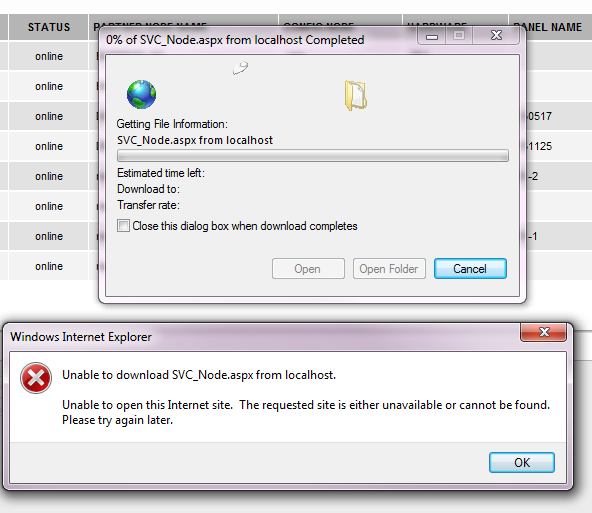
Everything works properly in other browsers and in IE9...
I suddenly bumped into weird problem. When I click export button (pdf, excel) on my grid - I am getting this:
Everything works properly in other browsers and in IE9...

1 answer
136 views
Hello
I am working on radtreeview control. I am new to telerik controls
I am having a problem, see if you guys can help me on it.
I am trying to set default static root for the categories, I have database table name called categories, has iID and iParent columns that make relation of parent and child.
I want to achieve treeview like this.
Root
|-child1
|-child2
|-child3
|-child3a
|-child3b
|-child4
|-child5
|-child6
but i am gettign all child1 to child 6 at root line including root.
here is the code
SqlConnection conn = new SqlConnection(Global.SQLConnectionString);
conn.Open();
string sqlString;
//sqlString = "SELECT * FROM [MediaLibraryCategories]";
sqlString = "Select iID,Title,iParent From Categories Union All Select '0','root', -1 Order By Sort";
SqlCommand Cmd = new SqlCommand(sqlString, conn);
try
{
SqlDataReader Dr = Cmd.ExecuteReader();
RadTreeView1.DataFieldID = "iID";
RadTreeView1.DataFieldParentID = "iParent";
RadTreeView1.DataTextField = "Title";
RadTreeView1.DataValueField = "iID";
RadTreeView1.DataSource = Dr;
RadTreeView1.DataBind();
}
with Union All, 0 is the iID, root is the title, and -1 is the iParent
other data are like this..
iID, Title, iParent
1 child1 0
2 child2 0
3 child3 0
4 child4 0
5 child5 0
6 child6 0
7 child3a 3
8 child3b 3
Union All
0 Root -1
Thanks,
I am working on radtreeview control. I am new to telerik controls
I am having a problem, see if you guys can help me on it.
I am trying to set default static root for the categories, I have database table name called categories, has iID and iParent columns that make relation of parent and child.
I want to achieve treeview like this.
Root
|-child1
|-child2
|-child3
|-child3a
|-child3b
|-child4
|-child5
|-child6
but i am gettign all child1 to child 6 at root line including root.
here is the code
SqlConnection conn = new SqlConnection(Global.SQLConnectionString);
conn.Open();
string sqlString;
//sqlString = "SELECT * FROM [MediaLibraryCategories]";
sqlString = "Select iID,Title,iParent From Categories Union All Select '0','root', -1 Order By Sort";
SqlCommand Cmd = new SqlCommand(sqlString, conn);
try
{
SqlDataReader Dr = Cmd.ExecuteReader();
RadTreeView1.DataFieldID = "iID";
RadTreeView1.DataFieldParentID = "iParent";
RadTreeView1.DataTextField = "Title";
RadTreeView1.DataValueField = "iID";
RadTreeView1.DataSource = Dr;
RadTreeView1.DataBind();
}
other data are like this..
iID, Title, iParent
1 child1 0
2 child2 0
3 child3 0
4 child4 0
5 child5 0
6 child6 0
7 child3a 3
8 child3b 3
Union All
0 Root -1
Thanks,
Kate
Telerik team
answered
on
17 Apr 2013
1 answer
98 views
Hi guys,
We noticed that the client-side clone() method for a SchedulerAppointment does not seem to clone the recurrence rule.
The definition of the function as we see it in your build 2013.1.220.45 is (minified)
I would have expected a line something like:
Is there a reason why the recurrence rule isn't cloned?
Cheers,
Sam
We noticed that the client-side clone() method for a SchedulerAppointment does not seem to clone the recurrence rule.
The definition of the function as we see it in your build 2013.1.220.45 is (minified)
clone:function(){var h=new b.SchedulerAppointment();h._id=this._id;h._subject=this._subject;h._description=this._description;h._start=this._start;h._end=this._end;h._toolTip=this._toolTip;h._internalID=this._internalID;h._visible=this._visible;h._recurrenceState=this._recurrenceState;h._recurrenceParentID=this._recurrenceParentID;h._contextMenuID=this._contextMenuID;h._resources=this.get_resources().clone();h._attributes=this.get_attributes().clone();if(this.get_reminders){h._reminders=this.get_reminders().clone();}for(var i in this){if(h[i]===g&&!i.startsWith("_")){h[i]=c(this[i]);}}return h;}h.set_recurrenceRule(this.get_recurrenceRule());Is there a reason why the recurrence rule isn't cloned?
Cheers,
Sam

Plamen
Telerik team
answered
on
17 Apr 2013
1 answer
113 views
I have a ribbon bar and some javascript that handles resizing the width of the page.
My ribbon bar as a number of groups on it and it will automatically collapse the groups starting from the right hand side, normally this is not a problem and it all works well, except if the last group is a template, it will just remove the complete group!!
What would be nice is having the ability to assign a collapse order on the groups, so that groups with an order of 1 are collapsed before those with an order of 2 etc....
Or is there some way that i can do this now ? That is, some way other than code it completely by hand in my resize function
My ribbon bar as a number of groups on it and it will automatically collapse the groups starting from the right hand side, normally this is not a problem and it all works well, except if the last group is a template, it will just remove the complete group!!
What would be nice is having the ability to assign a collapse order on the groups, so that groups with an order of 1 are collapsed before those with an order of 2 etc....
Or is there some way that i can do this now ? That is, some way other than code it completely by hand in my resize function
Ivan Zhekov
Telerik team
answered
on
17 Apr 2013
1 answer
69 views
Hi,
I know that the documentation says that for resource grouped views you need to do a postback to get the necessary html. I tried to code around this shortcoming by populating the view with all the available resources and then hide/show the columns for the resources that the user does not want to see.
This works until the user decides to drag or resize an appointment, then I receive javascript errors. Would there be any way I can get this to work? If needed I can create a sample that demonstrates this use case.
I know that the documentation says that for resource grouped views you need to do a postback to get the necessary html. I tried to code around this shortcoming by populating the view with all the available resources and then hide/show the columns for the resources that the user does not want to see.
This works until the user decides to drag or resize an appointment, then I receive javascript errors. Would there be any way I can get this to work? If needed I can create a sample that demonstrates this use case.
Plamen
Telerik team
answered
on
17 Apr 2013





