or
1 answer
69 views
Hello,
I am using RadGuage trail version for demo purpose.
Actually I am looking How this will help me in my application.
I have seen there is no effect of Size in Minor Ticks and Major TIcks.
Please look the Attachment which I have just make one application.
There is three atrributes in Major Ticks and Minor Ticks.
Color, Width and Size.
Color and Width take effect but there is no effect of size on image preview.
Can you provide me demo for this ?
Thank you.
I am using RadGuage trail version for demo purpose.
Actually I am looking How this will help me in my application.
I have seen there is no effect of Size in Minor Ticks and Major TIcks.
Please look the Attachment which I have just make one application.
There is three atrributes in Major Ticks and Minor Ticks.
Color, Width and Size.
Color and Width take effect but there is no effect of size on image preview.
Can you provide me demo for this ?
Thank you.

Danail Vasilev
Telerik team

answered
on
22 Apr 2013
1 answer
85 views
We have a RadFilter attached to a RadGrid, and some of the column headers use a BR tag to force them onto two lines in the grid in order to fit all the columns into the available space. Is there a way to take that BR out for that column on the RadFilter so the words won't be wrapped in the RadFilter?

Eyup
Telerik team
answered
on
22 Apr 2013
3 answers
98 views
Hello Guys,
I have a datagrid with a column as Dropdown, the update/insert/delete is inline. When I click on EDIT, I want that dropdown load all data from database but the correct register selected. I used the command "combo1.DataValueField = "TM_CP_TIPO_MODULO", but don't working,
Someone know where are the problem?
===================================================================================
Source code:
===================================================================================
protected void rdgRegistros_ItemDataBound(object sender, GridItemEventArgs e)
{
if (e.Item is GridEditableItem && e.Item.IsInEditMode)
{
FitUtil.EncryptedQueryString args = new FitUtil.EncryptedQueryString(Request.QueryString["args"]);
GestaoClientesDAL.ModulosDAL objModulosDAL = new GestaoClientesDAL.ModulosDAL();
int idProduto = Convert.ToInt32(args["IdProduto"]);
DataSet dtsModulos = objModulosDAL.RecuperaModulo(Conexao, idProduto);
//Popular DropDown em modo edição
GridEditableItem editableItem = e.Item as GridEditableItem;
TextBox txtNome = (editableItem["MO_NOME"].Controls[0] as TextBox);
TextBox txtCodigo = (editableItem["MO_COD_MODULO"].Controls[0] as TextBox);
CheckBox chbAtivo = (editableItem["MO_ATIVO"].Controls[0] as CheckBox);
//Popular DropDown em modo edição
GestaoClientesDAL.TipoModuloDAL objTipoModuloDAL = new GestaoClientesDAL.TipoModuloDAL();
DataSet dtsTipoModulo = objTipoModuloDAL.ListaTiposModulos(Conexao, idProduto);
RadComboBox combo1 = (RadComboBox)editableItem["dplTipo"].Controls[0];
combo1.DataSource = dtsTipoModulo;
combo1.DataTextField = "TM_NOME";
combo1.DataValueField = "TM_CP_TIPO_MODULO";
combo1.DataBind();
//Melhorando a largura do componente
txtNome.Width = 300;
txtCodigo.Width = 30;
combo1.Width = 130;
}
}
===================================================================================
ASPX
===================================================================================
<telerik:RadGrid ID="rdgRegistros" runat="server" Visible="False"
CssClass="gridPadrao" AllowPaging="True"
Width="895px" AutoGenerateColumns="False" CellSpacing="0" GridLines="None"
AllowSorting="True" OnNeedDataSource="rdgRegistros_NeedDataSource"
OnDeleteCommand="rdgRegistros_DeleteCommand"
onupdatecommand="rdgRegistros_UpdateCommand" Culture="pt-BR"
AllowMultiRowEdit="True" onitemdatabound="rdgRegistros_ItemDataBound"
PageSize="5" oninsertcommand="rdgRegistros_InsertCommand">
<ClientSettings EnableRowHoverStyle="True">
</ClientSettings>
<MasterTableView CommandItemDisplay="Top" AutoGenerateColumns="false"
DataKeyNames="MO_CP_MODULO" InsertItemPageIndexAction="ShowItemOnCurrentPage">
<CommandItemSettings ExportToPdfText="Export to PDF"></CommandItemSettings>
<RowIndicatorColumn Visible="True" FilterControlAltText="Filter RowIndicator column">
<HeaderStyle Width="20px"></HeaderStyle>
</RowIndicatorColumn>
<ExpandCollapseColumn Visible="True" FilterControlAltText="Filter ExpandColumn column">
<HeaderStyle Width="20px"></HeaderStyle>
</ExpandCollapseColumn>
<EditFormSettings>
<EditColumn FilterControlAltText="Filter EditCommandColumn column" >
</EditColumn>
</EditFormSettings>
<Columns>
...
<telerik:GridDropDownColumn HeaderText="Tipo do Módulo" UniqueName="dplTipo" DropDownControlType="RadComboBox"
DataType="System.Int32" DataField="TM_NOME" Visible="false">
</telerik:GridDropDownColumn>
</Columns>
( I posted only the part referent with my problem )
===================================================================================
Query(SQL)
===================================================================================
public DataSet RecuperaModulo(string conexao, int IdModulo)
{
try
{
SqlConnection conn = new SqlConnection(conexao);
SqlDataAdapter da = new SqlDataAdapter();
SqlCommand cmd = new SqlCommand();
cmd.Connection = conn;
cmd.CommandType = CommandType.Text;
cmd.CommandText = "SELECT * FROM MODULO "
+ " WHERE MO_CP_MODULO = " + IdModulo.ToString() + " "
+ " ORDER BY MO_NOME";
DataSet ds = new DataSet();
da.SelectCommand = cmd;
conn.Open();
da.Fill(ds);
conn.Close();
return ds;
}
catch (Exception ex)
{
Console.WriteLine(ex.Message);
return null;
}
}
I have a datagrid with a column as Dropdown, the update/insert/delete is inline. When I click on EDIT, I want that dropdown load all data from database but the correct register selected. I used the command "combo1.DataValueField = "TM_CP_TIPO_MODULO", but don't working,
Someone know where are the problem?
===================================================================================
Source code:
===================================================================================
protected void rdgRegistros_ItemDataBound(object sender, GridItemEventArgs e)
{
if (e.Item is GridEditableItem && e.Item.IsInEditMode)
{
FitUtil.EncryptedQueryString args = new FitUtil.EncryptedQueryString(Request.QueryString["args"]);
GestaoClientesDAL.ModulosDAL objModulosDAL = new GestaoClientesDAL.ModulosDAL();
int idProduto = Convert.ToInt32(args["IdProduto"]);
DataSet dtsModulos = objModulosDAL.RecuperaModulo(Conexao, idProduto);
//Popular DropDown em modo edição
GridEditableItem editableItem = e.Item as GridEditableItem;
TextBox txtNome = (editableItem["MO_NOME"].Controls[0] as TextBox);
TextBox txtCodigo = (editableItem["MO_COD_MODULO"].Controls[0] as TextBox);
CheckBox chbAtivo = (editableItem["MO_ATIVO"].Controls[0] as CheckBox);
//Popular DropDown em modo edição
GestaoClientesDAL.TipoModuloDAL objTipoModuloDAL = new GestaoClientesDAL.TipoModuloDAL();
DataSet dtsTipoModulo = objTipoModuloDAL.ListaTiposModulos(Conexao, idProduto);
RadComboBox combo1 = (RadComboBox)editableItem["dplTipo"].Controls[0];
combo1.DataSource = dtsTipoModulo;
combo1.DataTextField = "TM_NOME";
combo1.DataValueField = "TM_CP_TIPO_MODULO";
combo1.DataBind();
//Melhorando a largura do componente
txtNome.Width = 300;
txtCodigo.Width = 30;
combo1.Width = 130;
}
}
===================================================================================
ASPX
===================================================================================
<telerik:RadGrid ID="rdgRegistros" runat="server" Visible="False"
CssClass="gridPadrao" AllowPaging="True"
Width="895px" AutoGenerateColumns="False" CellSpacing="0" GridLines="None"
AllowSorting="True" OnNeedDataSource="rdgRegistros_NeedDataSource"
OnDeleteCommand="rdgRegistros_DeleteCommand"
onupdatecommand="rdgRegistros_UpdateCommand" Culture="pt-BR"
AllowMultiRowEdit="True" onitemdatabound="rdgRegistros_ItemDataBound"
PageSize="5" oninsertcommand="rdgRegistros_InsertCommand">
<ClientSettings EnableRowHoverStyle="True">
</ClientSettings>
<MasterTableView CommandItemDisplay="Top" AutoGenerateColumns="false"
DataKeyNames="MO_CP_MODULO" InsertItemPageIndexAction="ShowItemOnCurrentPage">
<CommandItemSettings ExportToPdfText="Export to PDF"></CommandItemSettings>
<RowIndicatorColumn Visible="True" FilterControlAltText="Filter RowIndicator column">
<HeaderStyle Width="20px"></HeaderStyle>
</RowIndicatorColumn>
<ExpandCollapseColumn Visible="True" FilterControlAltText="Filter ExpandColumn column">
<HeaderStyle Width="20px"></HeaderStyle>
</ExpandCollapseColumn>
<EditFormSettings>
<EditColumn FilterControlAltText="Filter EditCommandColumn column" >
</EditColumn>
</EditFormSettings>
<Columns>
...
<telerik:GridDropDownColumn HeaderText="Tipo do Módulo" UniqueName="dplTipo" DropDownControlType="RadComboBox"
DataType="System.Int32" DataField="TM_NOME" Visible="false">
</telerik:GridDropDownColumn>
</Columns>
( I posted only the part referent with my problem )
===================================================================================
Query(SQL)
===================================================================================
public DataSet RecuperaModulo(string conexao, int IdModulo)
{
try
{
SqlConnection conn = new SqlConnection(conexao);
SqlDataAdapter da = new SqlDataAdapter();
SqlCommand cmd = new SqlCommand();
cmd.Connection = conn;
cmd.CommandType = CommandType.Text;
cmd.CommandText = "SELECT * FROM MODULO "
+ " WHERE MO_CP_MODULO = " + IdModulo.ToString() + " "
+ " ORDER BY MO_NOME";
DataSet ds = new DataSet();
da.SelectCommand = cmd;
conn.Open();
da.Fill(ds);
conn.Close();
return ds;
}
catch (Exception ex)
{
Console.WriteLine(ex.Message);
return null;
}
}


2 answers
106 views
How can i cancel edit in code behind?
Thank you.
Thank you.

1 answer
112 views
Hi,
I am using hyperlink inside item template to navigate other pages that based on type.
If type is Task then I am giving navigateURL is Edittask.aspx
If type is Email then I am opening a radwindow to show email body.
Now I would like to open Attachment if type is attachment.
Note : I am taking image content direct from DB not from any path.
Table & column info here :


Generally I can use GridAttachmentColumn to open/save attachment like this..
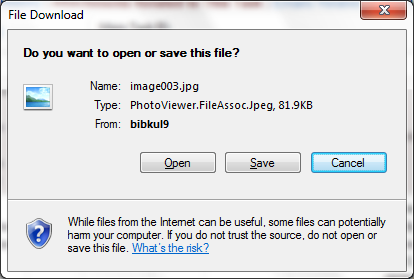
I want the same popup that If i click on hyperlink when type is attachment
Code :
Design :
Please help on this .. Thanks in advance..
I am using hyperlink inside item template to navigate other pages that based on type.
If type is Task then I am giving navigateURL is Edittask.aspx
If type is Email then I am opening a radwindow to show email body.
Now I would like to open Attachment if type is attachment.
Note : I am taking image content direct from DB not from any path.
Table & column info here :
Generally I can use GridAttachmentColumn to open/save attachment like this..
I want the same popup that If i click on hyperlink when type is attachment
Code :
Dim subject As String = String.Empty Dim item As GridDataItem = DirectCast(e.Item, GridDataItem) Dim link As HyperLink = DirectCast(item.FindControl("hlnkDescription"), HyperLink) Dim type As String = item("Type").Text Dim Privacy As String = item("Privacy").Text Dim lnkTaskNo As HyperLink = DirectCast(item.FindControl("hlnkTaskNo"), HyperLink) Dim taskNo As String = lnkTaskNo.Text If type IsNot Nothing And type <> "" Then Dim taskHierarchyURL As String = "~/MyTasksHierarchyMain.aspx?TaskNo=" + taskNo + "&Subject=" + subject + "&Id=" + item("Id").Text + "" Select Case type Case "Task", "Group" '28/03/2013 & 03/04/2013 If taskNo IsNot Nothing And taskNo <> "" Then If Privacy = "Confidential" Then link.Text = "Private & Confidential" link.CssClass = "hidelink" link.Enabled = False Else If Session("searchtype") = "All" Then link.NavigateUrl = taskHierarchyURL Else link.NavigateUrl = "~/EditTask.aspx?TaskNo=" + taskNo + "&Subject=" + subject + "&Id=" + item("Id").Text + "" End If End If End If Case "Email" If taskNo IsNot Nothing And taskNo <> "" And taskNo <> "0" Then If Privacy = "Confidential" Then link.Text = "Private & Confidential" link.CssClass = "hidelink" link.Enabled = False Else 'Start : 11/04/2013 'link.NavigateUrl = "~/EditTask.aspx?func=email&TaskNo=" + taskNo + "&Subject=" + subject + "&Id=" + item("Id").Text + "" lnkTaskNo.NavigateUrl = "~/EditTask.aspx?func=email&TaskNo=" + taskNo + "&Subject=" + subject + "&Id=" + item("Id").Text + "" link.Attributes("href") = "javascript:void(0);" link.Attributes("onclick") = [String].Format("return ShowEmailBodyForm('{0}','{1}');", item("Id").Text, e.Item.ItemIndex) 'End : 11/04/2013 End If Else link.NavigateUrl = "~/MasterScreen.aspx?page=EmailMasterLink&TaskNo=0&Mth=0&Yr=0&Subject=" + subject + "&Id=" + item("Id").Text + "" If item("InitiatorName").Controls.Count > 0 Then DirectCast(item("InitiatorName").Controls(0), TextBox).Visible = False End If End If Dim message As String = HtmlRemoval.StripTagsRegex(item("Message").Text).Replace(".", "").ToString() item("Message").Text = message.Substring(0, 100) + "..." Session("SearchEmail") = True '03/04/2013 Case "Attachment" If taskNo IsNot Nothing And taskNo <> "" And taskNo <> "0" Then If Privacy = "Confidential" Then link.Text = "Private & Confidential" link.CssClass = "hidelink" link.Enabled = False Else link.NavigateUrl = "~/EditTask.aspx?func=attachments&TaskNo=" + taskNo + "&Subject=" + subject + "&Id=" + item("Id").Text + "" End If Else link.NavigateUrl = "~/MasterScreen.aspx?page=UncategorisedAttachments,NonTask&Subject=" + subject + "&Id=" + item("Id").Text + "" End If End Select End IfDesign :
<telerik:GridTemplateColumn ShowSortIcon="true" SortExpression="Subject" FilterControlAltText="Filter Subject column" DataField="Subject" FilterControlWidth="250px" DataType="System.String" UniqueName="Subject" HeaderText="Click to view attachment / emails / tasks"> <ItemTemplate> <asp:HyperLink ID="hlnkDescription" Target="_blank" runat="server" Text='<%#DataBinder.Eval(Container.DataItem, "Subject")%>'></asp:HyperLink> </ItemTemplate> </telerik:GridTemplateColumn>Please help on this .. Thanks in advance..
Vasil
Telerik team
answered
on
22 Apr 2013
3 answers
123 views
Hi,
I am using Telerik's 2012.1.411 version. In this, the radgrid's vertical scroll seemed to be shifted outside the header. I am attaching the snapshots of it.
Earlier, the vertical scroll was within the last header.
I am not sure whether the version change has caused this changed or how?
I am using Telerik's 2012.1.411 version. In this, the radgrid's vertical scroll seemed to be shifted outside the header. I am attaching the snapshots of it.
Earlier, the vertical scroll was within the last header.
I am not sure whether the version change has caused this changed or how?
Venelin
Telerik team
answered
on
22 Apr 2013
1 answer
393 views
Hi All,
I am trying the implement multiple row select feature as pointed in the Telerik tutorial. Everything is working fine i.e.
I am able to reach the server side code
select/deselect the row
Except one thing: My whole page is refreshing on post back. It doesn't do the same in the tutorial, instead only the table updates. Can anyone point out if I need to change any particular setting w.r.t Ajax Control or add a update panel around RadGrid ?
http://demos.telerik.com/aspnet-ajax/grid/examples/programming/selectrowwithcheckbox/defaultcs.aspx
I am trying the implement multiple row select feature as pointed in the Telerik tutorial. Everything is working fine i.e.
I am able to reach the server side code
select/deselect the row
Except one thing: My whole page is refreshing on post back. It doesn't do the same in the tutorial, instead only the table updates. Can anyone point out if I need to change any particular setting w.r.t Ajax Control or add a update panel around RadGrid ?
http://demos.telerik.com/aspnet-ajax/grid/examples/programming/selectrowwithcheckbox/defaultcs.aspx
Maria Ilieva
Telerik team
answered
on
22 Apr 2013
1 answer
93 views
I am using Radgrid latest trial version. I have to display around 60 columns on screen. First five columns are frozen. It works with chrome with little misalignment for search textbox. But with IE 9 it gets disturbed a lot. Sixth column data is displayed under fifth column. Attached is the screen cap where you can find that how much employee id column is mismatched. Can someone help for this? this is the only thing which is restricting me to go ahead and purchase controls.
Angel Petrov
Telerik team
answered
on
22 Apr 2013
2 answers
112 views
<table style="width:100%;"> <tr> <td class="style9"> Basic information </td> <td class="style7"> </td> <td class="style6"> </td> <td> </td> </tr> <tr> <td class="style4"> </td> <td class="style7"> </td> <td class="style6"> </td> <td> </td> </tr> <tr> <td class="style4"> Name :</td> <td class="style7"> <telerik:RadTextBox ID="RadTextBox1" Runat="server"> </telerik:RadTextBox> </td> <td class="style6"> Departement :</td> <td> <telerik:RadComboBox ID="RadComboBox2" Runat="server" DataSourceID="SqlDataSource2" DataTextField="U_Dep" Width="200px"> </telerik:RadComboBox> </td> </tr> <tr> <td class="style4"> Title :</td> <td class="style7"> <telerik:RadComboBox ID="RadComboBox1" Runat="server" DataSourceID="SqlDataSource1" DataTextField="U_Title" DataValueField="U_Title" Width="230px"> </telerik:RadComboBox> </td> <td class="style6"> Internal Mail : </td> <td> <telerik:RadTextBox ID="RadTextBox4" Runat="server"> </telerik:RadTextBox> </td> </tr> <tr> <td class="style4"> Manager Name :</td> <td class="style7"> <telerik:RadComboBox ID="RadComboBox3" Runat="server" DataSourceID="SqlDataSource4" DataTextField="U_Manger_Name" DataValueField="U_Manger_Name"> </telerik:RadComboBox> </td> <td class="style6"> Manager Internal Mail :</td> <td> <telerik:RadTextBox ID="RadTextBox13" Runat="server"> </telerik:RadTextBox> </td> </tr> <tr> <td class="style5"> System Password :</td> <td class="style7"> <telerik:RadTextBox ID="RadTextBox2" Runat="server"> </telerik:RadTextBox> </td> <td class="style6"> Region :</td> <td> <telerik:RadComboBox ID="RadComboBox4" Runat="server" DataSourceID="SqlDataSource3" DataTextField="U_Region" DataValueField="U_Region"> </telerik:RadComboBox> </td> </tr> <tr> <td class="style5"> Work Mobile Number :</td> <td class="style7"> <telerik:RadTextBox ID="RadTextBox3" Runat="server"> </telerik:RadTextBox> </td> <td class="style6"> </td> <td> </td> </tr> <tr> <td class="style5"> </td> <td class="style7"> </td> <td class="style6"> </td> <td> </td> </tr> <tr> <td class="style8"> Personal Information </td> <td class="style7"> </td> <td class="style6"> </td> <td> </td> </tr> <tr> <td class="style5"> </td> <td class="style7"> </td> <td class="style6"> </td> <td> </td> </tr> <tr> <td class="style5"> National ID Number :</td> <td class="style7"> <telerik:RadTextBox ID="RadTextBox6" Runat="server"> </telerik:RadTextBox> </td> <td class="style6"> National ID Expire Date :</td> <td> <telerik:RadDatePicker ID="RadDatePicker1" Runat="server"> </telerik:RadDatePicker> </td> </tr> <tr> <td class="style5"> Address :</td> <td class="style7"> <telerik:RadTextBox ID="RadTextBox7" Runat="server"> </telerik:RadTextBox> </td> <td class="style6"> Sex :</td> <td> <telerik:RadComboBox ID="RadComboBox6" Runat="server"> <Items> <telerik:RadComboBoxItem runat="server" Text="Male" Value="Male" /> <telerik:RadComboBoxItem runat="server" Text="Female" Value="Female" /> </Items> </telerik:RadComboBox> </td> </tr> <tr> <td class="style5"> Marital Status :</td> <td class="style7"> <telerik:RadComboBox ID="RadComboBox5" Runat="server"> <Items> <telerik:RadComboBoxItem runat="server" Text="Single" Value="Single" /> <telerik:RadComboBoxItem runat="server" Text="Married" Value="Married" /> <telerik:RadComboBoxItem runat="server" Text="Divorced" Value="Divorced" /> <telerik:RadComboBoxItem runat="server" Text="Widowed" Value="Widowed" /> </Items> </telerik:RadComboBox> </td> <td class="style6"> Private Mobile Number :</td> <td> <telerik:RadTextBox ID="RadTextBox8" Runat="server"> </telerik:RadTextBox> </td> </tr> <tr> <td class="style5"> Picture : </td> <td class="style7"> <telerik:RadAsyncUpload ID="RadAsyncUpload1" runat="server"> </telerik:RadAsyncUpload> </td> <td class="style6"> </td> <td> </td> </tr> <tr> <td class="style8"> </td> <td class="style7"> </td> <td class="style6"> </td> <td> </td> </tr> <tr> <td class="style8"> HR Information :</td> <td class="style7"> </td> <td class="style6"> </td> <td> </td> </tr> <tr> <td class="style5"> </td> <td class="style7"> </td> <td class="style6"> </td> <td> </td> </tr> <tr> <td class="style5"> Start Date :</td> <td class="style7"> <telerik:RadDatePicker ID="RadDatePicker2" Runat="server"> </telerik:RadDatePicker> </td> <td class="style6"> Status :</td> <td> <telerik:RadComboBox ID="RadComboBox7" Runat="server"> <Items> <telerik:RadComboBoxItem runat="server" Text="Normal user" Value="Normal user" /> <telerik:RadComboBoxItem runat="server" Text="Admin" Value="Admin" /> </Items> </telerik:RadComboBox> </td> </tr> <tr> <td class="style5"> Insurance Number :</td> <td class="style7"> <telerik:RadTextBox ID="RadTextBox9" Runat="server"> </telerik:RadTextBox> </td> <td class="style6"> Insurance Date :</td> <td> <telerik:RadDatePicker ID="RadDatePicker3" Runat="server"> </telerik:RadDatePicker> </td> </tr> <tr> <td class="style5"> Annual Vacation Balance :</td> <td class="style7"> <telerik:RadTextBox ID="RadTextBox10" Runat="server"> </telerik:RadTextBox> </td> <td class="style6"> Incident Vacation Balance :</td> <td> <telerik:RadTextBox ID="RadTextBox12" Runat="server"> </telerik:RadTextBox> </td> </tr> <tr> <td class="style5"> Day Off :</td> <td class="style7"> <telerik:RadComboBox ID="RadComboBox8" Runat="server"> <Items> <telerik:RadComboBoxItem runat="server" Text="Saturday" Value="Saturday" /> <telerik:RadComboBoxItem runat="server" Text="Sunday" Value="Sunday" /> <telerik:RadComboBoxItem runat="server" Text="Monday" Value="Monday" /> <telerik:RadComboBoxItem runat="server" Text="Tuesday" Value="Tuesday" /> <telerik:RadComboBoxItem runat="server" Text="Wednesday" Value="Wednesday" /> <telerik:RadComboBoxItem runat="server" Text="Thursday" Value="Thursday" /> <telerik:RadComboBoxItem runat="server" Text="Friday" Value="Friday" /> </Items> </telerik:RadComboBox> </td> <td class="style6"> </td> <td> </td> </tr> <tr> <td class="style5"> Qualifications : </td> <td class="style7"> <telerik:RadTextBox ID="RadTextBox11" Runat="server"> </telerik:RadTextBox> </td> <td class="style6"> </td> <td> </td> </tr> <tr> <td class="style5"> <asp:SqlDataSource ID="SqlDataSource1" runat="server" ConnectionString="<%$ ConnectionStrings:ConnectionString %>" SelectCommand="SELECT DISTINCT [U_Title] FROM [Users] ORDER BY [U_Title]"> </asp:SqlDataSource> <asp:SqlDataSource ID="SqlDataSource2" runat="server" ConnectionString="<%$ ConnectionStrings:ConnectionString %>" SelectCommand="SELECT DISTINCT [U_Dep] FROM [Users] ORDER BY [U_Dep]"> </asp:SqlDataSource> <asp:SqlDataSource ID="SqlDataSource3" runat="server" ConnectionString="<%$ ConnectionStrings:ConnectionString %>" SelectCommand="SELECT DISTINCT [U_Region] FROM [Users] ORDER BY [U_Region]"> </asp:SqlDataSource> <asp:SqlDataSource ID="SqlDataSource4" runat="server" ConnectionString="<%$ ConnectionStrings:ConnectionString %>" SelectCommand="SELECT DISTINCT [U_Manger_Name] FROM [Users] ORDER BY [U_Manger_Name]"> </asp:SqlDataSource> </td> <td class="style7"> <asp:Button ID="Button1" runat="server" onclick="Button1_Click1" style="width: 56px" Text="Button" /> </td> <td class="style6"> <telerik:RadTextBox ID="RadTextBox14" Runat="server"> </telerik:RadTextBox> </td> <td> </td> </tr> </table>const int MaxTotalBytes = 1048576; int totalBytes;public bool? IsRadAsyncValid{ get { if (Session["IsRadAsyncValid"] == null) { Session["IsRadAsyncValid"] = true; } return Convert.ToBoolean(Session["IsRadAsyncValid"].ToString()); } set { Session["IsRadAsyncValid"] = value; }}public static string ConnectionString{ get { return ConfigurationManager.ConnectionStrings["ConnectionString"].ConnectionString; }}protected override void OnLoad(EventArgs e){ base.OnLoad(e); IsRadAsyncValid = null;}protected void Button1_Click1(object sender, EventArgs e){ if (!IsRadAsyncValid.Value) { Response.Write("The length of the uploaded file must be less than 1 MB"); return; } using (SqlConnection conn = new SqlConnection(ConnectionString)) { conn.Open(); SqlCommand cmd = new SqlCommand("INSERT INTO [Users] ([U_Name], [U_Dep], [U_Title], [U_Internal_Mail], [U_Password], [U_Region], [U_Manger_Mail], [U_Manger_Name], [U_Status], [U_Week_End], [U_Balance], [U_Incednt], [Image], [Personal_ID], [ID_Expire_Date], [Sex], [Insurance_Number], [Insurance_Date], [Address], [Marital_Status], [Qualifications], [Work_Mobile_Number], [Private_Mobile_Number], [U_Start_Date]) VALUES (@U_Name, @U_Dep, @U_Title, @U_Internal_Mail, @U_Password, @U_Region, @U_Manger_Mail, @U_Manger_Name, @U_Status, @U_Week_End, @U_Balance, @U_Incednt, @Image, @Personal_ID, @ID_Expire_Date, @Sex, @Insurance_Number, @Insurance_Date, @Address, @Marital_Status, @Qualifications, @Work_Mobile_Number, @Private_Mobile_Number, @U_Start_Date)", conn); cmd.Parameters.AddWithValue("@U_Name", RadTextBox1.Text); cmd.Parameters.AddWithValue("@U_Dep", RadComboBox2.Text); cmd.Parameters.AddWithValue("@U_Title", RadComboBox1.Text); cmd.Parameters.AddWithValue("@U_Internal_Mail",RadTextBox4.Text ); cmd.Parameters.AddWithValue("@U_Password",RadTextBox2.Text); cmd.Parameters.AddWithValue("@U_Region",RadComboBox4.Text ); cmd.Parameters.AddWithValue("@U_Manger_Mail",RadTextBox13.Text ); cmd.Parameters.AddWithValue("@U_Manger_Name",RadComboBox3.Text ); cmd.Parameters.AddWithValue("@U_Status",RadComboBox7.Text ); cmd.Parameters.AddWithValue("@U_Week_End", RadComboBox8.Text); cmd.Parameters.AddWithValue("@U_Balance",RadTextBox10.Text); cmd.Parameters.AddWithValue("@U_Incednt", RadTextBox12.Text); cmd.Parameters.AddWithValue("@Personal_ID", RadTextBox6.Text); cmd.Parameters.AddWithValue("@ID_Expire_Date", RadDatePicker1.SelectedDate); cmd.Parameters.AddWithValue("@Sex", RadComboBox6.Text); cmd.Parameters.AddWithValue("@Insurance_Number",RadTextBox9.Text); cmd.Parameters.AddWithValue("@Insurance_Date", RadDatePicker3.SelectedDate); cmd.Parameters.AddWithValue("@Address", RadTextBox7.Text); cmd.Parameters.AddWithValue("@Marital_Status", RadComboBox5.Text); cmd.Parameters.AddWithValue("@Qualifications", RadTextBox11.Text); cmd.Parameters.AddWithValue("@Work_Mobile_Number",RadTextBox3.Text); cmd.Parameters.AddWithValue("@Private_Mobile_Number",RadTextBox8.Text); cmd.Parameters.AddWithValue("@U_Start_Date", RadDatePicker2.SelectedDate); cmd.Parameters.AddWithValue("@Image", RadAsyncUpload1); cmd.ExecuteScalar(); }}
Andrey
Telerik team
answered
on
22 Apr 2013
5 answers
298 views
Hi,
I could not find my old thread about this issue so started a new one. Sorry
So I have a radcombobox that loads via a webservice on demand. Locally it works fine but when published it gives me an error saying that the server method '' failed. I did some debugging on my own and used fiddler to find out what might be happening and have narrowed down the issue to it calling the wrong url
http://screencast.com/t/epbKgzz7nFL
As you can see it is calling the url: http://www.khalsaconsulting.com/Services/WebServices.svc/GetICD9Data when it should be calling
http://www.khalsaconsulting.com/ekjotbeta/Services/WebServices.svc/GetICD9Data because ekjotbeta is the .NET application on the website that I am running. How can I make it call the right url? Or is there some other issue? Thanks for all the help in advance
I could not find my old thread about this issue so started a new one. Sorry
So I have a radcombobox that loads via a webservice on demand. Locally it works fine but when published it gives me an error saying that the server method '' failed. I did some debugging on my own and used fiddler to find out what might be happening and have narrowed down the issue to it calling the wrong url
http://screencast.com/t/epbKgzz7nFL
As you can see it is calling the url: http://www.khalsaconsulting.com/Services/WebServices.svc/GetICD9Data when it should be calling
http://www.khalsaconsulting.com/ekjotbeta/Services/WebServices.svc/GetICD9Data because ekjotbeta is the .NET application on the website that I am running. How can I make it call the right url? Or is there some other issue? Thanks for all the help in advance





