or
1 answer
78 views
I have a collapse of 1000 set on each context menu. The menu will not hide until I click either on a link in the context menu or somewhere else on the tree page. The collapse time doesn't make a different. (i.e. setting it to 1)

Kate
Telerik team

answered
on
19 Jul 2013
2 answers
122 views
Hi,
Here I have 2 problems ( one relatively simple, one sticky)
1 - The small "export to Excel" button in CommandItemSettings (ShowExportToExcelButton="true") it doesn't export anything, just refreshes the grid ( not the page) and makes the command line disappear, any ideas ? I also have a button export to excel which call the radgrid.export to excel command and exports the grid to excel. So I gues sIm missing some setting.
2 ( the sticky one) now the above grid configuration has a sqldatasource assigned to it. Ideally When the page is loaded for the first time I would like to display the grid but with no data-source ( basically it wont be visible) and then after some user input and doing a post back I go:
Grid.DataSource = result;
Grid.DataBind();
And the grid is built. But then when I try to export to excel I get an empty excel sheet, and after some testing it has to do something with not having that sql outsource initially. is there a way around this ?
regards, Neil
Here I have 2 problems ( one relatively simple, one sticky)
1 - The small "export to Excel" button in CommandItemSettings (ShowExportToExcelButton="true") it doesn't export anything, just refreshes the grid ( not the page) and makes the command line disappear, any ideas ? I also have a button export to excel which call the radgrid.export to excel command and exports the grid to excel. So I gues sIm missing some setting.
2 ( the sticky one) now the above grid configuration has a sqldatasource assigned to it. Ideally When the page is loaded for the first time I would like to display the grid but with no data-source ( basically it wont be visible) and then after some user input and doing a post back I go:
Grid.DataSource = result;
Grid.DataBind();
And the grid is built. But then when I try to export to excel I get an empty excel sheet, and after some testing it has to do something with not having that sql outsource initially. is there a way around this ?
regards, Neil
1 answer
180 views
Hi,
I trying to bind a dropDownColumn to a class property as Enum and the value in itemDataBound always nbsp. When i bind with BoundColumn it's ok, i see the value of the enum.
If i change the class property to integer, the dropDownColumn displayed correctly, but i want to keep the class property as enum.
Any workaround for this?
ty
I trying to bind a dropDownColumn to a class property as Enum and the value in itemDataBound always nbsp. When i bind with BoundColumn it's ok, i see the value of the enum.
If i change the class property to integer, the dropDownColumn displayed correctly, but i want to keep the class property as enum.
Any workaround for this?
'Do not workPublic class XYZ Public Property Status as StatusEnumEnd ClassPublic Enum StatusEnum as Integer Enabled = 0 Disabled = 1End Enum'WorkPublic class XYZ Public Property Status as IntegerEnd Classty
Antonio Stoilkov
Telerik team
answered
on
19 Jul 2013
1 answer
123 views
We are using SPRadEditor with Telerik.Web.UI version 2013.1.417.35. The Rad editor is declare using the below statement
<telerik:SPRadEditor ID="rtxtDetail" runat="server" Skin="Office2007" Width="100%" ToolbarMode="Default" ContentFilters="None" StripFormattingOptions="NoneSupressCleanMessage">
But the Toolbar is not getting fixed to the top of the control. Could you please help to provide a fix for this issue?
Thank you
Slav
Telerik team
answered
on
19 Jul 2013
1 answer
281 views
My RadGrid bonded to a list collection, but bonded no to all fields. Is there any way to get another field from DataMember bonded to exact row which user has selected.

Radoslav
Telerik team
answered
on
19 Jul 2013
3 answers
120 views
Hi
I have a radtreeview which is used for a directory structure/file list viewer, and there is a problem when folders are collapsed.
When I have folder (node) A, with subfolder B (child node), if I expand folder A node in the tree and then click on folder B child node, the files are displayed in my content pane correctly. However, once subfolder B node is selected, if I then collapse folder A (parent folder), the tree node collapses correctly, however the content view (list of files) is also refreshed to those contained in the root node. I want to prevent this redirect, and have the content view unchanged (same behaviour as in windows file explorer). I've had a look around and it seems like the OnClientNodeCollapsing is where I need to make the fix, but here I'm only using the default behaviour. And I don't want to disable the collapse itself in the tree, only the redirect in the content.
I'd appreciate any help, thanks
I have a radtreeview which is used for a directory structure/file list viewer, and there is a problem when folders are collapsed.
When I have folder (node) A, with subfolder B (child node), if I expand folder A node in the tree and then click on folder B child node, the files are displayed in my content pane correctly. However, once subfolder B node is selected, if I then collapse folder A (parent folder), the tree node collapses correctly, however the content view (list of files) is also refreshed to those contained in the root node. I want to prevent this redirect, and have the content view unchanged (same behaviour as in windows file explorer). I've had a look around and it seems like the OnClientNodeCollapsing is where I need to make the fix, but here I'm only using the default behaviour. And I don't want to disable the collapse itself in the tree, only the redirect in the content.
I'd appreciate any help, thanks
Bozhidar
Telerik team
answered
on
19 Jul 2013
5 answers
149 views
hello,
i have a grid using this GridDropDownColumn:
which gets its data from a simple DataTable retrieved via a business method call in this ObjectDataSource:
...the problem -- when I handle the grid's UpdateCommand in C#, I'm not able to refer to this column-value by name. Instead, when I use the below code, the DictionaryEntry for this column is empty (see attached image).
...is there a way for me to fix this? i tried giving the GridDropDownColumn a DataField value, but it complained since that value doesn't exist in the grid's source datatable.
not sure if it makes a difference, but we're on an older version: 2009.2.826.35.
thanks!
i have a grid using this GridDropDownColumn:
<Telerik:GridDropDownColumn HeaderText="Acceptance" UniqueName="AcceptanceStatus" DataSourceID="odsAcceptanceStatusTypes" ListValueField="ID" ListTextField="Name" ItemStyle-Wrap="false" DropDownControlType="DropDownList" />which gets its data from a simple DataTable retrieved via a business method call in this ObjectDataSource:
<asp:ObjectDataSource ID="odsAcceptanceStatusTypes" TypeName="MyUtilities.WellTest" SelectMethod="GetAcceptanceStatusTypes" runat="server" />...the problem -- when I handle the grid's UpdateCommand in C#, I'm not able to refer to this column-value by name. Instead, when I use the below code, the DictionaryEntry for this column is empty (see attached image).
protected void gridItems_UpdateCommand(object source, GridCommandEventArgs e){ GridEditableItem editableItem = e.Item as GridEditableItem; //get our primary ID from the grid's datasource int resultNo = (int)(editableItem.OwnerTableView.DataKeyValues[editableItem.ItemIndex]["Result_No"]); //get the new values from this edited row Hashtable newValues = new Hashtable(); e.Item.OwnerTableView.ExtractValuesFromItem(newValues, editableItem); int acceptanceStatusTypeID = -1; foreach (DictionaryEntry entry in newValues) { switch ((string)entry.Key) { // (other items removed from code) //get the value for this case "": acceptanceStatusTypeID = Int32.Parse((string)entry.Value); break; } }}...is there a way for me to fix this? i tried giving the GridDropDownColumn a DataField value, but it complained since that value doesn't exist in the grid's source datatable.
not sure if it makes a difference, but we're on an older version: 2009.2.826.35.
thanks!


3 answers
236 views
I am experimenting with the image editor to see if we can replace our silverlight image viewer with it. It's very promising but I am curious how you all would recommend handling multi-page tiffs? So far it looks like the only way to handle it would be to add a change page button, split the tiff on the back end, and change which image is dynamically loaded. Or am I missing a simpler way? It's a lot of processing to split the tiff each time so I'm hoping to find a way to avoid it. Thanks!
Dsffd
Top achievements
 Rank 1
Rank 1
answered
on
19 Jul 2013
1 answer
321 views
Hi guys
I have one requirement
I saw below link
http://www.telerik.com/help/reporting/buildingdatabinddatabase.html
In that all bars are in same color(Grey) can i have different colors for individual bar
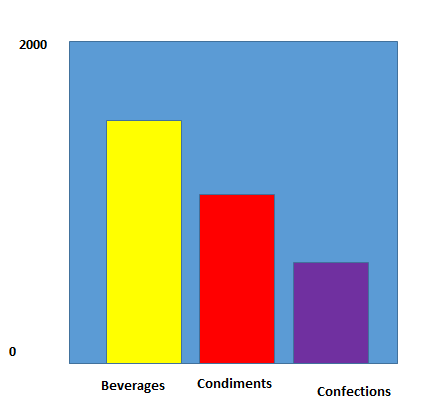
above all in one group
and i know if we have different group we can get different colors but i dont want different groups
Karthik.K
I have one requirement
I saw below link
http://www.telerik.com/help/reporting/buildingdatabinddatabase.html
In that all bars are in same color(Grey) can i have different colors for individual bar
above all in one group
and i know if we have different group we can get different colors but i dont want different groups
Karthik.K
A2H
Top achievements
Rank 1
Rank 1
answered
on
18 Jul 2013
2 answers
114 views
Is it possible to add SortExpression property? Like;
and default sort for the PivotGrid does not function if it does not binded to a DataField property.
For example; I did not bind ItemId to a RowField but would like to have default sort on that field. I think we need something like AdditionalDataFieldNames property.
You know, RadGrid has this functionality.
PS:Attached screen shot shows my problem.
TIA
<telerik:PivotGridRowField DataField="ITEMNAME" Caption="Ürün Adı" UniqueName="ITEMNAME" ZoneIndex="4" SortExpression="ItemId"></telerik:PivotGridRowField>and default sort for the PivotGrid does not function if it does not binded to a DataField property.
For example; I did not bind ItemId to a RowField but would like to have default sort on that field. I think we need something like AdditionalDataFieldNames property.
<SortExpressions> <telerik:PivotGridSortExpression FieldName="ItemId" SortOrder="Ascending" /></SortExpressions>You know, RadGrid has this functionality.
PS:Attached screen shot shows my problem.
TIA





