or
5 answers
931 views
Hi,
I have a contact page that retrieves contact information from the database. When I populate all fields from the database, how do I set the date for my RadDatePicker textbox to that of birthdate value from my contact object.
ex: RadaDatePicker1.Value = Contact.Birthdate
Thanks
I have a contact page that retrieves contact information from the database. When I populate all fields from the database, how do I set the date for my RadDatePicker textbox to that of birthdate value from my contact object.
ex: RadaDatePicker1.Value = Contact.Birthdate
Thanks


1 answer
327 views
Hi ,
I am using Radgird do display records. Grid contains 5 columns and 100 records.Now when i do filter one of the column for one search criteria, for example i will get 3 records.
when i click on one of the record which contains link button, i will navigate to other page. However now when i come back to inbox with contained rad grid, records which i filtered in gone and i will get to display original 100 records,
How do i retain the records which i filtered on postback ?? is there any way to do this.
Please suggest.
Regards,
Akki

Eyup
Telerik team

answered
on
20 Aug 2013
1 answer
209 views
Currently, we are using the RadDropDownTree to select filter criteria which is applied to data below. At the moment we count the number of items within the control and compare it to the total number of selected items, if they match we display 'All' within our custom filter text, otherwise we display the RadDropDownTree.SelectedText.
What we need to do is something similar for each parent item listed within the control (so if all child items for a specific parent item are selected we would only display the parent name). Is there any way to achieve this?
Thanks
What we need to do is something similar for each parent item listed within the control (so if all child items for a specific parent item are selected we would only display the parent name). Is there any way to achieve this?
Thanks

Peter Filipov
Telerik team
answered
on
20 Aug 2013
1 answer
146 views
Hi,
I'm trying to work on a project at the moment, and i've having alot of conflicts between JQuery itself, the framework has these tools;
scrollable
superfish
Being used, the script manager is loaded at code behind and the original framework was 1.7.2 for JQuery;
I've upgraded the system to handle 1.9.1 with a migrate jS project reference and some smaller Jquery adjustments.
Though; the system looks like this;
<head>
j191
</head>
Inline Js
Menu inline Js
scrollable calls
superfish calls. jquery tools.
Script manager
resources script
webresource.axd scripts.
inline tools for menu.
superfish js file
Now, the superfish definition is my biggest break and the inline tools for menu.
So, a radtreeview is being loaded on this page, and the web resource scripts reference 1.5.2 jquery, and it blows everything up; this is unfortunately an old Telerik.Web.UI and it's embedded into DNN.
So i have 3 parties using 2011 Q1 dll and i'm finding alot of problems with just simply getting superfish/scrollable to work which is coming back with a "not a function".
I want to disable the jquery being used in Telerik>web.UI and i've tried scriptreference paths with full resource name and path = "" and other jquery on conflict fixes, but it takes out half of DNN itself.
IS there ANYWAY, to override this webresource being included, i compared this to a cloned environment that was built before my time and the jquery isn't loaded but the jquery UI is, and i can't figure out why on earth this is the way it is?
Anyone give me any ideas? I've blown 2 days on this and i'm about ready to just give up.
I'm trying to work on a project at the moment, and i've having alot of conflicts between JQuery itself, the framework has these tools;
scrollable
superfish
Being used, the script manager is loaded at code behind and the original framework was 1.7.2 for JQuery;
I've upgraded the system to handle 1.9.1 with a migrate jS project reference and some smaller Jquery adjustments.
Though; the system looks like this;
<head>
j191
</head>
Inline Js
Menu inline Js
scrollable calls
superfish calls. jquery tools.
Script manager
resources script
webresource.axd scripts.
inline tools for menu.
superfish js file
Now, the superfish definition is my biggest break and the inline tools for menu.
So, a radtreeview is being loaded on this page, and the web resource scripts reference 1.5.2 jquery, and it blows everything up; this is unfortunately an old Telerik.Web.UI and it's embedded into DNN.
So i have 3 parties using 2011 Q1 dll and i'm finding alot of problems with just simply getting superfish/scrollable to work which is coming back with a "not a function".
I want to disable the jquery being used in Telerik>web.UI and i've tried scriptreference paths with full resource name and path = "" and other jquery on conflict fixes, but it takes out half of DNN itself.
IS there ANYWAY, to override this webresource being included, i compared this to a cloned environment that was built before my time and the jquery isn't loaded but the jquery UI is, and i can't figure out why on earth this is the way it is?
Anyone give me any ideas? I've blown 2 days on this and i'm about ready to just give up.
Kate
Telerik team
answered
on
20 Aug 2013
1 answer
113 views
Hi
How can I rename a node on double clicking it?
Senthil
How can I rename a node on double clicking it?
Senthil
1 answer
119 views
Pulling what little hair I have left out. I need to set the bar color to #4F6E8C or 79, 110, 140 - take your pick. Using VB.NET in codebehind. All the examples I've found show just using color.xxxxxx to set the color. That doesn't work for me as the client has very specific colors to use for items which are just not part of the standard color.xxxxx listing.
cbdSeries.Appearance.FillStyle.MainColor ????????????
What comes next? Have had no luck as it only seems to want to use the color.xxxxx or I get a "can't convert...." Something so simple shouldn't be so hard to find in your documentation.
cbdSeries.Appearance.FillStyle.MainColor ????????????
What comes next? Have had no luck as it only seems to want to use the color.xxxxx or I get a "can't convert...." Something so simple shouldn't be so hard to find in your documentation.
Evgenia
Telerik team
answered
on
20 Aug 2013
15 answers
827 views
I am trying to reduce the number of items in the gridview filter menu. I followed the approach on this page:
http://www.telerik.com/help/aspnet-ajax/grdreducingfiltermenuoptions.html
That approach works fine if you show the filter textbox for each column. It does not work if you want to enable the context menu and filter context menu for each column by setting EnableHeaderContextMenu="true" EnableHeaderContextFilterMenu="true" on the RadGrid and setting IsFilterItemExpanded="false" on the MasterTableView.
Is there a way to reduct the filter menu options if you have the header context menu on?
http://www.telerik.com/help/aspnet-ajax/grdreducingfiltermenuoptions.html
That approach works fine if you show the filter textbox for each column. It does not work if you want to enable the context menu and filter context menu for each column by setting EnableHeaderContextMenu="true" EnableHeaderContextFilterMenu="true" on the RadGrid and setting IsFilterItemExpanded="false" on the MasterTableView.
Is there a way to reduct the filter menu options if you have the header context menu on?

Radoslav
Telerik team
answered
on
20 Aug 2013
1 answer
91 views
Hi!
I am trying to combine a custom drag handler from listview with a drop to a treeview.
My problem is that when using a custom drag handler in the ListView, the "MouseOver" event is not triggered in the treeview, so I dont know on what node the items is being droped. The hover effect on the treeview node is not working ither.
If i'm using the build in DragHandler, everything works fine.
Any suggestions on what might be wrong?
Regards
Per
I am trying to combine a custom drag handler from listview with a drop to a treeview.
My problem is that when using a custom drag handler in the ListView, the "MouseOver" event is not triggered in the treeview, so I dont know on what node the items is being droped. The hover effect on the treeview node is not working ither.
If i'm using the build in DragHandler, everything works fine.
Any suggestions on what might be wrong?
Regards
Per
Venelin
Telerik team
answered
on
20 Aug 2013
3 answers
275 views
Hi,
I have a radgrid no my webpage. After insert or update, I want to keep grid in edit mode.
The item.edit = true, works on update command event or even from external save button. It is not working for InsertCommand event.
This is the code I am using:
protected void RadGrid1_InsertCommand(object source, GridCommandEventArgs e) { if (e.CommandName == RadGrid.PerformInsertCommandName) { if (e.Item is GridEditableItem) { GridEditableItem item = (GridEditableItem)e.Item; //Save Quote and get quoteid this.SaveQuote(); if (this.SaveQuoteItem(item, QuoteID, true)) { e.Canceled = true; item.Edit = true; RadGrid1.MasterTableView.IsItemInserted = false; RadGrid1.Rebind(); } //} } } } 1 answer
94 views
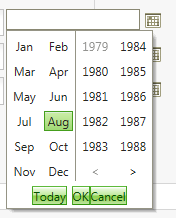
Why does the RadCalendar and the RadMonthyearPicker controls only go back to 2004?
Is there some way to set them to go back further?
http://i67.photobucket.com/albums/h292/Athono/programming/only_zps1b8fcb7d.png?t=1376946577
Is there some way to set them to go back further?
http://i67.photobucket.com/albums/h292/Athono/programming/only_zps1b8fcb7d.png?t=1376946577