Mail Merge
Mail merge produces personalized documents from a template that contains fixed content and placeholders. The placeholders are merge fields. During the merge process, RadWordsProcessing replaces each placeholder with content from a data source.
Inserting Merge Fields
Merge fields are field elements that you can add to a template document through the InsertField() method of RadFlowDocumentEditor. The method requires the field code and the result that is shown in the template before you run mail merge.
The code snippet in Example 1 shows how to initialize a RadFlowDocumentEditor instance and insert a merge field.
Example 1: Create a RadFlowDocumentEditor and insert a MERGEFIELD for FirstName
RadFlowDocument document = new RadFlowDocument();
RadFlowDocumentEditor editor = new RadFlowDocumentEditor(document);
editor.InsertField("MERGEFIELD FirstName", "");
You can also add a field to a Paragraph manually. Create a FieldInfo instance, then place its start, code, separator, result, and end in the block. Example 2 shows this approach.
Example 2: Manually construct a MERGEFIELD for LastName with FieldInfo
Paragraph paragraph = new Paragraph(document);
document.Sections.First().Blocks.Add(paragraph);

FieldInfo field = new FieldInfo(document);

paragraph.Inlines.Add(field.Start);
paragraph.Inlines.AddRun("MERGEFIELD LastName");
paragraph.Inlines.Add(field.Separator);
paragraph.Inlines.AddRun("");
paragraph.Inlines.Add(field.End);
Performing Mail Merge
To perform mail merge, call the MailMerge() method of RadFlowDocument. The method accepts an IEnumerable collection of data records.
During the operation, each MergeField is replaced with the corresponding value from the current data record in a new RadFlowDocument instance. If the data source contains multiple records, the method appends each result to the returned document. The original template remains unchanged.
Example 3 shows a sample data source.
Example 3: Define a sample mail-merge data source with FirstName and LastName values
List<MailMergeRecord> mailMergeDataSource = new List<MailMergeRecord>()
    {
        new MailMergeRecord()
        {
FirstName = "Andrew",
LastName = "Fuller"
        },
        new MailMergeRecord()
        {
        FirstName = "Nancy",
LastName = "Davolio"
        },
    };
        }


     public class MailMergeRecord
        {
public string FirstName { get; set; }
public string LastName { get; set; }
        }
Example 4 performs the mail merge operation over a previously defined template document using the data source from Example 3.
Example 4: Run MailMerge over the template document with the sample data source
RadFlowDocument mailMergeResult = document.MailMerge(mailMergeDataSource);Nested Mail Merge
The nested mail merge feature is available starting with R1 2022. Use it when your data source contains nested data. For example, a business object can contain a collection of child objects, and nested mail merge lets you access their properties. To reference the child objects, declare one of these group tag pairs:
BeginGroup/EndGroupTableStart/TableEndRangeStart/RangeEndGroupStart/GroupEnd
All tag pairs work the same way. Multiple options exist to improve document readability.
When a table row has only one cell, using
TableStart/TableEndaround the whole cell content creates a new row for each value. The other tag pairs keep the values on the same row inside that cell.
A single cell (spanning the whole row) with TableStart/TableEnd tags:
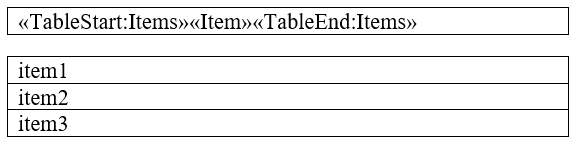
A single cell (spanning the whole row) with a tag group different than TableStart/TableEnd:

The following example shows how to use nested mail merge.
First, define a data source that contains an IEnumerable collection of objects.
Example 5: Define a nested mail-merge data source with teams and player collections
public List<Team> GetTeams()
{
    var teams = new List<Team>();
    var team1 = new Team();
    team1.TeamName = "Team 1";
    team1.Players.Add(new Player() { FirstName = "John", LastName = "Baker" });
    team1.Players.Add(new Player() { FirstName = "Sam ", LastName = "Wayne" });
    teams.Add(team1);

    var team2 = new Team();
    team2.TeamName = "Team 2";
    team2.Players.Add(new Player() { FirstName = "Patrick", LastName = "Gibbs" });
    team2.Players.Add(new Player() { FirstName = "Oscar", LastName = "Stevens" });
    teams.Add(team2);

    return teams;
}

public class Team
{
    public string TeamName { get; set; }

    public List<Player> Players { get; set; }

    public Team()
    {
        this.Players = new List<Player>();
    }
}
public class Player
{
    public string FirstName { get; set; }
    public string LastName { get; set; }
}
Then, add the fields by using one of the supported group tag pairs. In this example, the fields are added to the table with TableStart/TableEnd. This is not required, and you can use any supported tag pair.
Example 6: Build a table-based nested mail-merge template and merge team and player data
RadFlowDocument document = new RadFlowDocument();
RadFlowDocumentEditor editor = new RadFlowDocumentEditor(document);

editor.InsertParagraph();
editor.InsertField("MERGEFIELD TeamName", "");
editor.InsertParagraph();
editor.InsertText("Players:");

var playersTable = editor.InsertTable(2, 2);
playersTable.PreferredWidth = new TableWidthUnit(TableWidthUnitType.Percent, 100);
document.StyleRepository.AddBuiltInStyle(BuiltInStyleNames.TableGridStyleId);
playersTable.StyleId = BuiltInStyleNames.TableGridStyleId;

playersTable.Rows[0].Cells[0].Blocks.AddParagraph().Inlines.AddRun("First Name");
playersTable.Rows[0].Cells[1].Blocks.AddParagraph().Inlines.AddRun("Last Name");

var firstNameParagraph = playersTable.Rows[1].Cells[0].Blocks.AddParagraph();
editor.MoveToParagraphStart(firstNameParagraph);
editor.InsertField("MERGEFIELD TableStart:Players", "");
editor.InsertField("MERGEFIELD FirstName", "");

var lastNameParagraph = playersTable.Rows[1].Cells[1].Blocks.AddParagraph();
editor.MoveToParagraphStart(lastNameParagraph);
editor.InsertField("MERGEFIELD LastName", "");
editor.InsertField("MERGEFIELD TableEnd:Players", "");

RadFlowDocument mailMergeResult = document.MailMerge(GetTeams());
Single-Row and Multiline Mail Merge
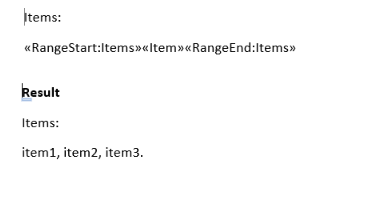
With the nested mail merge feature, you can add all items to a single line. Add the group and regular fields to a single paragraph.
Figure 1: Mail merge on a single row and the results
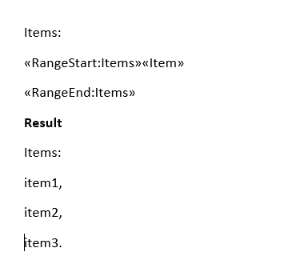
To separate the items into several rows, close the group on the next row.
Figure 2: Mail merge on multiple rows and the results
See Also
- Working with Fields
- Merge Field
- RadFlowDocument
- Hiding MailMerge Line in Output Word Document If Blank
- Inserting Images using Mail Merge
- Populate a Table with Data using Nested Mail Merge Functionality
- Generating a Word Document Template with Data Using MailMerge in RadWordsProcessing
- How to Remove a MERGEFIELD While Replacing the Placeholders with Values in RadWordsProcessing
- Performing Nested MailMerge with Multiple Levels in RadWordsProcessing
- Simulating Mail Merge with HTML content by Utilizing the Find and Replace Functionality
- Mail Merge with HTML Formatted Strings in RadWordsProcessing