New to Telerik Document Processing? Start a free 30-day trial
Simulating Mail Merge with Formatted HTML Content by Using the Find and Replace Functionality
Updated on Jun 9, 2026
Environment
| Version | Product | Author |
|---|---|---|
| 2025.2.520 | RadWordProcessing | Desislava Yordanova |
Description
This article shows how to simulate mail merge when formatted HTML content needs to replace placeholders in a DOCX template. When you perform a mail merge, the RadWordsProcessing library binds plain HTML text instead of rendering the HTML with its original formatting.
Solution
To insert the formatted HTML content, use the Find-and-Replace functionality instead. Replace placeholders with the styled HTML content by following these steps:
-
Import the HTML content using HtmlFormatProvider.
-
Import the DOCX template using DocxFormatProvider.
-
Find placeholders in the template and replace them with the imported HTML content.
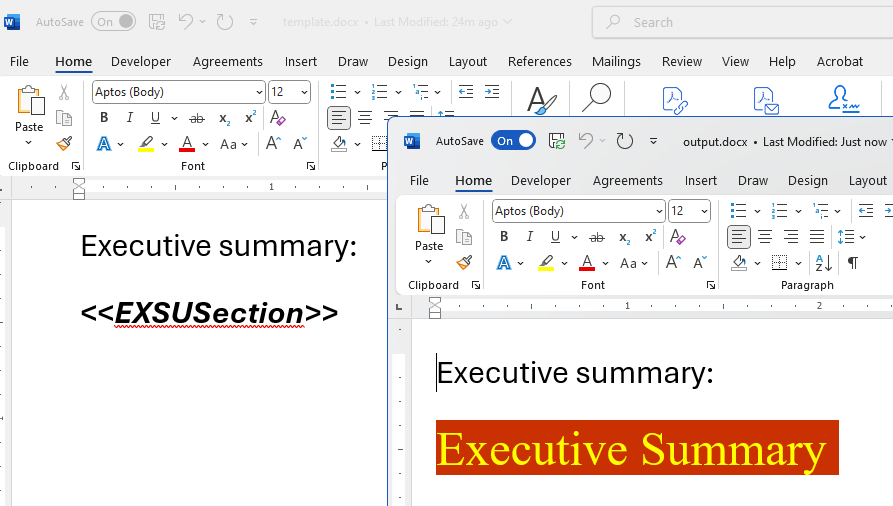
Code Example
csharp
// Import HTML content
RadFlowDocument htmlFlowDocument;
using (Stream input = File.OpenRead(@"info.html"))
{
    Telerik.Windows.Documents.Flow.FormatProviders.Html.HtmlFormatProvider htmlProvider = new Telerik.Windows.Documents.Flow.FormatProviders.Html.HtmlFormatProvider();
    htmlFlowDocument = htmlProvider.Import(input, TimeSpan.FromSeconds(10));
}

// Import DOCX template
RadFlowDocument templateFlowDocument;
Telerik.Windows.Documents.Flow.FormatProviders.Docx.DocxFormatProvider docxProvider = new Telerik.Windows.Documents.Flow.FormatProviders.Docx.DocxFormatProvider();

using (Stream input = File.OpenRead("template.docx"))
{
    templateFlowDocument = docxProvider.Import(input, TimeSpan.FromSeconds(10));
}

// Replace placeholder with HTML content
List<BlockBase> newContent = new List<BlockBase>();
RadFlowDocumentEditor editor = new RadFlowDocumentEditor(templateFlowDocument);

foreach (Section section in htmlFlowDocument.Sections)
{
    Section clonedSection = section.Clone(templateFlowDocument);
    newContent.AddRange(clonedSection.Blocks);
}

editor.ReplaceText("<<EXSUSection>>", newContent, true, false);

// Export the modified document
string outputFilePath = "output.docx";
File.Delete(outputFilePath);
using (Stream output = File.OpenWrite(outputFilePath))
{
    docxProvider.Export(templateFlowDocument, output, TimeSpan.FromSeconds(10));
}

// Open the output file
Process.Start(new ProcessStartInfo() { FileName = outputFilePath, UseShellExecute = true });
Notes
- Replace
<<EXSUSection>>with your placeholder text. - Modify the code to suit your template and requirements.
- Ensure the provided HTML content is supported by
HtmlFormatProvider.