New to Telerik Document Processing? Start a free 30-day trial
Mail Merge with HTML Formatted Strings in RadWordsProcessing
Updated on Jun 5, 2026
Environment
| Version | Product | Author |
|---|---|---|
| 2026.1.210 | RadWordsProcessing | Yoan Karamanov |
Description
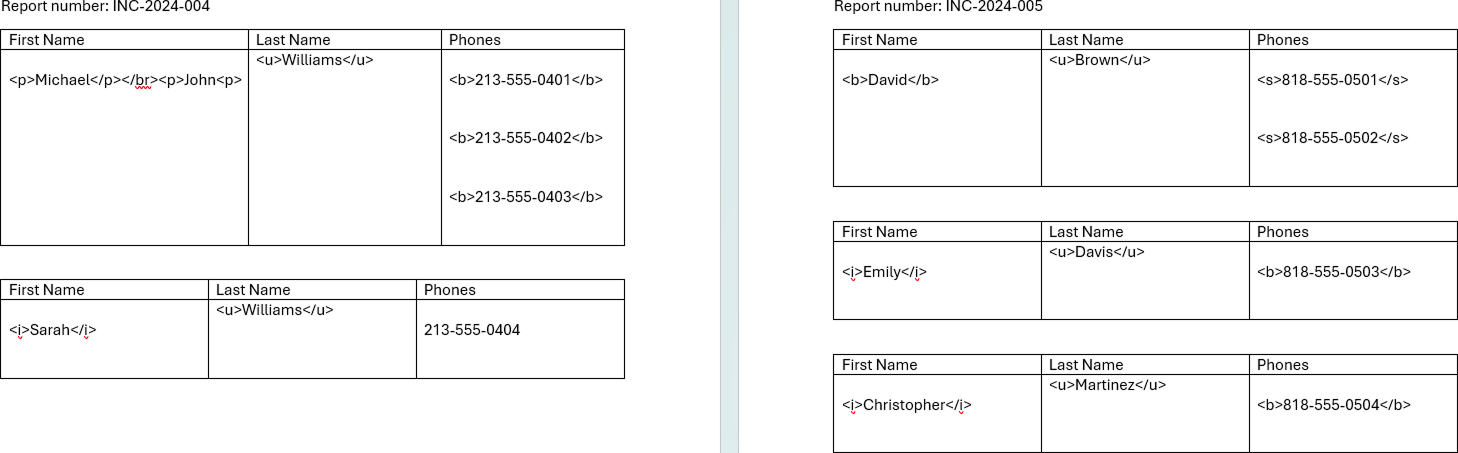
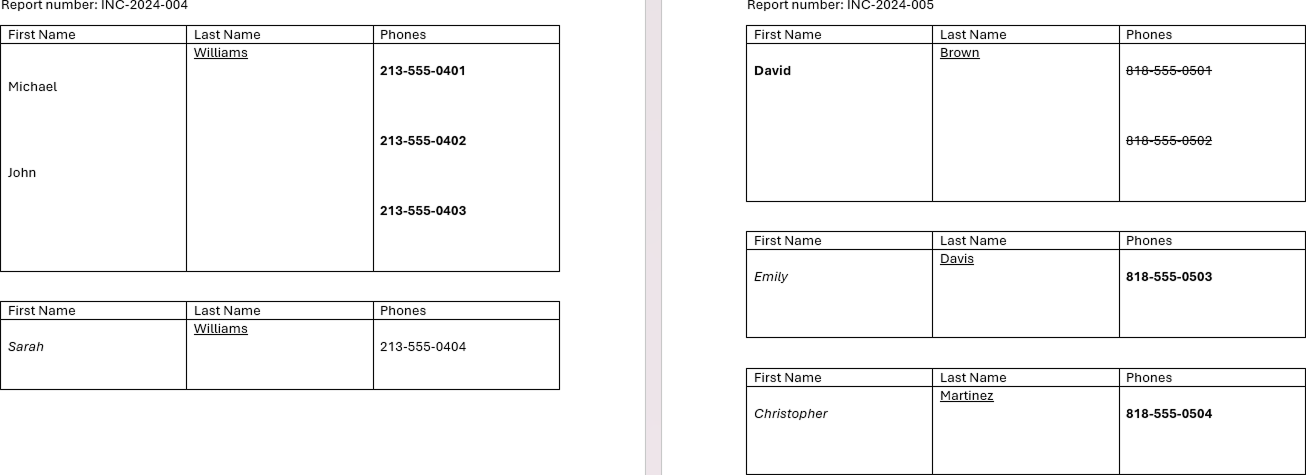
When you perform a Mail Merge operation with a DOCX template, the merge data may include HTML formatted strings. By default, the library does not parse these HTML strings and displays them as raw text in the result document after the mail merge. However, you can process and parse these HTML strings to display them with their intended formatting in the final document.
Without HTML Parsing:
With HTML Parsing:
Solution
The solution involves importing the HTML formatted strings as separate RadFlowDocument instances with the HtmlFormatProvider, then replacing the original HTML text with the parsed content.
The following example shows the complete workflow:
- Import the template document with DocxFormatProvider
- Perform the mail merge operation with data that contains HTML strings
- Iterate through all table cells in the merged document
- Detect lines that contain HTML tags (use regex to find "<" or ">")
- Import each HTML string as a separate document with HtmlFormatProvider
- Replace the raw HTML text with the parsed content with RadFlowDocumentEditor
- Export the final document
The implementation can vary depending on the template document structure and the HTML content.
Empty Template Document
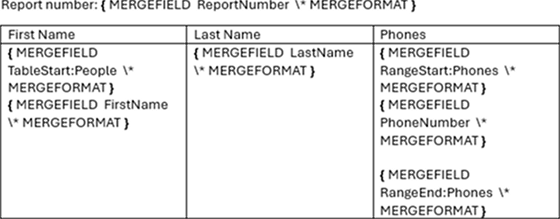
Example 1: Mail Merge with HTML Formatted Strings
csharp
using System;
using System.Collections.Generic;
using System.Diagnostics;
using System.IO;
using System.Linq;
using System.Text.RegularExpressions;
using Telerik.Windows.Documents.Flow.FormatProviders.Docx;
using Telerik.Windows.Documents.Flow.FormatProviders.Html;
using Telerik.Windows.Documents.Flow.Model;
using Telerik.Windows.Documents.Flow.Model.Editing;

var mergeData = new List<Incident>{
    new Incident{
        ReportNumber = "INC-2024-004",
        People = new List<Person>{
            new Person{
                FirstName = "<p>Michael</p></br><p>John<p>",
                LastName = "<u>Williams</u>",
                Phones = new List<Phone>{
                    new Phone{ PhoneNumber = "<b>213-555-0401</b>" },
                    new Phone{ PhoneNumber = "<b>213-555-0402</b>" },
                    new Phone{ PhoneNumber = "<b>213-555-0403</b>" }
                }
            },
            new Person{
                FirstName = "<i>Sarah</i>",
                LastName = "<u>Williams</u>",
                Phones = new List<Phone>{
                    new Phone{ PhoneNumber = "213-555-0404" }
                }
            }
        }
    },
    new Incident{
        ReportNumber = "INC-2024-005",
        People = new List<Person>{
            new Person{
                FirstName = "<b>David</b>",
                LastName = "<u>Brown</u>",
                Phones = new List<Phone>{
                    new Phone{ PhoneNumber = "<s>818-555-0501</s>" },
                    new Phone{ PhoneNumber = "<s>818-555-0502</s>" }
                }
            },
            new Person{
                FirstName = "<i>Emily</i>",
                LastName = "<u>Davis</u>",
                Phones = new List<Phone>{
                    new Phone{ PhoneNumber = "<b>818-555-0503</b>" }
                }
            },
            new Person{
                FirstName = "<i>Christopher</i>",
                LastName = "<u>Martinez</u>",
                Phones = new List<Phone>{
                    new Phone{ PhoneNumber = "<b>818-555-0504</b>" }
                }
            }
        }
    }
};

RadFlowDocument template;
DocxFormatProvider docxFormatProvider = new DocxFormatProvider();

using (Stream input = File.OpenRead("template.docx"))
{
    template = docxFormatProvider.Import(input, null);
}

RadFlowDocument mailMergeResult = template.MailMerge(mergeData);
RadFlowDocumentEditor htmlEditor = new RadFlowDocumentEditor(mailMergeResult);
var tables = mailMergeResult.EnumerateChildrenOfType<Table>();

var regex = new Regex(@"[<>]");

HtmlFormatProvider htmlFormatProvider = new HtmlFormatProvider();

// Iterate all table lines of text
foreach (Table table in tables)
{
    foreach (TableRow row in table.Rows)
    {
        foreach (TableCell cell in row.Cells)
        {
            foreach (var block in cell.Blocks.ToList())
            {
                var paragraph = block as Paragraph;

                if (paragraph != null)
                {
                    foreach (var inline in paragraph.Inlines.ToList())
                    {
                        string line = inline.ToString();

                        // If line contains "<" or ">", treat it as HTML and import it as an HTML document
                        if (regex.IsMatch(line))
                        {
                            RadFlowDocument htmlDocument = htmlFormatProvider.Import(line, TimeSpan.FromSeconds(10));

                            // Clear the paragraph of the original line and insert the new fomatted HTML document
                            paragraph.Inlines.Clear();
                            htmlEditor.MoveToParagraphEnd(paragraph);
                            htmlEditor.InsertDocument(htmlDocument);
                        }
                    }
                }
            }
        }
    }
}

string docxOutputPath = "output.docx";
using (Stream output = File.OpenWrite(docxOutputPath))
{
    docxFormatProvider.Export(mailMergeResult, output, TimeSpan.FromSeconds(20));
}

var psi = new ProcessStartInfo()
{
    FileName = docxOutputPath,
    UseShellExecute = true
};
Process.Start(psi);

public class Incident
{
    public string ReportNumber { get; set; }
    public List<Person> People { get; set; }
}

public class Person
{
    public string FirstName { get; set; }
    public string LastName { get; set; }
    public List<Phone> Phones { get; set; }
}

public class Phone
{
    public string PhoneNumber { get; set; }
}