MergeField Field
MergeField is a Field element that contains a reference to a data field by its name. When you mail merge a template document with the values from a data source, the data field information replaces the merge field. For more information on the mail merge feature, see the Mail Merge article.
Field Syntax
The following table shows the syntax of a Merge field:
| Syntax |
|---|
| { MERGEFIELD FieldName [Switches]} |
Figure 1 shows the syntax of a Merge field code.
Figure 1: Merge Field Code Syntax
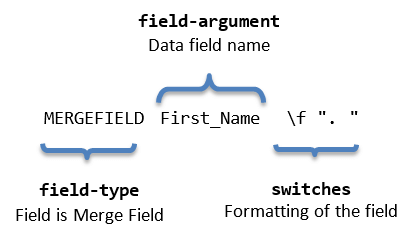
"FieldName"
The name of a data field listed in the header record of the selected data source. The field name must exactly match the field name in the header record.
Switches
Switches allow the code fragment to specify formatting for the result of the field. More information is available in the Syntax and Switches section of the Fields article.
The possible switches for a Merge field are:
| Switch | Description |
|---|---|
| @ "Date-Time Picture" | Specifies a date format different from the default format. |
| \* Format Switch | Specifies the appearance of the number if different from the default format. |
| \b | Specifies text that is inserted before the Merge Field if the field is not blank. |
| \f | Specifies text that is inserted after the Merge Field if the field is not blank. |
| \m | Specifies that the MergeField field is a mapped field. |
| \v | Enables character conversion for vertical formatting. |
Inserting
You can insert a Merge field through the InsertField() method of RadFlowDocumentEditor. The method accepts code as the first argument and result as the second argument.
Example 1: Insert a MERGEFIELD that targets the First_Name data field
editor.InsertField("MERGEFIELD First_Name", "«to be updated»");Example 2: Insert a MERGEFIELD with prefix and suffix text switches
editor.InsertField("MERGEFIELD First_Name \\b \"Mr. \" \\f \". \"", "«to be updated»");Example 3: Insert a MERGEFIELD that formats a date value with a date-time picture switch
editor.InsertField("MERGEFIELD Date_Time \\@ \"MM/dd/yy\"", "«to be updated»");After updating the field, the result is "05/13/21".