New to Telerik Document Processing? Start a free 30-day trial
Inserting Images using Mail Merge
Updated on Jun 5, 2026
Environment
| Version | Product | Author |
|---|---|---|
| 2024.1.124 | RadWordsProcessing | Desislava Yordanova |
Description
To insert images into a merge field using Mail Merge in RadWordsProcessing, follow these steps:
- Use specific text as a placeholder for the image in your DOCX template.
- Use the Find and Replace functionality to insert the image.
Solution
The following code snippet demonstrates how to replace the placeholder text with an image using RadWordsProcessing:
csharp
static void Main(string[] args)
{
    string placeHolder = "image_field";
    RadFlowDocument document = new RadFlowDocument();
    RadFlowDocumentEditor editor = new RadFlowDocumentEditor(document);
    editor.InsertField("MERGEFIELD Name", "");
    editor.InsertParagraph();
    editor.InsertField("MERGEFIELD Photo", "");

    List<MailMergeRecord> mailMergeDataSource = new List<MailMergeRecord>() { new MailMergeRecord() { Name = "My Name", Photo = placeHolder } };
    RadFlowDocument mailMergeResult = document.MailMerge(mailMergeDataSource);

    editor = new RadFlowDocumentEditor(mailMergeResult);

    // Replace
    ImageInline imageInline = new ImageInline(mailMergeResult);
    byte[] data = File.ReadAllBytes(@"..\..\ProgressNinjas.png");
    imageInline.Image.ImageSource = new ImageSource(data, "png");
    imageInline.Image.Size = new System.Windows.Size(100, 100);

    editor.ReplaceText(placeHolder, imageInline, true, true);
    DocxFormatProvider provider = new DocxFormatProvider();

    string originalFilePath = @"..\..\\original.docx";
    string mergedFilePath = @"..\..\merged.docx";
    File.Delete(originalFilePath);
    File.Delete(mergedFilePath);
    using (Stream output = File.OpenWrite(originalFilePath))
    {
        provider.Export(document, output);
    }
    using (Stream output = File.OpenWrite(mergedFilePath))
    {
        provider.Export(mailMergeResult, output);
    }
    Process.Start(mergedFilePath);
}

public class MailMergeRecord
{
    public MailMergeRecord()
    { }
    public string Name { get; set; }
    public string Photo { get; set; }

}
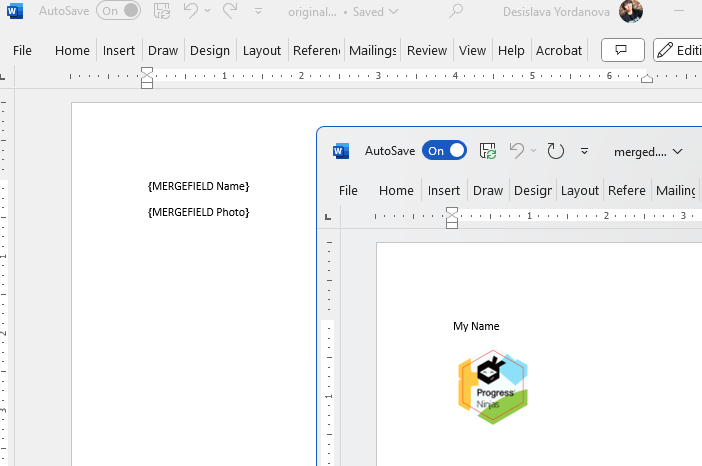
The following image shows the achieved result: