
SCIM Provisioning for DevCraft Subscriptions: Automating License Management for Your Teams

Summarize with AI:
Progress DevCraft Complete and DevCraft Ultimate subscription licenses just got a whole lot easier to manage across your team with SCIM provisioning.
Managing access across growing development teams can quickly become time-consuming when done manually.
That’s why we’re introducing System for Cross-domain Identity Management (SCIM) for Progress DevCraft Complete and DevCraft Ultimate subscription licenses, along with Fiddler and ThemeBuilder Enterprise licenses—bringing automated license seat management directly into your organization’s Identity Provider.
If SSO simplified how your team signs in, SCIM extends that experience by automating how access is assigned and maintained.
👉 If you haven’t set up SSO yet, follow the steps in our SSO guide.
What Is SCIM and Why It Matters
For customers using DevCraft Complete and Ultimate subscription licenses, as well as Fiddler and ThemeBuilder Enterprise licenses, SCIM allows license access to be managed directly through your organization’s Identity Provider (IdP), such as Microsoft Entra ID or Okta.
Instead of managing users separately in Telerik, access becomes part of your existing internal processes. When developers are assigned to the right group in your IdP, they automatically receive access to their DevCraft subscription. When they are removed, their access is updated accordingly.
This helps organizations:
- Keep license access aligned with internal systems
- Eliminate manual seat management
- Reduce the risk of unused or outdated assignments
👉 Your Identity Provider becomes the single place to manage access to your licenses.
How to Set It Up
SCIM builds on top of SSO and is designed to be quick to configure.
1. Enable SSO
SCIM requires SSO to be already configured for your domain.
If you haven’t enabled it yet, follow the steps in our SSO guide.
2. Open SCIM Setup in Your Telerik Account
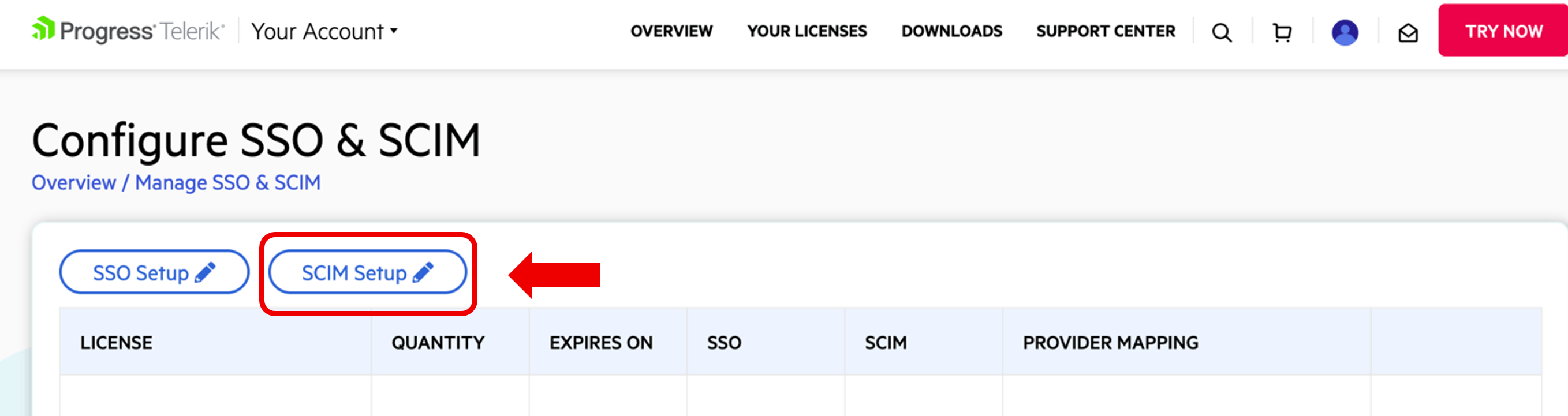
- Go to Manage SSO and SCIM in your Telerik account.
- Click on SCIM Setup.
3. Generate Your SCIM Key
In the SCIM Setup screen:
- Copy the SCIM URL and use it when configuring your Identity Provider.
- Add a Key Note that should help differentiate your keys in the future.
- Generate and copy the SCIM API key and Finish Setup
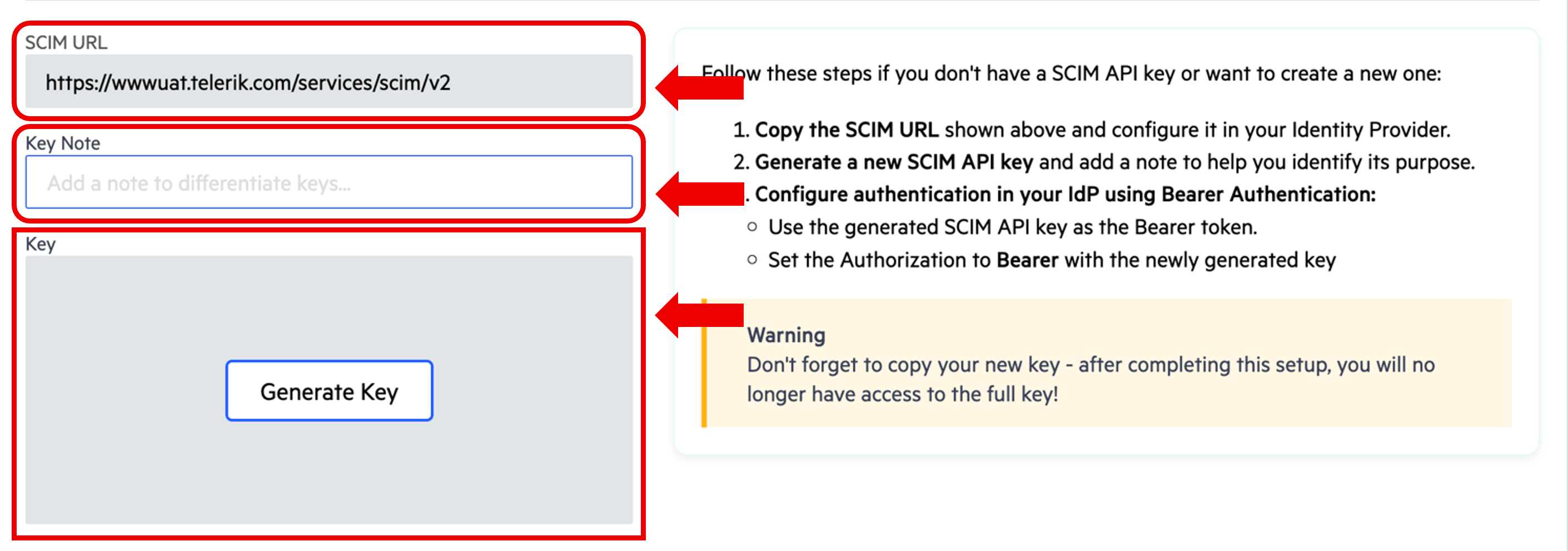
⚠️ Important: Please copy the key, as once the setup is complete, you will no longer have access to the full key.
The generated SCIM API Key will be used as a Bearer authentication token in your IdP.
4. Configure SCIM in Your Identity Provider and Create IdP Group
This step connects your Identity Provider with Telerik, allowing it to send user and group updates automatically.
In your Identity Provider (for example, Okta):
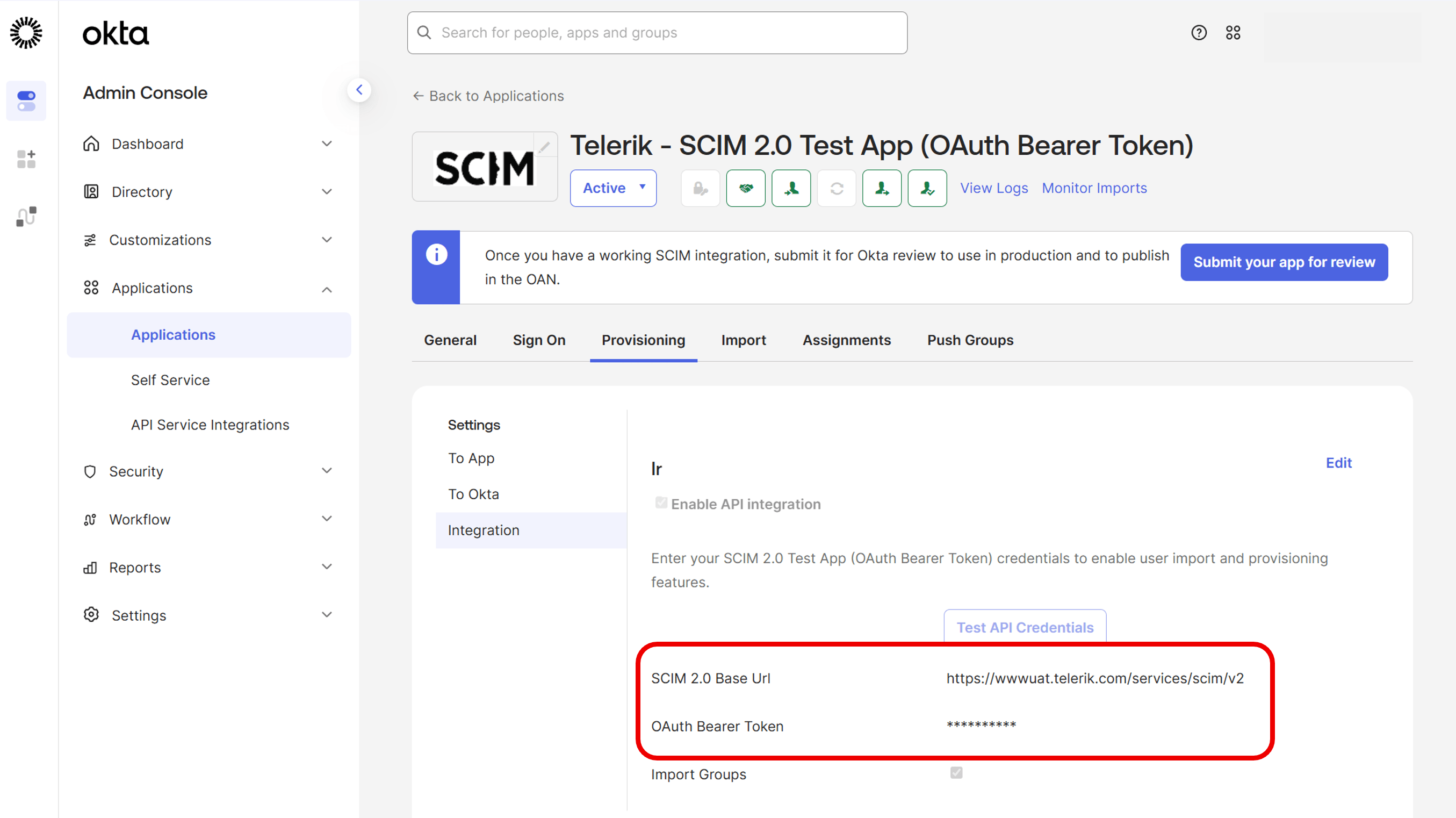
- Add the Telerik SCIM URL.
- Use the generated API key for authentication.
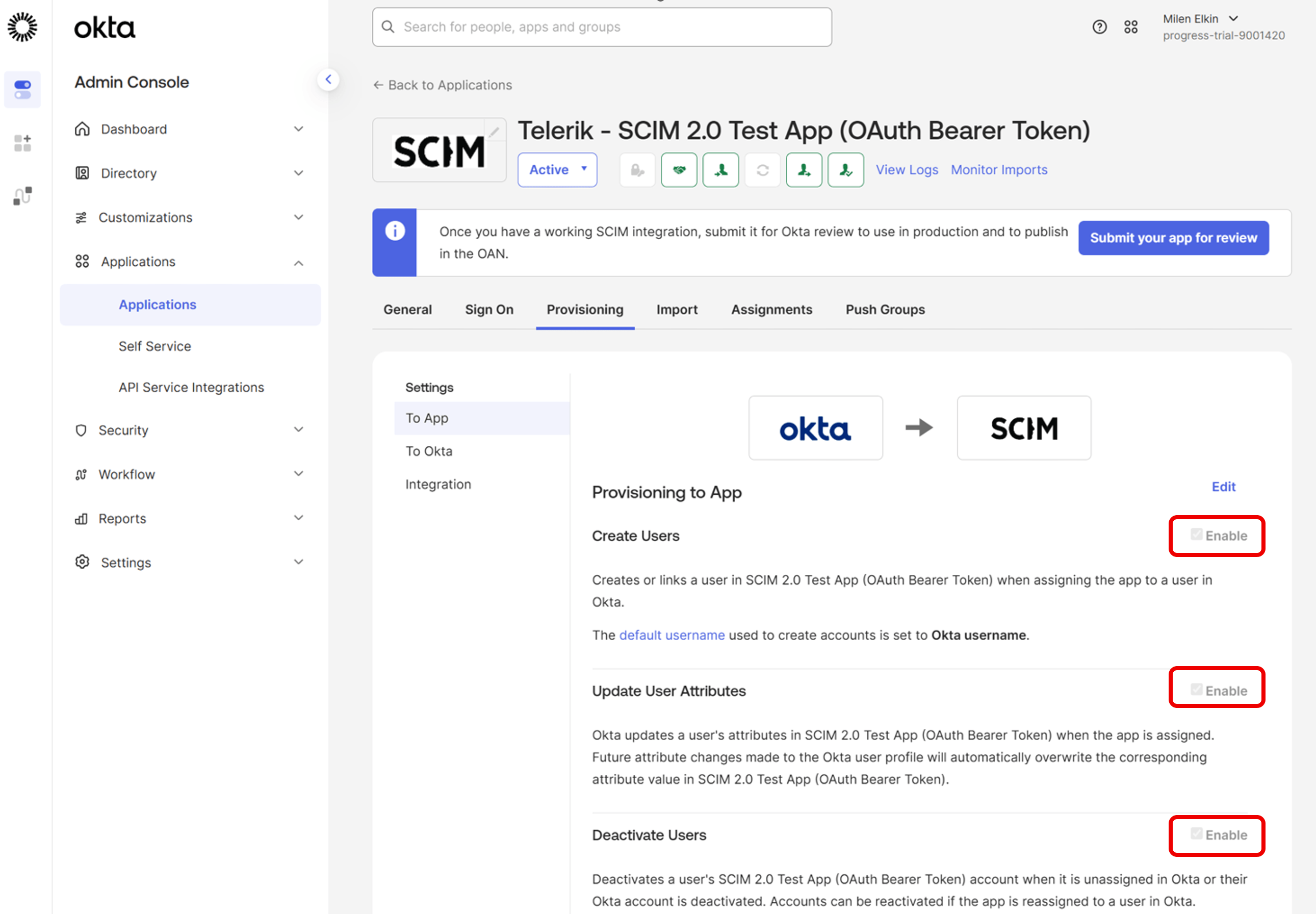
- Enable provisioning—verify the Create, Update and Deactivate are enabled.
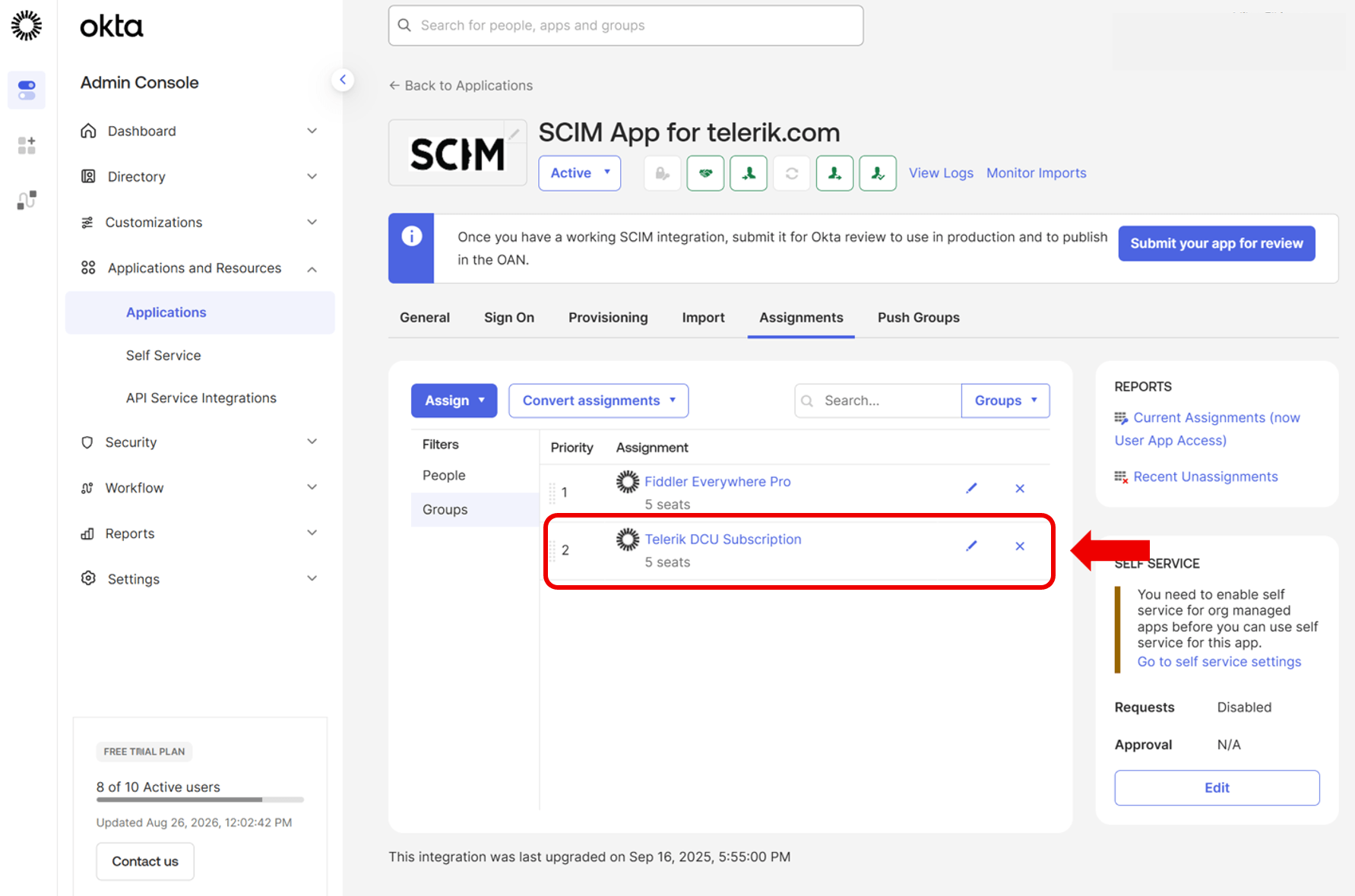
- Create an IdP group with a clear and distinctive name that corresponds to your license, e.g. “Telerik DCU Subscription,” and begin adding users to it. If your Telerik license already has seated users assigned, make sure to include those users in the IdP group before enabling SCIM provisioning.
Once SCIM provisioning is enabled, all users in the selected IdP group will be synchronized with the associated license. If developers are already assigned to a Telerik license but the corresponding IdP group is empty, the license assignments will be updated to match the IdP group membership, which will remove all currently assigned developers. To avoid any disruption, verify that the users in the IdP group match the existing Telerik license assignments before enabling SCIM provisioning. ⚠️
5. Enable Provisioning and Map Your DevCraft License to Your IdP Group
In Manage SSO & SCIM in Your Account:
- Identify your DevCraft Complete or Ultimate subscription license that you want to enable the SCIM feature, and click on Configure.
- Enable SCIM Provisioning.
- Once SCIM provisioning is configured and enabled, an IdP Group Name dropdown will become available, allowing you to select the group configured in your identity provider.
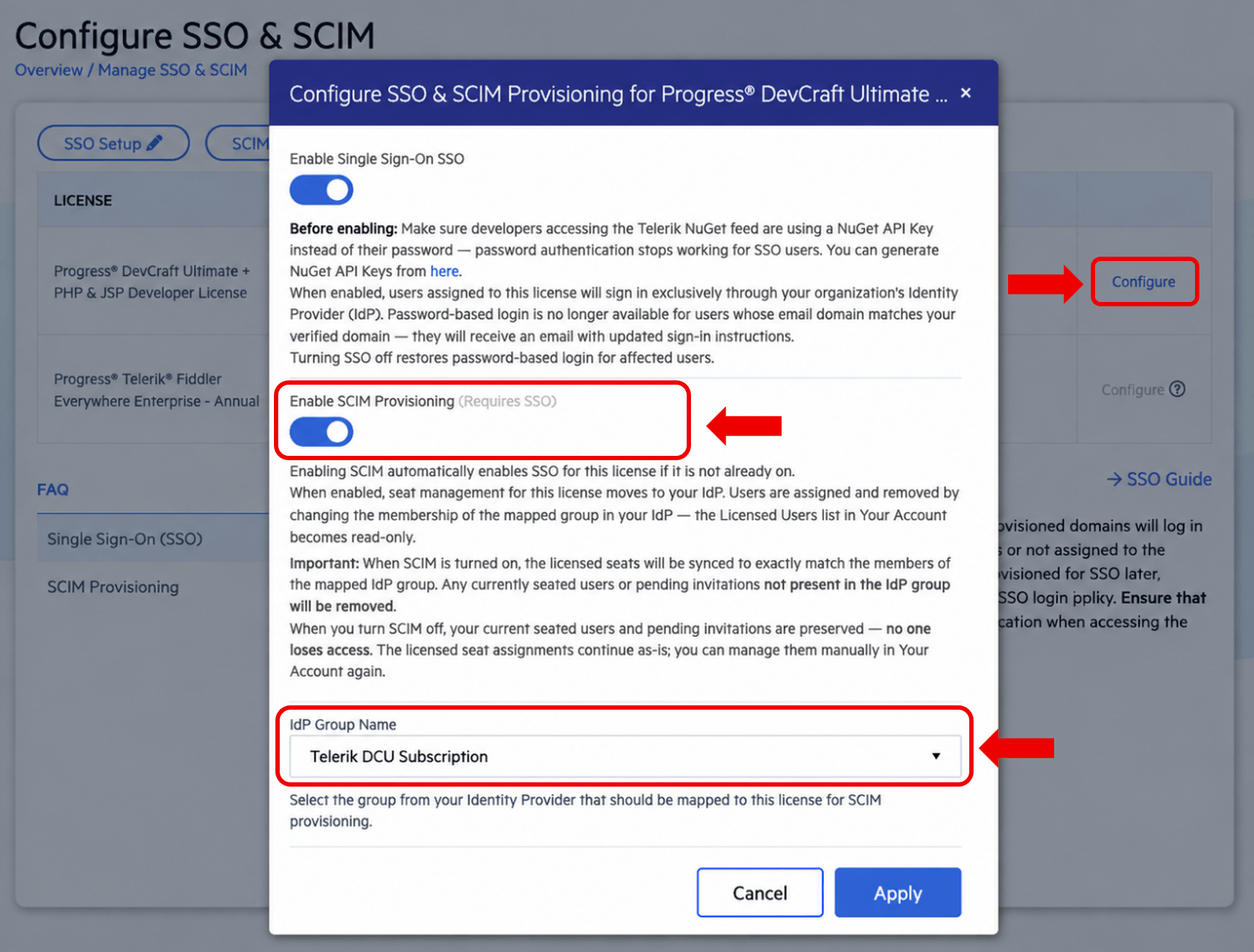
👉 From this point on, access is controlled through group membership in your Identity Provider.
6. Verify User Synchronization
After completing the setup, you can verify that the configuration is correct and that users are syncing as expected from the Licensed Users view.
- Users added to the mapped IdP group will start appearing automatically.
- Existing users (with Telerik accounts) should show as Assigned, and can continue signing in via SSO as before.
- New users (without a Telerik account) will appear with an Invited status. They will receive an email invitation. They need to complete their account setup on their first login.
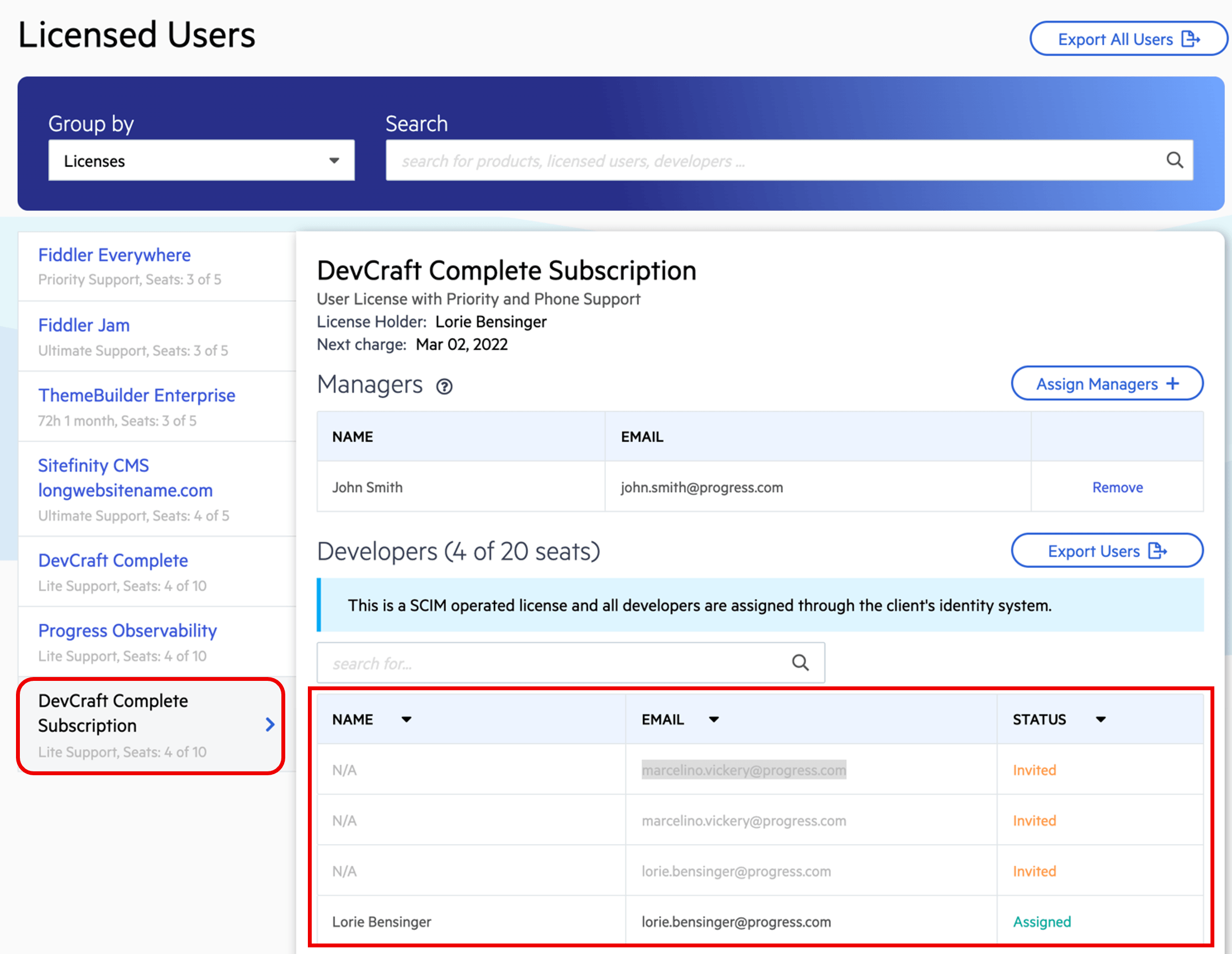
👉 This handles both new and existing users seamlessly.
What Happens After SCIM Is Enabled?
Once SCIM is enabled for your license, access management becomes fully automated.
User access is driven entirely by group membership in your Identity Provider, while Telerik reflects those changes automatically. New users are guided through a simple onboarding experience at login, and the Licensed Users view becomes read-only for visibility and reporting.
👉 There’s no need to manually manage seats in Telerik.-Your Identity Provider handles all updates.
Bring Automated Access to Your Telerik Licenses
SCIM makes it easier to manage access to your licenses by extending your existing identity management into license management.
Once combined with SSO, it provides a smooth experience where both authentication and access are handled together—directly from your Identity Provider.
Whether you’re looking to reduce manual work, keep access aligned with your organization or scale more efficiently as your team grows, SCIM is designed to help you get there!
Head to the Manage SSO and SCIM page now to get started.

Dragan Grigorov
Dragan is a Senior Technical Support Engineer Lead who enjoys helping customers and solving complex challenges. He takes a practical, solution-focused approach to every situation. Outside of work, he enjoys spending time with his family, traveling, playing sports and reading comic books.