OG Image Generation in AnalogJS

Summarize with AI:
AnalogJS can now generate custom OG Images in Angular on the server for dynamic image sharing.
You may not know it, but Vercel released a package for Next.js called @vercel/og. It is unfortunately not open-source, but almost every framework has implemented their own version using Satori under the hood.
TL;DR
Analog now has the ability to generate OG Images in Angular on the server for SEO purposes. You can customize them and generate them on the spot. While they only work in Node environments and have limited CSS capabilities, they are extremely useful and great for dynamic image sharing.
What Is an OG Image?
The Open Graph Protocol is an HTML pattern that allows you to describe your webpage in the meta tags for better search engine optimization.
<meta property="og:image" content="https://ia.media-imdb.com/images/rock.jpg" />
When you create an image for each webpage, you allow preview images to be displayed. You can test a website with tools like Open Graph Preview.
📝 You can also add data with Twitter Cards and Schema.org images.
Twitter Card
<meta name="twitter:card" content="summary_large_image">
<meta name="twitter:title" content="Learn Latin with Interactive Flashcards">
<meta name="twitter:description" content="Build your Latin vocabulary through smart, progressive flashcards.">
<meta name="twitter:image" content="https://example.com/images/latin-flashcards.jpg">
<meta name="twitter:image:alt" content="Latin flashcards with English translations">
Schema.org
Or JSON-LD for schemas:
{
  "@context": "https://schema.org",
  "@type": "WebPage",
  "name": "How to Make French Toast",
  "url": "https://example.com/french-toast",
  "image": "https://example.com/images/french-toast.jpg",
  "description": "A simple guide to making delicious French toast.",
  "author": {
    "@type": "Person",
    "name": "Jane Doe"
  }
}
Angular Image Directive
If you have an image on the site that can be created with CSS or Tailwind, you may also want to use it to generate dynamic images using the Angular Image Directive.
Satori
Vercel created a library called Satori, which converts HTML, CSS and Tailwind to an SVG image. It is a beautiful module, and it can run anywhere. However, it does not do every CSS function, nor does it convert the SVG to a PNG file, which requires rasterization. You must build a mini-canvas to convert the raw pixel data to PNG or JPG buffer. OG image parsers prefer PNG or SVG images.
Vercel OG
Vercel created a wrapper for this project. Unfortunately, it is not open-source and it only works on Next.js. It also uses JSX instead of pure HTML. However, there have been several implementations for it, including this one for AnalogJS.
Installation
First, install AnalogJS. Then install the packages.
npm install satori satori-html sharp --save
Og Image Route
Create the file og-image.ts in /server/routes/api.
import { defineEventHandler, getQuery } from 'h3';
import { ImageResponse } from '@analogjs/content/og';

export default defineEventHandler(async (event) => {
    const fontFile = await fetch(
        'https://cdn.jsdelivr.net/npm/@fontsource/geist-sans/files/geist-sans-latin-700-normal.woff',
    );
    const fontData: ArrayBuffer = await fontFile.arrayBuffer();
    const query = getQuery(event);

const template = `
    <div tw="flex flex-col w-full h-full p-12 items-center text-center justify-center text-white bg-[${query['bgColor'] ?? '#5ce500'}]">
      <h1 tw="flex font-bold text-8xl mb-4 text-black">${query['title'] ?? 'Progress <span class="text-gray-400">Telerik</span>'}</h1>
      <p tw="flex text-5xl mb-12 text-white">${query['description'] ?? 'Kendo UI'}</p>
    </div>
`;

    return new ImageResponse(template, {
        debug: true,
        fonts: [
            {
                name: 'Geist Sans',
                data: fontData,
                weight: 700,
                style: 'normal',
            },
        ],
    });
});
We can pass data from the URL parameters through getQuery. Her we are using three variables:
- title
- description
- bgColor
You can use whatever variables you want. The ImageResponse returns a png image. satori creates an svg and sharp is used to convert the image to a png.
Dynamic Images
Because you can pass parameters, you can create on-the-fly images through the parameters.
<html>
  <head>
    <meta
      property="og:image"
      content="https://your-url.com/api/v1/og-images?title=Developer"
    />
    <meta
      name="twitter:image"
      content="https://your-url.com/api/v1/og-images?title=Developer"
      key="twitter:image"
    />
    ...
  </head>
</html>
Demo
For this example, I am generating several images from the same route. The default route has no parameters.
/api/og-image/api/og-image?title=…/api/og-image?title=…&description=
You can also pass extra fields in the title or description fields like a span.
title=<span%20class='text-red-300'>Kendo+UI</span>
📝 Notice it is HTML encoded.
Request
Since we are generating the image URL first on the server, we need to get the correct URL from the request event. This is important so it can work on any server without changing the URL manually, including on the local machine.
Edit the main.server.ts file to get the request event through provideServerContext.
import 'zone.js/node';
import '@angular/platform-server/init';
import { provideServerContext } from '@analogjs/router/server';

import { AppComponent } from './app/app';
import { config } from './app/app.config.server';
import { renderApplication } from '@angular/platform-server';
import { bootstrapApplication, BootstrapContext } from '@angular/platform-browser';
import { ServerContext } from '@analogjs/router/tokens';

export function bootstrap(context: BootstrapContext) {
  return bootstrapApplication(AppComponent, config, context);
}

export default async function render(
  url: string,
  document: string,
  serverContext: ServerContext,
) {
  const html = await renderApplication(bootstrap, {
    document,
    url,
    platformProviders: [provideServerContext(serverContext)],
  });

  return html;
}
Config
Make sure to turn on ssr and turn off static in the vite.config.ts file.
/// <reference types="vitest" />

import { defineConfig } from 'vite';
import analog from '@analogjs/platform';
import tailwindcss from '@tailwindcss/vite';

// https://vitejs.dev/config/
export default defineConfig(() => ({
  build: {
    target: ['es2020'],
  },
  resolve: {
    mainFields: ['module'],
  },
  plugins: [
    analog({
      ssr: true,
      static: false,
      prerender: {
        routes: [],
      },
      nitro: {
        preset: 'vercel'
      }
    }),
    tailwindcss()
  ],
}));
⚠️ This will NOT work in Bun, Deno, Vercel Edge Functions, nor Cloudflare. Standard Node environments and serverless functions only! Only the Next.js version will correctly compile the large WASM file necessary to convert the SVG to a PNG. Hopefully, the framework developers will get this working for those environments as well. There may be some hacks, but I have never personally succeeded to get it working.
Origin
Next, we need to create a token to get the correct origin URL on the server and browser. I put this in app/lib/utils.ts.
import { injectRequest } from "@analogjs/router/tokens";
import { isPlatformBrowser } from "@angular/common";
import { DOCUMENT, inject, InjectionToken, PLATFORM_ID } from "@angular/core";

export const ORIGIN = new InjectionToken<string>(
  'origin',
  {
    providedIn: 'root',
    factory() {
      // You could hardcode this, or just hydrate the server value
      // This shows you how to derive it dynamically
      const doc = inject(DOCUMENT);
      const platformId = inject(PLATFORM_ID);
      const isBrowser = isPlatformBrowser(platformId);
      const request = injectRequest();
      const host = request?.headers.host;
      const protocol = host?.includes('localhost') ? 'http' : 'https';
      const origin = `${protocol}://${host}`;
      return isBrowser ? doc.location.origin : origin;
    }
  }
);
referer will get the origin from the request event on the server, but we must get rid of the extra / at the end with slice. The can inject a safely usable DOCUMENT token that will not error out on the server. Now we can get the correct base URL in any environment.
Creating the Images
We inject the ORIGIN token to get the correct URL.
import { Component, inject } from '@angular/core';
import { ORIGIN } from '../lib/utils';
import { Meta } from '@angular/platform-browser';

@Component({
  selector: 'app-home',
  standalone: true,
  template: `
  <main class="flex flex-col gap-5 items-center justify-center py-10">
    <h2 class="text-6xl font-semibold">AnalogJS</h2>
    <h3 class="text-4xl font-medium">OG Image Generator</h3>

    <img [src]="img1" alt="Default OG Image" />
    <div class="text-6xl font-semibold">or</div>

    <img [src]="img2" alt="Custom Title & Description" />
    <div class="text-6xl font-semibold">or</div>

    <img [src]="img3" alt="Styled Title, Custom BG" />
  </main>
  `,
})
export default class HomeComponent {

  readonly origin = inject(ORIGIN);
  readonly meta = inject(Meta);

  constructor() {
    this.meta.updateTag({
      name: 'og:image',
      content: this.origin + '/api/og-image'
    });
  }

  img1 = this.origin + '/api/og-image';

  img2 = this.origin + '/api/og-image?title=My%20Custom%20Title&description=My%20Custom%20Description';

  img3 = this.origin + "/api/og-image?title=<span%20class='text-red-300'>Kendo+UI</span>&description=For%20Angular&bgColor=%23eb0249";
}
You can see our images are created dynamically from our server route /api/og-image.
📝 We could have hard-coded the image URLs, but then they would not work automatically if we change servers or if we test on localhost.
Meta
We use the Meta injection to update the meta tag dynamically.
this.meta.updateTag({
  name: 'og:image',
  content: this.origin + '/api/og-image'
});
We could do something similar for any image URLs on the page.
📝 If we updated the header after a fetch or a time consuming JS function, we would need to update the tag in a resolver, or use PendingTasks to wait for the tag to be updated on the server before the server page is rendered.
Bonus SEO Tips
➕ If we want to have the best SEO, we should generate our images for the best image sizes by platform.
- og:image – 1200 x 620
- twitter:image (use summary large) – 1600 x 900
- JSON-LD – 1200 x 620, 1600 x 900, and 1000 x 1500 (for Pinterest)
<head>
  <!-- Primary Meta Tags -->
  <title>Example Page Title</title>
  <meta name="description" content="Short, compelling description for SEO." />

  <!-- Canonical URL -->
  <link rel="canonical" href="https://example.com/your-page" />

  <!-- Open Graph / Facebook -->
  <meta property="og:type" content="website" />
  <meta property="og:url" content="https://example.com/your-page" />
  <meta property="og:title" content="Example Page Title" />
  <meta property="og:description" content="Short, compelling description for SEO." />
  <meta property="og:image" content="https://example.com/images/your-image-1200x630.jpg" />
  <meta property="og:image:width" content="1200" />
  <meta property="og:image:height" content="630" />
  <meta property="og:image:alt" content="Descriptive alt text for your image." />

  <!-- Twitter -->
  <meta name="twitter:card" content="summary_large_image" />
  <meta name="twitter:url" content="https://example.com/your-page" />
  <meta name="twitter:title" content="Example Page Title" />
  <meta name="twitter:description" content="Short, compelling description for SEO." />
  <meta name="twitter:image" content="https://example.com/images/your-image-1600x900.jpg" />
  <meta name="twitter:image:alt" content="Descriptive alt text for your image." />

  <!-- JSON-LD Schema -->
  <script type="application/ld+json">
  {
    "@context": "https://schema.org",
    "@type": "WebPage",
    "name": "Example Page Title",
    "description": "Short, compelling description for SEO.",
    "url": "https://example.com/your-page",
    "image": [
      "https://example.com/images/your-image-1200x630.jpg",
      "https://example.com/images/your-image-1600x900.jpg",
      "https://example.com/images/your-image-1000x1500.jpg"
    ],
    "author": {
      "@type": "Person",
      "name": "John Doe"
    },
    "publisher": {
      "@type": "Organization",
      "name": "Example Company",
      "logo": {
        "@type": "ImageObject",
        "url": "https://example.com/images/logo-512x512.png"
      }
    }
  }
  </script>
</head>
📝 You don’t need to specify the image sizes in JSON-LD.
Result



Testing OG Image
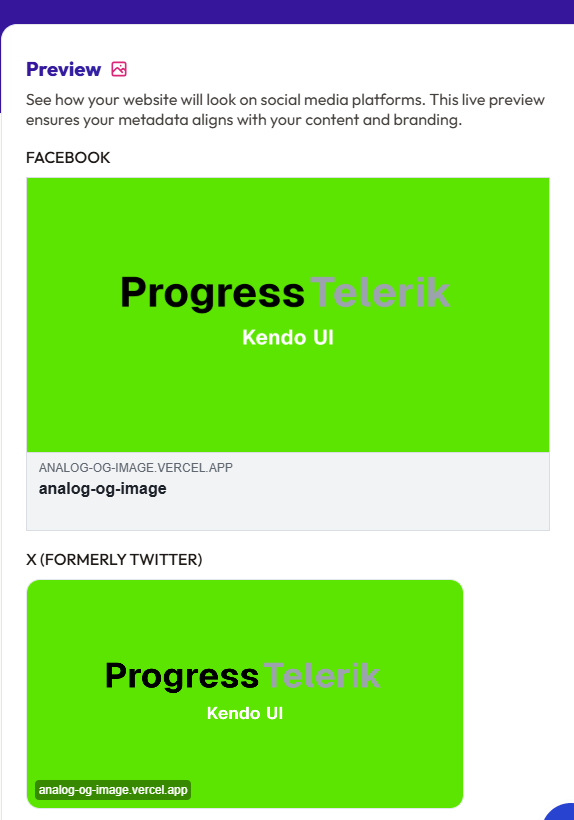
When we test our URL on Open Graph XYZ, we can see it works! Using a plain og:image tag is a minimum for most use cases.
Repo: GitHub
Demo: Vercel Functions
Beautiful dynamic images ready to be used as your preview image.

Jonathan Gamble
Jonathan Gamble has been an avid web programmer for more than 20 years. He has been building web applications as a hobby since he was 16 years old, and he received a post-bachelor’s in Computer Science from Oregon State. His real passions are language learning and playing rock piano, but he never gets away from coding. Read more from him at https://code.build/.
Related Posts
Comments
All articles
Topics
Web MobileMobile
Desktop
Design
Productivity
People