Getting Started with NLP Using Hugging Face Transformers in Python

Summarize with AI:
Learn about natural language processing and explore the Hugging Face Transformers library in Python for tasks like text classification and summarization.
Natural Language Processing (NLP) focuses on enabling computers to understand, analyze and generate human language.
Modern NLP systems are largely powered by transformer architectures, which introduced the self-attention mechanism to model relationships between words regardless of their position in a sentence. This approach significantly improved performance on tasks such as text classification, summarization, translation and question answering, while also enabling models to capture long-range context more efficiently than earlier methods, such as recurrent neural networks (RNNs).
Popular transformer models include:
- BERT (Bidirectional Encoder Representations from Transformers)
- GPT (Generative Pre-trained Transformer)
- RoBERTa
- DistilBERT
- T5
These models are pretrained on massive text datasets and can be fine-tuned for specific NLP tasks.
Hugging Face has become one of the most popular platforms for working with these models, providing easy-to-use tools, pretrained transformer models and Python libraries that allow developers to build powerful NLP applications with minimal code.
In this article, we will explore the basics of NLP using the Hugging Face Transformers library in Python, demonstrating how to implement common tasks such as text classification and text summarization using modern transformer models.
The Hugging Face Transformers library includes thousands of pretrained models that can be easily downloaded and used with just a few lines of Python code.
Key components of the Hugging Face ecosystem include:
- Transformers library for pretrained models
- A dataset library for loading NLP datasets
- Tokenizers for efficient text processing
- Hugging Face Hub for sharing models and datasets
The library supports both PyTorch and TensorFlow, making it flexible for different deep learning workflows.
Setting Up the Environment
In this tutorial, I assume you are new to Python. First, verify that Python is installed on your system. Then run the following commands to check the Python version and create or activate a virtual environment before installing the required dependencies.
python3 --versionpython3 -m venv .venvsource .venv/bin/activate
After that, run the command to install transformers in the project.
pip3 install transformers torch
After that, add requirement.txt file in your project, and add entry:
pandas>=2.0.0
And then again run the command pip3 install -r requirements.txt.
At this point, you have installed all the required dependencies and set up the Python project environment. Now we can start building some NLP pipelines using the libraries we configured.
Text Classification
Text classification is one of the most common NLP tasks. It involves assigning predefined categories to text. Examples include sentiment analysis, spam detection and topic classification.
Using Hugging Face, we can create a text classification model in just a few lines of Python, as shown below.
from transformers import pipeline
import pandas as pd

classifier = pipeline("text-classification")

output = classifier("I am excited for final cricket match")
df = pd.DataFrame(output)
print(df)
You should get the output shown below.

In this example, the pipeline automatically loads a pretrained transformer model that performs sentiment analysis. The model analyzes the text and predicts whether the sentiment is positive or negative.
Pipeline
The pipeline is a helper function, that performs three tasks.
- Preprocess – turn raw input into what model needs
- Run the model – run the model with given input
- Postprocess – turn model output into label, score or translated text
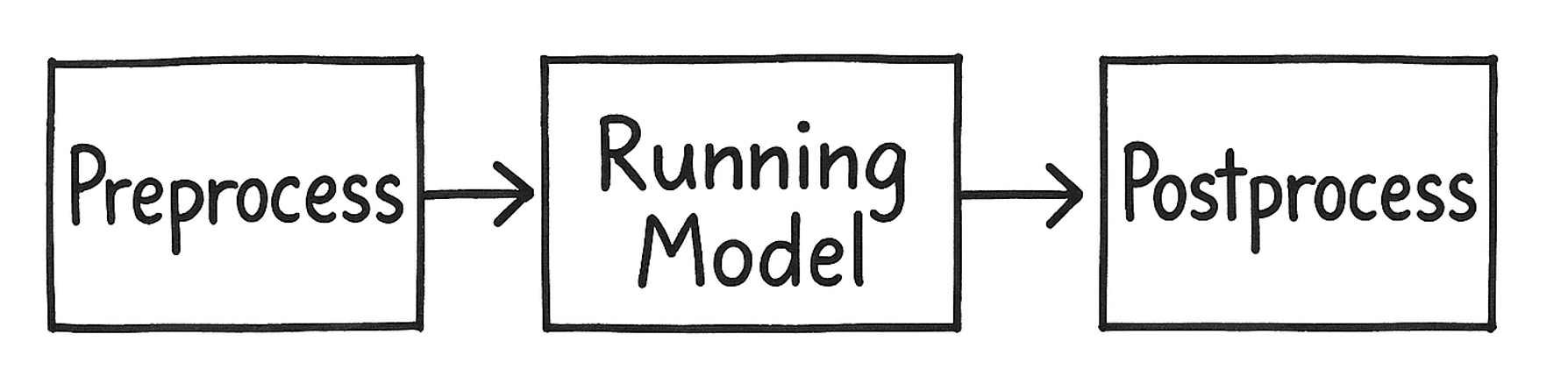
Essentially it takes a raw input and gives you clean output.
Named Entity Recognition
Using the pipeline wrapper, it is very easy to work with Named Entity Recognition (NER).
from transformers import pipeline
import pandas as pd
tags = pipeline("ner",aggregation_strategy="simple")

customer_feedback = "Barack Obama visited Tokyo in April 2014 and met with Shinzo Abe. The two leaders discussed trade agreements between the United States and Japan. Later, Obama gave a speech at the Roppongi Hills complex. The New York Times covered the event."
output = tags(customer_feedback)
df = pd.DataFrame(output)
print(df)
We are using Hugging Face NER pipeline to process feedback text, automatically identify named entities (such as people, locations and organizations). After converting the extracted entities into a tabular format using the pandas data frame=, you should get this output:
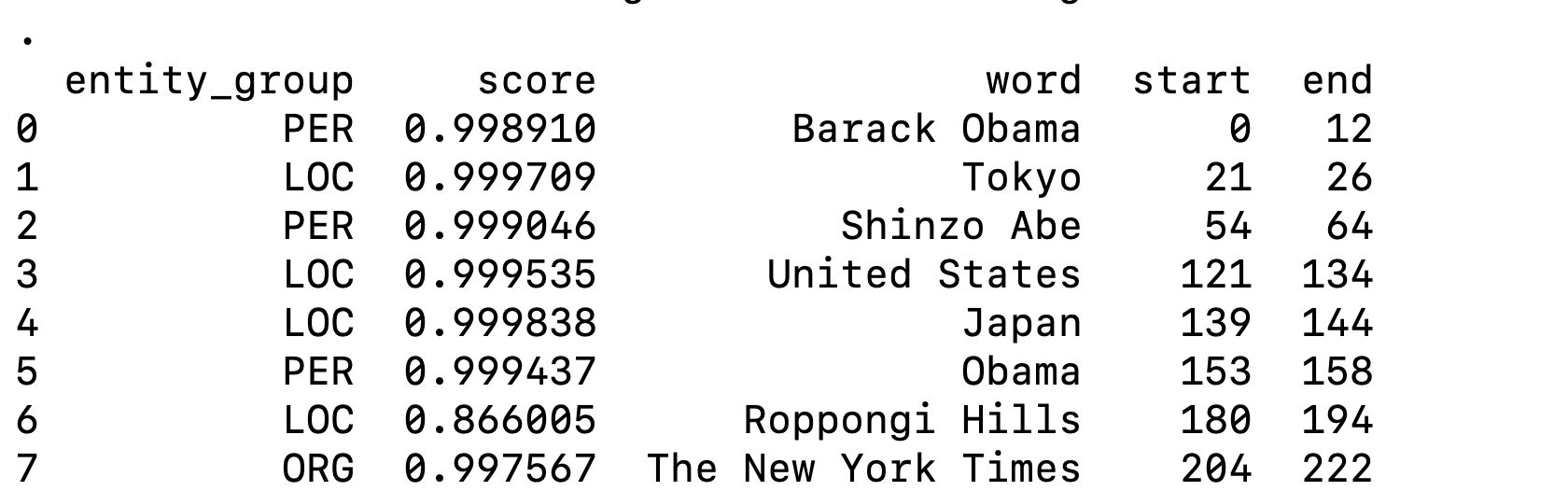
In the example above, we use the NER pipeline to identify named entities in text, such as people, places and organizations.
The aggregation_strategy="simple" option is used to merge subword tokens back into complete entities. Without this setting, some models may split words into subword pieces (for example, “Obama” may appear as “Ob” and “##ama”). Using the “simple” aggregation strategy keeps these fragments combined and returned as a single entity span (such as “Obama”).
Text Summarization
Let’s try text summarization without using pipeline. We can do that in three steps as shown below:
from transformers import AutoTokenizer, AutoModelForSeq2SeqLM

model_name = "facebook/bart-large-cnn"
tokenizer = AutoTokenizer.from_pretrained(model_name)
model = AutoModelForSeq2SeqLM.from_pretrained(model_name)
text = """
 your text
"""

inputs = tokenizer(
    text,
    return_tensors="pt",
    max_length=1024,
    truncation=True,
    padding=True,
)

outputs = model.generate(
    **inputs,
    max_length=150,
    min_length=30,
    num_beams=4,
    early_stopping=True,
)

summary = tokenizer.decode(outputs[0], skip_special_tokens=True)
print(summary)
The example above follows these steps:
- Loading the model
- Loading the tokenizer
- Tokenizing the input
- Generating the summary
- Decoding the output and printing
We are following all steps of preprocessing, running the model and the postprocessing as we are not using pipeline. This should give you an idea about pipeline utility function.
So, transformers are particularly powerful for NLP because they process text in parallel and capture context efficiently. The self-attention mechanism allows the model to determine which words in a sentence are most relevant when interpreting meaning.
For example, in the sentence:
“Apple released a new product.”
The word Apple could refer to a fruit or a technology company. A transformer model can use surrounding words like released and product to infer that the sentence refers to the company.
This contextual understanding is one of the major breakthroughs that transformer models introduced.
Transformer-based NLP systems are now used in many real-world applications:
- Chatbots and virtual assistants
- Automatic document summarization
- Email spam filtering
- Customer sentiment analysis
- Search engines
- Language translation
- Code generation tools
Companies increasingly rely on transformer models to analyze large volumes of text data and automate tasks that previously required human interpretation.
I hope that you now have a solid understanding of transformers. Thanks for reading this article.

Dhananjay Kumar
Dhananjay Kumar is the founder of nomadcoder, an AI-driven developer community and training platform in India. Through nomadcoder, he organizes leading tech conferences such as ng-India and AI-India. He partners with startups to rapidly build MVPs and ship production-ready applications. His expertise spans Angular, modern web architecture and AI agents, and he is available for training, consulting or product acceleration from Angular to API to agents.
Related Posts
Comments
All articles
Topics
Web MobileMobile
Desktop
Design
Productivity
People