Caching with TanStack Query

Summarize with AI:
TanStack Query caching creates an instantaneous feeling user experience. Combined with the KendoReact Loader component, we have a polished React app handling even complex server state smoothly.
Data fetching in large-scale React applications often becomes a complex juggling act. We need to manage loading states, handle errors, prevent duplicate requests and figure out when our cached data becomes outdated. Without a proper strategy, we end up with components full of useEffect hooks and users waiting for the same data to load repeatedly.
TanStack Query (formerly React Query) solves these problems by treating server state as a first-class citizen in React applications. Its intelligent caching system is the secret sauce that makes data fetching feel effortless while delivering a snappy user experience.
In this article, we’ll explore how TanStack Query’s caching works and demonstrate it with practical examples using the Progress KendoReact Loader component.
The KendoReact Loader component is part of the KendoReact Free suite, which means you can use it in your projects without any license or registration requirements.
TanStack Query
TanStack Query is a library for fetching, caching and updating asynchronous data in React without touching any global state. It treats server state as a separate concern from client state (like UI toggles or form inputs).
With TanStack Query, we don’t need to manage loading states or cache data ourselves manually. The library handles this for us by providing us a set of simple hooks that deliver data, loading status and error information directly to our components.
Let’s start by installing the necessary packages:
npm install @tanstack/react-query @progress/kendo-react-indicators
Every TanStack Query application needs a QueryClient and a QueryClientProvider to manage the cache and provide it to our component tree:
import React from 'react';
import { QueryClient, QueryClientProvider } from '@tanstack/react-query';
import ProfileDemo from './ProfileDemo';

// Create a client
const queryClient = new QueryClient();

function App() {
  return (
    // Provide the client to our App
    <QueryClientProvider client={queryClient}>
      <ProfileDemo />
    </QueryClientProvider>
  );
}

export default App;
This setup creates the foundation for all our caching magic. The QueryClient manages the cache, while the QueryClientProvider makes it available to all child components.
Basic Caching in Action
Let’s see TanStack Query’s caching in action with a simple <UserProfile /> component. We’ll fetch user data from the JSONPlaceholder API and use the KendoReact Loader to show loading states.
import React from 'react';
import { useQuery } from '@tanstack/react-query';
import { Loader } from '@progress/kendo-react-indicators';
import { Button } from '@progress/kendo-react-buttons';

// Our data fetching function
const fetchUser = async (userId) => {
  const response = await fetch(`https://jsonplaceholder.typicode.com/users/${userId}`);
  if (!response.ok) {
    throw new Error('Failed to fetch user');
  }
  return response.json();
};

function UserProfile({ userId = 1 }) {
  // Queries
  const query = useQuery({
    queryKey: ['user', userId],
    queryFn: () => fetchUser(userId),
  });

  if (query.isLoading) {
    return (
      <div className="loading-container">
        <Loader size="large" type="infinite-spinner" />
        <p>Loading user profile...</p>
      </div>
    );
  }

  if (query.error) {
    return <div className="error">Error: {query.error.message}</div>;
  }

  return (
    <div className="user-profile">
      {query.isFetching && (
        <div className="background-loading">
          <Loader size="small" type="pulsing" />
          <span>Updating...</span>
        </div>
      )}
      <h2>{query.data.name}</h2>
      <p>Email: {query.data.email}</p>
      <p>Website: {query.data.website}</p>
      <p>Company: {query.data.company.name}</p>
    </div>
  );
}

export function ProfileDemo() {
  const [showProfile, setShowProfile] = React.useState(true);

  return (
    <div className="app">
      <Button onClick={() => setShowProfile(!showProfile)}>
        {showProfile ? 'Hide' : 'Show'} Profile
      </Button>
      {showProfile && <UserProfile />}
    </div>
  );
}
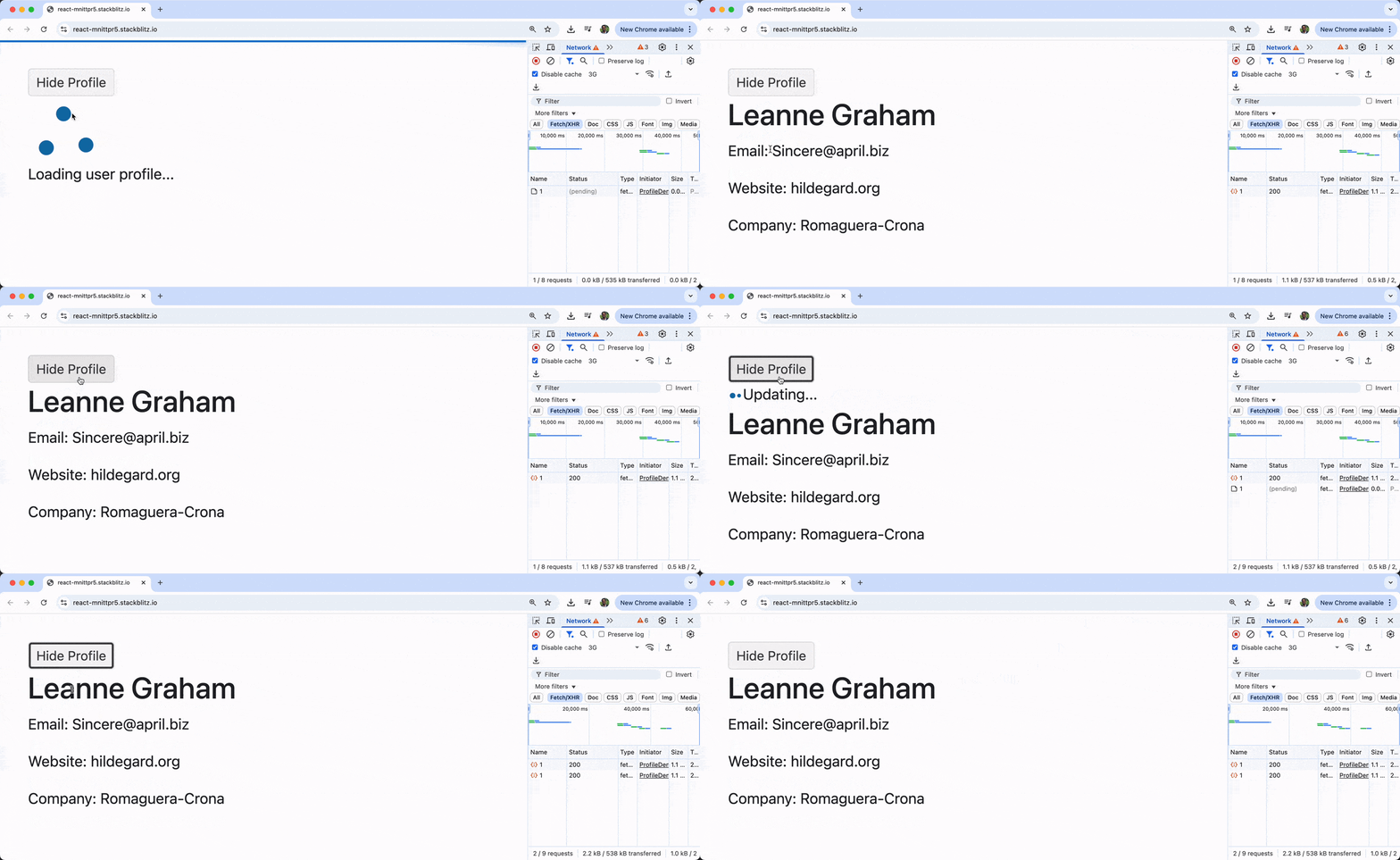
Here’s what happens when we run the above code:
- First load: The
isLoadingstate istrue, so we see the large spinner while data is being fetched. - Data arrives: The user profile displays, and
isLoadingbecomesfalse. - Toggle away and back: Click “Hide Profile” then “Show Profile” again. Notice the profile appears instantly! No loading spinner this time.
- Background update: We might see a small “Updating…” indicator because
query.isFetchingbecomestrueas TanStack Query refetches in the background.
This is the magic of caching. The second time the component mounts, TanStack Query serves the cached data immediately while quietly updating it in the background!
Understanding Cache Keys
The queryKey is crucial to how caching works. It’s a unique identifier for our queries, and TanStack Query uses it to store and retrieve cached data.
// These queries share the same cache
useQuery({ queryKey: ['user', 1], queryFn: () => fetchUser(1) });
useQuery({ queryKey: ['user', 1], queryFn: () => fetchUser(1) });

// This query has its own cache
useQuery({ queryKey: ['user', 2], queryFn: () => fetchUser(2) });
Query keys can be simple strings or arrays with multiple values. Using arrays allows us to create hierarchical keys that make cache invalidation more powerful:
// Cache different user data separately
['user', userId]
['user', userId, 'posts']
['user', userId, 'profile']
Configuring Cache Behavior
TanStack Query’s default caching behavior is designed to be aggressive but sensible. However, we can fine-tune it based on our application’s needs using two key options: staleTime and gcTime.
Understanding staleTime
By default, staleTime is 0, meaning data is considered “stale” immediately after it’s fetched. Stale data triggers background refetches when:
- The component remounts
- The window regains focus
- The network reconnects
Let’s modify our existing UserProfile component to see how staleTime affects behavior:
function UserProfile({ userId = 1 }) {
  // Queries with 2-minute staleTime
  const query = useQuery({
    queryKey: ['user', userId],
    queryFn: () => fetchUser(userId),
    staleTime: 2 * 60 * 1000, // 2 minutes
  });

  if (query.isLoading) {
    return (
      <div className="loading-container">
        <Loader size="large" type="infinite-spinner" />
        <p>Loading user profile...</p>
      </div>
    );
  }

  if (query.error) {
    return <div className="error">Error: {query.error.message}</div>;
  }

  return (
    <div className="user-profile">
      {query.isFetching ? (
        <div className="background-loading">
          <Loader size="small" type="pulsing" />
          <span>Updating...</span>
        </div>
      ) : (
        <div className="fresh-indicator">✨ Data is fresh!</div>
      )}
      <h2>{query.data.name}</h2>
      <p>Email: {query.data.email}</p>
      <p>Website: {query.data.website}</p>
      <p>Company: {query.data.company.name}</p>
    </div>
  );
}
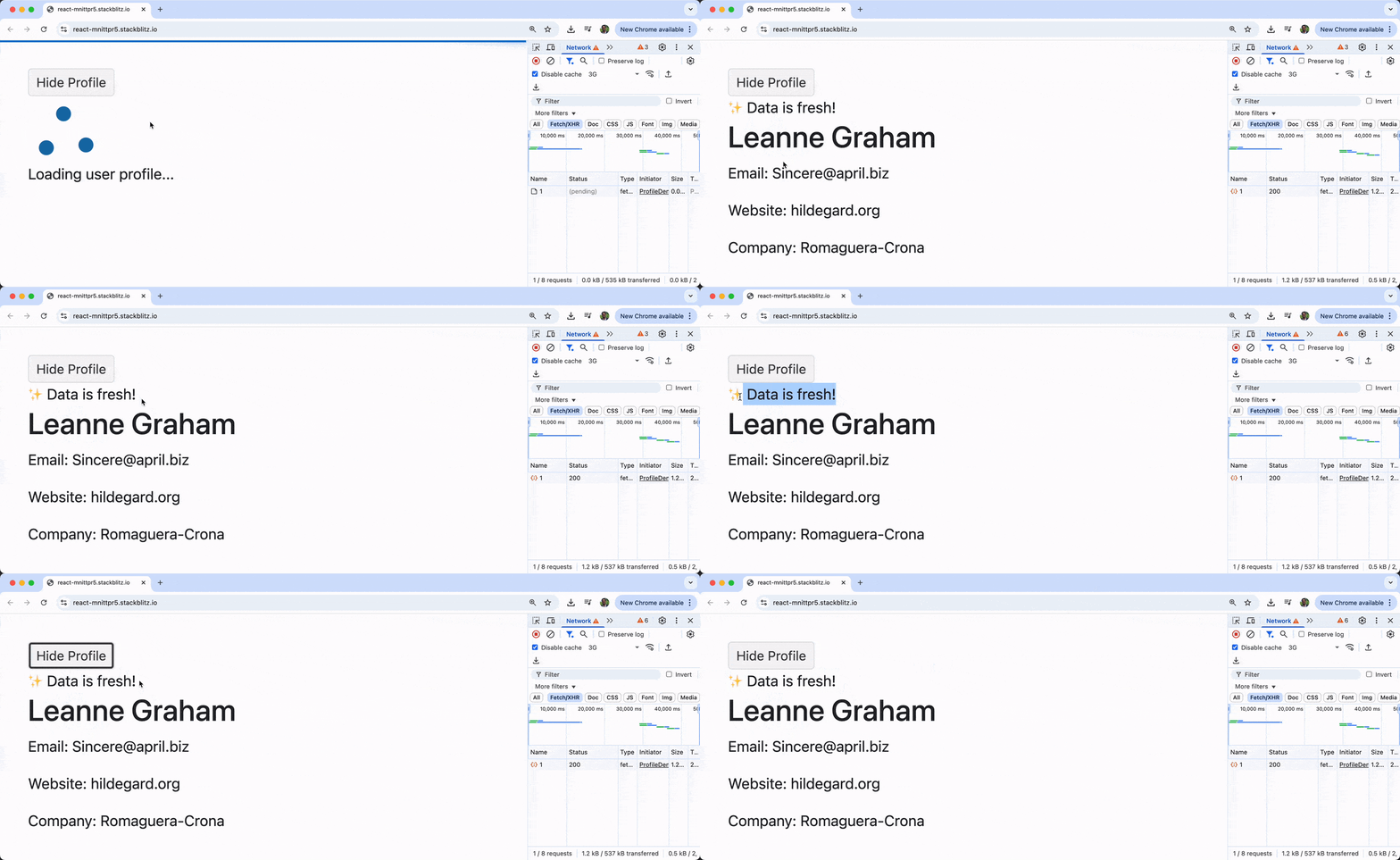
Above, we’ve specified 2 minutes as the new stale time value. With a 2-minute staleTime:
- Data appears instantly from cache when remounting.
- No background refetch happens during those 2 minutes.
- The “✨ Data is fresh!” indicator shows when no refetching is occurring.
- After 2 minutes, background refetching resumes.
Understanding gcTime (Garbage Collection Time)
The gcTime (formerly cacheTime) determines how long inactive cached data stays in memory. The default is 5 minutes.
To see this in action with our ProfileDemo, we can modify the UserProfile component to use a shorter gcTime:
function UserProfile({ userId = 1 }) {
  // Queries with short garbage collection time
  const query = useQuery({
    queryKey: ['user', userId],
    queryFn: () => fetchUser(userId),
    gcTime: 30 * 1000, // 30 seconds
  });

  if (query.isLoading) {
    return (
      <div className="loading-container">
        <Loader size="large" type="infinite-spinner" />
        <p>Loading user profile...</p>
      </div>
    );
  }

  if (query.error) {
    return <div className="error">Error: {query.error.message}</div>;
  }

  return (
    <div className="user-profile">
      <h2>{query.data.name}</h2>
      <p>Email: {query.data.email}</p>
      <p>Website: {query.data.website}</p>
      <p>Company: {query.data.company.name}</p>
    </div>
  );
}
With a 30-second gcTime, if we use the “Hide Profile” button in our ProfileDemo and wait more than 30 seconds before clicking “Show Profile” again, we’ll see the loading spinner because the cache was garbage collected.
Comparing Caching Scenarios
Let’s enhance our ProfileDemo to create a comparison of different caching strategies:
import React from 'react';
import { useQuery } from '@tanstack/react-query';
import { Loader } from '@progress/kendo-react-indicators';
import { Button } from '@progress/kendo-react-buttons';

// Enhanced UserProfile component that accepts cache configuration
function UserProfile({ userId = 1, title = "User Profile", cacheConfig = {} }) {
  const query = useQuery({
    queryKey: ['user', userId, title], // Include title to make each query unique
    queryFn: () => fetchUser(userId),
    ...cacheConfig,
  });

  if (query.isLoading) {
    return (
      <div className="profile-loading">
        <Loader size="medium" type="infinite-spinner" />
        <p>Loading {title}...</p>
      </div>
    );
  }

  if (query.error) {
    return <div className="error">Error: {query.error.message}</div>;
  }

  return (
    <div className="user-profile">
      <h3>{title}</h3>
      {query.isFetching ? (
        <div className="background-loading">
          <Loader size="small" type="pulsing" />
          <span>Updating...</span>
        </div>
      ) : (
        <div className="status-indicator">Ready</div>
      )}
      <h4>{query.data.name}</h4>
      <p>Email: {query.data.email}</p>
      <p>Company: {query.data.company.name}</p>
    </div>
  );
}

export function ProfileDemo() {
  const [showProfiles, setShowProfiles] = React.useState(true);

  return (
    <div className="comparison-container">
      <Button onClick={() => setShowProfiles(!showProfiles)}>
        {showProfiles ? 'Hide' : 'Show'} All Profiles
      </Button>

      {showProfiles && (
        <div className="profiles-grid">
          <UserProfile
            title="Default Caching"
            cacheConfig={{}}
          />

          <UserProfile
            title="With StaleTime (1 min)"
            cacheConfig={{ staleTime: 60 * 1000 }}
          />

          <UserProfile
            title="No Cache (gcTime: 0)"
            cacheConfig={{ gcTime: 0 }}
          />
        </div>
      )}
    </div>
  );
}
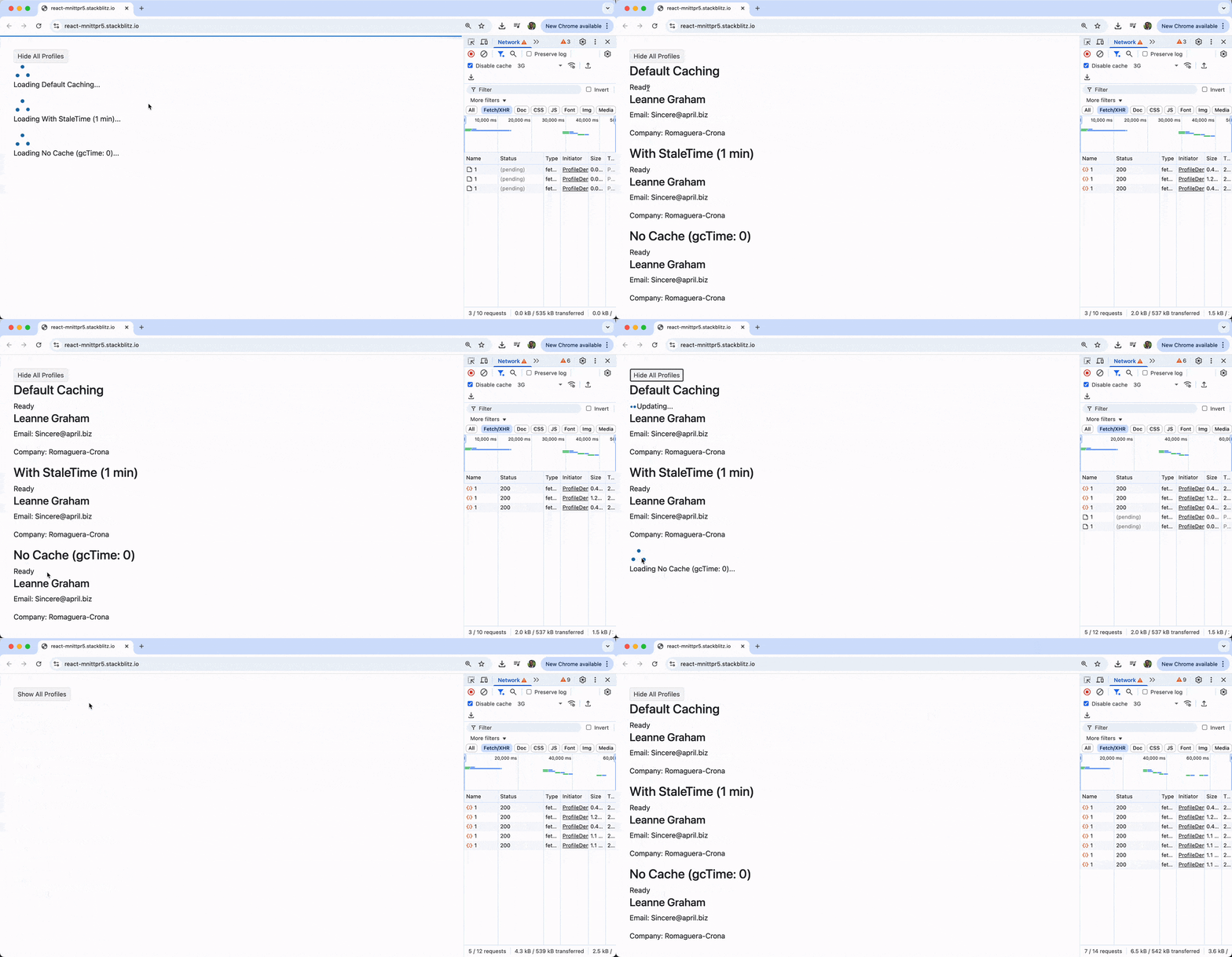
Now our enhanced ProfileDemo shows three different caching strategies using the same user data:
- Default Caching: Instant display with background refetch (we’ll see “Updating…” briefly)
- With StaleTime (1 min): Instant display, no refetch for 1 minute (shows “Ready” status)
- No Cache: Always shows loading spinner when toggled because data is immediately garbage collected
Advanced Cache Configuration
For more complex scenarios, we can configure additional caching behaviors:
function AdvancedCacheExample() {
  const query = useQuery({
    queryKey: ['advanced-cache-example'],
    queryFn: fetchUser,

    // Cache configuration
    staleTime: 5 * 60 * 1000,     // 5 minutes fresh
    gcTime: 10 * 60 * 1000,       // 10 minutes in cache

    // Refetch configuration
    refetchOnMount: true,          // Refetch when component mounts
    refetchOnWindowFocus: false,   // Don't refetch on window focus
    refetchOnReconnect: true,      // Refetch when network reconnects

    // Retry configuration
    retry: 3,                      // Retry failed requests 3 times
    retryDelay: attemptIndex => Math.min(1000 * 2 ** attemptIndex, 30000),
  });

  // Component implementation...
}
These additional options, like refetchOnMount, refetchOnWindowFocus and retry, give us granular control over when and how our data is fetched and cached.
Global Cache Configuration
We can set default cache behavior globally when creating our QueryClient:
const queryClient = new QueryClient({
  defaultOptions: {
    queries: {
      staleTime: 2 * 60 * 1000,     // 2 minutes default staleTime
      gcTime: 10 * 60 * 1000,       // 10 minutes default gcTime
      refetchOnWindowFocus: false,   // Disable refetch on window focus globally
    },
  },
});
This approach lets us set sensible defaults for our entire application while still allowing per-query overrides when needed.
Wrap-up
TanStack Query’s caching system transforms how we handle server state in React applications. Intelligently managing when to show cached data and when to fetch fresh data creates a responsive user experience that feels instant while keeping information up to date.
Combined with loading indicators like the KendoReact Loader component, we can create professional applications that handle the complexities of server state gracefully.
For more information, be sure to check out the official documentation:
Don’t forget: The KendoReact Loader is free to use, even in production.

Hassan Djirdeh
Hassan is a senior frontend engineer and has helped build large production applications at-scale at organizations like Doordash, Instacart and Shopify. Hassan is also a published author and course instructor where he’s helped thousands of students learn in-depth frontend engineering skills like React, Vue, TypeScript and GraphQL.
Related Posts
Comments
All articles
Topics
Web MobileMobile
Desktop
Design
Productivity
People