Building a Real-Time Security Monitoring Dashboard with Telerik UI for WinForms

Summarize with AI:
See how Telerik UI for WinForms components, like charts, maps, gauges and context menus, can easily compose a security monitoring dashboard.
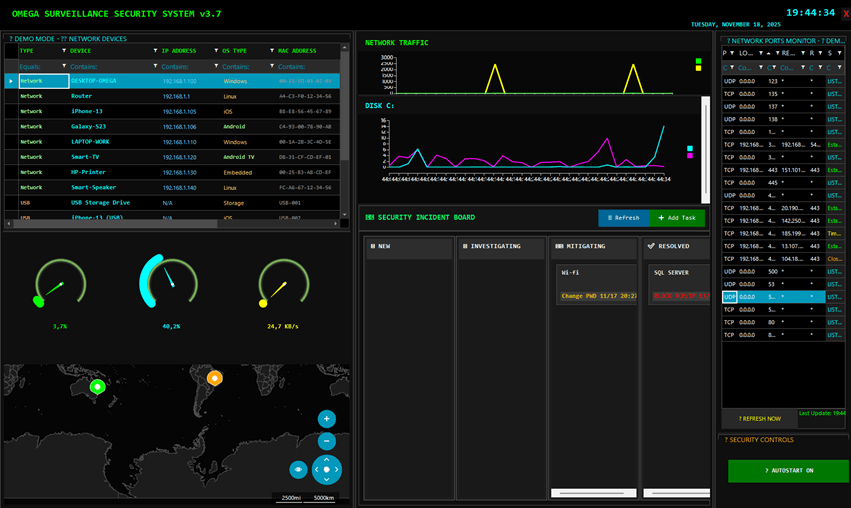
Omega Security Dashboard
In this post, I will show you the app I built with a modern, responsive security surveillance using Progress Telerik UI for WinForms, demonstrating that desktop applications can have a contemporary appearance and functionality. This platform remains a robust choice for corporate desktop applications, especially for real-time monitoring systems.
The app demonstrates the integration of 10+ Telerik components working together to create a cohesive, professional-grade security monitoring experience. The application features real-time threat visualization on an interactive RadMap with live GreyNoise* API integration, a custom Kanban board for incident management with drag-and-drop functionality, and intelligent AI-powered analysis of network devices using ChatGPT. The system monitors Bluetooth, USB and network devices simultaneously, triggering customizable sound alerts when specific MAC addresses are detected. All of this runs on .NET 10 with C# 14, wrapped in a striking FluentDark theme with neon accents that gives it a true cybersecurity operations center aesthetic.
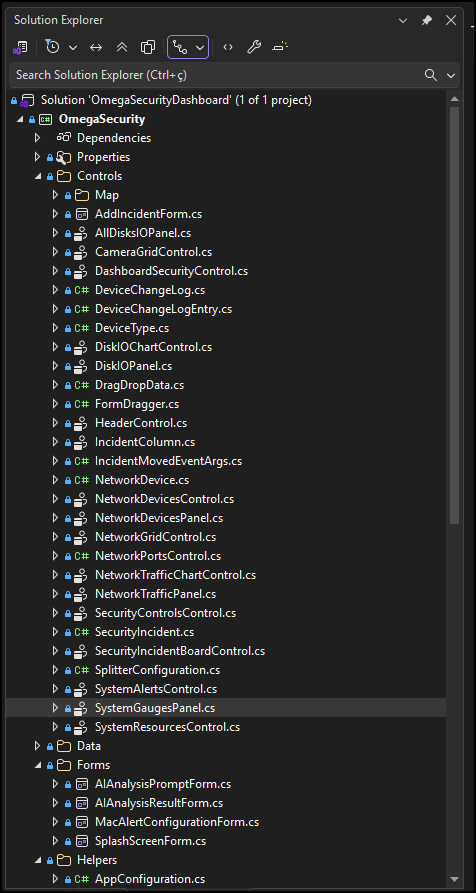
Solution Explorer
Why WinForms for Monitoring Dashboards?
Before diving into the functionalities, it’s worth questioning: why choose WinForms in 2026? The answer lies in the unique characteristics of this platform:
- Native performance: WinForms applications run directly on the operating system, without the overhead of a browser, resulting in faster screen updates and lower memory consumption.
- Direct access to system resources: For a monitoring system that needs to check USB devices, analyze network traffic and monitor system resources, native Windows access is fundamental.
- 24/7 reliability: Security monitoring systems need to run continuously. WinForms offers proven stability in critical environments where uptime is essential.
- Independence from web infrastructure: WinForms does not require web servers, SSL certificates or complex network configurations. The application simply runs.
Overview of the Omega Surveillance Security System
This app is a base for a professional security dashboard, and I’m using it on my networks to understand what is behind my network, and—this is awesome—I discovered that the iPhone of my partner was linking her name on the network without her knowing it.
It also can be used to detect PCs and Mobiles connected in the network as well Bluetooth devices.
Here is what the monitoring app offers:
- Network device monitoring: Automatically detects devices connected via Bluetooth, LAN and USB.
- Security alerts: Triggers sound alarms (MP3, MID or WAV) when a specific MAC address enters the network.
- AI analysis: Integrates OpenAI ChatGPT for intelligent analysis of captured data.
- Threat intelligence: Displays the top 10 cities under attack using the GreyNoise* API (when configured).
- Data export: Saves information in multiple formats (TXT, HTML, PDF, CSV, Excel).
- Resource monitoring: CPU, RAM, network traffic and disk space in real time.
- Startup control: AutoStart ON/OFF for automatic execution with Windows.
- Security Incidents Dashboard: Allows you to register cards with security activities and manage them with a CRUD with status lanes for each incident.
Telerik Components Used
The dashboard uses several components from the Telerik UI for WinForms framework, each chosen for its specific capabilities.
RadGridView Device Listing
The RadGridView is the heart of device monitoring. It displays both network devices, Bluetooth and connected USB devices.
AI Analysis Feature: A distinctive functionality is the ability to analyze grid data using ChatGPT:
The AI can be accessed on right mouse click on the Grid in the option Analyze with AI.
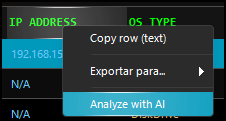
Context Menu
A form with the information about the PC will be sent to be analyzed:
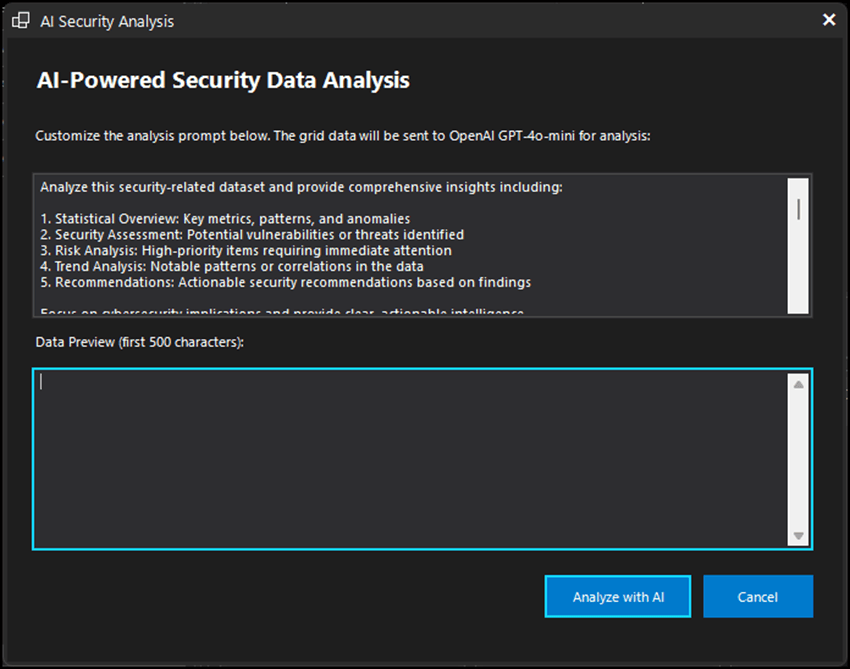
AI Form
The AI analysis on my PC showed that it was at risk, with some services exposed on the network.
RadChartView Traffic Visualization
The RadChartView renders real timeline charts for network traffic and disk usage.
RadMap Threat Geolocation
The RadMap visually displays the geographic location of detected threats. When integrated with the GreyNoise API, it shows the 10 most attacked cities. I did this for fun, but you can use the control inside a form and watch more cities if this makes sense for you.
RadRadialGauge Performance Indicators
The radial gauges provide an intuitive visualization of system resource usage. They declare the vars and initialize the Gauges.
Security Alert System
One of the most important functionalities is the alarm system when a specific MAC address is detected.
To create an alert, click the third button on the mouse in the MAC ADDRESS column.
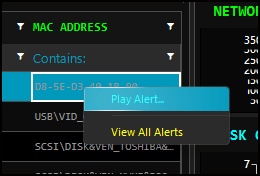
Context Alert Menu
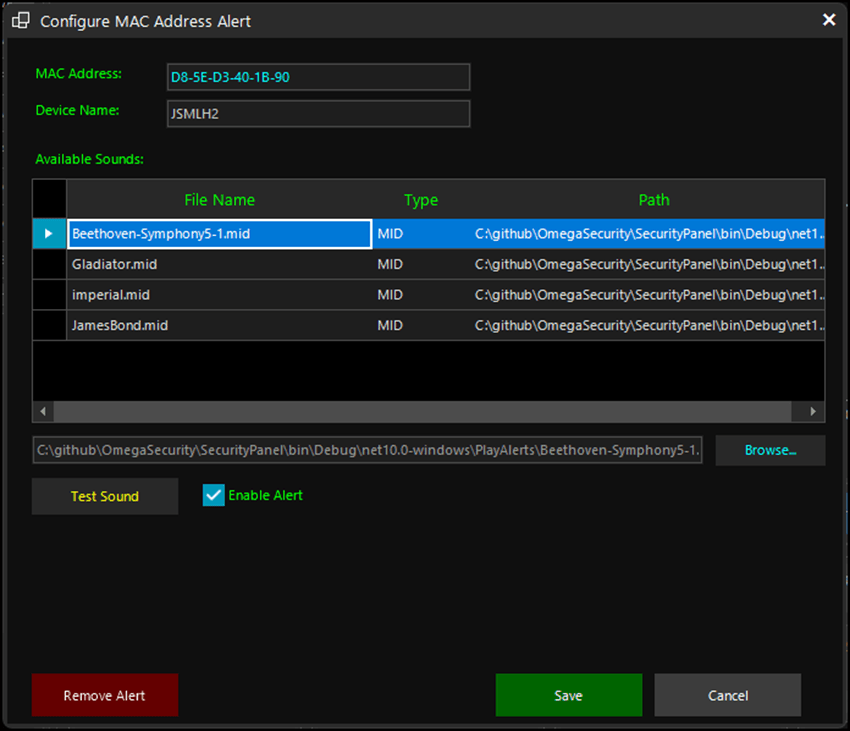
Configure Alert Form
The code below plays a sound with the MAC address is detected on the network.
Data Export
The system allows exporting, or copying lines to memory, or all grid data in multiple professional formats.
AutoStart and System Settings
The AutoStart feature allows the application to start automatically with Windows.
Splash Screen
The application has a splash screen to help the user avoid multiples starts. It uses C# Mutex to avoid multiples instances.
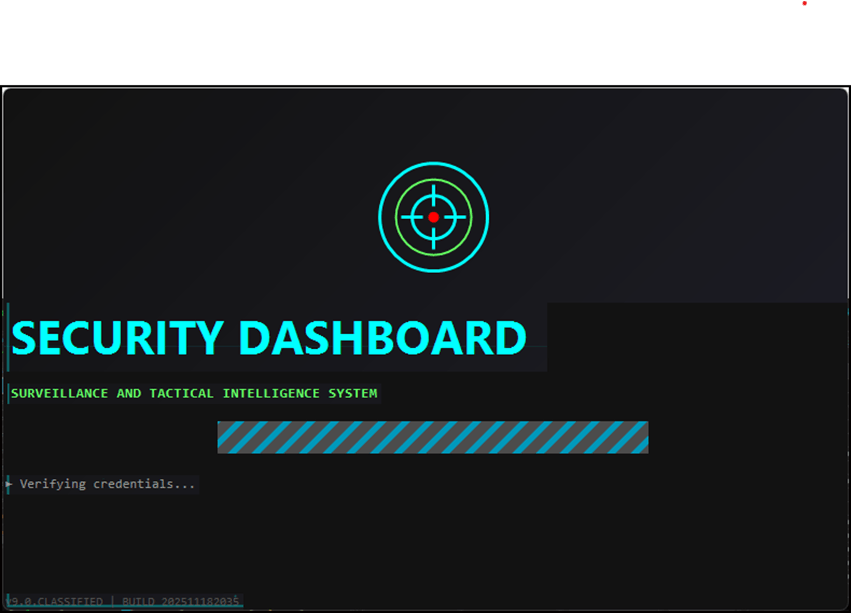
Splash Screen
When starting a second instance, this message below will be fired:
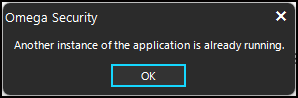
Message Avoiding Multiples Instances
Accelerated Development with AI
Vibe Coding: using AI assistants to accelerate initial development, followed by manual adjustments to refine the implementation.
The process was:
- Initial layout generation: I described the dashboard structure to the AI, and it generated the base code for the controls.
- Integration of Telerik UI components: I requested the AI to use Telerik components, but some had to be replaced manually.
- Business logic: From prompts, it was possible to create the alert logic according to the MAC address.
- Visual refinement: Fine adjustments to the theme and colors were made iteratively.
- C# 14: I changed manually some features like the new null-conditional assignment. And there are other to adjust yet.
This hybrid approach allowed me to significantly accelerate development without compromising code quality or customization.
Please note: This project was completed before the Telerik UI for WinForms AI Coding Assistant was available. This resource is now the preferred way to use AI to code with Telerik UI for WinForms as it is built with direct connection to the docs. (And if you need help, the Progress Telerik support team is second to none!)
Open Source and Demonstration
The complete source code for this project is available on GitHub (requires a Telerik license to use it with the WinForms components). The code helps you to:
- Study the implementation of Telerik components
- Adapt for your specific needs
- Contribute with improvements
I also made an executable available for testing, allowing you to experience the system before diving into the code.
Conclusion
This project demonstrates that WinForms remains a viable and powerful platform for modern desktop applications, especially when combined with the robust component suite in Telerik UI for WinForms.
The main lessons learned:
- Performance matters: For real-time dashboards, the native execution of WinForms offers significant advantages over web solutions.
- Professional componentization: Telerik components eliminate the need to develop complex controls from scratch.
- Modern integrations: WinForms can easily integrate with modern APIs (OpenAI, GreyNoise) and remain relevant.
- User experience: With the right themes and good information architecture, WinForms can compete visually with any technology.
If you are maintaining legacy WinForms applications or considering this platform for new critical desktop applications, Telerik UI for WinForms provides the tools you need to create professional, modern experiences.
The Omega Surveillance system is proof that WinForms not only survives in 2026, but it also thrives when combined with the right tools.
Try Telerik UI for WinForms free for 30 days!
*GreyNoise is a cybersecurity intelligence platform that helps organizations distinguish between benign internet background noise and genuine malicious activity. By operating one of the largest and most sophisticated global sensor networks, it collects and analyzes mass scanning and exploitation attempts across the internet in real time. This enables security teams to filter out low-priority alerts, focus on urgent threats and reduce mean time to respond (MTTR). Trusted by over 80,000 users, 400+ government agencies and 60% of the Fortune 1000, it provides definitive, verifiable data, including complete packet captures, and integrates seamlessly into existing security workflows to empower defenders with actionable insights.
References
GitHub: https://github.com/jssmotta/OmegaSecurityOpenSource
GreyNoise: https://www.greynoise.io/

Jefferson S. Motta
Jefferson S. Motta is a senior software developer, IT consultant and system analyst from Brazil, developing in the .NET platform since 2011. Creator of www.Advocati.NET, since 1997, a CRM for Brazilian Law Firms. He enjoys being with family and petting his cats in his free time. You can follow him on LinkedIn and GitHub.
Related Posts
Comments
All articles
Topics
Web MobileMobile
Desktop
Design
Productivity
People