AI Workflow Automation for Software Development: How to Hand an Agent a Whole Job
 by Adam Bertram

Summarize with AI:
AI workflow automation hands an agent a whole job instead of a single step. It only ships software if you write the limits before the first run and check your delivery metrics after.
Many teams think they have automated AI workflows, when they have really just added AI to individual steps of a manual process.
Ask a team whether AI changed how they handle dependency upgrades, and they will say yes. Then watch one happen.
Monday morning, a bot opens a pull request bumping a library. An engineer pastes the changelog into an assistant, which explains what changed. The build fails. Someone pastes the failure into a second assistant, which suggests three fixes. A third engineer picks one, applies it by hand, and the upgrade merges Thursday. Four days to raise a version number by one.
Both assistants did useful work. Neither knew the other existed. The connecting was done by people, copying text between browser tabs. That isn’t workflow automation. But that is what most teams mean when they say AI handles their upgrades. A model makes the judgment calls, and a person carries each step’s output into the next.
The steps got automated. The workflow did not. AI workflow automation is what you get when the carryover between steps stops and you have one trigger, one run, one review at the end.
When you remove the manual carryover steps, though, you’re removing a control nobody counted. Every handoff was a checkpoint where somebody looked at the work before passing it on, and removing the people removes those looks. Nobody wrote them down as a control, which is why nobody notices those look checkpoints are missing until something merges that should not have. So the workflow has to state what counts as finished, what a run may touch and who has to review and approve it.
What AI Workflow Automation Actually Means
A traditional workflow runs on if-then steps. A commit lands, prewritten steps run in order, and every branch is a condition somebody wrote in advance. If the build fails, post to this channel. If the label says release, cut a tag.
That works until a step needs a judgment no condition can express. Is this failure the same one as last week? Does this changelog touch code you actually call? Those questions have always fallen out of the workflow and onto a person.
AI workflow automation puts a model in exactly those steps. The trigger, the if-then steps and the finish line stay where they were. Give that model tools and a definition of finished, and it becomes an agent.
The ambitious version, sold as agentic, hands the AI model a goal and lets it pick its own steps, delegating the whole run instead of one judgment call. That freedom can cause problems. For example, if the goal is simply to get the test suite to pass, the AI could decide to weaken an assertion instead of fixing the code. The goal was technically met, but it’s not what the team wanted.
Point It at Delivery Work, Not Ticket Triage
The workflows teams automate first sit around the work rather than in it. It’s the low-stakes administrative sort of tasks: label the incoming issue, route it to a team, summarize a pull request, draft the stand-up note. These tasks have limited consequences. And each ends with a person making the actual change, so nothing the automation produced had to be correct. A mislabeled issue has never paged anyone at two in the morning.
Delivery stages are harder because the finish line is harder. A run has to produce something that still works after the workflow closes.
| Lifecycle stage | Automated before AI | The judgment a rule can’t cover | What “finished” has to mean |
|---|---|---|---|
| Test maintenance | Retry-on-red, quarantine lists | Whether a failure is real, and which change fixes it | A green suite whose assertions nobody weakened |
| Dependency upgrades | Bots open version-bump pull requests | Which call sites a changelog affects | A merged upgrade small enough to have been read |
| Incident response | Alert routing, runbook links | Whether recent deploys explain the alert | A named person deciding to roll back |
That last column decides whether a workflow is ready to automate. Ticket triage has a simple finish line: the issue has a label and is routed. Delivery is more complex. A change is not done until it works, has been reviewed and is safe to ship. AI can help carry out the steps, but it cannot define “done” for a team that has never agreed on what success looks like.
Design the Workflow Around Its Judgment Steps
Most of a workflow needs no model. Only the judgment steps do, where the decision cannot be written as a condition in advance. Everything else stays mechanical: fetching the branch, running the suite, opening a pull request, posting a comment. None of those improve when a model interprets them, and each step routed through a model is another place the run fails in a way you did not anticipate. A shell command that breaks will break identically every time, which is the most underrated feature it has.
Write the Workflow’s Limits Before the First Run
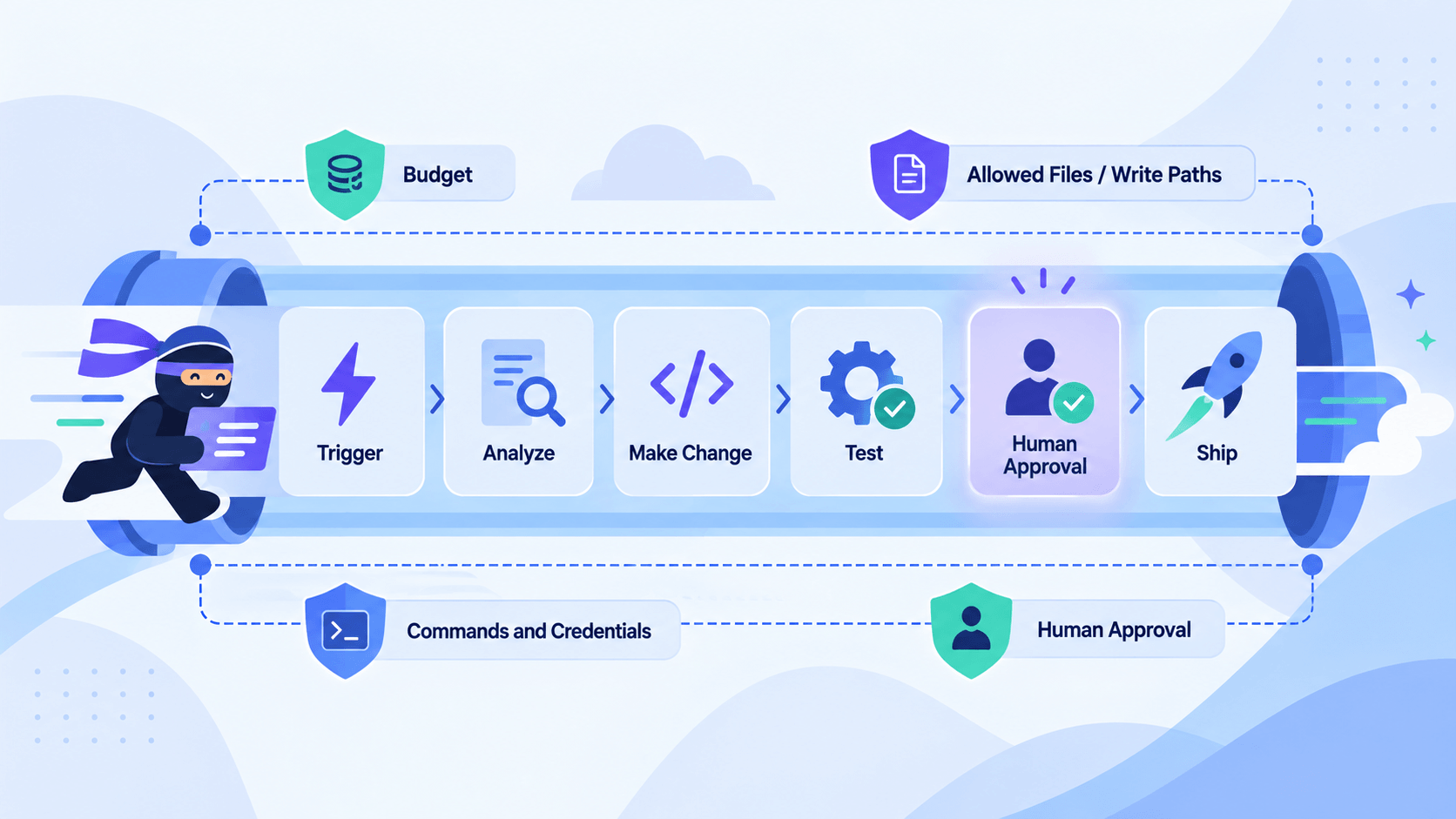
AI workflows need clear guardrails around what they can spend, change, access and execute, and someone needs to be responsible for maintaining those guardrails over time.
Before you let an AI agent act on code or systems, you need to define its boundaries. A run cannot set the limits that constrain it. Write them into the workflow definition.
Budget - How many attempts, steps or tokens one run may spend, and what happens at that ceiling. An agent with unlimited retries eventually discovers that changing the test is easier than changing the code.
Write paths - Which files a run may modify. Narrow paths keep each diff small enough for a human reviewer to read deliberately. Hand somebody 4,000 changed lines, and you’ll get an approval, not a review. Smaller, more focused changes are easier for humans to review properly.
Commands and credentials - Which tools a workflow may call. These tools should be restricted. If agents have access to read issue reports, comments or other untrusted text, they could follow malicious instructions. OWASP’s prompt injection guidance recommends least privilege and human approval for privileged operations. Get this wrong, and the incident review shows your own service account making the change at three in the morning, with a valid token, because a stranger asked it to in a bug report.
Approvals - Which actions need a signature. Microsoft researchers sorted 1,535 developer answers onto a five-level scale. For development work, the median was Level 3: the AI writes the change, a developer approves it before it takes effect. Worth remembering the next time somebody calls approvals “friction.” Human approvals are intentional safety control.
Each limit needs an owner who can revise it. Rules that make sense today may become outdated later. If nobody is responsible for reviewing and updating the rules, temporary exceptions can quietly turn into permanent policy that nobody decided on.
NIST’s AI Risk Management Framework calls for documented AI-risk roles for the same reason. Most teams can enforce all four limits with controls CI already audits: scoped job tokens, branch protection and environment approvals.
Measure the Workflow, Not the Agent
The right way to assess AI automation success is by whether the whole software delivery process gets better, not by whether the AI itself seems fast or productive.
Two DORA metrics tell you whether an automated workflow delivers:
- Lead time for changes: How long a commit takes to reach production
- Change fail rate: How often a change causes problems
Neither improves because a model writes faster, especially if developers have to spend more time reviewing and correcting what it produces. In a randomized trial, METR, an AI-evaluation research group, gave early-2025 coding tools to 16 experienced open-source developers on 246 real issues. The tools made the developers work 19% slower. The code arrived faster, but delivery got slower, because the time moved into reading and verifying output. Faster typing is not faster delivery, and only one of the two shows up in a number your business cares about.
So run a new workflow in approval-required mode and watch both numbers for weeks before granting more authority. Google’s 2025 DORA report found teams adopting more AI reported higher estimated throughput and higher estimated instability, without claiming AI caused either. That pairing is the risk in miniature: a workflow can produce more than your reviewers can check.
Don’t measure AI by how much code it produces; measure whether the entire workflow delivers software faster and more reliably.
Start with One Workflow
Don’t try to automate everything at once. Pick the workflow your team runs weekly and resents. Write its finish line in a sentence, its limits on one page and one owner’s name beside them. Run the workflow in approval-required mode, revise the limits that misfired, then use what you learned as a model for the next team.
Choose the tooling after you define the workflow. Many products call themselves AI workflow platforms, but the label matters less than the controls they can actually enforce. Ignore the label and ask what the product makes reviewable: a run that stops at a ceiling, a directory it cannot touch, a required human approval before a change takes effect. Those answers tell you more than the product category does.
Learn About Progress Forge Orchestration
If you’re ready to move from isolated AI coding tasks to repeatable engineering workflows, Progress Forge (formerly Progress Agent Harness) is designed for exactly that shift. It orchestrates the AI coding agents your team already uses through structured workflows with visibility, governance and human review built in.
Explore the Progress Forge Early Access Program to see how it can help you put these ideas into practice.
Adam Bertram
Adam Bertram is a 25+ year IT veteran, former Microsoft MVP and self-employed consultant who helps organizations replace repetitive manual work with generative AI automation and agent-based workflows. He’s a successful blogger, consultant, trainer, published author and freelance writer for dozens of technology publications.
Related Posts
Comments
All articles
Topics
Web MobileMobile
Desktop
Design
Productivity
People