Timeline View
The Timeline view displays appointments in a continuous horizontal direction.
In this article:
View Parameters
Generally, the views are designed around the timeframe that they show and the day-based views share some common properties that you will likely have to set to provide a good user experience for the user:
| Attribute | Type and Default Value | Description |
|---|---|---|
ColumnWidth | decimal | The width of each time column in pixels. |
EndTime | DateTime | The counterpart to StartTime — defines when the full day ends. Defaults to midnight. If you have the day end earlier you can reduce the amount of elements that render, but the user may not see some late appointments. |
NumberOfDays | int 1 | How many days to show side by side in the view. |
SlotDivisions | int | The number of partitions in each major time slot. |
SlotDuration | int | The time span of each major time slot in minutes. |
StartTime | DateTime | The first hour displayed in the view. Defaults to midnight. If not set to a value close to the start of the working day, the view may show blank spaces before scrolling down. |
WorkDayEnd | DateTime | The counterpart to WorkDayStart — defines when the working day ends. |
WorkDayStart | DateTime | The start time of the working day; differentiates work hours with a distinct background for easy identification. Influences the Show Business Hours toggle. |
If there are appointments outside of the defined visible time the user will not be able to see them. For most cases where the working day is subject to scheduling this may not be a problem, but if your users need to manage night shifts or irregular work hours, you may want to have a longer day rendered, or to bind the value to a time picker so the user can alter it themselves.
Slots
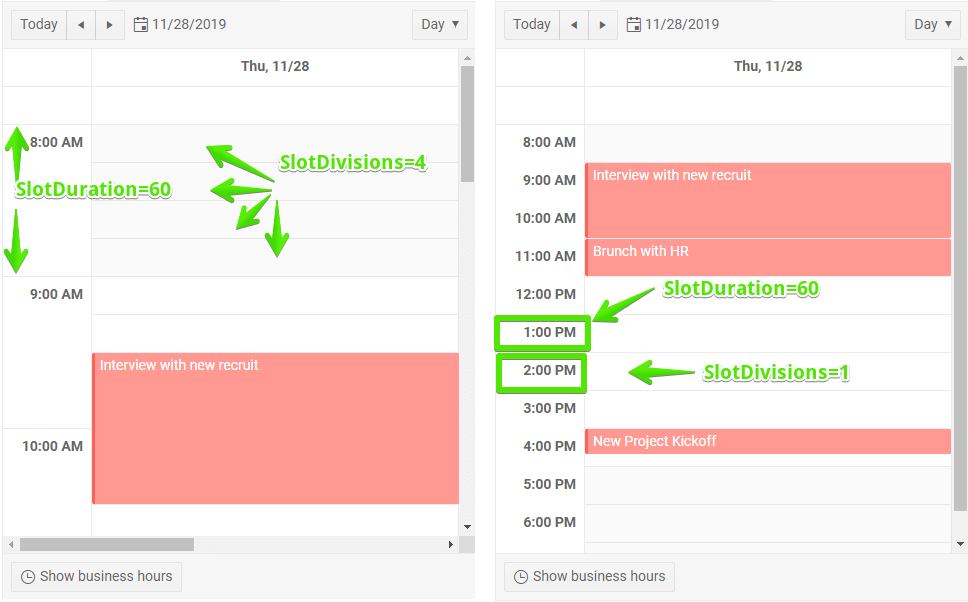
Views that show hours let you control their precision through the SlotDuration and SlotDivisions parameters:
SlotDuration- the time span of each major time slot in minutes.SlotDivisions- the number of partitions in each major time slot.
Figure: Slots explanation
Example
You can declare other views as well, this example adds only the Тimeline view for brevity.
Declare the Timeline view in the markup
@* Define the Timeline view. *@
<TelerikScheduler Data="@Appointments" @bind-Date="@StartDate" Width="1000px">
<SchedulerViews>
<SchedulerTimelineView StartTime="@DayStart" EndTime="@DayEnd"
WorkDayStart="@WorkDayStart" WorkDayEnd="@WorkDayEnd"
ColumnWidth="50"/>
</SchedulerViews>
</TelerikScheduler>
@code {
private DateTime StartDate { get; set; } = new DateTime(2019, 12, 2);
//the time portions are important
private DateTime DayStart { get; set; } = new DateTime(2000, 1, 1, 8, 0, 0);
private DateTime DayEnd { get; set; } = new DateTime(2000, 1, 1, 20, 0, 0);
private DateTime WorkDayStart { get; set; } = new DateTime(2000, 1, 1, 9, 0, 0);
private DateTime WorkDayEnd { get; set; } = new DateTime(2000, 1, 1, 17, 0, 0);
private List<SchedulerAppointment> Appointments = new List<SchedulerAppointment>()
{
new SchedulerAppointment
{
Title = "Board meeting",
Description = "Q4 is coming to a close, review the details.",
Start = new DateTime(2019, 12, 5, 10, 00, 0),
End = new DateTime(2019, 12, 5, 11, 30, 0)
},
new SchedulerAppointment
{
Title = "Vet visit",
Description = "The cat needs vaccinations and her teeth checked.",
Start = new DateTime(2019, 12, 2, 11, 30, 0),
End = new DateTime(2019, 12, 2, 12, 0, 0)
},
new SchedulerAppointment
{
Title = "Planning meeting",
Description = "Kick off the new project.",
Start = new DateTime(2019, 12, 6, 9, 30, 0),
End = new DateTime(2019, 12, 6, 12, 45, 0)
},
new SchedulerAppointment
{
Title = "Trip to Hawaii",
Description = "An unforgettable holiday!",
IsAllDay = true,
Start = new DateTime(2019, 11, 27),
End = new DateTime(2019, 12, 05)
}
};
public class SchedulerAppointment
{
public string Title { get; set; }
public string Description { get; set; }
public DateTime Start { get; set; }
public DateTime End { get; set; }
public bool IsAllDay { get; set; }
}
}
Time Range Constraints
The StartTime, EndTime, WorkDayStart, and WorkDayEnd parameters describe a single-day time pattern that the Timeline view repeats for every date it displays. The Scheduler compares only the time portion (hours, minutes, and seconds) of these DateTime values and ignores the date portion.
Because of the time-only comparison, EndTime has to represent a time of day that is later than StartTime, and WorkDayEnd has to represent a time of day that is later than WorkDayStart. The Scheduler throws an exception if EndTime is set to 00:00:00, because midnight is the earliest possible time of day and is never later than StartTime. Setting EndTime or WorkDayEnd to midnight of the following day produces the same result, because the Scheduler uses only the time portion (00:00:00) of that value.
To render the view until the end of the day, set EndTime (and WorkDayEnd if applicable) to 23:59:59 on the same date as StartTime.
Set EndTime and WorkDayEnd to the last moment of the day
<TelerikScheduler Data="@Appointments" @bind-Date="@StartDate" Width="1000px">
<SchedulerViews>
<SchedulerTimelineView StartTime="@DayStart"
EndTime="@DayEnd"
WorkDayStart="@WorkDayStart"
WorkDayEnd="@WorkDayEnd"
ColumnWidth="50" />
</SchedulerViews>
</TelerikScheduler>
@code {
private DateTime StartDate { get; set; } = new DateTime(2019, 12, 2);
//the time portions are important
private DateTime DayStart { get; set; } = new DateTime(2000, 1, 1, 8, 0, 0);
private DateTime DayEnd { get; set; } = new DateTime(2000, 1, 1, 23, 59, 59);
private DateTime WorkDayStart { get; set; } = new DateTime(2000, 1, 1, 9, 0, 0);
private DateTime WorkDayEnd { get; set; } = new DateTime(2000, 1, 1, 23, 59, 59);
private List<SchedulerAppointment> Appointments = new List<SchedulerAppointment>()
{
new SchedulerAppointment
{
Title = "Board meeting",
Description = "Q4 is coming to a close, review the details.",
Start = new DateTime(2019, 12, 5, 10, 00, 0),
End = new DateTime(2019, 12, 5, 11, 30, 0)
},
new SchedulerAppointment
{
Title = "Vet visit",
Description = "The cat needs vaccinations and her teeth checked.",
Start = new DateTime(2019, 12, 2, 11, 30, 0),
End = new DateTime(2019, 12, 2, 12, 0, 0)
},
new SchedulerAppointment
{
Title = "Planning meeting",
Description = "Kick off the new project.",
Start = new DateTime(2019, 12, 6, 9, 30, 0),
End = new DateTime(2019, 12, 6, 12, 45, 0)
},
new SchedulerAppointment
{
Title = "Trip to Hawaii",
Description = "An unforgettable holiday!",
IsAllDay = true,
Start = new DateTime(2019, 11, 27),
End = new DateTime(2019, 12, 05)
}
};
public class SchedulerAppointment
{
public string Title { get; set; } = string.Empty;
public string Description { get; set; } = string.Empty;
public DateTime Start { get; set; }
public DateTime End { get; set; }
public bool IsAllDay { get; set; }
}
}