Customizing Property Labels
Each field in RadPropertyGrid displays a label that identifies the underlying property. You can control the text of that label, apply a Style to it, or replace it entirely with a custom DataTemplate — either for a single field or for every field in the grid.
This article covers:
- Setting the Label Text with
PropertyDefinition.DisplayName. - Styling the Label with
PropertyDefinition.LabelStyle. - Templating All Field Labels with
RadPropertyGrid.LabelTemplate. - Overriding the Template for a Single Field with
PropertyDefinition.LabelTemplate.
Setting the Label Text
The DisplayName property of PropertyDefinition holds the text that is rendered by the field's label. When RadPropertyGrid auto-generates its property definitions, DisplayName defaults to the name of the underlying property, but you can override it for a manually defined PropertyDefinition.
Setting DisplayName on a manually defined PropertyDefinition
<telerik:RadPropertyGrid Item="{Binding}" AutoGeneratePropertyDefinitions="False">
    <telerik:RadPropertyGrid.PropertyDefinitions>
        <telerik:PropertyDefinition Binding="{Binding FirstName}" DisplayName="First Name" />
        <telerik:PropertyDefinition Binding="{Binding LastName}" DisplayName="Last Name" />
        <telerik:PropertyDefinition Binding="{Binding Occupation}" DisplayName="Job Title" />
    </telerik:RadPropertyGrid.PropertyDefinitions>
</telerik:RadPropertyGrid>
To change the label text of an auto-generated field, set DisplayName in the AutoGeneratingPropertyDefinition event handler instead.
Setting DisplayName for an auto-generated field
private void PropertyGrid_AutoGeneratingPropertyDefinition(object sender, Telerik.Windows.Controls.Data.PropertyGrid.AutoGeneratingPropertyDefinitionEventArgs e)
{
    if (e.PropertyDefinition.Binding is Binding binding && binding.Path.Path == nameof(Employee.Occupation))
    {
        e.PropertyDefinition.DisplayName = "Job Title";
    }
}
You can also drive
DisplayNamedeclaratively through theDisplaydata annotation attribute. Read more in the Data Annotations article.
Styling the Label
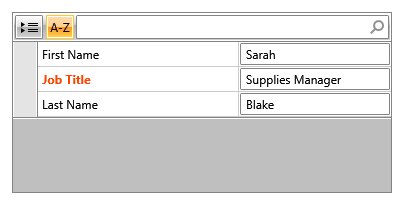
The LabelStyle property of PropertyDefinition accepts a Style targeting TextBlock and is applied to that field's default label.
Defining a label Style
<Window.Resources>
    <Style x:Key="HighlightedLabelStyle" TargetType="TextBlock">
        <Setter Property="Foreground" Value="OrangeRed" />
        <Setter Property="FontWeight" Value="Bold" />
    </Style>
</Window.Resources>
Applying LabelStyle to a PropertyDefinition
<telerik:RadPropertyGrid Item="{Binding}" AutoGeneratePropertyDefinitions="False">
    <telerik:RadPropertyGrid.PropertyDefinitions>
        <telerik:PropertyDefinition Binding="{Binding Occupation}"
                                    DisplayName="Job Title"
                                    LabelStyle="{StaticResource HighlightedLabelStyle}" />
    </telerik:RadPropertyGrid.PropertyDefinitions>
</telerik:RadPropertyGrid>
A field label styled through LabelStyle
LabelStyletargets the default labelTextBlockonly. It has no effect on a field whose label is rendered throughRadPropertyGrid.LabelTemplateor its ownPropertyDefinition.LabelTemplate.
Templating All Field Labels
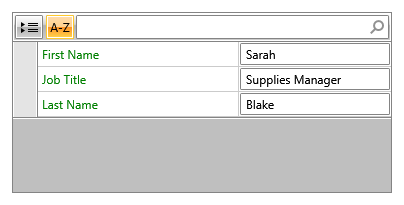
The LabelTemplate property of RadPropertyGrid accepts a DataTemplate that is used to render the label of every field in the grid, unless a field's own PropertyDefinition.LabelTemplate is set. The template receives the corresponding PropertyDefinition instance as its DataContext, so you can bind to DisplayName or any other of its members.
Setting RadPropertyGrid.LabelTemplate
<telerik:RadPropertyGrid Item="{Binding}">
    <telerik:RadPropertyGrid.LabelTemplate>
        <DataTemplate>
            <TextBlock Text="{Binding DisplayName}" Foreground="Green" />
        </DataTemplate>
    </telerik:RadPropertyGrid.LabelTemplate>
</telerik:RadPropertyGrid>
All field labels rendered through RadPropertyGrid.LabelTemplate
Overriding the Template for a Single Field
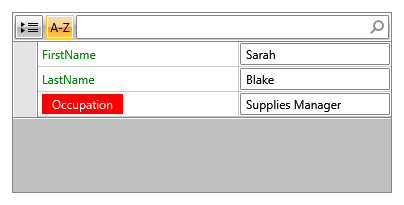
PropertyDefinition also exposes its own LabelTemplate property. When set, it takes precedence over RadPropertyGrid.LabelTemplate for that particular field, which lets you single out one field for a different label presentation while every other field keeps using the grid-wide template.
Defining a dedicated label template
<Window.Resources>
    <DataTemplate x:Key="OccupationLabelTemplate">
        <TextBlock Text="{Binding DisplayName}" Background="Red" Foreground="White" Padding="10,2" />
    </DataTemplate>
</Window.Resources>
Assigning the template to a single auto-generated field
private void PropertyGrid_AutoGeneratingPropertyDefinition(object sender, Telerik.Windows.Controls.Data.PropertyGrid.AutoGeneratingPropertyDefinitionEventArgs e)
{
    if (e.PropertyDefinition.DisplayName == nameof(Employee.Occupation))
    {
        e.PropertyDefinition.LabelTemplate = (DataTemplate)this.Resources["OccupationLabelTemplate"];
    }
}
A single field label overridden through PropertyDefinition.LabelTemplate