Self-Referencing GridView
Use a self-referencing hierarchy to display parent and child items of the same type from one collection. The RadGridView control in Progress® Telerik® UI for WPF matches items through a relation that points back to that collection.
Before you begin, configure a WPF project with RadGridView by following the GridView Getting Started guide. That guide covers package or assembly references, licensing, the Telerik XAML namespace, data binding, and theme setup.
Configuring a Self-Referencing Hierarchy
Start with the RadGridView declaration in Example 1 and the viewmodel in Example 2.
Example 1: RadGridView declaration
<Window.Resources>
       <my:MyViewModel x:Key="MyViewModel"/>
   </Window.Resources>
<telerik:RadGridView DataContext="{StaticResource MyViewModel}"
					 ItemsSource="{Binding Employees}"
					 AutoGenerateColumns="False">
	<telerik:RadGridView.Columns>
		<telerik:GridViewDataColumn DataMemberBinding="{Binding Id}"
							Header="Id" />
		<telerik:GridViewDataColumn DataMemberBinding="{Binding Name}"
							Header="Name" />
		<telerik:GridViewDataColumn DataMemberBinding="{Binding Title}"
							Header="Title" />
	</telerik:RadGridView.Columns>
</telerik:RadGridView>
Example 2 defines the Employee class and the viewmodel for the sample hierarchy.
Example 2: Creating the ViewModel
public class MyViewModel
{
    private ObservableCollection<Employee> employees;
    public ObservableCollection<Employee> Employees
    {
        get
        {
            if (this.employees == null)
            {
                this.employees = EmployeeService.GetEmployees();
            }

            return this.employees;
        }
    }
}

public class EmployeeService
{
    public static ObservableCollection<Employee> GetEmployees()
    {
        ObservableCollection<Employee> employees = new ObservableCollection<Employee>();

        employees.Add(new Employee()
        {
            Name = "Sarah Blake",
            Title = "Supplied Manager",
            Id = 1,
            ManagerId = null
        });
        employees.Add(new Employee()
        {
            Id = 2,
            ManagerId = 1,
            Name = "Jane Simpson",
            Title = "Security",
        });
        employees.Add(new Employee()
        {
            Id = 3,
            ManagerId = 1,
            Name = "John Peterson",
            Title = "Consultant"
        });
        employees.Add(new Employee()
        {
            Id = 4,
            ManagerId = 3,
            Name = "Peter Bush",
            Title = "Cashier"
        });
        employees.Add(new Employee()
        {
            Id = 5,
            ManagerId = 3,
            Name = "Will Grigs",
            Title = "Consultant"
        });

        return employees;
    }
}

public class Employee : INotifyPropertyChanged
{
    public event PropertyChangedEventHandler PropertyChanged;

    private int id;
    private int? managerId;
    private string name;
    private string title;

    public int Id
    {
        get { return this.id; }
        set
        {
            if (value != this.id)
            {
                this.id = value;
                this.OnPropertyChanged("Id");
            }
        }
    }

    public int? ManagerId
    {
        get { return this.managerId; }
        set
        {
            if (value != this.managerId)
            {
                this.managerId = value;
                this.OnPropertyChanged("ManagerId");
            }
        }
    }


    public string Name
    {
        get { return this.name; }
        set
        {
            if (value != this.name)
            {
                this.name = value;
                this.OnPropertyChanged("Name");
            }
        }
    }

    public string Title
    {
        get { return this.title; }
        set
        {
            if (value != this.title)
            {
                this.title = value;
                this.OnPropertyChanged("Title");
            }
        }
    }

    public Employee()
    {

    }

    public Employee(int id, int managerId, string name, string title)
    {
        this.name = name;
        this.id = id;
        this.managerId = managerId;
        this.title = title;
    }

    protected virtual void OnPropertyChanged(PropertyChangedEventArgs args)
    {
        PropertyChangedEventHandler handler = this.PropertyChanged;
        if (handler != null)
        {
            handler(this, args);
        }
    }

    private void OnPropertyChanged(string propertyName)
    {
        this.OnPropertyChanged(new PropertyChangedEventArgs(propertyName));
    }
} Public Class MyViewModel
Public ReadOnly Property Employees() As ObservableCollection(Of Employee)
Get
If Me.employees Is Nothing Then
Me.employees = EmployeeService.GetEmployees()
End If
Return Me.employees
End Get
End Property
End Class
Public Class EmployeeService
Public Shared Function GetEmployees() As ObservableCollection(Of Employee)
Dim employees As New ObservableCollection(Of Employee)()
employees.Add(New Employee() With {
.Name = "Sarah Blake",
.Title = "Supplied Manager",
.Id = 1,
.ManagerId = Nothing
})
employees.Add(New Employee() With {
.Id = 2,
.ManagerId = 1,
.Name = "Jane Simpson",
.Title = "Security"
})
employees.Add(New Employee() With {
.Id = 3,
.ManagerId = 1,
.Name = "John Peterson",
.Title = "Consultant"
})
employees.Add(New Employee() With {
.Id = 4,
.ManagerId = 3,
.Name = "Peter Bush",
.Title = "Cashier"
})
employees.Add(New Employee() With {
.Id = 5,
.ManagerId = 3,
.Name = "Will Grigs",
.Title = "Consultant"
})
Return employees
End Function
End Class
Public Class Employee
Implements INotifyPropertyChanged
Public Event PropertyChanged As PropertyChangedEventHandler Implements INotifyPropertyChanged.PropertyChanged
Private _id As Integer
Private _managerId As Integer
Private _name As String
Private _title As String
Public Property Id() As Integer
Get
Return Me._id
End Get
Set(ByVal value As Integer)
If value <> Me._id Then
Me._id = value
Me.OnPropertyChanged("Id")
End If
End Set
End Property
Public Property ManagerId() As Integer?
Get
Return Me._managerId
End Get
Set(ByVal value? As Integer)
If Not Me._managerId.Equals(value) Then
Me._managerId = value
Me.OnPropertyChanged("ManagerId")
End If
End Set
End Property
Public Property Name() As String
Get
Return Me._name
End Get
Set(ByVal value As String)
If value <> Me._name Then
Me._name = value
Me.OnPropertyChanged("Name")
End If
End Set
End Property
Public Property Title() As String
Get
Return Me._title
End Get
Set(ByVal value As String)
If value <> Me._title Then
Me._title = value
Me.OnPropertyChanged("Title")
End If
End Set
End Property
Public Sub New()
End Sub
Public Sub New(ByVal id As Integer, ByVal managerId As Integer, ByVal name As String, ByVal title As String)
Me._name = name
Me._id = id
Me._managerId = managerId
Me._title = title
End Sub
Protected Overridable Sub OnPropertyChanged(ByVal args As PropertyChangedEventArgs)
Dim handler As PropertyChangedEventHandler = Me.PropertyChangedEvent
If handler IsNot Nothing Then
handler(Me, args)
End If
End Sub
Private Sub OnPropertyChanged(ByVal propertyName As String)
Me.OnPropertyChanged(New PropertyChangedEventArgs(propertyName))
End Sub
End ClassUse the ChildTableDefinitions collection of RadGridView to define the child grids. Example 3 defines a self-referencing relation for the Employee class from Example 2.
Example 3: Setting the ChildTableDefinitions
<telerik:RadGridView DataContext="{StaticResource MyViewModel}"
					 ItemsSource="{Binding Employees}"
					 AutoGenerateColumns="False">
    <telerik:GridViewTableDefinition.Relation>
		<telerik:TableRelation IsSelfReference="True">
			<telerik:TableRelation.FieldNames>
				<telerik:FieldDescriptorNamePair
					ParentFieldDescriptorName="Id"
					ChildFieldDescriptorName="ManagerId" />
			</telerik:TableRelation.FieldNames>
		</telerik:TableRelation>
	</telerik:GridViewTableDefinition.Relation>
	<!--...-->
</telerik:RadGridView>
Each FieldDescriptorNamePair specifies the properties to compare in the parent and child items:
ParentFieldDescriptorName—Names the property on the parent item.ChildFieldDescriptorName—Names the property on the child item.
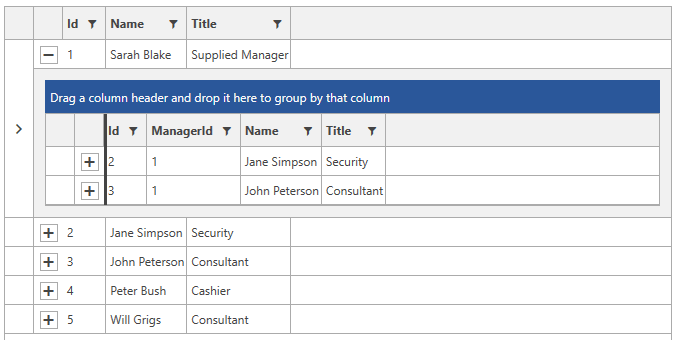
The child grid displays items whose child-field value equals the corresponding parent-field value.
Figure 1 shows the result of Example 3:
Self-referencing RadGridView
Matching Multiple Fields
Use more than one FieldDescriptorNamePair to add conditions to the relation. Example 4 adds a title comparison so that child items must also have the same title as the parent item.
Example 4: Specifying two FieldDescriptorNamePair objects
<telerik:RadGridView DataContext="{StaticResource MyViewModel}"
					 ItemsSource="{Binding Employees}"
					 AutoGenerateColumns="False">
    <telerik:RadGridView.ChildTableDefinitions>
        <telerik:GridViewTableDefinition>
            <telerik:GridViewTableDefinition.Relation>
				<telerik:TableRelation IsSelfReference="True">
					<telerik:TableRelation.FieldNames>
						<telerik:FieldDescriptorNamePair
							ParentFieldDescriptorName="Id"
							ChildFieldDescriptorName="ManagerId" />
					</telerik:TableRelation.FieldNames>
				</telerik:TableRelation>
			</telerik:GridViewTableDefinition.Relation>
        </telerik:GridViewTableDefinition>
    </telerik:RadGridView.ChildTableDefinitions>
    <!--...-->
</telerik:RadGridView>
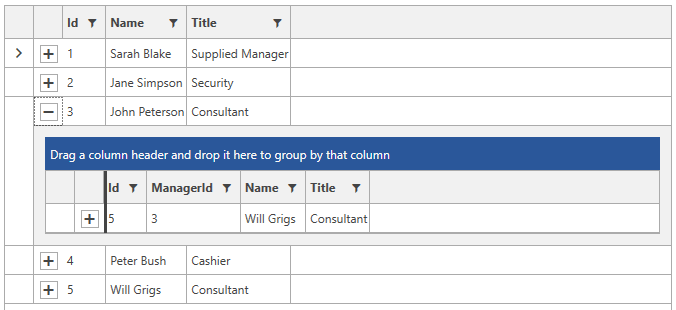
In Figure 2, the parent item has Id equal to 3 and Title equal to "Consultant". Its child grid displays only the employee whose ManagerId equals 3 and whose Title equals "Consultant".
Custom relation
To hide the
GridViewToggleButtonfor items without children, add a Boolean property toEmployee. Bind it throughIsExpandableBindingonRadGridViewto indicate whether each item has children.
To customize the nested grids, see Setting Properties of the Child GridView.