New to Telerik UI for WPF? Start a free 30-day trial
Text Functions
Updated on Sep 23, 2026
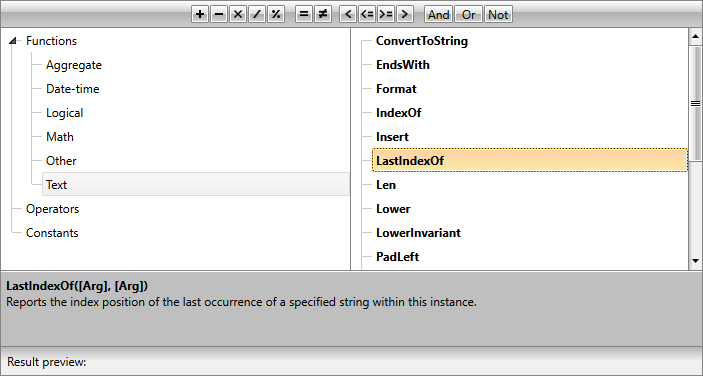
As of R1 2019, the RadExpression control also provides a number of functions for string manipulation. They can be found in the new Text subcategory illustrated in Figure 1.
The Text functions subcategory
Here is a full list of the available functions:
- ConvertToString: Returns the string representation of an object.
- Substring: Retrieves a substring from a string. The substring starts at a specified character position and has a specified length.
- Concat: Concatenates two specified instances of System.String.
- Format: Replaces the format item in a specified System.String with the text equivalent of the value of a specified System.Object instance.
- Trim: Removes all occurrences of white space characters from the beginning and end of this instance.
- Len: Gets the number of characters in a string.
- IndexOf: Reports the index of the first occurrence of the specified string in this instance.
- LastIndexOf: Reports the index position of the last occurrence of a specified string within this instance.
- Insert: Inserts String2 into String1 at the position specified.
- Lower: Returns the string in lowercase.
- Upper: Returns the string in uppercase.
- LowerInvariant: Returns a copy of this System.String object converted to lowercase using the casing rules of the invariant culture.
- UpperInvariant: Returns a copy of this System.String object converted to uppercase using the casing rules of the invariant culture.
- PadLeft: Right-aligns the characters in the defined string, padding its right side with white space characters up to a specified total length.
- PadRight: Left-aligns the characters in the defined string, padding its left side with white space characters up to a specified total length.
- Remove: Deletes a specified number of characters from this instance, beginning at a specified position.
- Replace: Returns a copy of String1, in which SubString2 has been replaced with String3.
- StartsWith: Determines whether the beginning of this string instance matches the specified string.
- EndsWith: Determines whether the end of this string instance matches the specified string.
- Contains: Returns a value indicating whether the specified System.String object occurs within this string.
Figure 2 demonstrates a possible use of the text functions for filtering a RadGridView control similarly to the example in the Getting Started article.
Filtering RadGridView via the text functions
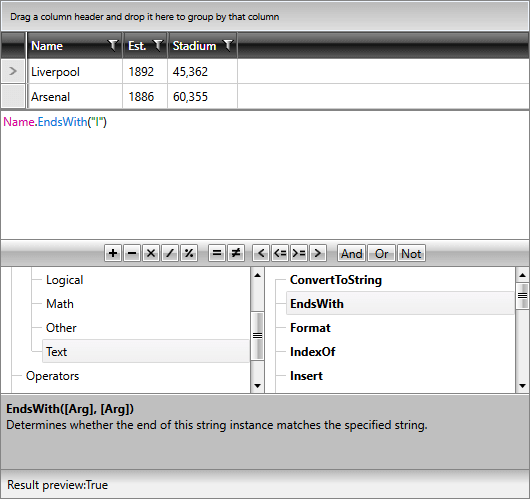
The same can be achieved via code-behind as well by using the code from Example 1.
Example 1: Creating the expression in code-behind
C#
this.ExpressionEditor.ExpressionText = @"Name.EndsWith(""l"")";VB.NET
Me.ExpressionEditor.ExpressionText = "Name.EndsWith(""l"")"