Function Invocation
The Expression Editor resolves calls to Telerik's built-in functions and registered custom functions. It does not discover and invoke arbitrary public methods automatically. The active ExpressionFunctionContext provides the registry.
The default context includes Telerik's built-in functions. For example, call Distinct on an enumerable property:
Distinct(Tasks)
The Tasks property must be an enumerable. The expression returns the distinct items in the collection.
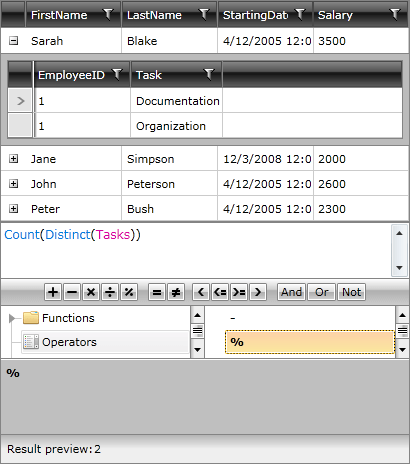
To call a custom method, register it through the active ExpressionFunctionContext.FunctionRegistry. The registry identifies the target type, function name, and exact parameter types. Register the method before parsing or evaluating the expression. See Custom Categories and Functions for a custom context example and migration details.
Parsing an Expression That Uses a Registered Function
using Telerik.Expressions;

ExpressionFunctionContext.Context = new CustomExpressionFunctionContext();

using (RadExpressionParser parser = new RadExpressionParser())
{
	parser.Parse("Discount(1000.0, 0.15)");
}
This example uses the CustomExpressionFunctionContext defined in Custom Categories and Functions. Set the context before parsing so the parser resolves the registered function.
The expression StartingDate.AddDays(3) does not call DateTime.AddDays unless that exact receiver method is registered. Expression function allowlisting controls calls only; expressions can still access members and properties.
The Expression Editor builds its function list from the active expression engine. The preview uses the same engine to resolve function calls. Set ExpressionFunctionContext.Context before initializing the editor so both use the intended registry. Use the Expression Editor view model to customize displayed categories and function items.
Use ExpressionFunctionRegistry.CreateWithBuiltInFunctions() to retain the built-in functions when you register custom functions. Use ExpressionFunctionRegistry.CreateEmpty() to start without functions and register only the functions that your expressions need.
For a Double constant, you can use exponential notation such as 0.0E+2. Use 0.0 for a Decimal constant.