TextPrimitive
Use the TextPrimitive class whenever you need to display text as part of rendering a control. Color for the font in the primitive is set by the ForeColor property. TextPrimitive also supplies other properties specific to displaying text, including:
-
Text: The actual text to display.
-
TextAlignment: An enumeration that controls the alignment of the text in the primitive.
-
TextFormatFlags: An enumeration that specifies special formatting such as trimming text and replacing long text with an ellipsis.
-
TextOrientation: An enumeration that specifies vertical or horizontal orientation relative to the primitive's baseline.
-
Shadow: An object that lets you set shadowing color, depth, and thickness.
-
TextRenderingHint: An enumeration defining the text antialiasing.
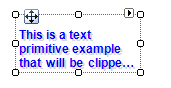
Creating a TextPrimitive
public class MyTextPrimitiveElement : RadElement
{
    protected override void CreateChildElements()
    {
        TextPrimitive textPrimitive = new TextPrimitive();
        textPrimitive.Class = "MyTextPrimtiveClass";
        textPrimitive.Font = new Font("Arial", 9F, FontStyle.Bold);
        textPrimitive.ForeColor = Color.Blue;
        textPrimitive.TextAlignment = ContentAlignment.BottomLeft;
        textPrimitive.TextWrap = true;
        textPrimitive.Shadow =
            new Telerik.WinControls.Paint.ShadowSettings(new Point(2, 2), Color.LightGray);
        textPrimitive.Text = "This is a text primitive example that will be clipped " +
            "according to the TextFormatFlags settings and MaxSize";
        this.Children.Add(textPrimitive);
        base.CreateChildElements();
    }
}