Resizing Rows Programmatically
RadVirtualGrid exposes an API allowing resizing of its rows. In order to utilize it we need to set the AllowRowResize property to true.
this.radVirtualGrid1.AllowRowResize = true;Resizing System Rows
The VirtualGridViewInfo object exposes properties for directly accessing its system rows and setting a desired height.
Figure 1 Resizing System Rows.
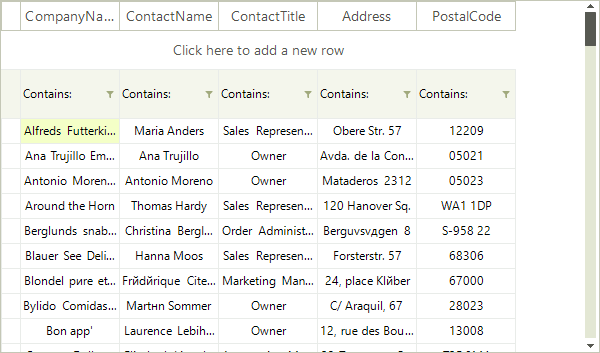
this.radVirtualGrid1.MasterViewInfo.HeaderRowHeight = 30;
this.radVirtualGrid1.MasterViewInfo.NewRowHeight = 40;
this.radVirtualGrid1.MasterViewInfo.FilterRowHeight = 50;Resizing Data Rows
The data rows can also be programmatically resized. RadVirtualGrid.VirtualGridViewInfo provides a property for defining a uniform height to all rows and also methods for setting or retrieving the height of a single row.
Figure 2 Resizing All Data Rows.
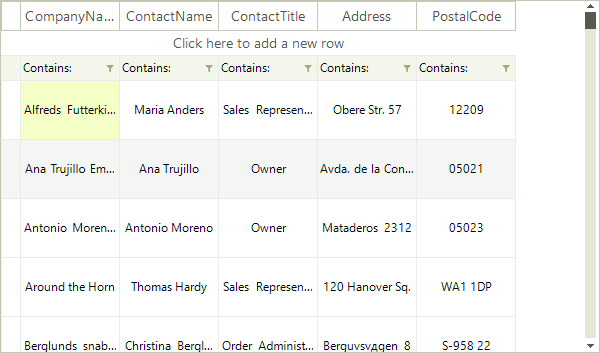
this.radVirtualGrid1.MasterViewInfo.RowHeight = 60;Figure 3 Resizing A Single Data Row.
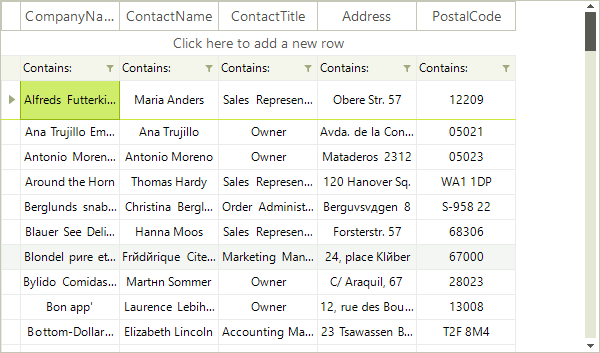
this.radVirtualGrid1.MasterViewInfo.SetRowHeight(0, 40);
int rowHeight = this.radVirtualGrid1.MasterViewInfo.GetRowHeight(0);Events
The API exposes two events for notifications when a change in the height of a row is about to happen or has already happened.
-
RowHeightChanging: Raised before the operation starts, it can be canceled. The event arguments are:
-
Cancel: If set to true suspends the operation.
-
NewHeight: Value of the new row height.
-
OldHeight: Value of the old row height.
-
RowIndex: The index of the row which is about to be resized.
-
ViewInfo: Reference to the VirtualGridViewInfo object.
-
-
RowHeightChanged: Raised after the execution of the resizing operation. The event arguments are:
-
RowIndex: The index of the resized row.
-
ViewInfo: Reference to the VirtualGridViewInfo object.
-
private void radVirtualGrid1_RowHeightChanging(object sender, VirtualGridRowHeightChangingEventArgs e)
{
    if (e.RowIndex == 0)
    {
        e.Cancel = true;
    }
}

private void radVirtualGrid1_RowHeightChanged(object sender, VirtualGridRowEventArgs e)
{

}