New to Telerik UI for WinForms? Start a free 30-day trial
Formatting System Rows
Updated on Aug 27, 2026
The RowFormatting event is used to add formatting to grid systems rows: header row, filter row and new row. Depending on the RowIndex, you can distinguish the system rows:
| RowIndex | VirtualGridRowElement |
|---|---|
| -1 | VirtualGridHeaderRowElement |
| -2 | VirtualGridNewRowElement |
| -3 | VirtualGridFilterRowElement |
This would not work properly if the styles of the cells are explicitly set in the theme. For example the TelerikMetro theme explicitly sets the styles of the HeaderRow cells.
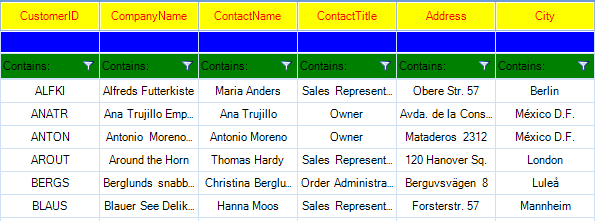
C#
private void radVirtualGrid_RowFormatting(object sender, VirtualGridRowElementEventArgs e)
{
    if (e.RowElement.RowIndex == -1)  //format header row
    {
        e.RowElement.DrawFill = true;
        e.RowElement.BackColor = Color.Yellow;
        e.RowElement.GradientStyle = Telerik.WinControls.GradientStyles.Solid;
        e.RowElement.ForeColor = Color.Red;
    }
    else if (e.RowElement.RowIndex == -2)//format new row
    {
        e.RowElement.DrawFill = true;
        e.RowElement.BackColor = Color.Blue;
        e.RowElement.GradientStyle = Telerik.WinControls.GradientStyles.Solid;
        e.RowElement.ForeColor = Color.Aqua;
    }
    else if (e.RowElement.RowIndex == -3)//format filter row
    {
        e.RowElement.DrawFill = true;
        e.RowElement.BackColor = Color.Green ;
        e.RowElement.GradientStyle = Telerik.WinControls.GradientStyles.Solid;
        e.RowElement.ForeColor = Color.Black ;
    }
    else
    {
        e.RowElement.ResetValue(LightVisualElement.DrawFillProperty, ValueResetFlags.Local);
        e.RowElement.ResetValue(LightVisualElement.BackColorProperty, ValueResetFlags.Local);
        e.RowElement.ResetValue(LightVisualElement.GradientStyleProperty, ValueResetFlags.Local);
        e.RowElement.ResetValue(LightVisualElement.ForeColorProperty, ValueResetFlags.Local);
    }
}
Due to the UI virtualization in RadVirtualGrid, row elements are created only for currently visible rows and are being reused during operations like scrolling, filtering, sorting and so on. In order to prevent applying the formatting to other columns' row elements (because of the row reuse) all customization should be reset for the rest of the row elements.