SpeechToTextButton Appearance
The RadSpeechToTextButton appearance can be customized using the Telerik theming system and by configuring its visual elements. The control inherits appearance options from Telerik UI for WinForms RadButton, providing extensive styling capabilities.
Animation
The RadSpeechToTextButton displays a visual pulse animation when the button enters the listening state (SpeechRecognizerState.Listening). This animation provides immediate visual feedback to users, indicating that the speech recognition is actively listening for input.
The pulse animation is enabled by default. The AllowAnimation property indicates whether the animation is enabled or not.
If you want, you can disable the pulse animation by setting the AllowAnimation property to false.
Example: Disable the pulse animation
this.radSpeechToTextButton1.AllowAnimation = false;Customizing the Tooltip
The RadSpeechToTextButton displays a tooltip (represented by a RadCallout when the user hovers over it. This tooltip shows the current state of the button to provide visual feedback.
| Ready | Listening |
|---|---|
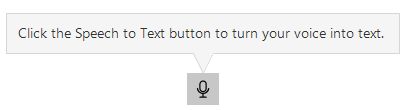 |  |
By default, the tooltip is displayed for the Ready and Listening states. You can customize the tooltip content and behavior using the CalloutOpening event.
CalloutOpening Event
The CalloutOpening event allows you to customize the tooltip text or cancel the tooltip display based on the current state of the recognizer.
Customizing tooltip text based on state
private void RadSpeechToTextButton1_CalloutOpening(object sender, Telerik.WinControls.UI.SpeechToTextButton.SpeechToTextTooltipOpeningEventArgs e)
{
    var button = (RadSpeechToTextButtonElement)sender;

    if (button.State == SpeechRecognizerState.Ready)
    {
        e.ToolTipText = "Click here to start speaking";
    }
    else if (button.State == SpeechRecognizerState.Listening)
    {
        e.ToolTipText = "Launching listening mode";
    }
}
To prevent the tooltip from opening, set the e.Cancel property of the event arguments to true.
Using the CalloutOpening event to cancel the tooltip opening
private void RadSpeechToTextButton1_CalloutOpening(object sender, Telerik.WinControls.UI.SpeechToTextButton.SpeechToTextTooltipOpeningEventArgs e)
{
    e.Cancel = true; // Cancel the default tooltip opening
}
note You can also customize the RadCallout component by accessing it through SpeechToTextTooltipOpeningEventArgs.