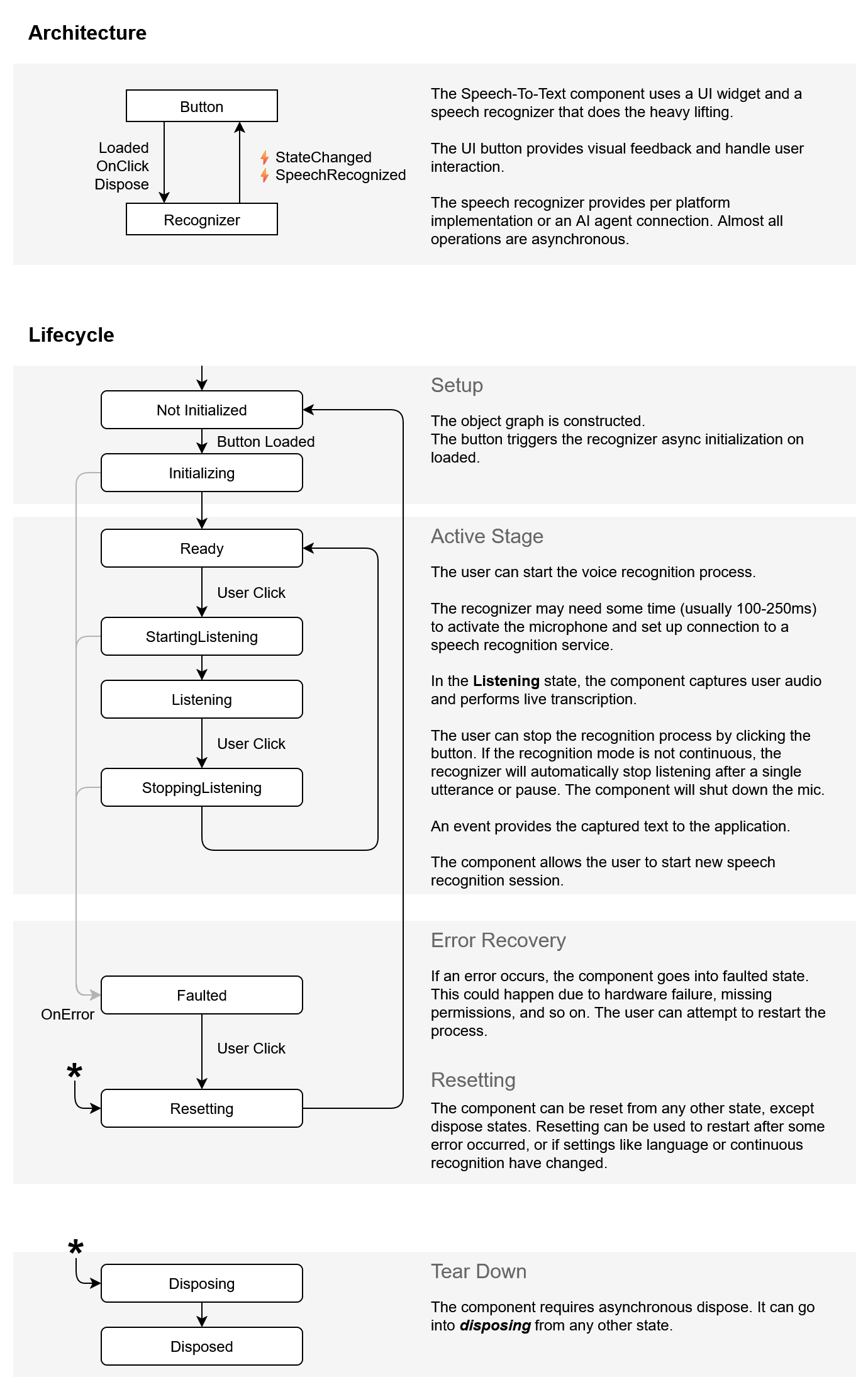
SpeechToTextButton Architecture and States
The RadSpeechToTextButton control provides different states that reflect the current status of the speech recognition process. Understanding these states helps you monitor the control's behavior and handle user interactions effectively.
The control manages its state automatically as it processes speech input. The underlying speech recognition service provides clear indicators of the recognizer's status, from initialization through active listening to disposal.
Recognizer States
The RadSpeechToTextButton exposes the SpeechRecognizerState enum to indicate the current status of the speech recognition process:
| State | Description |
|---|---|
NotInitialized | The recognizer has not been initialized yet and is in its default state. |
Initializing | The recognizer is currently initializing its components and preparing for use. |
Ready | The recognizer is fully initialized and ready to begin listening for speech input. |
StartingListening | The recognizer is transitioning into listening mode and preparing to capture audio input. |
Listening | The recognizer is actively listening and processing speech input from the microphone. |
StoppingListening | The recognizer is transitioning out of listening mode and stopping the audio capture process. |
Faulted | The recognizer has encountered an error and is in a faulted state. Common causes include no internet connection, speech recognizer failures, or denied microphone permissions. The control can be reset to recover from this state. |
Resetting | The recognizer is resetting to the NotInitialized state. |
Disposing | The recognizer is in the process of releasing its resources and shutting down. |
Disposed | The recognizer has been fully disposed. |
Using States in Your Application
You can use the state information to provide appropriate feedback to users or to enable/disable related UI elements based on the recognizer's availability. The control automatically transitions between these states as users interact with the button and as the speech recognition process progresses.
Accessing the Current State
You can access the current state of the recognizer through the State property. It returns the current SpeechRecognizerState value.
Getting the current state of the recognizer
SpeechRecognizerState state = this.radSpeechToTextButton1.State;
Tracking State Changes
The StateChanged event is raised when the state of the speech recognizer changes. Subscribe to this event to track state transitions and update your UI accordingly.
Architecture Diagram
The following diagram illustrates the state lifecycle and transitions of the speech recognizer in the RadSpeechToTextButton control: